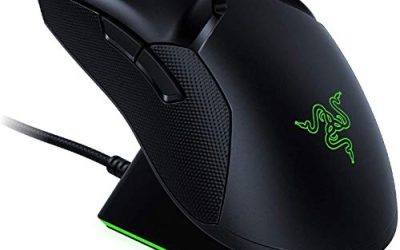
The best all-around gaming mouse for most players in 2026 is a wireless, symmetrical model weighing roughly 60 g with a flawless modern sensor. The Logitech G Pro X Superlight 2 is the safest single pick. If you have a larger hand or want a sculpted shape, the Razer DeathAdder V3 Pro is the better fit. An “all-around” mouse has to handle shooters, MOBAs, single-player games and desk work without a compromise that bothers you, so shape and weight matter more than headline DPI.
Quick comparison of the picks
| Pick | Best for | Key specs (per manufacturer) | Typical price |
|---|---|---|---|
| Logitech G Pro X Superlight 2 | Best overall | About 60 g, symmetrical, up to 44,000 DPI, up to 2,000 Hz reported polling on Lightspeed, roughly 95 hours battery | $130–$160 |
| Razer DeathAdder V3 Pro | Best ergonomic all-rounder | About 63 g, right-handed ergonomic, up to 30,000 DPI, 4,000 Hz with the HyperPolling dongle, up to roughly 90 hours | $130–$160 |
| Razer Viper V3 Pro | Best for competitive shooters | About 54 g, symmetrical, up to 35,000 DPI, 8,000 Hz polling support | $140–$170 |
| Logitech G502 X Plus | Best for MMO, RPG and productivity | About 106 g, 13 controls, wireless, RGB, up to 25,600 DPI | $130–$160 |
| Logitech G309 Lightspeed | Best budget wireless | About 85–90 g with battery, wireless, AA-free design with long rated battery life | $50–$80 |
Prices are general market ranges and move with sales and regional availability. Specs come from the manufacturers’ published sheets, so check the current revision before buying.
Best overall: Logitech G Pro X Superlight 2
This mouse suits players who want one mouse for everything. The low-profile symmetrical shell works with palm, claw and fingertip grips on medium hands. It has five buttons, so it won’t get in the way in shooters or MOBAs, and the roughly 60 g weight lets you flick without fatigue. The main trade-off is the button count. If you want macro-heavy MMO binds, you will miss the extra thumb keys. The price is also high for a mouse with no RGB and few extras.
Best ergonomic all-rounder: Razer DeathAdder V3 Pro
The DeathAdder shape has a tall hump and a gentle right-hand slope that supports palm and relaxed claw grips better than flat symmetrical shells. At around 63 g it is only slightly heavier than the Superlight 2, so it gives up very little in speed. The trade-off is that it is right-handed only and feels bulky for fingertip grip on small hands. Look for the newest revision in the DeathAdder Pro line, since Razer updates this family periodically.
Best for competitive shooters: Razer Viper V3 Pro
It is for players who put aim consistency first and play mostly Valorant, CS2, Apex or similar games. The ambidextrous shape runs very low at about 54 g, and 8,000 Hz polling support is the main differentiator. The trade-offs are the price, and that the extremely light shell can feel too small for large hands. High polling rates also raise CPU load and cut battery life, as the calculation below shows.
Best for MMO, RPG and productivity: Logitech G502 X Plus
If your games need many binds (MMOs, ARPGs, strategy titles) or you use the mouse for editing and spreadsheets, 13 controls and a free-spin/ratchet wheel are worth the weight. At roughly 106 g it is not a flick-shot tool. It is a good all-rounder only if you do not play fast shooters most of the time.
Best budget: Logitech G309 Lightspeed
A wireless mouse with a competent sensor for $50–$80 covers most casual and mid-level play. The trade-off is weight, since it is heavier than the premium picks, and the plastics and switches are not as refined. If you prefer wired, a good wired mouse in the 60–70 g range for $30–$50 will aim just as well.
Decision matrix: match your situation to a choice
| Your situation | Hand length (wrist crease to middle fingertip) | Best match |
|---|---|---|
| Mixed FPS, MOBA and single-player; medium hand; claw or palm grip | 17–19 cm | Logitech G Pro X Superlight 2 |
| Large hand, palm grip, long sessions | 19 cm or more | Razer DeathAdder V3 Pro |
| Small or medium hand, fingertip or claw, mostly FPS | Under 18 cm | Razer Viper V3 Pro |
| MMO, RPG or work-heavy use | Any, preferably 18 cm or more | Logitech G502 X Plus |
| Tight budget, casual to mid-level play | Any | Logitech G309 Lightspeed or a wired 60–70 g mouse |
The hand-length bands are rough guides based on common ergonomic sizing practice, not manufacturer rules. Grip style changes the fit, so a fingertip user can go smaller than the table suggests.
How to choose: criteria with numbers
Weight: 55–70 g is the sweet spot
Under about 60 g, mice feel effortless in fast shooters. Above 90 g, flicks and micro-adjustments take more effort. For a true all-rounder, 60–70 g works for FPS and still feels stable in slower games. Go heavier only if you need extra buttons.
Sensor: DPI is not the spec to compare
Current flagship sensors are rated at 25,000–44,000 DPI, but almost nobody plays above 3,200 DPI. What matters is tracking consistency, low smoothing and a lift-off distance of around 1–2 mm. Any current premium sensor meets that, so do not pay extra for a larger DPI number.
Worked example: converting DPI to real sensitivity
Physical distance for a 360° turn is cm/360 = (360 ÷ (DPI × in-game sensitivity × yaw)) × 2.54. CS2 and Valorant-family games use a yaw of 0.022 (Valorant uses 0.07, so check the title). For CS2 at 800 DPI and 1.0 sensitivity: 360 ÷ (800 × 1.0 × 0.022) = 20.45 inches, or about 52 cm per 360°. That is a typical arm-aim setup. At 1,600 DPI and 0.5 sensitivity, the result is the same 52 cm, so you can use a higher DPI with lower in-game sensitivity without changing your aim. Many players choose 800–1,600 DPI because pointer movement is cleaner on the desktop at 1,600.
Polling rate and battery: do the math
At 1,000 Hz, the mouse reports every 1 ms. At 4,000 Hz it reports every 0.25 ms, and at 8,000 Hz every 0.125 ms. Higher rates cost battery. Suppose a mouse is rated at about 95 hours at 1,000 Hz. At 4 hours of play a day, that is roughly 23 days between charges. Manufacturers say higher rates shorten battery life (Razer notes this for 4,000 and 8,000 Hz), so if a drop to around 30–40 hours is plausible at 8,000 Hz, that same 4-hour routine means a charge every 7–10 days. A mouse that reports faster also increases CPU load, which matters in CPU-limited games. For most players, 1,000 Hz (or 2,000 Hz if offered) is the all-around setting. Reserve 4,000–8,000 Hz for tournament-level use on a fast CPU and a 240 Hz or faster monitor.
Switches, feet and wireless
- Switches: Optical switches (Razer, Logitech’s hybrid designs) avoid double-click failures caused by contact wear.
- Feet: PTFE feet are standard on premium models. Replacement skates are inexpensive if they wear.
- Wireless: Current 2.4 GHz wireless matches wired latency for practical purposes. Use the included dongle, ideally on a front USB port or short extension, and not behind a case or metal desk.
- Software: Check whether onboard memory stores profiles, so settings survive without running Synapse or G HUB.
Common mistakes
- Buying on DPI or “RGB zones” instead of shape and weight.
- Choosing a 50 g shell with large hands, which often causes cramped grip and fatigue.
- Running 8,000 Hz without checking CPU headroom and battery.
- Skipping a mouse pad upgrade. A consistent cloth or glass pad often improves tracking more than a more expensive mouse.
Frequently Asked Questions
What makes a gaming mouse “all-around”?
It has a comfortable shape for several grip styles, a weight of roughly 55–70 g, a reliable sensor, and enough buttons for general use. It should work in fast shooters and slower games without needing different gear. Symmetrical or mildly ergonomic five-button designs usually fit that description best.
Is wireless good enough for competitive gaming in 2026?
Yes. Current 2.4 GHz wireless from Logitech, Razer and other major brands is used by many esports players. Keep the dongle close and avoid Bluetooth for gaming, since it adds more latency and is less consistent.
What DPI should I use?
Most players use 800–1,600 DPI and adjust in-game sensitivity to get the cm/360 they like. Around 40–55 cm per 360° suits arm aim in tactical shooters, while lower values suit wrist aim. Higher DPI is not better on its own.
Do I need an 8,000 Hz polling rate?
Not for most players. The gain is real but small, and it needs a capable CPU and a high-refresh monitor to be noticeable. It also reduces battery life. Stay at 1,000 Hz unless you have a specific competitive reason.
Is a lighter mouse always better?
No. Below roughly 55 g, some players find the mouse less stable, and large-handed users often prefer 63–80 g for control. Choose the lightest mouse that still fills your hand, not the lowest number on the spec sheet.
Should I buy a wired or wireless mouse on a budget?
If you spend under $50, a wired 60–70 g mouse with a good sensor usually beats a heavier, cheaper wireless one. Wireless becomes a good value from around $50–$80, where models like the Logitech G309 Lightspeed sit.
Related guides
More from Amazon
Programs that pair well with the guide above. Offers and eligibility are set by Amazon and may change.
A free business account with business pricing and bulk-buying tools for work, shop or home office.
Create a business accountFree shipping on eligible items, Prime Video and more. Eligible new members can start with a free trial.
Start a Prime free trialAudiobooks and podcasts to listen to on the go. Eligible new members can start with a free trial.
Try Audible freeAd-free music streaming. Eligible new subscribers can start with a free trial.
Try Music Unlimited freeAs an Amazon Associate we earn from qualifying purchases.