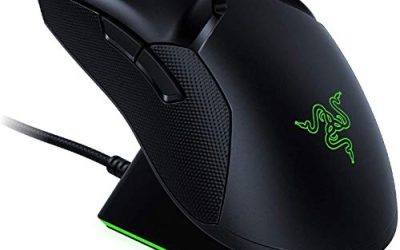
A standard gaming mouse gives you two thumb buttons and expects the keyboard to do the rest. That works until a game asks for a full hotbar, a long macro chain, or a dozen shortcuts in the middle of a fight. The real decision is not how many buttons a mouse has on paper, but how many you can reach without looking, how the thumb panel fits your hand, and whether the software lets you assign, layer, and save those commands for each game you play.
This guide is for MMO and MOBA players, streamers, editors, and anyone who wants more commands under the thumb. Every mouse below is a gaming mouse with extra buttons, chosen from names and specifications on its Amazon product page, and each one is still selling on Amazon US. The five cover wired and wireless, thumb grids and adjustable panels, flagship and budget.
Top 3 picks at a glance


Quick Picks
As an Amazon Associate we earn from qualifying purchases
| Product | Best for | Key spec from title |
|---|---|---|
| Razer Naga V2 Pro | A full MMO hotbar with swappable plates | Up to 19 programmable buttons, Focus Pro 30K sensor |
| Corsair Scimitar RGB Elite | A sliding thumb panel that fits your hand | 17 programmable buttons, 18,000 DPI sensor |
| Logitech G600 | A classic wired thumb grid on a budget | 20 programmable buttons, 12-button thumb panel |
| SteelSeries Aerox 9 Wireless | A light wireless mouse with many buttons | 18 programmable buttons, 89 g, 180-hour battery |
| Redragon M908 Impact | Trying a 12-button grid for the first time | 12 side buttons, 12,400 DPI sensor |
How to Choose
How many buttons you can actually use
A 12-button grid sounds like the most power, but only the buttons you can find by touch count in a fight. Look for a panel where each button has a distinct shape or spacing, so your thumb learns the layout instead of guessing. Some mice let you swap a 12-button plate for a 6-button or 2-button plate, which suits players who want fewer, larger buttons for action games. Count the buttons you truly use in your main game first: a healer with twelve cooldowns needs the full grid, while a player with six core abilities may prefer a smaller panel that never causes a misclick.
Thumb panel fit and grip shape
Extra buttons only help if the panel sits where your thumb naturally rests. A sliding panel, like the Key Slider on the Scimitar, lets you move the whole grid forward or back to match your hand length, which matters more than most buyers expect. Check the overall shape too: a wide, palm-filling body supports long sessions, while a narrow body suits claw grips. Weight matters as well, since a thumb grid adds mass; a 134-gram mouse feels anchored and steady, while an 89-gram mouse stays quick when you also play faster games.
Sensor, polling rate, and connection
A mouse with many buttons still needs a sensor that keeps up. Look for a modern optical sensor with a high maximum sensitivity and a polling rate of at least 1000 Hz, so cursor movement stays smooth while your thumb works the panel. Wired mice remove battery worries entirely and suit a fixed desk setup. Wireless mice need a strong battery rating and a stable 2.4 GHz link; Bluetooth is handy for a laptop or a second device, but check whether the polling rate drops in Bluetooth mode before you buy.
Software, macros, and onboard memory
Extra buttons are only as useful as the software behind them. The maker’s app is where you assign abilities, build macros, and set up a second input layer that doubles what each button can do. Check whether the software lets you save profiles per game and whether those profiles live on the mouse itself. Onboard memory matters when you move between computers, since a mouse without it falls back to default bindings on a new machine. Also confirm the software runs on your operating system before you order.
The 5 Best Options
Razer Naga V2 Pro

The Naga V2 Pro is the most flexible multi-button mouse here, because it ships with three magnetic side plates that swap between 12, 6, and 2-button layouts. That means the same mouse can run a dense MMO hotbar one night and a lean action-game setup the next, without buying a second mouse. The Focus Pro 30K sensor tracks cleanly across most desk surfaces, including glass, and the HyperScroll Pro wheel adds a tilt function for extra bindings. It is heavy and right-handed, so it suits palm-grip players who want a stable, anchored mouse.
Specs
- Up to 19 programmable buttons with swappable 12, 6, and 2-button side plates
- Focus Pro 30K optical sensor, up to 30,000 DPI, 750 IPS, 70 G acceleration
- HyperSpeed Wireless 2.4 GHz, Bluetooth, and USB-C Speedflex cable
- Up to 150 hours on 2.4 GHz and 300 hours on Bluetooth
- 134 g with the 12-button plate, right-handed ergonomic shape, model RZ01-04400100-R3U1
Best for: MMO players who want one mouse that adapts to every genre they play.
Watch out for: The 12-button plate takes practice to learn by touch, and wireless charging needs a separately sold accessory.
Corsair Scimitar RGB Elite
The Scimitar RGB Elite is built around a simple idea: the thumb panel should move to fit your hand, not the other way around. Its patented Key Slider lets you shift the 12-button side panel forward or back by 8 mm, so the grid lands exactly under your thumb. The 17 programmable buttons cover macros, remaps, and DPI switching, and the custom PixArt PMW3391 sensor reaches 18,000 DPI with fine 1 DPI steps. Omron switches rated for 50 million clicks and a braided cable round out a wired mouse made for long sessions.
Specs
- 17 programmable buttons, including a 12-button mechanical side panel
- Patented Key Slider control system repositions the side buttons
- Custom PixArt PMW3391 optical sensor, native 18,000 DPI
- 50 million click-rated Omron switches, braided cable
- iCUE software for macros, RGB lighting, and profiles, model CH-9304211-NA
Best for: Players whose hands never quite fit a fixed thumb grid.
Watch out for: It is wired only, and the iCUE software must be installed to program the buttons and lighting.
Logitech G600
The G600 is the classic thumb-grid mouse, and it remains the cheapest way into a full 12-button panel. Twenty programmable buttons include the 12-button thumb grid, three primary buttons, a tilting scroll wheel, and DPI controls, while the G-Shift ring-finger button doubles the function of every other button. The two rows of six thumb buttons sit in shallow dishes that help your thumb tell them apart without looking. RGB lighting runs through the thumb panel itself, so the grid stays visible in a dark room during late sessions.
Specs
- 20 programmable buttons, including a 12-button thumb panel in two rows of six
- G-Shift button doubles the actions available on every other button
- Up to 8,200 DPI, 1000 Hz polling rate, 133 g
- RGB backlit thumb panel, wired USB with braided cable
- Onboard memory stores profiles, model 910-002864
Best for: Budget buyers who want the full MMO button count without paying flagship money.
Watch out for: The laser sensor and older design feel dated next to modern optical sensors, so check your sensitivity needs first.
SteelSeries Aerox 9 Wireless

The Aerox 9 Wireless is the answer for players who want many buttons without the weight. At 89 grams it is far lighter than most multi-button mice, thanks to a honeycomb shell, yet it still carries 18 programmable buttons, including a 12-button thumb panel. The TrueMove Air sensor reaches 18,000 CPI, and the battery runs up to 180 hours, so a wireless MMO mouse no longer means charging every few days. AquaBarrier protection guards against dust and splashes, and the mouse connects over 2.4 GHz or Bluetooth 5.0.
Specs
- 18 programmable buttons, including a 12-button thumb panel
- TrueMove Air optical sensor, 18,000 CPI
- 89 g honeycomb shell with AquaBarrier dust and splash protection
- Up to 180 hours of battery life, 2.4 GHz wireless and Bluetooth 5.0
- SteelSeries GG software for macros and profiles, model 62618
Best for: Players who want a light wireless mouse for long MMO sessions and fast games alike.
Watch out for: The honeycomb shell lets dust in over time, so keep it clean, and small hands may find the 12-button panel a stretch.
Redragon M908 Impact

The M908 Impact is the low-cost way to find out whether a thumb grid suits you. Its 12 side buttons sit in a 3-by-4 grid under the thumb, with a weight tuning set in the box so you can adjust the heft to your taste. The 12,400 DPI optical sensor and 1000 Hz polling rate are more than enough for MMO and MOBA play, and the braided cable with a gold-plated connector holds up to daily use. RGB lighting runs through the scroll wheel and side buttons, and the included software handles macros and remapping.
Specs
- 12 side buttons in a 3-by-4 thumb grid
- 12,400 DPI optical sensor, P3327, 1000 Hz polling rate
- Weight tuning set included, braided cable with gold-plated connector
- RGB backlighting, wired USB connection
- Redragon software for macros and button remapping, model M908
Best for: First-time buyers who want to try a 12-button mouse without a big spend.
Watch out for: The total programmable button count is listed differently across sources, so confirm the exact count on the listing before you buy.
Which One Fits Your Situation
You raid in an MMO with a full hotbar
Pick the Razer Naga V2 Pro. Its swappable plates let you run the full 12-button grid for raids, then switch to a 6-button plate for action games without learning a new shape. The strong sensor and long battery life suit long sessions, and the extra ring-finger button gives you a second input layer for cooldowns. It is the most complete multi-button mouse in this guide.
Your hands never fit a fixed thumb grid
Pick the Corsair Scimitar RGB Elite. The sliding Key Slider moves the whole 12-button panel to match your thumb reach, which solves the most common complaint about grid mice. Its 17 programmable buttons and precise sensor cover MMO and MOBA play, and the wired connection means no battery checks. Just make sure you are happy with a cable on your desk.
You want many buttons and a light mouse
Pick the SteelSeries Aerox 9 Wireless. At 89 grams it is the lightest multi-button mouse here, and its 18 programmable buttons still cover a full hotbar. The 180-hour battery and dual wireless modes suit players who switch between a desktop and a laptop. It is the best fit when your wrist gets tired from a heavy mouse during long sessions.
You want to try a thumb grid on a small budget
Pick the Redragon M908 Impact. It gives you a real 12-button grid, a solid sensor, and weight tuning for far less than the flagship mice. If the grid clicks with you, it is a capable daily mouse; if it does not, you learned that cheaply. The Logitech G600 is the step up if you want a proven classic with onboard memory and a G-Shift layer.
Common Mistakes
- Buying the biggest 12-button grid without checking whether your thumb can reach every button comfortably.
- Skipping the software check: macros and remaps need the maker’s app, and some features only work while it is running.
- Forgetting onboard memory, so your bindings vanish when you plug the mouse into another computer.
- Choosing a heavy multi-button mouse for fast games, then finding it too slow for flick shots.
- Ignoring the second input layer: a shift button can double your commands, so a mouse with fewer buttons may cover more actions than you think.
Frequently Asked Questions
How many extra buttons do I really need?
Count the abilities, items, and macros you use in your main game. Most MMO players use between 8 and 12 thumb commands, so a 12-button grid covers a full hotbar, while a 6-button panel suits MOBA and strategy games. A mouse with a shift layer doubles whatever you have, so 6 well-placed buttons can cover 12 commands. Buy for the commands you press, not the biggest number on the box.
Are MMO mice good for FPS games too?
They can work, but they are rarely the best choice for shooters. A thumb grid adds weight and width, which slows flick shots, and the side buttons can crowd a tight grip. Swappable plates solve this: the Naga V2 Pro drops to a 2-button plate for shooters, and the Aerox 9 stays light enough to move quickly. If shooters are your main game, a lighter mouse usually aims better.
Do I need the software running to use my macros?
It depends on the mouse. Mice with onboard memory save your bindings and profiles on the device, so macros work on any computer without the app. Mice without onboard memory fall back to default bindings when the software is closed. Check the listing for onboard memory before you buy, and install the maker’s app to set up profiles, macros, and lighting the first time.
Can I use a 12-button mouse with small hands?
Yes, but choose carefully. Look for a sliding thumb panel, like the Key Slider on the Scimitar, or a lighter, narrower body, like the Aerox 9. A fixed wide grid can force your thumb to stretch, which causes misclicks and fatigue. If possible, check the mouse length and width against your hand size, and favor a mouse with swappable plates so you can drop to fewer, larger buttons.
Related guides
More from Amazon
Programs that pair well with the guide above. Offers and eligibility are set by Amazon and may change.
A free business account with business pricing and bulk-buying tools for work, shop or home office.
Create a business accountFree shipping on eligible items, Prime Video and more. Eligible new members can start with a free trial.
Start a Prime free trialAudiobooks and podcasts to listen to on the go. Eligible new members can start with a free trial.
Try Audible freeAd-free music streaming. Eligible new subscribers can start with a free trial.
Try Music Unlimited freeAs an Amazon Associate we earn from qualifying purchases.