Disclosure: As an Amazon Associate, this site may earn from qualifying purchases made through links on this page.
A wireless gaming mouse with a charging dock solves the one chore that wireless play adds to your routine: keeping the battery full. The best wireless gaming mouse with charging dock pairs a strong wireless mouse with a dock in the same box, so the mouse charges every time you set it down and you never hunt for a cable before a match. A dock also gives the mouse a home on the desk, which keeps the setup tidy and the receiver in a fixed spot. This guide compares four wireless gaming mice that are still sold on Amazon US with a charging dock included in the box, covering light ambidextrous shells, button-rich ergonomic designs and a heavy MMO mouse with a magnetic dock. Each pick states the dock type, the battery life and the sensor, so you can see exactly what arrives in the box before you buy.
Our Top Picks


Top 3 picks at a glance
At a Glance
| Product | Dock type | Battery life | Best for |
|---|---|---|---|
| Razer Viper Ultimate | RGB charging dock | Up to 70 hours | Light ambidextrous play |
| Razer Basilisk Ultimate | RGB charging dock | Up to 100 hours | Many buttons and long battery |
| ASUS ROG Spatha X | Magnetic charging dock | Up to 67 hours | MMO play with 12 buttons |
| Razer Viper Ultimate Mercury White | RGB charging dock | Up to 70 hours | A white setup with the same dock |
How to Choose for Wireless Mice With Charging Docks
Begin by confirming that the dock is included in the box, because this is the detail that trips up buyers most often. Several popular wireless mice sell in two versions, one with a dock and one without, and the listings can look nearly identical. Check the listing for the words charging dock in the included components, and confirm the model number matches the dock version before you buy. The picks in this guide all use dock-included listings, and the notes for each one give the exact model number to look for.
Next, weigh the dock design against your desk habits. A magnetic dock holds the mouse in place and charges through contact pins, which suits a player who sets the mouse down in the same spot every time. An RGB dock adds lighting to the desk and doubles as a display stand, which suits a player who likes a tidy, lit setup. Some docks also hold the wireless receiver, which keeps the receiver close to the mouse and the connection strong. Check the listing for whether the dock needs its own USB port, since a dock that shares a port with the receiver frees up a socket on your computer.
Battery life and weight shape the gaming side of the choice. A mouse that runs for 70 hours or more covers a full week of evening play between charges, and a dock makes even a shorter battery easy to live with, since the mouse tops up whenever it rests. Weight matters for flicks and long sessions: a light shell suits fast competitive play, while a heavier shell suits deliberate aiming and MMO play with many buttons. Finally, check the sensor, the button count and the software in the listing, and confirm that the dock works with the exact color and model you choose, since some docks are tied to a single model.
The Picks
1. Razer Viper Ultimate

The Razer Viper Ultimate is the light ambidextrous pick in this guide, and its RGB charging dock is the reason it leads the list. The dock holds the mouse upright, charges it through contact pins, and lights up with Chroma RGB, so the mouse has a home on the desk and a full battery whenever you sit down to play. The mouse itself weighs 74 grams and uses the Focus+ 20K optical sensor, which tracks up to 20,000 DPI, and the optical mouse switches give a fast, consistent click with no metal contact to wear. Eight programmable buttons cover the essentials, and the ambidextrous shape suits left-handed and right-handed players alike.
HyperSpeed wireless keeps the connection responsive, and the battery runs for up to 70 hours, so a single charge covers a full week of evening play for most players. The dock connects over USB and holds the wireless receiver, which keeps the receiver close to the mouse and the signal strong. Razer Synapse software handles button remapping, sensitivity and lighting, and the mouse stores profiles on board. The Viper Ultimate comes in several colors and bundles, so confirm that the listing you open is the black model with the RGB charging dock included, model RZ01-03050100-R3U1, before you buy. For a player who wants a light, fast mouse that is always charged and always in the same spot, the Viper Ultimate is the strongest all-round choice here. The dock also keeps the receiver in a fixed spot, so the wireless link stays steady even on a crowded desk.
2. Razer Basilisk Ultimate
The Razer Basilisk Ultimate is the button-rich pick in this guide, and it pairs a long battery with the same RGB charging dock idea as the Viper Ultimate. The dock holds the mouse, charges it, and lights up with Chroma RGB, and a ten-minute rest on the dock gives hours of play, so even a low battery rarely interrupts a session. The mouse uses the Focus+ 20K optical sensor, optical mouse switches, and eleven programmable buttons, including a tilt scroll wheel and a multi-function paddle under the thumb. The ergonomic right-handed shape suits a palm grip, and the thumb rest gives the hand a place to sit during long sessions.
Battery life runs for up to 100 hours with the lighting off, which is the longest in this guide, and HyperSpeed wireless keeps the connection responsive across the desk. The dock holds the wireless receiver, so the receiver sits close to the mouse and the signal stays strong. Razer Synapse software handles remapping, sensitivity and lighting profiles, and the mouse stores settings on board. The Basilisk Ultimate sells in a mouse-only version too, so confirm that the listing you open is the dock bundle, model RZ01-03170100-R3U1, with the RGB mouse charging dock in the included components. For a player who wants many buttons, a long battery and a dock that keeps the mouse charged, the Basilisk Ultimate covers more ground than any other pick here. The paddle under the thumb can be swapped for a blank plug, which suits players who never use that extra input.
3. ASUS ROG Spatha X
The ASUS ROG Spatha X is the MMO pick in this guide, and its magnetic charging dock is the most practical dock design here. The dock holds the mouse with magnets, charges it, and doubles as the wireless receiver, so one small stand handles charging and connection in a single USB port. The mouse itself is built for games with many abilities: twelve programmable buttons sit under the thumb and fingers, and the 19,000 DPI optical sensor tracks cleanly across the full sensitivity range. Push-fit hot-swap switch sockets let you change the ROG micro switches without soldering, which suits players who like to tune the click feel, and two spare switches ship in the box.
Battery life runs for up to 67 hours with the lighting off, and a 15-minute charge gives up to 12 hours of play, so a short rest on the dock covers an evening session. The right-handed ergonomic shape weighs 168 grams, which suits deliberate aiming and long MMO sessions rather than fast flicks. Dual-mode connectivity covers wired USB-C and 2.4 GHz wireless, and Armoury Crate software handles remapping, sensitivity and lighting. The box also includes two ROG Paracord cables, a screwdriver, a travel pouch and a ROG sticker. For a player who wants many buttons, a magnetic dock and switches that can be swapped, the Spatha X is the most flexible pick in this guide. The two included Paracord cables give you a spare if the first cable wears out at the desk edge.
4. Razer Viper Ultimate Mercury White
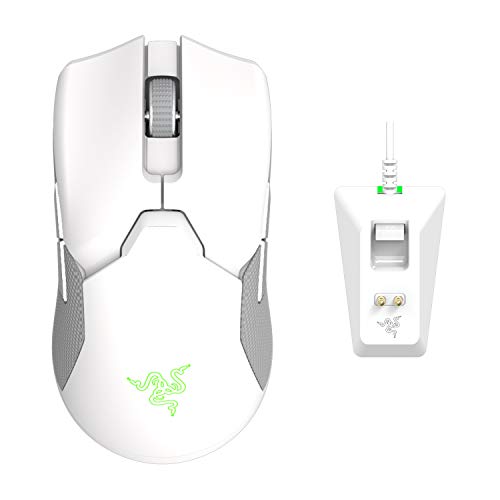
Razer Viper Ultimate Mercury White
The Razer Viper Ultimate in Mercury White is the same mouse and dock as the black Viper Ultimate, dressed for a white setup. The RGB charging dock holds the mouse upright, charges it through contact pins, and lights up with Chroma RGB, so the white shell and the white dock make a clean pair on a light-colored desk. The mouse weighs 74 grams and uses the Focus+ 20K optical sensor, which tracks up to 20,000 DPI, and the optical mouse switches give a fast, consistent click. Eight programmable buttons cover the essentials, and the ambidextrous shape suits left-handed and right-handed players alike.
HyperSpeed wireless keeps the connection responsive, and the battery runs for up to 70 hours, so a single charge covers a full week of evening play for most players. The dock connects over USB and holds the wireless receiver, which keeps the receiver close to the mouse and the signal strong. Razer Synapse software handles button remapping, sensitivity and lighting, and the mouse stores profiles on board. The Mercury White version carries a different model number, RZ01-03050400-R3U1, so confirm that the listing you open is the white mouse with the RGB charging dock included before you buy. For a player building a white setup who wants the same light, fast mouse and the same always-charged dock, the Mercury White Viper Ultimate is the pick to choose. The white finish pairs with a light desk and a white keyboard, so the whole setup looks matched.
Comparison Table
| Feature | Viper Ultimate | Basilisk Ultimate | ROG Spatha X | Viper Ultimate Mercury |
|---|---|---|---|---|
| Dock | RGB charging dock | RGB charging dock | Magnetic charging dock | RGB charging dock |
| Battery life | Up to 70 hours | Up to 100 hours | Up to 67 hours | Up to 70 hours |
| Sensor | Focus+ 20K | Focus+ 20K | 19,000 DPI | Focus+ 20K |
| Weight | 74 g | Check the listing | 168 g | 74 g |
| Buttons | 8 programmable | 11 programmable | 12 programmable | 8 programmable |
Which One Fits Your Situation
If you want a light, fast mouse that is always charged, choose the Razer Viper Ultimate, since its 74-gram shell and RGB charging dock cover competitive play and desk tidiness in one box. If you want many buttons and the longest battery in this guide, choose the Razer Basilisk Ultimate, since its eleven programmable controls and 100-hour battery suit long sessions with many abilities. If you play MMO games and want a magnetic dock with swappable switches, choose the ASUS ROG Spatha X, since its twelve buttons and hot-swap sockets give the most room to tune the mouse to your hand. If you are building a white setup and want the same light mouse and dock, choose the Razer Viper Ultimate in Mercury White, since it pairs the same hardware with a white shell and dock. Check the listing for current availability and confirm the dock is in the included components before you buy, since each mouse here also sells without a dock.
FAQ
Does the charging dock need its own USB port?
Most docks in this guide connect over a single USB cable and hold the wireless receiver inside the dock, so one port handles charging and connection together. Check the listing for the exact cable and port details, since some docks use a separate cable for the receiver.
Can I use the mouse while it charges on the dock?
No, a dock charges the mouse while it rests, so you cannot play with the mouse sitting on the dock. All four mice here also work wired over a USB cable, so you can plug in and keep playing while the battery charges.
Is a mouse with a charging dock better than one with a long battery?
A dock and a long battery solve different problems. A long battery means fewer charges, while a dock means the mouse is always full when you sit down. The Basilisk Ultimate gives you both, with a 100-hour battery and a dock, while the Viper Ultimate pairs a 70-hour battery with a dock that tops it up between sessions.
Do these docks work with other mice?
No, each dock is made for its own mouse model, and the charging pins and receiver placement match that model only. A Viper Ultimate dock will not charge a Basilisk Ultimate, and a Spatha X dock will not charge a Razer mouse, so keep the dock with the mouse it came with.
What should I check before buying a mouse with a charging dock?
Confirm that the listing includes the charging dock in the box contents, check the model number against the dock version, and confirm the color matches the dock you want. Several of these mice sell in mouse-only versions that look almost identical in the listing, so the model number is the detail to trust.
Final Take
The best wireless gaming mouse with charging dock is the one whose dock you will actually use every day. The Razer Viper Ultimate is the strongest all-round pick, light and fast with an RGB dock that keeps it charged. The Razer Basilisk Ultimate adds more buttons and the longest battery here. The ASUS ROG Spatha X brings a magnetic dock, twelve buttons and swappable switches for MMO play. The Mercury White Viper Ultimate gives the same light mouse and dock for a white setup. Pick the shape and button count that match your games, confirm the dock is in the box, and let the dock do the charging while you play.
Related guides
More from Amazon
Programs that pair well with the guide above. Offers and eligibility are set by Amazon and may change.
A free business account with business pricing and bulk-buying tools for work, shop or home office.
Create a business accountFree shipping on eligible items, Prime Video and more. Eligible new members can start with a free trial.
Start a Prime free trialAudiobooks and podcasts to listen to on the go. Eligible new members can start with a free trial.
Try Audible freeAd-free music streaming. Eligible new subscribers can start with a free trial.
Try Music Unlimited freeAs an Amazon Associate we earn from qualifying purchases.