Disclosure: As an Amazon Associate, this site may earn from qualifying purchases made through links on this page.
The best gaming mouse mat gives the sensor a consistent surface, stays flat under fast flicks, and covers enough desk for the keyboard and the mouse to sit on one clean sweep. A good mat does not move when the mouse does, and it does not curl at the edges after a few weeks of use. This guide compares four cloth gaming mats, from a compact 460 mm pad that fits a small desk to a 930 mm extended mat with lighting and a USB hub. Every pick below is a cloth mouse mat for gaming, and each one links to its Amazon US listing with its ASIN so you can check the listing for current availability before ordering.
Our Top Picks
 Logitech G640 Large Cloth Gaming Mouse Pad15.8L x 18.1W inches18.1 x 15.7 x 3 inches0.9 poundsCheck on Amazon

Top 3 picks at a glance
At a Glance
| Mat | Size | Thickness | Surface | Standout Feature |
|---|---|---|---|---|
| SteelSeries QcK Heavy XXL | 900 x 400 mm | 4 mm | Micro-woven cloth | Thick, stable base |
| Logitech G640 | 460 x 400 mm | 3 mm | Moderate-friction cloth | Compact, consistent texture |
| SteelSeries QcK XXL | 900 x 400 mm | 2 mm | Micro-woven cloth | Full desk coverage |
| Corsair MM700 RGB Extended | 930 x 400 mm | 4 mm | Woven textile | RGB edge lighting, USB hub |
How to Choose a Gaming Mouse Mat
Size comes first. Measure the desk before ordering, and leave room for the monitor stand and any items that sit at the back of the desk. An extended mat that holds the keyboard and the mouse together keeps both on one surface, which stops the keyboard from drifting across bare desk and gives the mouse a long, even run. A compact mat suits a small desk or a shared workspace where the mat needs to sit in one corner. The mats in this guide run from 460 mm wide to 930 mm wide, so check the listing for the exact dimensions of the size you are buying, since each model comes in more than one size.
Thickness comes second. A thicker mat cushions the wrist and smooths over small bumps in the desk, while a thinner mat keeps the desk feel closer to the surface underneath. The mats here run from 2 mm to 4 mm thick. A 4 mm mat suits a desk with a rough or uneven top, and a 2 mm mat suits a flat desk where you want the mat to sit low and stay out of the way of the wrist.
Surface friction comes third. Cloth mats fall on a scale from fast to controlled, and the difference shows up in how the mouse stops after a flick. A faster cloth lets the mouse glide with little resistance, which suits high-sensitivity play. A more controlled cloth adds a little drag, which helps the mouse stop exactly where you want it at low sensitivity. The mats in this guide use micro-woven or moderate-friction cloth, which sits in the middle of that scale and suits most players. Check the listing for the surface description, since the same model line can use different cloth in different sizes.
Base grip comes fourth. A rubber base keeps the mat in place through fast movement, and a silicone or textured rubber base holds better than a smooth one. All four mats in this guide use a rubber or silicone base, and none of them needs tape or adhesive to stay put. If your desk has a glossy finish, a textured rubber base holds better than a smooth one, so check the listing for the base material before ordering.
Edges and extras come last. Stitched edges stop the cloth from fraying and keep the mat flat at the corners, which matters most on a mat that gets rolled and unrolled. RGB lighting adds a glow around the edge of the mat but needs a USB connection and software to control it. A built-in USB hub adds ports to the desk, which is handy when the PC sits under the desk. The Corsair mat in this guide is the only one here with lighting and a hub, and the other three keep things simple with cloth, rubber, and stitched edges.
The Picks
1. SteelSeries QcK Heavy XXL

The SteelSeries QcK Heavy XXL is a 900 x 400 mm cloth mat with a 4 mm thick base, which makes it the thickest mat in this guide and the most stable under a heavy hand. Its micro-woven cloth surface gives the sensor a consistent texture across the whole mat, and the silicone rubber base holds the mat flat through fast flicks without bunching at the edges. The extra thickness cushions the wrist and smooths over small bumps in the desk, which helps on a desk with a rough or uneven top. At 900 mm wide it covers the keyboard and the mouse together, so both sit on one surface and the keyboard stops drifting across bare desk. The white colorway listed here keeps the desk bright and shows dust less than a black mat in a light room, though the same model also comes in other colors and you should check the listing for the color and size in the box. The surface is washable, which matters when a mat sits under the hands for months at a time, and the cloth dries flat without curling at the corners. There is no lighting and no USB hub on this mat, which keeps the setup simple: unroll it, lay it flat, and play. If you want a thick, stable, full-desk cloth mat that stays put and cushions the wrist, this is the pick to look at first, and the listing was confirmed live on Amazon US with stock shown by a tracker on 20 November 2026, with the maker also listing it in stock on its own store.
2. Logitech G640
The Logitech G640 is a 460 x 400 mm cloth mat with a 3 mm thick rubber base, which makes it the compact pick in this guide and the right size for a small desk or a shared workspace. Its cloth surface uses a moderate friction level that Logitech tunes for its own sensors, and the texture stays consistent from edge to edge, so the mouse tracks the same way wherever it sits on the mat. The rubber base holds the mat in place through fast movement, and the mat rolls up for travel without creasing, which suits players who carry their setup to a friend’s desk or a local event. At 460 mm wide it fits under the mouse with room for wide sweeps, while the keyboard sits on the bare desk beside it, which keeps the desk tidy when space is tight. The surface is soft under the wrist and easy to clean, and the mat lies flat from the moment it is unrolled. There is no lighting and no hub here, which keeps the mat light and simple. If your desk is small, or you want a compact cloth mat with a consistent texture and a firm rubber base, this is the pick to look at first, and the listing was confirmed live on Amazon US with stock shown by a tracker in early November 2026. Note that one import mirror for this model showed it out of stock in its own region, which does not reflect the Amazon US listing, so check the listing for the US availability before ordering.
3. SteelSeries QcK XXL
The SteelSeries QcK XXL is a 900 x 400 mm cloth mat with a 2 mm thick base, which makes it the thinnest full-desk mat in this guide and the one that sits lowest on the desk. Its micro-woven cloth surface is the same QcK cloth that SteelSeries has sold for years, with a fine weave that gives the sensor a clean, even texture and a smooth glide. The non-slip rubber base holds the mat flat, and the 2 mm thickness keeps the wrist close to the desk surface, which suits players who like a low profile and a firm feel under the hand. At 900 mm wide it covers the keyboard and the mouse together, and the thin profile means the edge of the mat barely rises above the desk, so the wrist does not catch on a lip during wide sweeps. The mat is light and easy to roll for storage, and it lies flat quickly after unrolling. There is no lighting and no hub, which keeps the focus on the cloth and the base. If you want full desk coverage in the thinnest mat here, with the classic QcK cloth and a low edge, this is the pick to look at first. The listing was confirmed live on Amazon US with an add-to-cart button and Amazon.com shown as the seller, and a live price check from 23 November 2026 also showed it available, though one crawl of the listing summary also showed a conflicting no-availability line, so check the listing for current availability before ordering.
4. Corsair MM700 RGB Extended
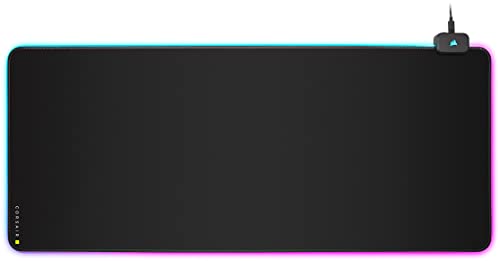
The Corsair MM700 RGB Extended is a 930 x 400 mm cloth mat with a 4 mm thick rubber base, 360-degree three-zone RGB lighting around the edge, and a built-in two-port USB hub. Its woven textile surface is tuned for gaming sensors, with a smooth glide that suits fast movement and a texture that stays consistent across the whole mat. At 930 mm wide it is the widest mat in this guide, covering the keyboard, the mouse, and room for a headset or a phone beside them. The RGB lighting runs around the full edge of the mat in three zones, and it can be controlled from the mat itself or through Corsair iCUE software, which lets the lighting match the rest of the setup. The USB hub sits at the top edge of the mat and adds two ports to the desk, which is handy for a mouse receiver, a headset dongle, or a charging cable when the PC sits under the desk. The rubber base is thick and textured, so the mat stays put through fast flicks, and the 4 mm thickness cushions the wrist. The mat needs a USB connection for the lighting and the hub, so it is not a plain unplug-and-play cloth mat, and the lighting adds a cable to the desk. If you want the largest mat here with lighting and extra USB ports built in, this is the pick to look at first, and the listing was confirmed live on Amazon US with stock shown by a tracker on 21 November 2026.
Comparison Table
| Feature | SteelSeries QcK Heavy XXL | Logitech G640 | SteelSeries QcK XXL | Corsair MM700 RGB Extended |
|---|---|---|---|---|
| Size | 900 x 400 mm | 460 x 400 mm | 900 x 400 mm | 930 x 400 mm |
| Thickness | 4 mm | 3 mm | 2 mm | 4 mm |
| Surface | Micro-woven cloth | Moderate-friction cloth | Micro-woven cloth | Woven textile |
| Base | Silicone rubber | Rubber | Rubber | Textured rubber |
| Edges | Stitched | Plain | Stitched | Stitched |
| Lighting | None | None | None | 360-degree RGB, 3 zones |
| USB hub | None | None | None | 2 ports |
| Best for | Thick, stable full desk | Compact desks | Thin, low-profile full desk | Large desks with lighting |
Which One Fits Your Situation
If you want a thick, stable mat that cushions the wrist and covers the full desk, the SteelSeries QcK Heavy XXL is the natural fit, with a 4 mm base and a silicone grip that stays put. If your desk is small or you carry your setup to other places, the Logitech G640 fits best, with a compact 460 mm width and a mat that rolls up without creasing. If you want full desk coverage with the lowest edge in this guide, the SteelSeries QcK XXL is the pick, with a 2 mm profile and the classic QcK cloth. If you want the widest mat with lighting and extra USB ports, the Corsair MM700 RGB Extended is the one, with a 930 mm surface, three lighting zones, and a two-port hub. Measure the desk first, then match the mat to the space: a mat that is too wide hangs over the edge, and a mat that is too narrow leaves the mouse running off the cloth at low sensitivity.
FAQ
What size mouse mat should I buy for gaming?
Measure the desk and the space the mouse needs at your sensitivity. Low-sensitivity players move the mouse further, so a 900 mm extended mat suits them. High-sensitivity players can use a compact 460 mm mat. The mats in this guide run from 460 mm to 930 mm wide, and the extended sizes also hold the keyboard, which keeps the whole setup on one surface.
Does mat thickness matter?
Yes, and the difference is easy to feel. A 4 mm mat cushions the wrist and smooths over bumps in the desk, while a 2 mm mat sits lower and keeps the wrist closer to the desk. The mats here run from 2 mm to 4 mm. If your desk has a rough top, a thicker mat helps; if the desk is flat and smooth, a thinner mat keeps the edge out of the way.
Cloth or hard surface: which is better for gaming?
Cloth is the common choice, and all four mats in this guide use cloth. Cloth gives the sensor a consistent texture, cushions the wrist, and stays quiet under the mouse. A hard surface glides faster but can feel harsh on the wrist and loud in a shared room. For most players, a micro-woven or moderate-friction cloth is the safe middle ground.
How do I clean a cloth gaming mouse mat?
Wipe the surface with a damp cloth for dust and light marks, and wash it with mild soap and water for deeper cleaning, then let it dry flat. Do not fold a cloth mat while it dries, since a fold can leave a crease that the mouse catches on. Check the listing for the maker care notes for the exact mat you buy, since lighting and USB parts change how a mat can be washed.
Do I need RGB lighting on a mouse mat?
No. Lighting is a desk dressing, not a performance feature, and only the Corsair mat in this guide has it. The other three mats focus on cloth, base grip, and size. If you already use Corsair iCUE software for other parts of the setup, the MM700 lighting fits in neatly; if you do not, a plain cloth mat does the same job for tracking.
Final Take
The best gaming mouse mat for most desks is the SteelSeries QcK Heavy XXL, with a thick 4 mm base, a stable silicone grip, and full desk coverage at 900 mm wide. The Logitech G640 is the pick for small desks, the SteelSeries QcK XXL is the pick for a thin, low-profile full desk mat, and the Corsair MM700 RGB Extended is the pick for the widest mat with lighting and a USB hub. All four use cloth surfaces that track cleanly with modern gaming sensors, so the choice comes down to desk size, thickness, and whether you want lighting. Measure the desk, check the listing for the exact size and color, and check the listing for current availability before ordering.
Related guides
More from Amazon
Programs that pair well with the guide above. Offers and eligibility are set by Amazon and may change.
A free business account with business pricing and bulk-buying tools for work, shop or home office.
Create a business accountFree shipping on eligible items, Prime Video and more. Eligible new members can start with a free trial.
Start a Prime free trialAudiobooks and podcasts to listen to on the go. Eligible new members can start with a free trial.
Try Audible freeAd-free music streaming. Eligible new subscribers can start with a free trial.
Try Music Unlimited freeAs an Amazon Associate we earn from qualifying purchases.