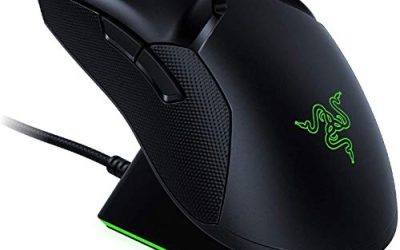
The best Apple-friendly gaming mouse for most Mac players is the Logitech G Pro X Superlight 2: it is lightweight, uses a 2.4 GHz wireless receiver for low latency, and works on macOS with Logitech’s G HUB software. If you want a cheaper option, the Logitech G305 Lightspeed is the safe choice. If your Mac doubles as a work machine, the Logitech MX Master 3S for Mac is the better pick. Apple’s own Magic Mouse is a poor gaming tool, for reasons covered below.
As an Amazon Associate we earn from qualifying purchases at no extra cost to you.


Top 3 picks at a glance
Quick comparison of the picks
| Pick | Best for | Key specs (per manufacturer) | Budget tier |
|---|---|---|---|
| Logitech G Pro X Superlight 2 | Best overall, FPS | Under 60 g, 32,000 DPI HERO 2 sensor, up to about 95 h battery, 2.4 GHz wireless | Premium |
| Logitech G305 Lightspeed | Best budget | About 99 g with AA battery, 12,000 DPI, up to about 250 h, 2.4 GHz wireless | Budget |
| Razer DeathAdder V3 Pro | Best ergonomic shape | About 63 g, right-handed ergonomic shell, 2.4 GHz wireless, high-end optical sensor | Premium |
| Logitech MX Master 3S for Mac | Work plus casual games | About 141 g, 8,000 DPI, Bluetooth plus receiver option, rechargeable via USB-C | Mid-range |
| Apple Magic Mouse (USB-C) | Desktop use, not gaming | Bluetooth only, no side buttons, multi-touch surface | Mid-range |
Best overall: Logitech G Pro X Superlight 2
Its weight of under 60 g, according to Logitech’s spec sheet, makes fast flicks easier on a Mac trackpad-sized desk area, and the symmetrical shape suits palm, claw and fingertip grips. Logitech’s G HUB runs on macOS, so you can set DPI stages, onboard profiles and button mapping, then store them in the mouse so they persist without the app running.
Trade-off: It has only five buttons and a premium price. The receiver is USB-A, so most modern Macs need a USB-C adapter or hub (see the connection tips below).
Best budget: Logitech G305 Lightspeed
This is the practical choice if you want a real gaming sensor and a 2.4 GHz connection without paying flagship money. A single AA battery lasts up to about 250 hours per Logitech, so you rarely think about charging. Its 12,000 DPI ceiling is far more than most players use.
Trade-off: At about 99 g with the battery it is heavy by esports standards, and the shape is small, so large hands may find it cramped.
Best ergonomic shape: Razer DeathAdder V3 Pro
If you grip a mouse with your palm and want a sculpted right-handed shell, this is the stronger option. At about 63 g it keeps the classic DeathAdder profile without the weight of older models. Razer’s configuration software has had macOS support in recent versions, but check the current version before buying, because feature parity with Windows can vary.
Trade-off: It is right-hand only and comes at a premium price.
Best for work and casual games: Logitech MX Master 3S for Mac
This is not a gaming mouse in the esports sense. It is heavy, around 141 g, and built for productivity with a metal scroll wheel, a thumb wheel and gesture buttons. But it pairs with a Mac over Bluetooth or the receiver, and its 8,000 DPI sensor is fine for strategy games, city builders and slower RPGs.
Trade-off: Weight and shape make fast aim in shooters tiring. Buy it only if the Mac is mostly a work machine.
Why the Apple Magic Mouse is a bad gaming mouse
- No usable buttons: There are no physical side buttons, and the surface is one clickable shell. Many games expect left, right, middle and at least two thumb buttons.
- Bluetooth only: There is no 2.4 GHz mode. Bluetooth connection intervals commonly sit in the range of roughly 7.5 to 15 ms or more, against about 1 ms for a 1000 Hz wireless gaming receiver.
- Charging port on the bottom: You cannot use it while it charges.
- Not a gaming sensor design: Apple does not market it for gaming, and its low profile makes controlled aiming harder.
Decision matrix: match your situation to a choice
| Your situation | Choose | Reason |
|---|---|---|
| Mac only, competitive shooters | Logitech G Pro X Superlight 2 | Lowest weight, 2.4 GHz link, onboard profiles |
| Tight budget, any genre | Logitech G305 Lightspeed | Real gaming sensor, very long battery life |
| Large hand, palm grip | Razer DeathAdder V3 Pro | Ergonomic hump and longer body |
| Work all day, strategy or RPG at night | Logitech MX Master 3S for Mac | Comfort, scroll control, Bluetooth multi-device |
| MacBook with only USB-C ports | Any wireless pick plus a small USB-A to USB-C adapter | Receivers are USB-A |
| Zero battery worries | A wired mouse with a flexible cable | No charging, no latency from wireless |
How to choose: the numbers that matter
Weight
For fast-aim games such as shooters, aim for under about 70 g. For general use and slower games, up to about 100 g is fine, and heavier productivity mice are tolerable if comfort matters more than speed.
Polling rate and connection
A 1000 Hz polling rate means the mouse reports every 1 ms; 125 Hz reports every 8 ms. Choose a mouse with a 2.4 GHz receiver for games. Use Bluetooth only for casual play or when you need to save the USB port.
Battery runtime worked out
Take the manufacturer’s rated hours and divide by your daily play time. A 95-hour rating at 4 hours a day gives about 23 days between charges. A 250-hour rating at 4 hours a day gives about 62 days. Rated figures usually assume moderate lighting and polling settings, so real runtime is typically lower with maximum polling and bright RGB.
Sensitivity example for macOS games
Take a shooter like Counter-Strike 2 with a yaw of 0.022 degrees per count. A full 360-degree turn takes 360 / 0.022, or about 16,364 counts, divided by in-game sensitivity. At in-game sensitivity 2.0 and 800 DPI, that is 8,182 counts, or about 10.2 inches, or roughly 26 cm of mouse travel. At 1600 DPI with in-game sensitivity 1.0, the result is the same. This lets you carry the same feel across mice, so you do not have to relearn aim when you switch.
Mac-specific setup tips
- Use a short USB extension or a USB-C hub with its own power. Place the receiver within about 20 cm of the mouse, away from large metal surfaces and Thunderbolt drives, to reduce interference. The reason is that a receiver on the far side of a laptop or behind a dock can raise dropouts.
- Turn off acceleration where possible. macOS applies pointer acceleration at the system level, and the “Tracking speed” slider in System Settings affects desktop movement. Many games read raw input and bypass it, but for those that do not, set the speed slider moderately and use in-game sensitivity as your main control.
- Set the mouse DPI to 800 or 1600. These are common baseline values on high-resolution sensors and make sensitivity math simple.
- Save profiles to onboard memory. Then your settings stay even if you do not install the vendor app on a second Mac.
- Check game compatibility. Native Mac titles and games run through Apple’s Game Porting Toolkit-based tools can differ in how they handle raw mouse input, so test in a practice range before ranked play.
Frequently Asked Questions
Does a normal gaming mouse work on a Mac?
Yes. Almost any USB or 2.4 GHz mouse works on macOS as a plug-and-play pointing device. Extra buttons and DPI changes are the parts that may need vendor software, so check that the brand offers a macOS app before you buy.
Can I use the Apple Magic Mouse for gaming?
You can, but it is not a good idea beyond very casual games. It lacks side buttons, connects only over Bluetooth and uses a low-profile shape that is hard to aim with. A dedicated mouse is a better use of your budget.
Do Mac gaming mice need special software?
Not to move the pointer, but you need software to remap buttons, change DPI stages or edit lighting. Logitech’s G HUB and Razer’s configuration software offer macOS versions, though feature sets can differ from Windows. Settings saved to onboard memory keep working without the app running.
Is Bluetooth good enough for gaming on a Mac?
For casual games, yes. For fast shooters, a 2.4 GHz receiver is better because it typically provides a more consistent 1 ms report rate, whereas Bluetooth intervals are longer and vary with interference.
Which mouse is best for a MacBook with only USB-C ports?
Any wireless mouse with a USB-A receiver works if you add a small adapter or hub. A model with Bluetooth as a fallback, such as the MX Master 3S for Mac, avoids the dongle entirely. If you want a wired mouse, look for one with a USB-C cable or add an adapter.
What DPI should I use on a Retina display?
Start at 800 DPI for games and 1600 DPI for general desktop use. High-resolution displays make the cursor feel slow at low DPI on the desktop, which is why a DPI button for quick switching is useful. Once you have your game sensitivity, keep it consistent across games using the cm per 360 calculation above.
Related guides
More from Amazon
Programs that pair well with the guide above. Offers and eligibility are set by Amazon and may change.
A free business account with business pricing and bulk-buying tools for work, shop or home office.
Create a business accountFree shipping on eligible items, Prime Video and more. Eligible new members can start with a free trial.
Start a Prime free trialAudiobooks and podcasts to listen to on the go. Eligible new members can start with a free trial.
Try Audible freeAd-free music streaming. Eligible new subscribers can start with a free trial.
Try Music Unlimited freeAs an Amazon Associate we earn from qualifying purchases.