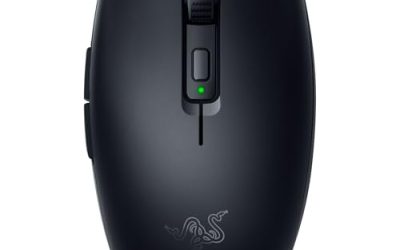
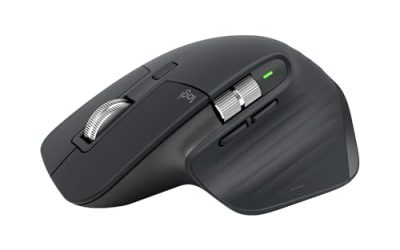
The best AliExpress gaming mouse for most players is the Attack Shark X3, a lightweight tri-mode wireless mouse built around a PixArt PAW3395-class sensor that usually sells for roughly $30–$50. If you want to spend less, the Attack Shark R1 or a wired Redragon M711 Cobra covers the basics for about $15–$25. If you’d rather avoid brand risk, buy a Logitech G305 only from the official brand store on the marketplace.
AliExpress is a marketplace, so the mouse model matters less than who sells it, which sensor is actually inside, and what you really pay after shipping and tax. The sections below cover the picks first, then the decision criteria with numbers.
Quick comparison of the best AliExpress gaming mice
| Pick | Best for | Key specs (per manufacturer/listing) | Typical price |
|---|---|---|---|
| Attack Shark X3 | Best overall | Tri-mode (2.4 GHz, Bluetooth, USB), PAW3395-class sensor, about 59 g | $30–$50 |
| Attack Shark R1 | Best budget wireless | Ultralight shell around 60 g, 2.4 GHz wireless, up to 18,000 DPI listed | $15–$25 |
| VGN/VXE Dragonfly F1 / R1 Pro Max series | Best for ultralight FPS aim | PAW3395-class sensor, roughly 50–60 g, 2.4 GHz with a high-polling dongle on some variants | $35–$70 |
| Logitech G305 Lightspeed | Best for avoiding sensor and QC risk | HERO sensor up to 12,000 DPI, 1 ms report rate, AA battery, about 99 g with battery | $30–$50 |
| Redragon M711 Cobra | Best cheap wired MMO/general mouse | Wired, up to 10,000 DPI listed, 7 buttons, RGB, about 120 g | $12–$25 |
Prices are general market ranges. They shift with sales, coupons and region.
Best overall: Attack Shark X3
The X3 is the mouse most buyers should start with. It offers the spec combination that used to cost $80–$150: a flagship-class PixArt sensor (the PAW3395 is rated by PixArt at up to 26,000 DPI, 650 IPS and 50 g acceleration), tri-mode connectivity and a sub-60 g body. It suits FPS players moving from a heavy office mouse who want to try wireless and light weight without a big spend.
Trade-off: The shell is a symmetrical, fairly low-profile shape. Large hands in a full palm grip may find it small, and the software is more basic than Logitech’s or Razer’s.
Best budget: Attack Shark R1
The R1 shows how far down the price curve lightweight wireless has gone. It is a good first wireless mouse for casual shooters, MOBA players and students. Its listed DPI figure is generous, but you will never use more than 1,600 DPI, so a lower-end sensor is not a real handicap.
Trade-off: The sensor is a step below PAW3395-class parts, so expect less consistent tracking at very fast flicks. It also has fewer customization options.
Best for ultralight aim: Dragonfly F1 / R1 Pro Max series
The VGN and VXE Dragonfly lines are popular among players who want a honeycomb-free, sub-60 g shape with a high-end sensor at a mid-range price. Some variants include a dongle with higher polling-rate options. Check the exact variant on the listing before buying, because several versions share similar names.
Trade-off: Variant confusion is the main risk. The same product name can cover different sensors, weights and battery sizes across listings.
Best for avoiding sensor lottery: Logitech G305 Lightspeed
The G305 is not a cutting-edge mouse, but it has a proven HERO sensor and Logitech’s Lightspeed wireless. Buying from the official Logitech store on the marketplace also gives you a real warranty path. It suits players who want predictable behavior and don’t care about weight.
Trade-off: At about 99 g with its AA battery it is far heavier than the ultralight picks, and its sensor tops out at 12,000 DPI. Third-party sellers also list counterfeits, so the seller matters.
Best cheap wired option: Redragon M711 Cobra
For $12–$25, the Cobra gives you a wired connection with no battery to manage and a familiar right-handed shape. It works for MMOs, strategy games and general use.
Trade-off: It is heavy by modern standards and the cable is stiff. It is not the mouse to pick if competitive aim is your priority.
How to choose: decision matrix
| Your situation | Choose | Why |
|---|---|---|
| Competitive FPS, claw or fingertip grip, hand length under 19 cm | Attack Shark X3 or Dragonfly class | Under 60 g and a top-tier sensor |
| First wireless mouse, tight budget | Attack Shark R1 | Lowest cost for light wireless |
| Large hands, palm grip | Logitech G305 or a larger-shell mouse from a known brand | Small ultralight shells can cramp |
| MMO or many-button games | Redragon M711 Cobra, or a mouse with side-button grids | Cheap and wired |
| Warranty matters more than price | Official brand store only | Easier returns and fewer counterfeits |
Check the sensor, not the DPI number
Marketing DPI numbers like 26,000 or 30,000 mean little. Useful traits are tracking without spin-out, no smoothing at your DPI, and a polling rate your PC can use. A mouse at 800 DPI with a sensitivity of 0.3 in a typical tactical shooter gives a comfortable range of motion, so you are using a small fraction of the sensor’s range either way.
Worked example: landed cost
Marketplace prices can look cheaper than they are. Here is a sample calculation for a mouse listed at $32:
- Item price: $32.00
- Shipping: $3.50
- Import VAT or sales tax at 20% on $35.50: about $7.10
- Landed cost: about $42.60
If a local store sells a comparable mouse for $45 with a 2-year warranty, the saving on the marketplace is only a few dollars. Compare the landed cost, not the headline price. Tax rules vary by country, and some marketplaces collect tax at checkout.
Worked example: battery runtime
Listings often claim “up to 200 hours” at a low polling rate. Runtime is battery capacity divided by average current draw. These figures are illustrative, not measured:
- 300 mAh battery at an average 2.5 mA draw (1,000 Hz, light use): 300 ÷ 2.5 = 120 hours
- Same battery at an average 8 mA (4,000 Hz and RGB on): 300 ÷ 8 = about 37 hours
At 4 hours of play a day, that is roughly 30 days versus 9 days between charges. Higher polling rates and lighting cut runtime sharply, so a mouse advertised at 100+ hours rarely reaches that in a competitive configuration.
How to avoid fakes and wrong variants
- Buy from the brand’s official store. Attack Shark, VXE, VGN and Logitech run their own storefronts on the marketplace. Third-party resellers add the most risk.
- Select the exact variant before comparing price. Cheaper variants often use a lower sensor or a smaller battery.
- Look for a stated weight and sensor model in the listing’s spec table. If either is missing, skip it.
- Check the dispute window. Buyer protection runs for a fixed period after delivery, so test the mouse early.
- Look for shipping from a local warehouse if possible. It cuts delivery time and makes returns simpler.
First-day setup settings
- Update the firmware and driver from the brand’s site, not from a link in the box. Fixes for tracking and sleep behavior ship there.
- Set polling to 1,000 Hz first. It gives the best battery life, and 1,000 Hz is plenty for most players. Move to 2,000 Hz or higher only if the mouse and your CPU handle it well.
- Use 800 or 1,600 DPI. Adjust in-game sensitivity rather than going higher on DPI.
- Set lift-off distance to the lowest value if offered, so the cursor stops when you lift the mouse to reposition.
- Plug the 2.4 GHz dongle into a front or rear port on a short extension, away from USB 3.0 devices and Wi-Fi antennas that can cause interference.
Frequently Asked Questions
Is it safe to buy a gaming mouse from AliExpress?
Yes, if you buy from the manufacturer’s official store and use the platform’s buyer protection. The main risks are counterfeit listings, mixed-up variants and slow returns. A well-known brand’s own storefront removes most of that risk.
Are cheap AliExpress mice as good as Logitech or Razer?
For sensor and weight, mid-priced Chinese brands often match or beat them per dollar. They fall behind in software polish, warranty service and long-term button durability, which are harder to judge from a listing.
What weight is best for a gaming mouse?
Many FPS players prefer 50–65 g for fast flicks, while 80–100 g mice feel more stable for slower, controlled aiming. Grip and hand size matter as much as the number, so pick a shape that fits your hand first.
Do I need an 8,000 Hz polling rate?
No. At 1,000 Hz the mouse reports every 1 ms, which is already below most players’ perception threshold. 4,000 Hz and 8,000 Hz can help on high-refresh monitors, but they add CPU load and drain the battery much faster.
How long does AliExpress shipping take for a mouse?
Usually about 1–3 weeks, depending on whether the item ships from a local warehouse or from China. Choose a local-warehouse option when it is offered, because returns are far easier.
Should I choose wired or wireless?
A good 2.4 GHz wireless mouse performs the same as wired for gaming, so choose wireless for cable-free movement. Choose wired if you want zero battery management or the lowest price. Avoid Bluetooth for competitive play, as latency is higher and less consistent.
Related guides
More from Amazon
Programs that pair well with the guide above. Offers and eligibility are set by Amazon and may change.
A free business account with business pricing and bulk-buying tools for work, shop or home office.
Create a business accountFree shipping on eligible items, Prime Video and more. Eligible new members can start with a free trial.
Start a Prime free trialAudiobooks and podcasts to listen to on the go. Eligible new members can start with a free trial.
Try Audible freeAd-free music streaming. Eligible new subscribers can start with a free trial.
Try Music Unlimited freeAs an Amazon Associate we earn from qualifying purchases.