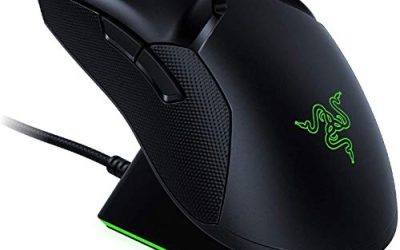
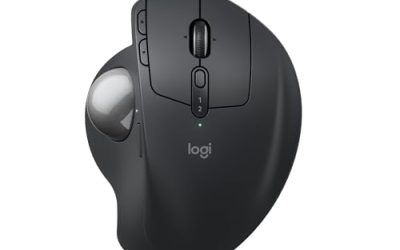
Dota 2 asks a mouse to do two jobs that pull in opposite directions. You need fast, accurate camera and hero movement for last hits and positioning, yet you also need instant access to six item slots, courier commands, control groups, and a stop or hold key during a fight that lasts only seconds. A mouse with too few buttons leaves those actions crowded onto the keyboard, while a huge thumb grid can invite misclicks until you learn it.
This guide serves support, core, and offlane players, plus anyone who queues for several matches in one sitting. The picks were chosen from the names and specifications on their Amazon product pages, balancing programmable button layouts, listed sensor ranges, hand shapes, and weights that suit different grips and roles.
Top 3 picks at a glance


Quick Picks
As an Amazon Associate we earn from qualifying purchases
| Product | Best for | Key spec from title |
|---|---|---|
| Razer Naga Trinity | Players who want a changeable thumb panel | 16,000 DPI optical sensor |
| Corsair Scimitar RGB Elite | Item-heavy builds on a fixed thumb grid | 18,000 DPI |
| Logitech G600 | Maximum programmable actions under the thumb | 20 programmable buttons |
| Logitech G502 HERO | A middle ground between items and aiming | 25,600 DPI |
| Razer Basilisk V3 | Ergonomic comfort with fewer extra buttons | 26K DPI optical sensor |
How to Choose
Button Count and Thumb Layout
Count the actions you genuinely want off the keyboard before counting buttons on a box. Most Dota 2 players need quick access to a few active items, such as a Blink Dagger, Black King Bar, or a neutral item, rather than every slot at once. A twelve-button grid suits players who also bind courier, shop, and control groups to the mouse. A smaller cluster near the thumb is easier to learn and less likely to cause an accidental activation. Check whether side buttons sit in distinct rows or dishes, because shape and spacing matter more than the headline total once a team fight starts.
Shape, Grip, and Long Matches
A single match can run long, and a ranked session can stretch across an evening, so shape deserves as much attention as the sensor. Right-handed ergonomic shells with a thumb rest support a relaxed palm grip and reduce how hard your hand works between fights. Smaller or flatter shapes can feel quicker for fingertip movement and frequent camera adjustments. Compare the listed length and width with your current mouse instead of guessing from photographs. If your fingers overhang the front, or your palm feels forced upward, that mismatch will show up as fatigue long before any specification limit does.
Weight and Movement Style
Weight changes how a mouse feels during the small, repeated movements Dota 2 demands. Heavier models can feel planted when you are making fine corrections for a last hit or placing a ward, and some players prefer that steadiness. Lighter movement, by contrast, makes constant camera panning and quick turns toward a gank feel less effortful. Look at the weight stated on the listing, and note whether it includes the cable or added tuning weights. There is no single correct figure here. Match the weight to your grip, your mousepad space, and how often you lift or sweep the mouse.
Sensor, DPI Range, and Switches
Every mouse in this guide lists a sensor range far beyond the sensitivity most Dota 2 players actually use, so treat the maximum figure as headroom rather than a target. What matters more is clean tracking at your chosen setting, with no unwanted smoothing described on the page, and a report rate that keeps movement consistent. Switch type is worth a glance too. Mechanical and optical switches are both listed across these picks, with different click ratings stated by each brand. A clear, deliberate click feel helps you avoid double inputs when you are issuing move and attack commands in rapid succession.
The 5 Best Options
Razer Naga Trinity

The Naga Trinity solves the central Dota 2 dilemma by letting you change the thumb panel itself. Fit the twelve-button plate when you want items, courier, and control groups under your thumb, or swap to the seven-button circular plate for a smaller set of actions arranged around a central point. That flexibility suits players who switch roles between matches, or who are still learning how many mouse bindings they actually use. Its right-handed shape, listed at 120 grams in the comparison on its page, favours a settled palm grip.
Specs
- Sensor: 5G optical sensor, up to 16,000 DPI
- Buttons: Up to 19 programmable buttons, depending on side plate
- Side plates: Interchangeable plates with 2, 7, and 12 button configurations
- Switches: Mechanical switches, as stated in the product title
- Polling: 1000 Hz Ultrapolling, as stated on the product page
- Connection: Wired, USB
- Hand orientation: Right-handed, with rubber side grips
Best for: Players who want to experiment with thumb layouts before committing to one.
Watch out for: Confirm which side plate is fitted before a match, since bindings change with each plate.
Corsair Scimitar RGB Elite
Corsair built this mouse specifically around MOBA and MMO play, and its listing says so directly. Twelve mechanical side buttons sit on a patented Key Slider system that lets you reposition the whole panel to match where your thumb naturally rests, which is a thoughtful answer to the misclick problem that fixed grids can create. With seventeen programmable buttons in total, there is room for active items, a quickbuy shortcut, and push-to-talk without crowding the keyboard. The braided cable and sturdy scroll wheel described on the page suit a desk setup that stays in place.
Specs
- Sensor: Custom PixArt PMW3391 optical sensor, native 18,000 DPI, adjustable in 1 DPI steps
- Buttons: 17 fully programmable buttons, including 12 mechanical side buttons
- Side panel: Patented Key Slider control system to reposition side buttons
- Switches: Omron switches rated to 50 million clicks
- Software: CORSAIR iCUE for macros, lighting, and surface calibration
- Storage: Onboard profile storage
- Connection: Wired, with braided cable
Best for: Players who want a full item grid they can physically adjust to their thumb.
Watch out for: Take time to set the slider position and lock it before binding every item slot.
Logitech G600
The G600 offers the largest action count in this group, with twenty programmable buttons and a twelve-button thumb panel split into two dished sets of six. That shaping helps your thumb find a row by touch, which is exactly what you need when your eyes stay on a fight. Its G-Shift ring-finger button doubles the actions available on the other buttons, so one profile can hold both item use and courier or shop commands. Three onboard profiles store your settings on the mouse itself, useful if you play on more than one computer.
Specs
- Buttons: 20 programmable buttons, including a 12-button thumb panel
- Sensor: Gaming-grade laser tracking, up to 8,200 DPI
- Resolution range: 50 to 8,200 DPI, as stated on the product page
- G-Shift: Ring-finger button that doubles actions on other buttons
- Primary switches: Rated to 20 million clicks
- Weight: 133 grams without cable
- Cable: Braided USB cable, 6.5 feet
- Profiles: Three onboard memory profiles
Best for: Players who bind the most actions to the mouse, including courier and control groups.
Watch out for: Its laser sensor and heavier body differ from the optical picks here, so check both suit you.
Logitech G502 HERO

The G502 HERO is the balanced option for players who want meaningful extra buttons without moving to a full thumb grid. Eleven programmable buttons cover a handful of active items, a stop command, and camera or control-group shortcuts, while the dual-mode scroll wheel adds tilt inputs. Its HERO 25K sensor is listed with zero smoothing, filtering, or acceleration across the range, which supports predictable cursor movement for last hitting. Five removable tuning weights let you adjust balance and feel, so you can set the mouse heavier for control or leave the weights out entirely.
Specs
- Sensor: HERO 25K optical sensor, up to 25,600 DPI
- Buttons: 11 programmable buttons
- Scroll wheel: Dual-mode hyper-fast scroll wheel
- Weights: Five 3.6 gram tuning weights included
- Lighting: LIGHTSYNC RGB, customisable through Logitech G HUB
- Memory: On-board memory for custom game profiles
- Model number: 910-005469
- Connection: Wired
Best for: Core players who want a few item bindings plus precise, familiar aiming movement.
Watch out for: At its listed size it suits medium to larger hands best, so compare dimensions first.
Razer Basilisk V3

Choose the Basilisk V3 when comfort and a tidy button count matter more than a thumb grid. Its ergonomic shape includes a thumb rest, and eleven programmable buttons give you space for your most used active items, a ping, or push-to-talk without a learning curve spent memorising rows. Razer lists optical switches in its second generation, with a fast actuation claim and a rating stated on the page, alongside a Focus Plus sensor for precise tracking. The HyperScroll tilt wheel can switch between tactile and free-spin movement, handy for cycling through options quickly.
Specs
- Sensor: Focus Plus 26K DPI optical sensor
- Buttons: 11 programmable buttons
- Switches: Optical mouse switches, second generation, rated to 70 million clicks
- Scroll wheel: HyperScroll tilt wheel with tactile and free-spin modes
- Design: Ergonomic form factor with thumb rest
- Lighting: 11 Razer Chroma RGB lighting zones
- Model number: RZ01-04000100-R3U1
- Connection: Wired
Best for: Palm-grip players who want ergonomic support and a moderate set of bindings.
Watch out for: There is no thumb grid, so plan which few actions earn a mouse binding.
Which One Fits Your Situation
You Play Item-Heavy Heroes
Heroes who stack active items punish slow keyboard reaches. The Corsair Scimitar RGB Elite and Logitech G600 both put twelve thumb buttons within reach, letting you separate damage items, defensive items, and consumables into distinct rows. Pick the Scimitar if you want to reposition its panel, or the G600 if the G-Shift layer and onboard profiles appeal more. Either choice needs practice in unranked games first.
You Switch Roles Between Matches
A support game and a carry game ask for different bindings, sometimes in the same evening. The Razer Naga Trinity handles that change physically, moving between its twelve-button and seven-button plates as your role changes. Its two-button plate also works when you play other genres. If you would rather keep one layout and swap profiles in software, the G502 HERO with its on-board memory is the simpler route.
Your Hand Aches After Long Sessions
Comfort should drive the decision when a session runs to several matches. The Razer Basilisk V3 pairs an ergonomic shell and thumb rest with only eleven buttons, so your thumb is not constantly hovering over a dense grid. The G502 HERO is another settled palm-grip option, though its size deserves a check. Whichever you choose, keep your existing grip in mind rather than forcing a new one overnight.
You Mainly Need Better Fight Control
If your item use is already comfortable on the keyboard, extra buttons may add confusion rather than speed. A moderate layout keeps the focus on movement, positioning, and clean clicks during fights. The G502 HERO and Basilisk V3 both fit that approach, with eleven programmable buttons for a stop key, one or two key items, and communication shortcuts. Spend the saved learning time on camera movement and attack-move settings instead.
Common Mistakes
- Binding every item slot to the mouse on day one, then misfiring actives in fights before the layout becomes familiar.
- Choosing a mouse by its maximum DPI figure and then playing at a sensitivity where small movements become hard to control.
- Ignoring listed dimensions and weight, even though hand size and grip decide comfort over a long session.
- Forgetting to save bindings to an onboard profile or the correct software profile, so a new profile loads mid-queue.
- Moving a thumb-grid mouse straight into ranked matches without first practising item order in a bot or unranked game.
Frequently Asked Questions
How many mouse buttons do you need for Dota 2?
Most players do well with a few extra buttons rather than a full grid. Bind your most time-sensitive active item, a stop or hold command, and perhaps courier delivery first. Add more bindings only when those feel automatic. A twelve-button panel helps players who also manage control groups and several actives, but it is an option, not a requirement for climbing.
Is a wired mouse a problem for Dota 2?
No. All five mice in this guide are wired models listed with USB connections, and a cable removes any need to manage a battery during a long session. Route the cable so it does not catch on your desk edge or monitor stand, and leave enough slack for camera pans. A tidy cable path matters more than the connection type for most home setups.
What DPI should you use for Dota 2?
Start with a moderate setting that lets you cross the screen with a comfortable sweep while still placing the cursor precisely on a creep or hero. The listed maximum figures on these mice are far higher than most players need. Change the setting in small steps between matches, not during one, and give each change several games before judging whether control actually improved.
Should support players choose differently from core players?
Often, yes. Supports frequently use wards, detection, and several save or disable items, so a larger thumb panel can help. Core players may value movement feel and a smaller set of bindings for one or two decisive actives. The Naga Trinity bridges both groups because its side plates change with your role, while the Scimitar and G600 lean toward item-heavy support play.
Related guides
More from Amazon
Programs that pair well with the guide above. Offers and eligibility are set by Amazon and may change.
A free business account with business pricing and bulk-buying tools for work, shop or home office.
Create a business accountFree shipping on eligible items, Prime Video and more. Eligible new members can start with a free trial.
Start a Prime free trialAudiobooks and podcasts to listen to on the go. Eligible new members can start with a free trial.
Try Audible freeAd-free music streaming. Eligible new subscribers can start with a free trial.
Try Music Unlimited freeAs an Amazon Associate we earn from qualifying purchases.