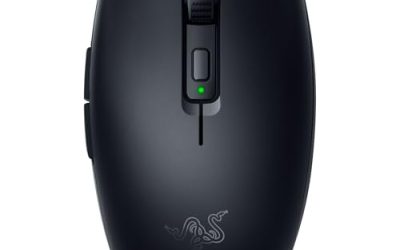
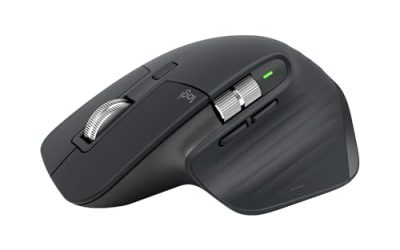
The best gaming mouse for an amateur player is a wired or wireless model in the 60–100 g range with a modern optical sensor, 6–8 buttons and a shape that fits your hand. For most people that means the Logitech G203 Lightsync on a tight budget, the Logitech G305 Lightspeed for a cheap wireless option, or the Razer DeathAdder V3 if you want a step up in shape and weight. Beginners gain more from fit and a sensible sensitivity setting than from sensor specs.
Quick comparison of the best amateur gaming mice
Specs below come from the manufacturers’ spec sheets. Prices are general market ranges and move with sales and regional stock.
| Pick | Best for | Key specs | Price range |
|---|---|---|---|
| Logitech G203 Lightsync | Tightest budget | Wired, up to 8,000 DPI, 6 buttons, about 85 g, RGB | Usually $20–$40 |
| Logitech G305 Lightspeed | Cheap wireless | Wireless, HERO sensor up to 12,000 DPI, 6 buttons, about 99 g with AA battery | Usually $40–$60 |
| Logitech G502 Hero | MMO, RPG and strategy players | Wired, up to 25,600 DPI, 11 buttons, tunable weights, about 121 g without extra weights | Usually $40–$60 |
| Razer Basilisk V3 | Many buttons and a scroll wheel with adjustable resistance | Wired, up to 26,000 DPI, 11 programmable controls, about 101 g | Usually $40–$70 |
| Razer DeathAdder V3 | Best overall for FPS and general play | Wired, ergonomic shape, about 59 g, up to 30,000 DPI | Usually $60–$80 |
| Razer Viper V3 HyperSpeed | Wireless, symmetrical, esports-style | Wireless, symmetrical shape, about 82 g, up to 30,000 DPI | Usually $60–$90 |
Best overall: Razer DeathAdder V3
The DeathAdder V3 suits right-handed players who want one mouse for shooters, battle royales and everyday use. Its ergonomic hump supports a palm or relaxed claw grip, and at roughly 59 g it is light enough that long sessions don’t tire your wrist. Razer’s sensor tops out at 30,000 DPI, far above anything an amateur needs, so the real benefit is the shape and weight.
Trade-off: it is wired and right-handed only, and it costs more than the budget picks. If you have small hands or a fingertip grip, the hump can feel tall.
Best budget: Logitech G203 Lightsync
The G203 is the usual first gaming mouse because it costs little and avoids the problems of cheap office mice. It has a reliable optical sensor, a small, comfortable shape and a rubbery scroll wheel. The 8,000 DPI ceiling is irrelevant in practice, since most players use 400–1,600 DPI.
Trade-off: there are only six buttons, and the shell is basic plastic. It is slightly heavy for its size at around 85 g, so it won’t feel as nimble as a 60 g mouse.
Best cheap wireless: Logitech G305 Lightspeed
The G305 uses Logitech’s Lightspeed 2.4 GHz connection, which is built for gaming latency. Logitech rates battery life at up to 250 hours on one AA battery in its performance mode. That is a manufacturer figure for a specific mode and varies with lighting and polling use. Still, a single AA going 2–3 months at moderate use is a real convenience.
Trade-off: the AA battery makes it about 99 g, and the design is older than the current Razer and Logitech wireless models. It also has no onboard RGB to speak of, which most players won’t miss.
Best for MMOs and strategy: Logitech G502 Hero
If you play MMOs, MOBAs or RTS games, extra buttons save keystrokes. The G502 Hero has 11 buttons, including a sniper-style DPI button and a free-spinning scroll wheel. It is a good fit for a palm grip on a medium-to-large hand.
Trade-off: at 121 g without added weights, it is heavy for fast flick aiming in shooters. It is wired and its large shape suits palm grip better than fingertip grip.
Best for button count and comfort: Razer Basilisk V3
The Basilisk V3 offers 11 programmable controls and a scroll wheel whose resistance can be adjusted, plus a thumb paddle that works as a DPI clutch. The sculpted right-hand shape suits palm grips well. It is a good pick if you play a mix of shooters and RPGs.
Trade-off: at roughly 101 g it is not a lightweight FPS mouse, and the RGB software is more elaborate than some people want.
Best wireless step-up: Razer Viper V3 HyperSpeed
This is the pick if you want a symmetrical, lightweight wireless mouse that suits claw and fingertip grips and is also usable left-handed in terms of body shape. At roughly 82 g, it sits between the budget mice and ultralight models. It is a sensible choice if you expect to get more serious about shooters.
Trade-off: the side buttons are on the left side only, so left-handed players won’t get thumb buttons. The shape is low and flat, which large palm-grip hands may find cramped.
How to choose: decision criteria with numbers
1. Match the mouse to your hand and grip
Measure from your wrist crease to the tip of your middle finger. As a rough guide, under 17 cm suits small mice, 17–19 cm suits medium, and over 19 cm suits large. Palm grip likes taller, longer shells such as the DeathAdder V3 or Basilisk V3. Claw and fingertip grips do better with low, symmetrical shapes like the Viper V3 HyperSpeed.
2. Weight: stay under about 100 g unless you want the buttons
For shooters, 55–85 g is the sweet spot for amateurs. Heavier mice are fine for MMO or strategy play, where you rely on clicks and buttons more than flicks. A 120 g mouse takes noticeably more effort to stop than a 60 g one, which is why the G502 is better for slower genres.
3. Ignore DPI headlines
Every pick above has a sensor that is accurate at any DPI you will realistically use. Pick 800 or 1,600 DPI and adjust in-game sensitivity. A worked example shows why a “30,000 DPI” claim doesn’t matter.
Worked example: set your sensitivity and check your mousepad space
Many shooters, including Valorant and CS2, use 0.07 degrees per count at 1.0 sensitivity (Valorant’s yaw value; CS2 uses 0.022, so the numbers differ by game). Take Valorant at 800 DPI and 0.4 in-game sensitivity:
- eDPI = 800 × 0.4 = 320
- Counts for a full 360° turn = 360 ÷ 0.07 ≈ 5,143
- Inches per 360° = 5,143 ÷ 320 ≈ 16.1 inches (about 41 cm)
So a full turn takes about 41 cm of mouse movement. A desk pad around 40 cm wide is enough for a comfortable arm swipe. If you doubled to 1,600 DPI at the same in-game sensitivity, the same turn would take about 20 cm. That is twitchy for a beginner. A sensible starting range is 25–45 cm per 360°, then adjust by 10% at a time until you can track and flick without overshooting.
| DPI | In-game sens (Valorant) | eDPI | cm per 360° | Feel |
|---|---|---|---|---|
| 400 | 0.8 | 320 | about 41 | Same as 800 × 0.4 |
| 800 | 0.4 | 320 | about 41 | Typical beginner-friendly start |
| 800 | 0.6 | 480 | about 27 | Faster, smaller pad needed |
| 1,600 | 0.4 | 640 | about 20 | Very fast for most amateurs |
Which mouse for which situation
| Your situation | Choose | Why |
|---|---|---|
| Under $40, any genre | Logitech G203 Lightsync | Low price, solid sensor, simple shape |
| Want wireless under $60 | Logitech G305 Lightspeed | Lightspeed link, long AA battery life |
| Mostly shooters, palm grip | Razer DeathAdder V3 | Light 59 g body with ergonomic shape |
| Mostly shooters, claw grip, wireless | Razer Viper V3 HyperSpeed | Low symmetrical shell, mid-light weight |
| MMO, RPG, strategy | Logitech G502 Hero or Razer Basilisk V3 | 11 buttons for macros and abilities |
| Left-handed | Symmetrical mice such as the Viper V3 HyperSpeed | Body shape works for both hands, though thumb buttons are on one side |
Wired or wireless for an amateur?
Modern 2.4 GHz wireless, including Lightspeed and HyperSpeed, has latency that casual players will not notice versus wired. Wired mice are cheaper and never need charging. Wireless mice cost about $20–$40 more, and the benefit is a clean desk. If you play competitively on a budget, buy wired and spend the difference on a decent mouse pad.
Frequently Asked Questions
What is the best gaming mouse for a beginner?
The Logitech G203 Lightsync is the safest low-cost start, and the Razer DeathAdder V3 is a better long-term choice if your budget reaches $60–$80. Both have sensors far more accurate than a beginner needs. Pick based on shape and weight, not specs.
Do amateur gamers need a high DPI mouse?
No. Most players use 400–1,600 DPI, and extra headroom up to 30,000 DPI is marketing rather than a benefit. A sensor rated at 8,000 DPI, like the one in the G203, is already more than enough.
Is a lightweight mouse better for casual gaming?
Often, but not always. A 55–85 g mouse is easier on the wrist and quicker to flick in shooters. For MMOs or strategy games, a heavier mouse with more buttons can be more useful than a lighter one.
How many buttons do I need?
For shooters and general play, 5–6 buttons are enough: left, right, wheel click, two side buttons and a DPI button. MMOs and complex RPGs benefit from 11 or more, as on the G502 Hero or Basilisk V3.
Should I buy a wireless gaming mouse as a first mouse?
You can, as long as it uses a 2.4 GHz dongle rather than basic Bluetooth. The Logitech G305 Lightspeed is a cheap way to try it. If you would rather put money into a pad or a better shape, a wired mouse is perfectly fine.
Does a mouse pad matter for an amateur?
Yes. A pad around 40 × 30 cm or larger gives consistent tracking and enough room for a 40 cm turn at typical sensitivities. A cheap cloth pad usually improves control more than upgrading from a $40 mouse to a $70 one.
Related guides
More from Amazon
Programs that pair well with the guide above. Offers and eligibility are set by Amazon and may change.
A free business account with business pricing and bulk-buying tools for work, shop or home office.
Create a business accountFree shipping on eligible items, Prime Video and more. Eligible new members can start with a free trial.
Start a Prime free trialAudiobooks and podcasts to listen to on the go. Eligible new members can start with a free trial.
Try Audible freeAd-free music streaming. Eligible new subscribers can start with a free trial.
Try Music Unlimited freeAs an Amazon Associate we earn from qualifying purchases.