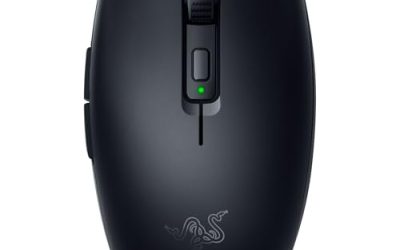
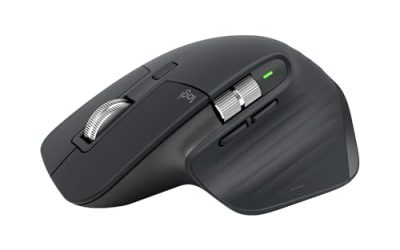
The best all-round gaming mouse in 2026 is a wireless, right-handed ergonomic or safe-shape mouse weighing 60–100 g with a modern 25K–30K DPI optical sensor, five or more buttons and at least 70 hours of battery life. For most players the Logitech G502 X Plus is the most versatile pick, the Razer DeathAdder V3 Pro is the best comfort-first alternative, and the Logitech G305 Lightspeed is the best cheap option. This guide explains how to choose between them for FPS, MMO, strategy and everyday work.
Quick comparison of the all-round picks
| Pick | Best for | Key specs (per manufacturer) | Typical price |
|---|---|---|---|
| Logitech G502 X Plus | Best overall, mixed genres | Wireless, about 106 g, HERO 25K sensor, 13 controls, RGB, free-spin wheel | $130–$160 |
| Razer DeathAdder V3 Pro | Comfort-first FPS and general use | Wireless, about 63 g, 30K optical sensor, 5 buttons, up to 8 kHz with the HyperPolling dongle | $120–$160 |
| Logitech G Pro X Superlight 2 | Competitive shooters, claw/fingertip grips | Wireless, about 60 g, 32K sensor, 5 buttons, roughly 95 h battery | $140–$160 |
| Razer Basilisk V3 | Best wired value with extra buttons | Wired, about 101 g, 26K optical sensor, 11 programmable controls, tilt wheel | $50–$80 |
| Logitech G305 Lightspeed | Best budget wireless | Wireless, about 99 g with AA battery, HERO 12K sensor, 6 buttons, up to 250 h | $30–$50 |
Weights and sensor figures come from the manufacturers’ spec sheets. Street prices move with sales and regional pricing, so treat the ranges as general market guidance.
Best overall: Logitech G502 X Plus
The G502 X Plus earns “all-round” because it covers the most situations without a compromise that ruins any of them. It has a sculpted right-hand shape with a thumb rest and 13 controls, including a DPI shift button and a wheel that switches between ratchet and free-spin. That layout suits MMOs, MOBAs, battle royales and spreadsheets alike.
Who it suits: palm and relaxed-claw grip users with medium to large hands who want macros and profile switching.
Trade-off: at around 100 g class it is heavy next to esports mice. If you play only twitch shooters, you will feel the mass. The wired G502 X is lighter and cheaper if you don’t need wireless.
Best for comfort and shooters: Razer DeathAdder V3 Pro
The DeathAdder shape is one of the most copied ergonomic designs, with a gentle hump and a slightly flared right side. At around 63 g it is much lighter than the G502 X Plus while keeping a full-size body. It has only five buttons, so MMO and heavy-macro players will want more.
Who it suits: palm grippers who play FPS and want a lightweight ergonomic shape.
Trade-off: it is right-handed only, and the 8 kHz polling needs the separate HyperPolling dongle. The standard dongle works fine for most people.
Best for competitive play: Logitech G Pro X Superlight 2
The Superlight 2 is a low, symmetrical, roughly 60 g mouse that fits claw and fingertip grips well and is the safest choice for hand sizes in the middle. It is “all-round” in a different sense: its shape works for almost everyone, even if its button count does not.
Trade-off: five buttons, no RGB and a premium price. It is not ideal for large hands in a full palm grip.
Best wired value: Razer Basilisk V3
The Basilisk V3 gives you a thumb rest, 11 programmable controls and a tilt wheel with an adjustable scroll resistance dial for roughly a third of the flagship price. It also suits office work because the free-spin wheel is useful for long documents. The cable is the compromise, and at about 100 g it is not a twitch-shooter mouse.
Best budget: Logitech G305 Lightspeed
The G305 uses a single AA battery and is wireless with a fast 1 ms report rate. Its 12K sensor is more than enough for any in-game sensitivity. It is small and symmetrical, which is a plus for claw and fingertip grips but not for large hands in a palm grip. If you want an even cheaper wired mouse, look for a model with a 16K–26K optical sensor and avoid anything that advertises only “up to 12,000 DPI” without naming the sensor.
How to choose: the decision criteria that matter
1. Match the shape to your hand and grip first
Shape matters more than any spec. A common rule of thumb is that comfortable mouse length is about 60% of your hand length, measured from the wrist crease to the tip of the middle finger. A 19 cm hand suits a mouse around 11–12 cm long, which covers the DeathAdder and G502 families. A 17 cm hand suits roughly 10–11 cm, which points to the Superlight or G305 class. Palm grips like longer, taller bodies, while claw and fingertip grips like shorter, lower ones.
2. Pick weight by the job
- Under 65 g: competitive shooters and fast flicking.
- 65–90 g: a good all-round balance for most players.
- 90–110 g: acceptable for MMO and strategy when you need many buttons, or for people who prefer a heavier feel.
3. Choose buttons by genre
Two side buttons cover FPS, battle royale and general use. Add a DPI button if you swap between desktop and in-game speeds. Choose six to twelve buttons for MMOs, MOBAs and productivity macros. More buttons mean more weight and more accidental presses.
4. Don’t overpay for DPI or polling rate
Every pick above has a sensor far beyond what you can use. Most players run 800–1600 DPI. Polling rate sets the update interval: 1000 Hz is 1 ms, 4000 Hz is 0.25 ms and 8000 Hz is 0.125 ms. Anything beyond 1000 Hz mostly benefits 240 Hz+ monitors and fast CPUs. Higher rates also drain the battery faster and can cost frames on weaker CPUs.
Worked example: set the same sensitivity on any mouse
A mouse swap should not change your aim. Use cm per 360° to match it. For games using the Source-style yaw of 0.022° per count (CS2, for example), the formula is:
cm/360 = (360 ÷ (0.022 × in-game sensitivity × DPI)) × 2.54
At 800 DPI and sensitivity 1.0: 0.022 × 1.0 × 800 = 17.6 counts-degrees per inch. 360 ÷ 17.6 = 20.45 inches, or about 52 cm for a full turn. If your new mouse works better at 1600 DPI, halve the in-game sensitivity to 0.5 and the result stays 52 cm. Other games use different yaw values, so check the game’s own conversion before copying the numbers.
Battery runtime: what the claims mean
Manufacturers quote battery life under specific conditions, usually 1000 Hz polling and lighting off or low. Take a mouse rated at 95 hours (the Superlight 2 class) and play 4 hours a day: 95 ÷ 4 ≈ 24 days. At 4000 Hz polling, real runtime can drop sharply, so plan for about a third to a half of the rated figure on a high polling rate. The AA-powered G305 changes the maths: a rated 250 hours at 4 hours a day is about two months, and you can swap batteries rather than wait to charge.
Decision matrix: which mouse for your situation
| Your situation | Grip / hand | Best choice | Why |
|---|---|---|---|
| Mixed games plus work, want macros | Palm or relaxed claw, medium–large | Logitech G502 X Plus | 13 controls and free-spin wheel |
| Mostly FPS, want comfort | Palm, medium–large | Razer DeathAdder V3 Pro | Ergonomic shape at about 63 g |
| Ranked shooters, speed first | Claw or fingertip, small–medium | Logitech G Pro X Superlight 2 | About 60 g, symmetrical |
| MMO or MOBA on a budget | Palm, any size | Razer Basilisk V3 | 11 controls for $50–$80 |
| Cheapest reliable wireless | Claw, small hands | Logitech G305 Lightspeed | Low price, AA battery |
| Left-handed | Any | A true ambidextrous mouse | The picks above except the Superlight 2 and G305 are right-handed or only mildly symmetrical, so check the shape |
Common buying mistakes
- Choosing by DPI. Past about 3,200 DPI the number rarely matters.
- Buying an ultra-light “honeycomb” mouse for a large hand. Comfort suffers more than the weight saving helps.
- Ignoring the mouse pad. A worn or glossy surface hurts tracking more than a cheaper sensor does.
- Paying for wireless when you game at a fixed desk. A good wired mouse costs less and never needs charging.
Frequently Asked Questions
What makes a gaming mouse “all-round”?
An all-round mouse has a comfortable shape for most grips, a weight of roughly 60–100 g, a modern optical sensor and enough buttons for several genres. It should work for shooters, MMOs and daily desk work without a major weakness. The Logitech G502 X Plus and Razer DeathAdder V3 Pro are common examples.
Is wireless good enough for competitive gaming?
Yes. Current 2.4 GHz wireless gaming mice from Logitech and Razer use dedicated dongles with latency that matches wired mice for practical purposes. Use the dongle on a front or rear USB port close to the mouse, not through a hub, to avoid signal problems.
What DPI should I use?
Most players do well at 800–1600 DPI with in-game sensitivity tuned to land around 25–50 cm per 360° for tactical shooters. Higher DPI is fine, but it does not make the mouse more accurate. Pick a value, then tune sensitivity in the game.
Do I need an 8000 Hz polling rate?
Not for most players. 1000 Hz is sufficient at 144–240 Hz refresh rates. 4000–8000 Hz can give slightly smoother cursor motion on very high refresh monitors, but it uses more battery and more CPU time.
Is a lightweight mouse better for everyone?
No. Lighter mice make fast flicks easier, but a heavier mouse with a larger body can feel steadier and more comfortable for large hands. Shape and grip fit should come before chasing the lowest weight.
How long should a gaming mouse last?
The switches in current mice are typically rated for tens of millions of clicks, per manufacturer spec sheets. In practice, double-click faults and scroll wheel wear usually show up first. Check the warranty length, which is commonly one to two years, before buying.
Related guides
More from Amazon
Programs that pair well with the guide above. Offers and eligibility are set by Amazon and may change.
A free business account with business pricing and bulk-buying tools for work, shop or home office.
Create a business accountFree shipping on eligible items, Prime Video and more. Eligible new members can start with a free trial.
Start a Prime free trialAudiobooks and podcasts to listen to on the go. Eligible new members can start with a free trial.
Try Audible freeAd-free music streaming. Eligible new subscribers can start with a free trial.
Try Music Unlimited freeAs an Amazon Associate we earn from qualifying purchases.