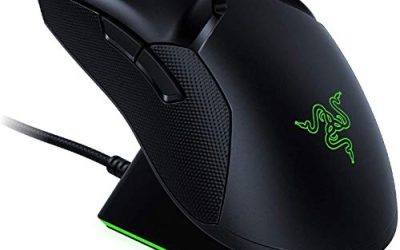
A thumb button panel turns a gaming mouse into a second command deck. Instead of stretching across the keyboard for every ability, you press a button under your thumb and the skill fires. That change matters most in games with long ability bars, where a missed key can cost a fight, but it also helps in any game that rewards fast macros and quick item swaps.
The five mice below all put real command clusters under the thumb, from a compact six-button row to a full twelve-button grid. They cover wired and wireless play, light and heavy shells, and a wide range of hand sizes, so the right pick depends on how many commands you want at your thumb and how much weight you are willing to carry.
Top 3 picks at a glance


Quick Picks
As an Amazon Associate we earn from qualifying purchases
| Product | Best for | Key spec |
|---|---|---|
| Logitech G604 Lightspeed | MMO players who want wireless play | 15 programmable controls, 6 thumb buttons |
| Corsair Scimitar RGB Elite | Full 12-button grid on a wired mouse | 17 programmable buttons, Key Slider panel |
| Razer Naga V2 Pro | Swappable side plates for any genre | 2, 6, and 12-button side plates |
| Razer Naga V2 HyperSpeed | Long battery life with a fixed grid | 19 programmable buttons, up to 400 hours on Bluetooth |
| Logitech G502 HERO | A thumb cluster on a classic shooter mouse | 11 programmable buttons, HERO 25K sensor |
How to Choose
Count the Buttons You Will Actually Use
A full twelve-button grid holds an entire ability bar, while a six-button row covers the skills you press most often. More buttons are not always better, because a grid you never learn wastes space and adds weight. Think about the games you play every week and count the abilities you cast in a typical fight. If the number is under eight, a six-button panel or a compact cluster will feel natural within days. If you run two full bars of skills, only a twelve-button grid gives you room to grow, and you should pick a mouse whose panel you can slide or swap to match your thumb.
Panel Shape and Thumb Reach
Thumb panels come in three shapes: a flat grid, a curved row, and a swappable plate. A flat grid suits players who memorize positions by feel, while a curved row keeps each button within a short thumb sweep. Some panels slide forward or back so the grid lines up with your thumb joint, which matters more than most buyers expect. Before you settle on a mouse, check whether the panel is fixed or adjustable, and whether the buttons are spaced wide enough to press one without brushing its neighbor. A panel that fights your thumb will slow you down in every match.
Wired or Wireless
Wired mice never need charging and usually cost less for the same sensor, which makes them a safe pick for a desk setup that never moves. Wireless mice free the desk from cables and work well for players who travel with a laptop or switch between machines. Modern wireless connections add no delay you can feel in play, so the real trade is battery care against cable drag. If you pick wireless, look for a battery that lasts several weeks of normal play and a wired mode so you can keep playing while it charges. A mouse that dies mid-raid is worse than a cable.
Sensor, Weight, and Grip Shape
A strong sensor tracks cleanly at high speeds and on many surfaces, which keeps aim steady when the action gets fast. Weight shapes how the mouse feels over long sessions: heavy mice feel planted and steady for ability-heavy games, while light mice flick faster in shooters. Grip shape matters just as much, because a thumb grid only works when your thumb rests on it without effort. Right-handed ergonomic shells suit palm and claw grips best, and most thumb-button mice are built that way. Check the weight, the shell length, and the grip style before you commit.
The 5 Best Options
Logitech G604 Lightspeed
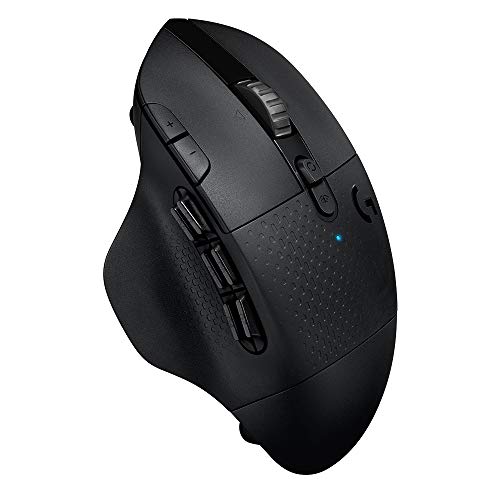
The G604 gives MMO players a wireless mouse with six thumb buttons arranged in a row that is easy to learn. Fifteen programmable controls cover abilities, macros, and utility commands, while the dual-mode metal scroll wheel switches between free spin and click steps. Lightspeed wireless keeps the connection steady, and Bluetooth lets you pair a second device for work between sessions. At 135 grams with its battery, it is a substantial mouse that suits medium and large hands best. Note: Amazon itself no longer lists this mouse as sold new, so check the listing and confirm the seller and condition before you buy.
Specs
- Sensor: HERO 16K optical sensor, up to 16,000 DPI
- Buttons: 15 programmable controls including 6 thumb buttons
- Connectivity: Lightspeed wireless and Bluetooth
- Battery: Up to 240 hours on Lightspeed, up to 5.5 months on Bluetooth
- Weight: 135 g with AA battery
- Scroll wheel: Dual-mode metal hyper-fast wheel with tilt
Best for: MMO and MOBA players who want a wireless mouse with a learnable thumb row.
Watch out for: Amazon itself no longer sells it new, so confirm the seller and listing condition before buying.
ASIN: B07QN369XX
Corsair Scimitar RGB Elite
The Scimitar RGB Elite is the classic wired MMO mouse, built around a twelve-button side panel that slides to fit your thumb. Seventeen programmable buttons in total cover a full ability bar plus macros, and the Key Slider lets you shift the whole panel forward or back until the grid sits under your thumb joint. A custom PixArt PMW3391 sensor tracks up to 18,000 DPI in single-DPI steps, and the braided cable holds up to long daily sessions. Four-zone RGB lighting runs through iCUE, where you can also build macros and store profiles on the mouse itself.
Specs
- Sensor: Custom PixArt PMW3391 optical sensor, up to 18,000 DPI
- Buttons: 17 programmable buttons including a 12-button side panel with Key Slider
- Switches: 50 million click-rated Omron switches
- Connectivity: Wired USB
- Weight: 122 g
- Lighting: Four-zone RGB lighting with iCUE support
- Model: CH-9304211-NA
Best for: MMO players who want a full twelve-button grid on a wired mouse with an adjustable panel.
Watch out for: The panel takes a week of practice to learn, and the 122 g shell feels heavy next to ultralight mice.
ASIN: B082LRMY53
Razer Naga V2 Pro
The Naga V2 Pro is the most flexible mouse here because its side plates swap between two, six, and twelve-button layouts. That means one mouse can run a full MMO grid on raid night and a light two-button panel for shooters the next day, with up to twenty programmable buttons in the twelve-button setup. The Focus Pro 30K sensor tracks up to 30,000 DPI, and the HyperScroll Pro wheel offers six scroll modes plus a custom mode. Gen-3 optical switches handle the clicks, and the battery runs up to 150 hours over HyperSpeed wireless or up to 300 hours over Bluetooth.
Specs
- Sensor: Razer Focus Pro 30K optical sensor, up to 30,000 DPI
- Buttons: Up to 20 programmable buttons with 2, 6, and 12-button swappable side plates
- Switches: Razer Optical Mouse Switches Gen-3
- Scroll wheel: HyperScroll Pro wheel with six scroll modes
- Battery: Up to 150 hours on HyperSpeed wireless, up to 300 hours on Bluetooth
- Weight: 134 g
- Connectivity: HyperSpeed wireless, Bluetooth, wired USB-C
- Model: RZ01-04400100-R3U1
Best for: Players who want one mouse that adapts from MMOs to shooters by swapping side plates.
Watch out for: At 134 g it is one of the heaviest mice here, and the swappable plates add cost.
ASIN: B0BGJTLFN5
Razer Naga V2 HyperSpeed

The Naga V2 HyperSpeed keeps the same twelve-button grid idea as the Pro but fixes the panel in place and trims the extras, which makes it the simpler pick. Nineteen programmable buttons hold a full rotation, and the Focus Pro 30K sensor gives it the same tracking hardware as its sibling. A single AA battery powers up to 250 hours on HyperSpeed wireless and up to 400 hours on Bluetooth, so charging is never a concern. Gen-2 mechanical switches sit under the main buttons, and the HyperScroll wheel switches between free spin and tactile steps. At 95 grams without the battery, it is the lighter of the two Naga mice.
Specs
- Sensor: Razer Focus Pro 30K optical sensor, up to 30,000 DPI
- Buttons: 19 programmable buttons including a fixed 12-button thumb panel
- Switches: Razer Mechanical Switches Gen-2
- Scroll wheel: HyperScroll Technology with free-spin and tactile modes
- Battery: Up to 250 hours on HyperSpeed wireless, up to 400 hours on Bluetooth
- Weight: 95 g without battery
- Power: Single AA battery
- Connectivity: HyperSpeed wireless, Bluetooth, wired USB
- Model: RZ01-03600100-R3U1
Best for: MMO players who want a fixed twelve-button grid with very long battery life.
Watch out for: The fixed panel cannot move or swap, and the AA battery adds ongoing cost.
ASIN: B0BGJT87N2
Logitech G502 HERO

The G502 HERO is the pick for players who want thumb buttons without giving up a shooter mouse. Its thumb cluster holds three buttons plus a sniper button that drops sensitivity while held, so you can steady aim for long shots and release to return to normal speed. Eleven programmable buttons in total cover abilities, macros, and utility commands, and onboard memory stores up to five profiles on the mouse. The HERO 25K sensor tracks up to 25,600 DPI, and five 3.6-gram tuning weights let you adjust the balance. A dual-mode scroll wheel with tilt rounds out a mouse that has stayed popular for years.
Specs
- Sensor: HERO 25K optical sensor, up to 25,600 DPI
- Buttons: 11 programmable buttons including 3 thumb buttons and a sniper button
- Scroll wheel: Dual-mode hyper-fast wheel with tilt
- Weight: 121 g plus five 3.6 g tuning weights
- Onboard memory: Up to 5 profiles
- Lighting: LIGHTSYNC RGB
- Connectivity: Wired USB
- Model: 910-005469
Best for: Players who split time between shooters and ability-heavy games and want one mouse for both.
Watch out for: At 121 g before weights it is heavy for fast flicks, and the shape suits right-handed grips only.
ASIN: B07GBZ4Q68
Which One Fits Your Situation
You Play MMOs With Long Skill Bars
Pick a twelve-button grid such as the Scimitar RGB Elite or the Naga V2 HyperSpeed. A full grid maps one ability to each button, so your whole rotation sits under your thumb and your left hand stays on movement keys. The Scimitar panel slides to match your thumb, while the HyperSpeed runs for months on one battery. Either one rewards a week of practice with much faster casting.
You Want One Mouse for MMOs and Shooters
Pick the Naga V2 Pro or the G502 HERO. The Naga V2 Pro swaps side plates, so you can run a twelve-button grid for raids and a two-button plate for shooters. The G502 HERO keeps a small thumb cluster and a sniper button, which suits players who spend most of their time aiming and only some of it casting. Both keep your desk to one mouse.
You Want Wireless Freedom With a Grid
Pick the G604 Lightspeed or the Naga V2 HyperSpeed. The G604 runs up to 240 hours on Lightspeed wireless and pairs over Bluetooth with a second device, while the HyperSpeed stretches to 250 hours on wireless and 400 hours on Bluetooth. Both let you play without a cable, and both keep working wired while charging or with a fresh battery. Check the G604 listing carefully, since Amazon itself no longer sells it new.
You Want a Thumb Cluster Without a Heavy Mouse
Pick the G502 HERO or the Naga V2 HyperSpeed. The HyperSpeed weighs 95 grams without its battery, making it the lightest grid mouse here, while the G502 HERO keeps its thumb cluster compact and its shell familiar. Both suit players who want extra buttons without carrying a large MMO shell. Try the shape first if you have small hands, since both are right-handed designs.
Common Mistakes
- Buying a twelve-button grid when you only cast six abilities, then leaving half the panel unused and fighting its weight.
- Mapping every button on day one instead of learning three or four at a time and adding more as muscle memory builds.
- Ignoring panel position: a grid that sits too far forward or back will slow your thumb in every fight.
- Choosing wireless without checking battery life, then running out of charge during a long session.
- Forgetting that most thumb-button mice are right-handed, so left-handed players need to check the shell shape before buying.
Frequently Asked Questions
How many thumb buttons do I need for MMOs?
Most MMO players do well with twelve thumb buttons, since a full grid holds one ability bar without modifiers. If you play with fewer abilities or use modifier keys, six buttons can be enough and easier to learn. Count the skills you cast in a typical fight and match the panel to that number, leaving room for one or two extra macros.
Are twelve-button mice hard to learn?
They take about a week of steady play to feel natural. The trick is to map a few buttons at a time, beginning with the skills you cast most often, and let muscle memory build before adding more. A panel that slides or swaps helps, because you can line the buttons up with your thumb instead of stretching for them.
Do thumb-button mice work for FPS games?
Yes, but a full twelve-button grid is heavier and wider than a typical FPS mouse, so it suits players who value macros over flick speed. For shooters, a small thumb cluster such as the G502 HERO or a swappable plate such as the Naga V2 Pro works better, since you keep the extra buttons without carrying a large MMO shell.
Can I remap the thumb buttons?
Yes, every mouse here lets you remap its thumb buttons through the maker’s software. You can assign abilities, macros, media controls, or keyboard shortcuts, and most of these mice store profiles in onboard memory so your bindings travel with the mouse. Set up profiles per game so each title gets its own layout.
Related guides
More from Amazon
Programs that pair well with the guide above. Offers and eligibility are set by Amazon and may change.
A free business account with business pricing and bulk-buying tools for work, shop or home office.
Create a business accountFree shipping on eligible items, Prime Video and more. Eligible new members can start with a free trial.
Start a Prime free trialAudiobooks and podcasts to listen to on the go. Eligible new members can start with a free trial.
Try Audible freeAd-free music streaming. Eligible new subscribers can start with a free trial.
Try Music Unlimited freeAs an Amazon Associate we earn from qualifying purchases.