A wireless gaming mouse under the $50 cap forces one real decision: which specification are you willing to trade away? At this budget you cannot have the lightest shell, the newest sensor, the longest battery and the most buttons in one mouse, so the sensible move is to pick the compromise that matches your games. Every model in this list was selected from a listing priced under the $50 cap at check time, and prices move, so confirm the figure on the listing before you buy.
This guide is for players building a first wireless setup, laptop gamers who want one mouse for play and travel, and anyone replacing a worn-out wired mouse without overspending. The four picks were chosen from the specifications and prices shown on their Amazon US product pages: a proven Logitech all-rounder, an ultralight with a flagship sensor, a travel mouse with extraordinary battery life, and a button-heavy budget model with a rapid-fire key.
Our Top Picks
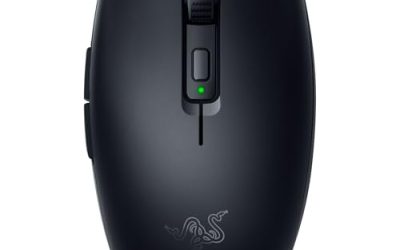
 Razer Orochi V2 Wireless Gaming Mouse4.26 x 1.52 inch (Pack of 1)4.26 x 1.52 x 2.47 inches0.13 poundsCheck on Amazon
Top 3 picks at a glance

Quick Picks
As an Amazon Associate we earn from qualifying purchases.
| Product | Best for | Key spec from title |
|---|---|---|
| Logitech G305 Lightspeed | All-round play with the longest simple battery life | HERO 12K sensor, 250-hour battery |
| Attack Shark X3 | Ultralight flick aiming on a budget | 49g, PAW3395 sensor, tri-mode wireless |
| Razer Orochi V2 | Travel and laptop gaming away from a charger | Up to 950-hour battery, HyperSpeed and Bluetooth |
| Redragon M810 Pro | Button-heavy games and macros | 8 programmable buttons, rapid fire key |
How to Choose
Judge the sensor by tracking quality, not the biggest DPI number
Listings under $50 advertise DPI figures from 10,000 to 26,000, but no player uses the top of that range. What matters is a sensor that tracks without smoothing or acceleration at normal settings: the HERO sensor in the G305 and the PAW3395 in the Attack Shark X3 are both proven designs, while the Redragon’s PAW3325 is an older, simpler sensor that still performs fine for casual and mid-rank play. Spend your attention on the sensor model named on the page, not the headline DPI.
Match the battery system to your habits
The four picks use three different power strategies, and each suits a different player. The G305 runs up to 250 hours on a single AA battery you can swap in seconds. The Orochi V2 stretches a single AA or AAA to a listed 950 hours in Bluetooth mode. The Attack Shark X3 and Redragon M810 Pro use built-in rechargeable batteries rated around 200 hours and 45 hours respectively, so they need a cable session now and then. If you hate charging cables, choose a replaceable-battery model.
Check which wireless modes you actually get
Not every wireless mouse under the $50 cap connects the same way. A 2.4GHz USB receiver gives the low-latency, 1ms-class connection you want for gaming, and all four picks include one. Bluetooth, offered by the X3 and the Orochi V2, is the useful second mode for a work laptop or tablet, but it polls slower and should not be your gaming connection. Wired fallback over USB-C, included with the X3 and M810 Pro, keeps you playing while the battery charges.
Know where the $50 cap cuts corners
Savings at this level come from predictable places: simpler mechanical or entry-level optical switches instead of flagship ones, basic software, no charging dock, and shells without premium coatings. None of that prevents good gaming, but it does mean you should check the listing for switch type, whether the receiver stores inside the mouse for travel, and what the stated polling rate is. A model that hides its polling rate or sensor model is telling you something about where the money went.
The 4 Best Options
Logitech G305 Lightspeed

The G305 remains the safe first wireless gaming mouse because it gets the fundamentals right at this budget. Logitech’s HERO sensor delivers up to 12,000 DPI with tracking past 400 IPS, the LIGHTSPEED connection reports at 1ms, and a single AA battery is rated for 250 hours of continuous gameplay, so battery anxiety simply disappears. At 99 g it is not ultralight, and the symmetrical shell suits claw and fingertip grips better than a full palm rest, but six programmable buttons, onboard memory and a receiver that stores inside the mouse make it a complete, fuss-free package.
Specs
- Sensor: HERO optical sensor, 200 – 12,000 DPI
- Tracking speed: Over 400 IPS
- Connectivity: LIGHTSPEED wireless USB receiver, 1ms report rate
- Battery life: Up to 250 hours on a single AA battery
- Buttons: 6 programmable buttons
- Weight: 99 g
- Memory: On-board memory, receiver storage compartment
Best for: Players who want one dependable wireless mouse for mixed gaming and everyday use, with months between battery changes.
Watch out for: The 99 g weight and compact shell will feel heavy and small if you are shopping for an ultralight or have large hands; check the dimensions on the listing against your current mouse.
Attack Shark X3
The X3 is the specification outlier of this budget class: a 49 g shell built around PixArt’s PAW3395, the same flagship sensor family found in mice costing several times more. It tracks at up to 26,000 DPI and 650 IPS, clicks through Kailh GM8.0 switches, and connects three ways, over a 2.4GHz receiver for gaming, Bluetooth for a second device, or a USB-C cable. The listed battery life reaches up to 200 hours. The shell is small and symmetrical, so it rewards fingertip and claw grips and smaller hands rather than palm players.
Specs
- Weight: 49 g
- Dimensions: 118.5 x 61 x 39.7 mm
- Sensor: PixArt PAW3395, up to 26,000 DPI
- Tracking: 650 IPS, 50G acceleration
- Switches: Kailh GM8.0, rated 80 million clicks
- Connectivity: 2.4GHz wireless, Bluetooth 5.2, USB-C wired
- Polling rate: 1000Hz
- Battery life: Up to 200 hours
- Buttons: 5 programmable buttons
Best for: FPS players with small to medium hands who want flagship tracking and an ultralight shell inside the $50 cap.
Watch out for: Polling tops out at 1000Hz with no high-polling option, and the small shell will cramp large hands; confirm the size suits your grip before ordering.
Razer Orochi V2
The Orochi V2 is the travel specialist. Razer’s listing leads with battery life: up to 950 hours in Bluetooth mode from a single battery, and the mouse accepts either an AA or an AAA, which also lets you tune its weight slightly. For gaming it switches to HyperSpeed wireless, backed by a 5G Advanced 18K DPI optical sensor and mechanical switches rated for 60 million clicks. The compact, symmetrical shell disappears into a laptop bag, which is precisely the point: this is the pick for gaming in hotel rooms, lecture halls and living-room couches rather than at a dedicated desk.
Specs
- Sensor: Razer 5G Advanced 18K DPI optical sensor
- Connectivity: HyperSpeed wireless and Bluetooth, 2 wireless modes
- Battery life: Up to 950 hours (Bluetooth mode)
- Battery type: Single AA or AAA battery
- Switches: Mechanical mouse switches, rated 60 million clicks
- Design: Ultra lightweight, portable mobile form factor
Best for: Laptop and travel gamers who want one mouse that lasts for months and works on any desk or tray table.
Watch out for: The 950-hour figure is for Bluetooth mode; HyperSpeed gaming mode uses power faster, and the small shell is a poor fit for palm grips and large hands.
Redragon M810 Pro

The M810 Pro is the pick when buttons matter more than grams. It offers eight programmable buttons, including a dedicated rapid-fire key and two side macro buttons, all remappable in Redragon’s software with five onboard DPI levels up to 10,000. The PAW3325 sensor and 1000Hz polling rate are a step behind the flagship sensors in this list, but they are entirely adequate for MOBA, MMO and casual shooter play. Its rechargeable battery is rated up to 45 hours in eco mode, and a USB-C cable keeps it running while it charges. RGB backlighting rounds out a feature set few rivals at this level match.
Specs
- Sensor: PixArt PAW3325 optical sensor
- DPI: 5 onboard levels (500/1000/2000/3000/10000), up to 10,000 DPI
- Buttons: 8 programmable buttons, including rapid fire key and 2 side macro buttons
- Connectivity: 2.4GHz wireless receiver, USB-C wired
- Polling rate: 1000Hz
- Battery life: Up to 45 hours at maximum (eco mode)
- Lighting: RGB backlit
Best for: MMO and MOBA players who want macros and a rapid-fire key from a wireless mouse inside the $50 cap.
Watch out for: Battery life drops well below the 45-hour figure with RGB lighting on, and the PAW3325 is an entry-level sensor, so competitive FPS players should choose the G305 or X3 instead.
Which One Fits Your Situation
You are buying your first wireless gaming mouse
Take the Logitech G305 Lightspeed. It asks nothing of you: drop in the AA battery, plug in the receiver, and the 1ms LIGHTSPEED connection, proven HERO sensor and 250-hour battery simply work across every genre. It is the pick least likely to be replaced within a year, and its onboard memory keeps your settings when you move between computers.
You play fast FPS games and flick with your whole arm
The Attack Shark X3 is your mouse. At 49 g it changes direction with almost no inertia, and the PAW3395 sensor keeps up with hard swipes at 650 IPS. Pair it with the 2.4GHz receiver rather than Bluetooth, keep a charging cable nearby for weekly top-ups, and accept the small shell as part of the ultralight bargain.
You game on a laptop in different places every week
Choose the Razer Orochi V2. Its listed 950-hour Bluetooth battery life means the charger question disappears, the AA or AAA flexibility lets you use whatever battery a shop sells, and HyperSpeed mode is there when you sit down for a serious session. The compact shell packs flat and survives being carried daily.
You play MMOs and want macros without a wired mouse
The Redragon M810 Pro gives you eight programmable buttons and a rapid-fire key at the lowest typical street level in this list. Map your rotation to the side buttons, use the onboard DPI levels to separate combat and inventory sensitivity, and keep the USB-C cable in your desk drawer for the evenings the battery runs low mid-raid.
Common Mistakes
- Assuming every pick under the $50 cap stays there; prices move with sales and stock, so verify the figure on the listing at checkout.
- Gaming over Bluetooth when the mouse includes a 2.4GHz receiver, then blaming the mouse for input lag.
- Chasing the highest DPI number instead of checking which sensor model the listing actually names.
- Buying an ultralight small shell like the X3 for a large palm grip, then fighting cramps in long sessions.
- Forgetting that rechargeable models need charging time, and discovering an empty battery at the start of a game night.
Frequently Asked Questions
Are wireless mice under $50 good enough for competitive gaming?
For most players, yes. Models like the G305 and Attack Shark X3 pair proven sensors with 1ms-class 2.4GHz connections, which covers ranked play comfortably. The compromises at this budget are in switch feel, software polish and extras, not in core tracking. Only players chasing 4K or 8K polling need to spend above the cap.
Why do prices in this category change so often?
Budget peripherals are discounted aggressively and stock rotates between sellers, so a mouse listed under the $50 cap at check time can drift above it later, and vice versa. That is why this guide names no fixed figures per product: open the listing, confirm the current price and seller, and check whether a coupon box on the page changes the total.
Is a replaceable AA battery better than a rechargeable one?
It depends on your habits. Replaceable batteries, as in the G305 and Orochi V2, give the longest runtimes and instant swaps, at the cost of buying cells. Built-in rechargeable batteries, as in the X3 and M810 Pro, are tidier and charge over USB-C, but the mouse is tethered while charging and the cell ages over years of use.
Can these mice connect to a console or tablet?
The 2.4GHz receivers work with devices that accept USB input, and the Bluetooth modes on the X3 and Orochi V2 pair with tablets and laptops for everyday control. Console support varies by game and platform, and competitive console titles may restrict mouse input, so check your specific game before relying on any of these as a console mouse.
Related guides
More from Amazon
Programs that pair well with the guide above. Offers and eligibility are set by Amazon and may change.
A free business account with business pricing and bulk-buying tools for work, shop or home office.
Create a business accountFree shipping on eligible items, Prime Video and more. Eligible new members can start with a free trial.
Start a Prime free trialAudiobooks and podcasts to listen to on the go. Eligible new members can start with a free trial.
Try Audible freeAd-free music streaming. Eligible new subscribers can start with a free trial.
Try Music Unlimited freeAs an Amazon Associate we earn from qualifying purchases.