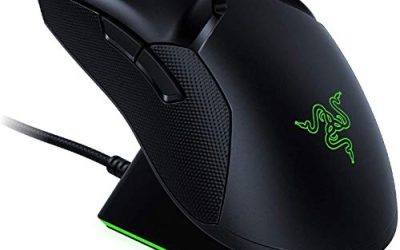
The best travel gaming mouse is small enough to disappear into a laptop bag, light enough to use for hours on a hotel desk, and tough enough to survive being packed and unpacked every day. It also has to keep gaming properly: a real sensor, a low-latency wireless connection, and a receiver that stores inside the mouse so it never gets lost between trips.
A travel gaming mouse is a different purchase from a desktop gaming mouse. Size and weight matter more than extra buttons, battery life matters more than RGB lighting, and a receiver slot inside the shell matters more than a charging dock you will never pack. This guide covers three compact wireless gaming mice that are built for the road, with the honest trade-offs of each one.
Our Top Picks
 Razer Orochi V2 Wireless Gaming Mouse4.26 x 1.52 inch (Pack of 1)4.26 x 1.52 x 2.47 inches0.13 poundsCheck on Amazon

Top 3 picks at a glance

How to Choose a Travel Gaming Mouse
Size and weight
A travel mouse should be compact and light. Mice under 100 grams are easy to carry and easy to use for long sessions, and the lightest travel mice sit under 65 grams, which makes a real difference when you are playing on a small hotel desk or a laptop tray. Compact does not have to mean cramped: a well-shaped small mouse still supports claw and fingertip grips comfortably, while palm grip players with large hands may find very small mice tiring over a long session. Check the length of the mouse against your hand size before you buy.
Battery life
Battery life is the feature that decides whether a travel mouse is useful or annoying. A mouse that runs for hundreds of hours on a single battery can last a whole trip and several more, while a mouse that needs charging every few days becomes one more cable to pack. Mice that run on a single AA battery are easy to keep going anywhere in the world, since a replacement is always nearby. Rechargeable mice are lighter and cheaper to run, but they need a cable and a charging habit. For travel, long battery life beats fast charging.
Wireless connection and receiver storage
A travel mouse lives or dies by its wireless connection. A 2.4 GHz connection with a dedicated USB receiver gives the lowest latency for games, while Bluetooth is useful for pairing with a laptop or a tablet without using a USB port. The single most important travel feature is a storage slot for the receiver inside the mouse: a receiver left loose in a bag is a receiver that gets lost. Dual-mode mice that support both 2.4 GHz and Bluetooth are the most flexible on the road, since they can connect to almost anything you carry.
Sensor and buttons
A travel mouse still needs a gaming sensor. A ceiling of 8,500 DPI or higher covers most games and most display resolutions, and a sensor that tracks cleanly at high speeds matters more than the maximum DPI number. Six programmable buttons are enough for most games on the road, covering two side buttons, a DPI button, and the standard clicks and wheel. More buttons add weight and size, which is the opposite of what a travel mouse needs.
Durability and the cable question
Travel mice get knocked around, so a solid shell and a scroll wheel that survives being pressed into a bag matter. Wired mice avoid batteries entirely and are often cheaper, but the cable is one more thing to pack and manage on a small desk. If you choose a wired travel mouse, look for a flexible, lightweight cable and a compact body; if you choose wireless, look for a receiver slot and a battery that lasts the trip.
Our Picks
Razer Orochi V2
The Razer Orochi V2 is the most travel-focused gaming mouse in this guide, and it is built around a single idea: a full gaming mouse that weighs under 60 grams and runs for months on one battery. It is the mouse to pack when weight and battery life matter most.
It weighs under 60 grams, making it one of the lightest wireless gaming mice you can buy, and it runs for up to 950 hours on Bluetooth or up to 445 hours on Razer HyperSpeed wireless, so a single battery can last through many trips. Two wireless modes are built in: HyperSpeed 2.4 GHz for low-latency gaming and Bluetooth for laptops and tablets. The Focus+ 18K optical sensor reaches 18,000 DPI, second-generation mechanical switches give a crisp click, and six programmable buttons cover the essentials. PTFE mouse feet keep it gliding smoothly on a hotel desk or a laptop tray, and onboard memory stores your settings on the mouse itself.
This mouse suits a frequent traveler who games on a laptop and wants the lightest possible mouse with the longest possible battery life. It also suits a small-handed player who finds full-size mice too large, since the compact body fits claw and fingertip grips well.
Its limits are size and shape. The compact body can feel small for palm grip players with large hands, and there is no RGB lighting or extra side-button cluster for MMO play. It runs on a single AA or AAA battery, which is easy to replace anywhere, but it is not rechargeable over USB. If you want the lightest travel mouse with the longest battery life, this is the pick; if you want a larger mouse, look at the next one.
Logitech G305 LIGHTSPEED
The Logitech G305 LIGHTSPEED is the classic compact wireless gaming mouse, and it has been the default travel pick for years because it gets the fundamentals right: a small body, a long battery life, and a receiver that stores inside the mouse.
It weighs 99 grams and uses the HERO 12K sensor, which reaches 12,000 DPI with up to 400 IPS tracking and no acceleration or smoothing. LIGHTSPEED wireless delivers a 1 millisecond report rate, so it feels as responsive as a wired mouse. A single AA battery runs it for up to 250 hours of continuous play, and the USB receiver stores inside the battery compartment, so it is always with the mouse when you pack it. Six programmable buttons and onboard memory cover the essentials, and the symmetrical shape suits claw and fingertip grips as well as smaller palm grips.
This mouse suits a traveler who wants a proven, no-fuss gaming mouse that works the same on every trip, and a buyer who wants one mouse for both a desktop and a laptop bag. It also suits a player who likes a slightly larger and more substantial body than the ultra-light travel mice, without giving up portability.
Its limits are that it is heavier than the lightest travel mice, at 99 grams against the Orochi V2 at under 60 grams, and it has no Bluetooth mode, so it always needs its receiver. It also runs on a disposable AA battery rather than recharging over USB, which is convenient on the road but means keeping a spare battery in the bag. For most travelers, those are small trade-offs against a mouse that simply works everywhere.
Razer DeathAdder V2 Mini
The Razer DeathAdder V2 Mini is the compact version of a classic gaming shape, shrunk down for smaller hands and smaller bags. At 62 grams it is nearly as light as the Orochi V2, and it keeps the comfortable DeathAdder ergonomics in a body that packs easily.
It uses an 8,500 DPI optical sensor with fast, precise tracking, and Razer Optical Mouse Switches that actuate quickly and last far longer than standard mechanical switches. Six programmable buttons, Chroma RGB lighting, and anti-slip grip tape included in the box round out a mouse that is built for long sessions. At 62 grams it is light enough for fast movement, and the compact body fits claw and fingertip grips well.
This mouse suits a traveler with small or medium hands who likes the DeathAdder shape but finds the full-size version too large, and a player who wants a light, compact mouse for fast games on the road. It also suits a buyer who wants a smaller mouse for a laptop setup at home as well as on trips.
Its limits are the cable. Unlike the other two picks, the DeathAdder V2 Mini is wired, so it needs a cable on the desk and in the bag, and it has no wireless mode at all. The 8,500 DPI sensor ceiling is also lower than the other picks, though it is still plenty for most games. If you want a wireless travel mouse, choose one of the other two; if you want the lightest possible wired mouse with a classic shape, this is the one.
Comparison Table
| Mouse | Weight | Sensor | Battery | Connection | Receiver storage |
|---|---|---|---|---|---|
| Razer Orochi V2 | Under 60 g | Up to 18,000 DPI | Up to 950 hours on Bluetooth | HyperSpeed 2.4 GHz, Bluetooth | Receiver stores in mouse |
| Logitech G305 LIGHTSPEED | 99 g | Up to 12,000 DPI | Up to 250 hours on one AA battery | LIGHTSPEED 2.4 GHz | Receiver stores inside mouse |
| Razer DeathAdder V2 Mini | 62 g | Up to 8,500 DPI | Wired, no battery | Wired USB | Not applicable |
Frequently Asked Questions
Is a wireless mouse good enough for gaming while traveling?
Yes. A modern 2.4 GHz wireless gaming mouse with a dedicated receiver runs at a 1,000 Hz polling rate, which is effectively the same responsiveness as a wired mouse. Bluetooth adds more latency and is better for casual play or for connecting to a laptop without using a USB port. For competitive games on the road, use the 2.4 GHz receiver mode.
How light should a travel gaming mouse be?
Under 100 grams is a good target, and under 65 grams is ideal if you play for long sessions on small desks. Lighter mice are easier to move quickly and cause less fatigue, but very light mice can feel insubstantial to players who like a heavier, more planted feel. Try to match the weight to your grip style rather than chasing the lowest number.
What happens if I lose the USB receiver?
That is the most common travel problem with wireless mice, which is why receiver storage inside the mouse matters so much. Some manufacturers sell replacement receivers, but they are often model-specific and can be hard to find. A mouse with Bluetooth as a backup connection can still be used while you wait for a replacement receiver.
Should I pack a mouse pad as well?
A small, foldable mouse pad is worth packing if you play on hotel desks, glass tables, or other surfaces that do not track well. Modern optical sensors track on most surfaces, but a consistent cloth surface improves accuracy and protects the mouse feet. A thin pad adds almost no weight to a bag.
Can one mouse serve as both a travel mouse and a desktop mouse?
Yes, and the mice in this guide are built for exactly that. A compact wireless mouse with a long battery life works just as well on a desktop as it does on a laptop tray. The main trade-off is size: a mouse that is comfortable for travel may feel small during long desktop sessions, especially for palm grip players with large hands.
Conclusion
The best travel gaming mouse is the one that disappears into your bag and then performs like a proper gaming mouse when you take it out. The Razer Orochi V2 is the lightest pick here and the longest-lasting, with under 60 grams and a battery that can run for months, making it the best choice for frequent travelers. The Logitech G305 LIGHTSPEED is the most proven all-rounder, with a compact body, a 250-hour battery life, and a receiver that stores inside the mouse. The Razer DeathAdder V2 Mini is the lightest wired option, with a classic shape shrunk down for small hands and small bags. Pick the one that fits your hand and your trips, and your games will travel as well as you do.
Disclosure: As an Amazon Associate, we may earn from qualifying purchases.
Related guides
More from Amazon
Programs that pair well with the guide above. Offers and eligibility are set by Amazon and may change.
A free business account with business pricing and bulk-buying tools for work, shop or home office.
Create a business accountFree shipping on eligible items, Prime Video and more. Eligible new members can start with a free trial.
Start a Prime free trialAudiobooks and podcasts to listen to on the go. Eligible new members can start with a free trial.
Try Audible freeAd-free music streaming. Eligible new subscribers can start with a free trial.
Try Music Unlimited freeAs an Amazon Associate we earn from qualifying purchases.