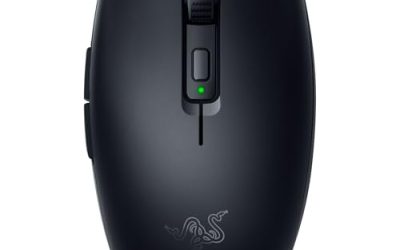
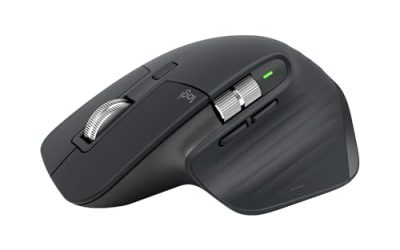
The best affordable gaming mouse for most players in 2026 is the Logitech G305 Lightspeed. It gives you a wireless connection with gaming-grade latency, a proven sensor and AA battery life measured in months, usually for $30–$50. If you want a cheaper wired option, the Logitech G203 is the safe pick. If you want a lighter, faster-feeling shooter mouse and can spend a bit more, the Razer Viper V3 HyperSpeed is the step-up. Below are the picks, then the numbers that decide which one fits your hand and your game.
Quick comparison of the best budget gaming mice
| Pick | Best for | Key specs (per manufacturer sheets, approximate) | Typical price |
|---|---|---|---|
| Logitech G305 Lightspeed | Best overall value | Wireless 2.4 GHz, HERO sensor up to 12,000 DPI, 6 buttons, about 99 g with AA, up to ~250 hours | $30–$50 |
| Logitech G203 Lightsync | Cheapest dependable wired | Wired, up to 8,000 DPI, 6 buttons, about 85 g, RGB | $20–$30 |
| Attack Shark X3 | Lightweight on a tight budget | Tri-mode wireless, roughly 60 g class, high-end-class sensor, 6 buttons | $25–$45 |
| Razer Viper V3 HyperSpeed | Competitive FPS step-up | Wireless 2.4 GHz, symmetrical shape, about 80 g class, optical switches, up to 30,000 DPI sensor | $50–$75 |
| SteelSeries Rival 3 | Wired, mid-size comfort | Wired, up to 8,500 CPI, 6 buttons, about 77 g | $25–$40 |
Prices move with sales and regions, so treat these as general market ranges rather than fixed figures.
Best overall: Logitech G305 Lightspeed
The G305 is still the reference point for budget wireless. It uses Logitech’s Lightspeed 2.4 GHz connection, which is built for 1 ms report rates. The HERO sensor tracks cleanly well beyond any DPI you will use in games. It runs on a single AA battery, which means no charging cable and no downtime.
Who it suits: players who want one mouse for FPS, MOBA and desktop use, with medium to large hands.
Trade-off: it is not light. With the battery installed it weighs about 99 g, which is noticeable if you flick-aim a lot. Its 6 buttons and basic shape also make it more generic than ergonomic.
Best cheap wired: Logitech G203 Lightsync
The G203 is the “just works” choice. A wired connection removes battery and pairing concerns, and the shape is small to medium and forgiving for palm and claw grips. Its software is mature, so on-board DPI stages and RGB settings are easy to set.
Trade-off: the cable adds drag unless you use a mouse bungee, and its 8,000 DPI sensor is a step behind newer budget sensors. That ceiling does not matter in practice, because few players use more than 1,600 DPI.
Best lightweight on a budget: Attack Shark X3
The X3 is aimed at players who want a roughly 60 g mouse for under $50. It offers Bluetooth, 2.4 GHz and wired modes, which is rare at this price. That makes it useful if you also want a laptop mouse.
Trade-off: brand support and software polish are weaker than Logitech or Razer. Check warranty terms before buying, and expect coating and switch feel to vary more than with the big brands.
Best step-up for competitive shooters: Razer Viper V3 HyperSpeed
The Viper V3 HyperSpeed is a symmetrical, low-profile shape with a wireless connection and optical switches, which avoid the double-click failures that eventually hit mechanical switches. It suits claw and fingertip grips on medium hands.
Trade-off: it costs about twice the price of the G305 and offers only a few extras. The weight is moderate rather than ultralight, and the AA-style battery arrangement on Razer’s HyperSpeed line is less convenient than a rechargeable cell for some users. Buy it if you play Valorant, CS2 or Apex seriously. Otherwise the G305 gives most of the benefit.
Best wired alternative with a roomier shape: SteelSeries Rival 3
The Rival 3 has a mid-size body with a rubberized side grip, which suits palm grips better than the Viper-style shapes. It is a good fit if you find the G203 slightly small.
Trade-off: it is on the heavier side for a wired mouse at about 77 g, and it has no standout feature beyond a sound shape and reliable tracking.
How to choose: the numbers that matter
1. Match the mouse to your hand length
Measure from the wrist crease to the tip of your middle finger. A common rule of thumb is that the mouse’s length should be roughly 60–70% of that number for palm grip and about 55–65% for claw. A 19 cm hand suggests a mouse around 115–130 mm for palm grip. Small hands, under about 17 cm, do well with the Cobra-class and X3-class shapes. Hands over about 20 cm will find the G305 and Rival 3 more comfortable.
2. Decide wired or wireless with a battery calculation
Budget wireless is no longer laggy, so the real question is running cost. Take the G305’s rated runtime of about 250 hours on one AA battery at the default report rate. At 3 hours of use a day, that is 250 ÷ 3 ≈ 83 days, or about 4 AA batteries a year. A pair of rechargeable AA cells makes the running cost close to zero. A mouse with a built-in rechargeable cell and a 60-hour rating would need a recharge about every 20 days at the same use. Your own use will differ, and the manufacturer’s figure is usually measured with lighting off and specific settings.
3. Don’t pay for DPI, set it sensibly
DPI claims such as 26,000 or 30,000 do not make a mouse better in games. What matters is your effective sensitivity. Here is a worked example for CS2, which uses a yaw of 0.022 degrees per count:
- Set 800 DPI and 0.40 in-game sensitivity, so eDPI = 800 × 0.40 = 320.
- Counts for a full 360° turn = 360 ÷ (0.022 × 0.40) ≈ 40,909.
- Distance = 40,909 ÷ 800 ≈ 51.1 inches, or about 130 cm per 360°.
That is a typical, comfortable range for arm aiming, and every sensor on this list handles 800 DPI easily. If you have a small mousepad, you would raise the sensitivity or DPI to cut the distance. For example, 1,600 DPI at 0.20 in-game gives the same 320 eDPI and the same 130 cm.
4. Weight and your game
- Under 65 g suits fast flick shooters and anyone with wrist fatigue.
- 65–90 g suits all-rounders and is where most budget mice sit.
- Over 90 g only matters if you like a planted, stable feel, as in strategy and MMO play.
Decision matrix: which mouse for your situation
| Your situation | Pick | Why |
|---|---|---|
| Under $30 total budget | Logitech G203 or SteelSeries Rival 3 | Reliable wired sensors, no battery to buy |
| Want wireless, desk setup, all genres | Logitech G305 | Long battery life and a strong track record |
| Competitive FPS, small to medium hands | Attack Shark X3 or Razer Viper V3 HyperSpeed | Lower weight, symmetrical shape |
| Also need a laptop or travel mouse | Attack Shark X3 | Bluetooth plus 2.4 GHz modes |
| Large hands, palm grip | Logitech G305 or SteelSeries Rival 3 | Longer, fuller bodies |
| Sweaty hands, long sessions | Rival 3 (rubber grips) or add grip tape to any pick | Better hold without gripping harder |
What not to pay extra for
- Extreme DPI numbers. They do not change real-world tracking quality at 400–1,600 DPI.
- 8,000 Hz polling. It needs a strong CPU and a mouse priced well above this class. 1,000 Hz is enough for budget play.
- Heavy RGB. It drains the battery on wireless models and adds nothing to aim.
- Many side buttons. Only MMO and some MOBA players use them. Six buttons cover most games.
Frequently Asked Questions
Is a wireless gaming mouse good enough for competitive play at a budget price?
Yes. Modern 2.4 GHz connections such as Logitech’s Lightspeed and Razer’s HyperSpeed are designed for 1 ms report rates. Latency differences against wired mice are far smaller than typical human reaction variation. Avoid Bluetooth mode for competitive play, because its latency is less consistent.
How much should I spend on an affordable gaming mouse?
$25–$50 is the sweet spot. Under $25 you get a reliable wired mouse. Between $30 and $50 you get wireless or lightweight designs, and above $60 you are paying mainly for weight, switches and finish rather than for better aim.
What DPI should I use?
Most players settle between 400 and 1,600 DPI, and 800 is a common default. Pick a DPI first, then adjust in-game sensitivity until a 360° turn takes about 25–45 cm of mouse movement, depending on your pad size and play style. Higher DPI with a lower in-game setting gives the same result.
Are cheap mice from lesser-known brands worth it?
They can be, especially for the price of an Attack Shark-class mouse. The main risks are weaker software, variable quality control and limited warranty support. Check the return window and warranty terms before buying, and prefer models with an established sensor.
Do I need a gaming mouse pad too?
A consistent, textured surface matters more than most people expect. A basic cloth pad of about 400 × 320 mm gives enough room for a 130 cm per 360° sensitivity and a stable glide. It is one of the cheapest upgrades to consistency.
How long should a budget gaming mouse last?
Switches on most budget mice are rated for tens of millions of clicks. In practice, a left-click that starts double-clicking is the usual failure. Optical switches such as those on the Viper V3 HyperSpeed avoid the contact wear that causes it. Most others are fine for several years of normal use.
Related guides
More from Amazon
Programs that pair well with the guide above. Offers and eligibility are set by Amazon and may change.
A free business account with business pricing and bulk-buying tools for work, shop or home office.
Create a business accountFree shipping on eligible items, Prime Video and more. Eligible new members can start with a free trial.
Start a Prime free trialAudiobooks and podcasts to listen to on the go. Eligible new members can start with a free trial.
Try Audible freeAd-free music streaming. Eligible new subscribers can start with a free trial.
Try Music Unlimited freeAs an Amazon Associate we earn from qualifying purchases.