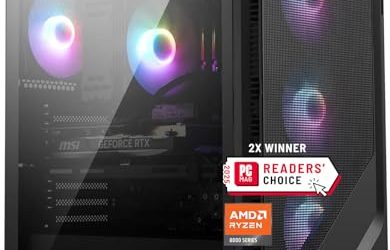
Buying a custom PC means choosing between a machine that is ready to play today and one that can grow with you tomorrow. The real trade-off is not brand against brand: it is how much of your money goes into the graphics card and processor versus the memory, storage, cooling, and power supply that keep those parts running well for years. A system that looks fast on paper can stutter in demanding games if its cooling is weak or its storage fills up after three installs.
This guide is for first-time buyers who want a complete desktop without building one, for players upgrading from a laptop or console, and for creators who also edit video or stream. Every system below was chosen from the names and specifications printed on its Amazon product page, with a focus on balanced parts, a clear upgrade path, and a complete out-of-box setup.
Our Top Picks


Top 3 picks at a glance

Quick Picks
As an Amazon Associate we earn from qualifying purchases
| Product | Best for | Key spec from title |
|---|---|---|
| iBUYPOWER SlateMesh A5N4601 | First-time buyers on a budget | Ryzen 5 7600, RTX 4060, 16GB DDR5, 500GB NVMe SSD |
| CyberPowerPC Gamer Master GMA2900A2 | Mainstream 1080p gaming with newer parts | Ryzen 7 8700F, RTX 5060 Ti, 16GB DDR5, 1TB PCIe 4.0 SSD |
| Skytech Azure 3 9700X RTX 4060 | Quiet cooling and a white build | Ryzen 7 9700X, RTX 4060, 16GB DDR5, 1TB NVMe SSD |
| iBUYPOWER Slate MESH SMI7N5701 | Heavy multitasking and streaming | Core i7 14700F, RTX 5070, 32GB DDR5 RGB, 1TB NVMe SSD |
| Skytech Azure 3 9850X3D RX 9070 XT | High-end play at high settings | Ryzen 7 9850X3D, RX 9070 XT, 32GB DDR5, 2TB Gen4 NVMe SSD |
How to Choose
Match the graphics card to your monitor
The graphics card decides which games run smoothly and at what settings, so start there and work backward. A card with 8GB of video memory suits 1080p play in most current titles, while 12GB or more gives you headroom for 1440p and for texture-heavy games that are arriving now. Check your monitor first: pairing a flagship card with a 1080p 60Hz screen wastes its power, just as pairing a modest card with a 4K display guarantees disappointment. If you plan to upgrade the monitor within a year, buy the stronger card now rather than replacing it later.
Weigh the processor against the work you do
For pure gaming, a modern six-core or eight-core processor is plenty, and extra cores add little to frame rates. The balance shifts when you stream, edit video, compile code, or run virtual machines alongside a game, because those jobs use the extra threads directly. Intel chips in this guide pair well with heavy multitasking, while AMD Ryzen chips often give better value at the same gaming tier. Ignore clock speed alone: a newer architecture at a lower clock can beat an older chip that boosts higher, so compare the full model name and generation instead.
Do not skimp on memory and storage
Sixteen gigabytes of memory is the realistic floor for a gaming PC today, and 32GB is the safer choice if you keep a browser, chat app, and game open at once. Storage matters just as much: a 500GB drive fills quickly once a few modern games are installed, so a 1TB drive is the sensible minimum and 2TB removes the worry entirely. Look for NVMe drives rather than older SATA ones, since they load games and levels noticeably faster. Check how many memory slots are free, because a system with room to add another stick is cheaper to upgrade later.
Check cooling, power, and the upgrade path
A powerful processor and graphics card generate real heat, and a cramped case with weak airflow will throttle them under load. Liquid cooling suits high-end chips, while a good tower air cooler is fine for mid-range builds and is simpler to maintain. The power supply should carry a recognized efficiency rating and enough wattage for a future graphics card upgrade, not just for the parts installed today. Finally, confirm the case uses standard parts and a standard motherboard layout, so swapping the graphics card or adding storage in two years is a straightforward job.
The 5 Best Options
iBUYPOWER SlateMesh A5N4601

The SlateMesh A5N4601 is the sensible starting point for a first custom PC, pairing a Ryzen 5 7600 processor with an RTX 4060 graphics card and 16GB of DDR5 memory. It handles 1080p gaming comfortably, runs Windows 11 Home out of the box, and arrives with a keyboard and mouse included, so there is nothing else to buy before the first session. The mesh front panel and tempered glass side give it a clean gaming look without pushing the build into a higher tier. This is the budget pick for buyers who want a complete, ready-to-play system.
Specs
- Processor: AMD Ryzen 5 7600, 6-core
- Graphics: NVIDIA GeForce RTX 4060, 8GB
- Memory: 16GB DDR5, 5200 MHz
- Storage: 500GB NVMe SSD
- Operating system: Windows 11 Home
- Included: RGB gaming keyboard and mouse
- Model number: PB-SLATEMESHA5N46-01
Best for: First-time buyers who want a complete budget gaming PC.
Watch out for: The 500GB drive fills fast, so plan for a storage upgrade.
ASIN: B0CCZYRNHK
CyberPowerPC Gamer Master GMA2900A2
The Gamer Master GMA2900A2 moves the budget up a notch for buyers who want newer-generation parts, with a Ryzen 7 8700F processor and an RTX 5060 Ti graphics card on the AM5 platform. Its 1TB PCIe 4.0 SSD gives twice the room of the budget pick, and 16GB of DDR5 memory keeps everyday multitasking smooth. Wi-Fi is built in, Windows 11 Home is preinstalled, and a keyboard and mouse are included, so the system is ready the moment it is plugged in. This is the mid-range pick for mainstream gaming with a modern platform under it.
Specs
- Processor: AMD Ryzen 7 8700F, 4.1 GHz
- Graphics: NVIDIA GeForce RTX 5060 Ti, 8GB GDDR7
- Memory: 16GB DDR5
- Storage: 1TB PCIe 4.0 SSD
- Operating system: Windows 11 Home
- Wireless: Wi-Fi Ready
- Model number: GMA2900A2
Best for: Mainstream gamers who want current-generation parts and 1TB of storage.
Watch out for: The 8GB of video memory can limit texture settings in future demanding titles.
ASIN: B0DW4BK2TW
Skytech Azure 3 9700X RTX 4060
The white Azure 3 build stands out for buyers who care about cooling and looks as much as raw speed, pairing a Ryzen 7 9700X with an RTX 4060 and a 360mm liquid cooler. Sixteen gigabytes of DDR5 memory running at 6000 MHz and a 1TB NVMe drive keep the system responsive, while the 650W Gold power supply and tempered glass case complete a tidy package. It ships with Windows 11 Home and free lifetime technical support from the builder, plus a one-year parts and labor warranty. This is the mid-range pick for a quiet, good-looking desk setup.
Specs
- Processor: AMD Ryzen 7 9700X, 3.8 GHz, up to 5.5 GHz turbo
- Graphics: NVIDIA GeForce RTX 4060, 8GB GDDR6
- Memory: 16GB DDR5 RAM, 6000 MHz
- Storage: 1TB NVMe M.2 SSD
- Cooling: 360mm ARGB AIO liquid CPU cooler
- Power supply: 650W Gold ATX 3 PSU
- Model number: ST-AZURE3-1564-W-AM
Best for: Players who want strong liquid cooling and a white tempered-glass build.
Watch out for: The graphics card is the same tier as the budget pick, so this build pays for cooling and style.
ASIN: B0DQ6PVLCV
iBUYPOWER Slate MESH SMI7N5701

The Slate MESH SMI7N5701 is the workhorse of this group, built around an Intel Core i7 14700F and an RTX 5070 with 12GB of video memory. Its 32GB of DDR5 RGB memory and 1TB NVMe drive make it the natural choice for streaming while gaming, editing video between sessions, or running demanding creative software. The mesh case, tower air cooler, and RGB fans keep airflow strong, and the included keyboard and mouse mean the setup is complete on arrival. This is the premium mid-range pick for buyers whose PC does more than play games.
Specs
- Processor: Intel Core i7 14700F
- Graphics: NVIDIA GeForce RTX 5070, 12GB
- Memory: 32GB DDR5 RGB, 5200 MHz
- Storage: 1TB NVMe SSD
- Operating system: Windows 11 Home
- Cooling: Tower air cooler with RGB fans
- Model number: PB-SMI7N57-01
Best for: Streamers and creators who game and multitask heavily.
Watch out for: The large case needs desk space, so measure before ordering.
ASIN: B0DWHFTQWY
Skytech Azure 3 9850X3D RX 9070 XT
The flagship Azure 3 pairs a Ryzen 7 9850X3D processor with an RX 9070 XT graphics card carrying 16GB of video memory, the strongest combination in this guide. Thirty-two gigabytes of DDR5 memory and a 2TB Gen4 NVMe drive remove the usual bottlenecks, while the 850W Gold power supply and 360mm liquid cooler give the parts room to run at full speed. Wi-Fi 5 is built in, Windows 11 Home is preinstalled, and the builder backs the system with a one-year parts and labor warranty. This is the premium pick for high-end play at high settings.
Specs
- Processor: AMD Ryzen 7 9850X3D, 4.7 GHz, up to 5.6 GHz turbo
- Graphics: AMD Radeon RX 9070 XT, 16GB GDDR6
- Memory: 32GB DDR5 RAM, 5600 MHz
- Storage: 2TB Gen4 NVMe M.2 SSD
- Cooling: 360mm ARGB AIO liquid CPU cooler
- Power supply: 850W Gold ATX 3 PSU
- Model number: ST-AZURE3-2951-B-AM
Best for: High-end gamers who want maximum settings and 2TB of storage.
Watch out for: Confirm the listed graphics card brand, since the listing notes it may vary.
ASIN: B0GRGCQMXW
Which One Fits Your Situation
You are buying your first gaming PC
Choose the iBUYPOWER SlateMesh A5N4601. It is the lowest-priced complete system here, it includes a keyboard and mouse, and its Ryzen 5 and RTX 4060 combination plays current games well at 1080p. The 500GB drive is the main compromise, so add storage later when your library grows. If your budget is tight, this is the safest way to start PC gaming without cutting corners on the parts that matter most.
You want current parts and room to grow
Choose the CyberPowerPC Gamer Master GMA2900A2. Its AM5 platform and RTX 5060 Ti put it a generation ahead of the budget pick, and the 1TB drive means you will not run out of space after a few installs. It is the balanced middle ground for buyers who plan to keep the PC for years.
You stream, edit, or work on the same machine
Choose the iBUYPOWER Slate MESH SMI7N5701. The Core i7 processor and 32GB of memory handle streaming software, editing timelines, and heavy multitasking without slowing the game down. The RTX 5070 also gives you headroom for higher-resolution play when work is done. Its large mesh case keeps airflow strong during long sessions, which matters when the processor and graphics card are both working hard at once.
You want the strongest system in the guide
Choose the Skytech Azure 3 9850X3D RX 9070 XT. Its 16GB graphics card, 32GB of memory, and 2TB drive cover demanding games at high settings with storage to spare. The 850W power supply and liquid cooling support the hardware properly, making it the pick for a no-compromise setup. Buyers who play at higher resolutions or want the system to stay relevant for years will get the most from this flagship configuration.
Common Mistakes
- Buying the most expensive graphics card while leaving only 8GB of memory or a small drive in the build.
- Ignoring the monitor: a 4K display needs a far stronger card than a 1080p one.
- Assuming every listing with the same model name has the same parts, since builders sell many configurations under one series name.
- Forgetting to check the case size and the desk space it needs before ordering.
- Skipping the warranty and support terms, which differ between builders and matter when a part fails.
Frequently Asked Questions
Is a custom prebuilt PC better than building one myself?
A prebuilt custom PC saves the time and risk of assembly, and it arrives with Windows installed and parts already tested together. Building yourself can cost less and lets you pick every component, but you take on assembly, troubleshooting, and separate warranties. Buyers who value convenience and a single point of support usually prefer a prebuilt system.
How much memory does a gaming PC need in 2026?
Sixteen gigabytes is the practical minimum for smooth gaming with a few background apps open. Thirty-two gigabytes is the safer choice for streaming, content creation, or heavy multitasking, and it avoids slowdowns when many programs run at once. Memory is also one of the easiest upgrades later if your motherboard has a free slot.
Can I upgrade a prebuilt custom PC later?
Most of the systems in this guide use standard parts and cases, so adding storage, memory, or a new graphics card is usually straightforward. Check the power supply wattage and the free slots before planning an upgrade, since a weak power supply can limit your options. Liquid-cooled models need a little more care when opening the case.
Do these PCs come with Windows and peripherals?
Every system in this guide ships with Windows 11 Home preinstalled, so it is ready to use after setup. Several include a keyboard and mouse in the box, which the product pages list explicitly. A monitor, headset, and speakers are sold separately, so budget for those if you do not already own them.
Related guides
More from Amazon
Programs that pair well with the guide above. Offers and eligibility are set by Amazon and may change.
A free business account with business pricing and bulk-buying tools for work, shop or home office.
Create a business accountFree shipping on eligible items, Prime Video and more. Eligible new members can start with a free trial.
Start a Prime free trialAudiobooks and podcasts to listen to on the go. Eligible new members can start with a free trial.
Try Audible freeAd-free music streaming. Eligible new subscribers can start with a free trial.
Try Music Unlimited freeAs an Amazon Associate we earn from qualifying purchases.