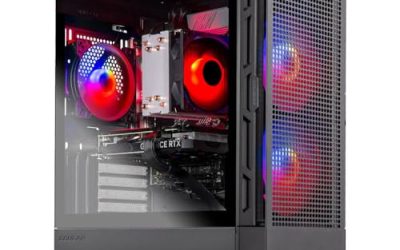
The best custom-built gaming PC for most people in 2026 is a mid-range AM5 build: a Ryzen 5 or Ryzen 7 X3D-class CPU, a 16GB graphics card such as the GeForce RTX 5070 Ti or Radeon RX 9070 XT, 32GB of DDR5-6000, a 2TB NVMe SSD and a quality 750W ATX 3.1 power supply. That combination targets 1440p at high refresh rates, and it can be upgraded later. Spend your money on the GPU first, then the CPU, and keep the rest of the build sensible.
Quick comparison: five build classes
| Build | Best for | Key parts | Price range |
|---|---|---|---|
| Best overall | 1440p, 100-165 fps | Ryzen 7 7800X3D or 9700X, RTX 5070 Ti (16GB) or RX 9070 XT (16GB), 32GB DDR5-6000, 750W PSU | Upper mid-range |
| Best budget | 1080p high / entry 1440p | Ryzen 5 7600 or 9600X, RX 9060 XT 16GB or RTX 5060 Ti 16GB, 32GB DDR5, 650W PSU | Budget to lower mid-range |
| Best for esports | 1080p/1440p, 240 Hz+ | Ryzen 7 9800X3D, RTX 5070 (12GB) or RX 9070, 32GB DDR5-6000 CL30, 650-750W PSU | Mid-range to upper mid-range |
| Best for 4K | 4K 60-120 fps | Ryzen 7 9800X3D, RTX 5080 (16GB), 32GB DDR5, 850W PSU | Premium |
| Best no-compromise | 4K max settings, AI and creator work | Ryzen 9 9950X3D, RTX 5090 (32GB), 64GB DDR5, 1000W+ PSU | Enthusiast |
These are spec classes, not fixed shopping lists. Prices swing with memory and GPU supply, so check current market ranges before you commit.
Best overall: the 1440p sweet spot
Pair a Ryzen 7 7800X3D (or a non-X3D Ryzen 7 9700X if you want to save money) with an RTX 5070 Ti or RX 9070 XT. Both GPUs have 16GB of VRAM on a 256-bit bus, per the manufacturers’ spec sheets. That is enough headroom for 1440p with high textures and for ray-traced titles at moderate settings. Published reviews generally put this class somewhere around 100-165 fps at 1440p in demanding modern games, but results vary with settings, CPU, upscaling and patch.
Trade-off: it costs noticeably more than the budget tier, and it is overkill if you play on a 1080p/144 Hz panel. Choose the RTX card for DLSS and stronger ray tracing. Choose the Radeon for raw rasterization value per dollar of budget and generous VRAM.
Best budget: 16GB on a 128-bit bus
The RX 9060 XT and RTX 5060 Ti both come in 8GB and 16GB versions. For a build you plan to keep for years, buy the 16GB version. Recent games at high texture settings can overflow 8GB even at 1080p, which causes stutter that a faster GPU core cannot fix. A Ryzen 5 7600 or 9600X is plenty to feed these cards.
Trade-off: the 128-bit memory bus limits these cards at 4K, so plan on 1080p or 1440p with upscaling.
Best for competitive esports
If you play shooters at 240 Hz or more, the CPU matters more than it does in single-player games. The Ryzen 7 9800X3D (8 cores, 3D V-Cache) is the usual choice for CPU-limited play. Pair it with an RTX 5070 or RX 9070. Both are plenty for competitive titles at 1440p.
Trade-off: the 9800X3D’s premium is wasted if your GPU is the limit in the games you play. At 4K ultra, a cheaper CPU gives nearly the same result.
Best for 4K gaming
The RTX 5080 (16GB GDDR7, 256-bit) with a 9800X3D is the realistic 4K pick. The RTX 5090 is faster but costs far more. Expect roughly 60-120 fps at 4K depending on the game and whether you use upscaling or frame generation.
Trade-off: 16GB is adequate for 4K today but has less margin than the 32GB on the 5090. A 4K monitor is also an extra cost that is easy to forget.
Best no-compromise build
The RTX 5090 (32GB, 512-bit, 575W rated board power per NVIDIA) and a Ryzen 9 9950X3D make sense if you also do 3D rendering, video editing or local AI work. For gaming alone, the extra cores of the 9950X3D add little over the 9800X3D.
Trade-off: power, heat and case size. You need a 1000W or larger ATX 3.1 PSU with a native 12V-2×6 cable, and a case with real airflow.
How to choose: a worked power budget
Do not buy a power supply by guessing. Add the parts, then add headroom for transient spikes. Example for the best overall build:
- Ryzen 7 9800X3D under gaming load: about 120-160 W
- RTX 5070 Ti, rated board power about 300 W
- Motherboard, 32GB DDR5, NVMe SSD, fans, USB devices: about 60 W
- Estimated peak: 160 + 300 + 60 = 520 W
- Add 40% for transient spikes and aging: 520 × 1.4 = about 730 W
- Round up to a 750 W unit. Load sits near 70%, which is a comfortable efficiency range.
This matches the typical manufacturer guidance of 750W for this GPU class. Use the same method for the other builds: an RTX 5080 (about 360 W) lands near 850 W, and an RTX 5090 pushes you to 1000 W or more.
Match VRAM to resolution
| Resolution | Minimum VRAM | Comfortable VRAM | Typical GPU class |
|---|---|---|---|
| 1080p | 8GB | 12-16GB | RX 9060 XT, RTX 5060 Ti |
| 1440p | 12GB | 16GB | RTX 5070 / 5070 Ti, RX 9070 / 9070 XT |
| 4K | 16GB | 16-32GB | RTX 5080, RTX 5090 |
These figures are practical guidelines. Actual use depends on the game, texture setting and whether ray tracing is on.
Decision matrix: your situation to your build
| Your situation | Choose | Reason |
|---|---|---|
| 1080p/144 Hz monitor, tight budget | Ryzen 5 7600 + 16GB RX 9060 XT | The GPU already saturates the display; an X3D chip adds little |
| 1440p/165 Hz, mixed single-player and multiplayer | 7800X3D + RTX 5070 Ti or RX 9070 XT | 16GB of VRAM and balanced CPU/GPU spend |
| 360 Hz esports monitor | 9800X3D + RTX 5070 | CPU-limited games benefit from V-Cache |
| 4K OLED or TV | 9800X3D + RTX 5080 | Bus width and core count matter at 4K |
| You stream and game on one PC | Ryzen 7 or 9 with 8+ cores, RTX card with hardware encoding | Keeps the encode load off the CPU |
| Small living-room case | Ryzen 5 or 7 non-X3D + 65W-class parts, 650W SFX PSU | Lower heat in a small enclosure |
Parts that matter, and where to save
Motherboard
For AM5, a B650 or B850 board is enough. You do not need an X870E board unless you want the extra PCIe 5.0 lanes or connectivity. Check for the VRM quality needed by your CPU, a BIOS flashback button, and at least two M.2 slots.
Memory
Buy 32GB of DDR5-6000 CL30 as a two-stick kit. On AM5 this speed is the commonly recommended balance point, and a single-kit purchase is more likely to be stable with EXPO enabled. 16GB is the floor for budget builds, but 32GB is the safer choice for new games.
Storage
A 2TB PCIe 4.0 NVMe SSD is the best value for most builds. PCIe 5.0 drives run hotter and make little real difference in games. Prefer a drive with a DRAM cache and a solid endurance rating.
Cooling and case
A 120/240 mm tower air cooler handles a 9800X3D well. Choose a case with a mesh front and at least two intake fans. A GPU like the 5080 or 5090 needs the airflow far more than it needs RGB.
Where not to save
The power supply. Pick an ATX 3.1 model from a reputable brand with a long warranty and a native 12V-2×6 connector if your GPU uses one. A failure here can take other parts with it.
Custom build vs pre-built
Building your own gives you control over the PSU, motherboard, RAM kit and cooler, which are the parts pre-built vendors often cut. A pre-built can be competitive during GPU shortages or when a system integrator has volume discounts. If you buy one, check the PSU model, RAM speed and whether it has a single-channel memory configuration before you pay.
Frequently Asked Questions
Is it cheaper to build a gaming PC than buy a pre-built?
Often, but not always. Building usually saves money and gets you better PSU, board and cooling choices. Pre-built systems can be competitive when a vendor discounts a GPU or when parts prices spike, so compare the full part list before deciding.
How much VRAM do I need for a gaming PC in 2026?
Aim for 16GB if you play at 1440p or 4K or keep your PC for several years. 12GB is workable at 1440p, and 8GB is only suitable for 1080p with reduced texture settings. Many recent releases already exceed 8GB at high settings.
Should I buy an X3D processor?
Buy one if you play CPU-bound games, such as esports titles, strategy games and simulators, or if you use a high-refresh monitor. If you play at 4K with a mid-range GPU, a cheaper non-X3D chip will perform almost the same.
What power supply wattage should I get?
Add your CPU and GPU power draw plus about 60 W for the rest, multiply by roughly 1.4 for headroom, and round up. For an RTX 5070 Ti build this works out to about 750 W. Higher-end GPUs like the RTX 5080 and RTX 5090 need 850 W and 1000 W or more respectively.
Intel or AMD for a custom build?
AMD’s AM5 platform is the common recommendation for gaming because of the X3D chips and the long socket support. Intel’s Core Ultra chips are competitive for productivity and can make sense when a bundle is discounted. Compare gaming reviews for the specific games you play.
Can I upgrade later?
Yes, if you plan for it. Buy a PSU with spare capacity, a board with a good BIOS update record and a case with room for a larger GPU. AM5 has been supported across several CPU generations, so swapping the processor later is realistic.
Related guides
More from Amazon
Programs that pair well with the guide above. Offers and eligibility are set by Amazon and may change.
A free business account with business pricing and bulk-buying tools for work, shop or home office.
Create a business accountFree shipping on eligible items, Prime Video and more. Eligible new members can start with a free trial.
Start a Prime free trialAudiobooks and podcasts to listen to on the go. Eligible new members can start with a free trial.
Try Audible freeAd-free music streaming. Eligible new subscribers can start with a free trial.
Try Music Unlimited freeAs an Amazon Associate we earn from qualifying purchases.