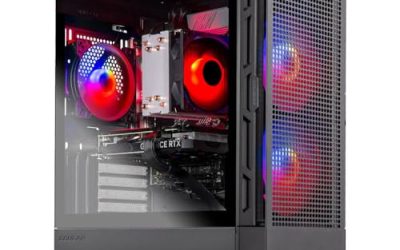
The best PC building company for most gamers is Maingear for a premium custom build, NZXT or Corsair for a clean mainstream prebuilt, and CyberPowerPC, iBuyPower or Skytech for the lowest price per frame. Falcon Northwest and Digital Storm suit buyers who want hand-tuned, high-end systems, and Puget Systems suits people who need a workstation. The right pick depends on how much of the price premium you will pay for build quality, support and warranty, so this guide gives you numbers to judge that.
Quick comparison of the best PC building companies
Lineups and pricing change often, so treat these as general market positions rather than quotes. Check current configurations and warranty terms on each company’s site before you buy.
| Company | Best for | Typical approach | Usual price range |
|---|---|---|---|
| Maingear | Premium custom gaming PCs | Configurable builds, cable management focus, optional liquid cooling and custom finishes | $1,800–$5,000+ |
| Falcon Northwest (Tiki, Talon) | Compact and hand-tuned high-end rigs | Build-to-order, burn-in testing, premium cases | $3,000–$7,000+ |
| Digital Storm | Enthusiast builds with custom cooling | Wide configurator, optional hardline loops | $1,800–$5,000+ |
| NZXT (Player series) | Clean, simple mainstream prebuilts | Fixed configurations in NZXT’s own cases and cooling | $1,100–$3,000 |
| Corsair (Vengeance line) | Name-brand parts throughout | Corsair PSU, memory, case and cooler in every build | $1,500–$4,000 |
| CyberPowerPC / iBuyPower / Skytech | Best value per dollar | High volume, many preset configs, mixed component quality | $800–$3,000 |
| Micro Center in-store builds | Local service with no shipping risk | You choose parts from the shelf, they assemble | Parts cost plus a flat build fee |
| Puget Systems | Creator and workstation PCs | Validated configurations, published reliability focus | $2,000–$8,000+ |
Best overall: Maingear
Maingear is a long-running US builder known for tidy internals, a configurator that lets you pick specific parts, and a focus on gaming. It suits buyers who want a custom rig without sourcing and assembling the parts. The trade-off is price: you pay a clear premium over the same parts bought separately, and delivery can take longer than a stock prebuilt.
Best for high-end, compact builds: Falcon Northwest
Falcon Northwest builds to order and is known for the compact Tiki and the mid-tower Talon. Its approach centers on hand assembly, testing before shipping and tightly packed premium systems. It is the choice if you want a small, quiet, high-end PC and value support over price. The trade-off is cost, since comparable parts often cost far less if you are willing to build them yourself.
Best for custom cooling and looks: Digital Storm
Digital Storm offers a broad configurator with cooling and aesthetic options, including custom liquid loops on higher tiers. It fits enthusiasts who want a showpiece without doing the loop work. The trade-off is that the options you add, such as custom tubing and colored coolant, raise the price quickly, and they do not add frames per second.
Best mainstream prebuilt: NZXT and Corsair
NZXT’s Player series and Corsair’s Vengeance systems are the easiest recommendations for someone who wants a clean, no-fuss PC. Both use their own cases, coolers and, in Corsair’s case, power supply and memory, so you get recognizable parts and consistent support. The trade-off is limited customization: you pick from set configurations, and the price sits a little above the budget integrators for similar GPU and CPU tiers.
Best budget: CyberPowerPC, iBuyPower and Skytech
These high-volume builders usually give the most GPU and CPU for the money. They suit first-time buyers on a tight budget who want a working PC with a warranty. The trade-off is component quality. Motherboards, power supplies and storage are often the places where costs are cut, so read the full spec list rather than just the GPU and CPU line.
Best for local service: Micro Center build service
Micro Center lets you choose parts in the store and pay for assembly, so you see the exact parts you are getting and can return to the store for help. It is the best option if you live near one and want a custom parts list without building the PC yourself. The trade-off is that you must choose compatible parts yourself, and the build fee and warranty terms depend on the store, so confirm them first.
Best for workstations: Puget Systems
Puget Systems focuses on creators, developers and professionals, with validated configurations for video editing, 3D work and similar loads. Choose it if uptime and support matter more than peak gaming value. The trade-off is that you pay for validation and support, and gaming-specific cosmetic choices are limited.
Worked example: what a builder premium really costs
Take a hypothetical mid-high gaming PC. The figures below are illustrative market ranges, not quotes.
| Item | DIY parts cost | Premium builder | Value builder |
|---|---|---|---|
| GPU, CPU, board, RAM, SSD, PSU, case, cooler | $1,900 | $1,900 (equivalent) | $1,750 (cheaper board, PSU, case) |
| Assembly and testing | $0 (your 3–5 hours) | $150–$300 built in | $50–$100 built in |
| Support and warranty value | Per part, you handle RMAs | $100–$300 built in | $50–$100 built in |
| Typical sticker price | $1,900 | $2,300–$2,600 | $1,900–$2,100 |
| Premium over DIY | — | $400–$700 (21–37%) | $0–$200 (0–10%) |
The calculation: if a premium builder charges $2,450 for $1,900 of parts, the premium is $550, or about 29%. If you value your build time at $25 an hour for 4 hours ($100), the remaining $450 is what you pay for a single point of support, a unified warranty and testing. That is reasonable if you would otherwise avoid building. It is poor value if you are comfortable with a screwdriver.
How to choose: a decision matrix
| Your situation | Best choice | Why |
|---|---|---|
| First PC, budget under $1,500 | CyberPowerPC, iBuyPower or Skytech | Most GPU per dollar, as long as the PSU and board check out |
| Want a clean build and brand-name parts | NZXT or Corsair | Consistent components and support |
| Want custom parts without building | Maingear or Digital Storm | Configurators that let you choose specific parts |
| Small form factor, high end | Falcon Northwest | Compact thermal tuning is hard to do yourself |
| Live near a store, want to see parts | Micro Center build service | Local returns and help |
| Video editing or 3D work | Puget Systems | Validated configs and support |
| Comfortable building | DIY | Saves 20–35% versus a premium builder |
What to check before you order
Power supply headroom
Calculate the load yourself. A 300 W GPU, a 150 W CPU under load and about 100 W for the board, drives and fans gives roughly 550 W of peak draw. A common rule is to leave 30–40% headroom for transient spikes and efficiency, so 550 × 1.4 = 770 W, which points to an 850 W unit. If a builder lists a 650 W PSU for that system, ask about the model and its certification.
Memory configuration
Confirm that the memory ships as two modules for dual channel. A single stick can cost a noticeable amount of performance in CPU-limited games. Check the listed speed against what the CPU platform supports.
Motherboard and storage
Look for the specific board model rather than a vague “B-series” description. Check its VRM quality, the number of M.2 slots and the rear I/O. For storage, prefer a named NVMe SSD over an unspecified “1TB NVMe” listing.
Warranty and standard parts
Read the warranty terms, which typically run 1 to 3 years for labor and parts, and ask whether the PC uses standard ATX parts. Proprietary power supplies or motherboards make later upgrades harder, which matters most with large-brand mainstream desktops.
Cooling and noise
A 240 mm or 360 mm AIO or a large dual-tower air cooler matters more than RGB fans. Check whether the case has a mesh front panel, because a glass front restricts airflow.
Frequently Asked Questions
Which company builds the best gaming PCs overall?
Maingear is a strong all-round choice for custom builds, while NZXT and Corsair are easier picks for a simple mainstream prebuilt. Falcon Northwest and Digital Storm sit at the high end. The best one depends on your budget and how much you want to customize.
Is it cheaper to build a PC myself or buy from a builder?
Building yourself usually saves roughly 20–35% compared with a premium builder, and less compared with a value integrator. Prebuilt sales and bundled parts can narrow the gap. You also give up the single warranty and the assembly and testing work.
Are CyberPowerPC, iBuyPower and Skytech worth it?
They can be, especially for first-time buyers who want the most GPU for their money. Check the power supply, motherboard and memory configuration, since those are where costs tend to be trimmed. A well-specified configuration from these builders is often better value than a mainstream brand.
What warranty should I expect from a PC builder?
Expect around 1 to 3 years of coverage for parts and labor, sometimes with shorter terms for certain components. Terms vary by company and configuration, so read the current policy. Also check who pays for shipping on a repair.
Should I choose a local builder or a national company?
A local shop or store build service offers easier returns and quicker troubleshooting, which is useful if something fails. National companies usually offer wider configuration choices and more standardized support. Choose local if you value in-person help, and national if you want specific parts or finishes.
Related guides
More from Amazon
Programs that pair well with the guide above. Offers and eligibility are set by Amazon and may change.
A free business account with business pricing and bulk-buying tools for work, shop or home office.
Create a business accountFree shipping on eligible items, Prime Video and more. Eligible new members can start with a free trial.
Start a Prime free trialAudiobooks and podcasts to listen to on the go. Eligible new members can start with a free trial.
Try Audible freeAd-free music streaming. Eligible new subscribers can start with a free trial.
Try Music Unlimited freeAs an Amazon Associate we earn from qualifying purchases.