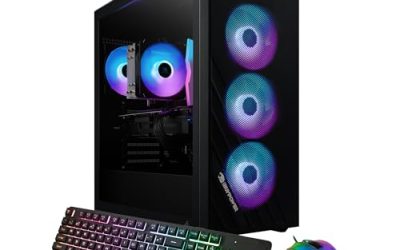
The best armor set for a Guardian depends on your class, build and the current season’s stat rules, so check the game’s official patch notes before you farm anything. What you can control as a PC buyer is the hardware that runs Destiny 2 at a smooth, consistent frame rate. A mid-range 12 GB graphics card such as the GeForce RTX 5070, paired with a modern six-core CPU and a 1440p high-refresh monitor, is the best all-round Guardian rig in 2026.
This guide does not rank in-game armor, because those rankings change with every balance patch and we do not want to give you stale loadout advice. It covers the part a hardware site can answer accurately: which GPU, CPU, memory and display fit a Guardian-style looter-shooter, and how to match them to your resolution.
As an Amazon Associate we earn from qualifying purchases at no extra cost to you.


Our Top Picks


Top 3 picks at a glance
Quick comparison: Guardian PC picks by spec class
| Pick | Best for | Key specs | Price range |
|---|---|---|---|
| GeForce RTX 5070 + six-core Ryzen 5 / Core i5 class CPU | Best overall, 1440p at 144-165 Hz | 12 GB GDDR7, 192-bit bus, 250 W board power (per NVIDIA’s spec sheet) | Mid-range |
| GeForce RTX 5060 or Radeon RX 9060 XT | Best budget, 1080p at 144-240 Hz | RTX 5060: 8 GB, 128-bit, 145 W. RX 9060 XT: 8 or 16 GB, 128-bit | Budget to lower mid-range |
| Radeon RX 9070 XT or GeForce RTX 5070 Ti | Best for 4K | 16 GB, 256-bit bus, roughly 300 W class | Upper mid-range to premium |
| Ryzen 7 9800X3D or 7800X3D with a 1080p/1440p 240 Hz panel | Best for competitive PvP | 8 cores, large 3D V-Cache, 120 W class TDP | Premium CPU, flexible GPU |
Best overall: RTX 5070 with a six-core CPU at 1440p
The RTX 5070 has 12 GB of VRAM on a 192-bit bus and a 250 W board power, per NVIDIA’s spec sheet. That is enough headroom for Destiny 2 at high settings at 1440p, and also for the occasional heavier game. Published reviews of similar cards typically put Destiny 2 at 1440p high settings well above 100 FPS. Exact numbers vary with settings, CPU, the activity you are in (a crowded public event is far heavier than a lost sector) and the current patch.
Who it suits: players on a 1440p 144-165 Hz monitor who want to stay on high settings without tuning. Trade-off: 12 GB is fine now, but it is not generous if you also plan on heavily modded or ray-traced games.
Best budget: RTX 5060 or RX 9060 XT at 1080p
Destiny 2 is not a demanding title by modern standards. The developer’s own recommended spec has long been a GTX 1060-class card. A current budget GPU therefore gives you high settings at 1080p with a high refresh rate in most activities. The RTX 5060 draws 145 W, so it works with a decent 550 W power supply. The RX 9060 XT is the better buy if you can get the 16 GB variant, because it leaves more room for other games.
Who it suits: 1080p players and anyone building a first gaming PC. Trade-off: 8 GB cards can run short of VRAM in newer games at high texture settings, so avoid them if you want 1440p in other titles.
Best for 4K: a 16 GB, 256-bit class card
At 4K you push four times the pixels of 1080p. The Radeon RX 9070 XT (16 GB, 256-bit) and the GeForce RTX 5070 Ti (16 GB, 256-bit) are the realistic targets. Both can reach 60-120 FPS at 4K with tuned settings or upscaling, though results vary widely by settings and patch. Neither is cheap, so choose this tier only if you already own or plan to buy a 4K monitor or TV.
Trade-off: a large step up in cost and power draw for a game that looks good and plays well at 1440p on cheaper hardware.
Best for competitive PvP: CPU first, resolution second
In Crucible-style play the limiting factor is often the CPU, not the GPU. A Ryzen 7 7800X3D or 9800X3D keeps minimum frame rates higher in busy scenes, which is what you feel as smoothness. Pair it with a 240 Hz panel at 1080p or 1440p. A mid-range GPU is enough, as you will usually lower some settings for clarity and speed anyway.
Trade-off: the CPU premium is paid for lower frame-time spikes, not for prettier graphics.
How to choose: the numbers that matter
Match pixel throughput to your monitor
A quick way to size a GPU is to multiply pixels by refresh rate:
- 1080p at 240 Hz: 2,073,600 pixels × 240 = about 498 million pixels per second.
- 1440p at 165 Hz: 3,686,400 × 165 = about 608 million pixels per second.
- 4K at 120 Hz: 8,294,400 × 120 = about 995 million pixels per second.
So 4K at 120 Hz asks for roughly twice the pixel throughput of 1440p at 165 Hz, which is why a 4K target pushes you up a GPU tier. As a frame-time budget, 165 FPS leaves about 6.1 ms per frame, and 240 FPS leaves about 4.2 ms. Your CPU must prepare each frame inside that window as well.
Worked power supply example
For an RTX 5070 (250 W) and a Ryzen 7 7800X3D (120 W class), add about 75 W for the motherboard, RAM, drives and fans: 250 + 120 + 75 = 445 W estimated peak. Adding roughly 30-40% headroom for transient spikes gives about 580-620 W, so a quality 650 W unit is the sensible choice. Check the GPU maker’s own recommended PSU wattage as well, since it can be higher than this estimate.
Decision matrix
| Your situation | Choose | Why |
|---|---|---|
| 1080p 144 Hz monitor, first build | RTX 5060 or RX 9060 XT, 6-core CPU, 16 GB RAM | Pixel load is about 300 million per second, well inside a budget card’s range |
| 1440p 144-165 Hz, plays several games | RTX 5070 class, 6-8 core CPU, 32 GB RAM | 12 GB VRAM and a 192-bit bus suit 1440p |
| 4K TV or monitor | RX 9070 XT or RTX 5070 Ti class, 750 W PSU | 16 GB VRAM and a 256-bit bus for the roughly 8.3 million pixels per frame |
| Ranked PvP, 240 Hz | X3D CPU plus mid-range GPU | Higher minimum FPS, less stutter in crowded fights |
| Older PC with a GTX 1060-class card | Upgrade the GPU first | It still meets the recommended spec, but not high-refresh play |
Other parts that affect a Guardian PC
- Storage: Destiny 2 is a large install, well over 100 GB depending on content, so use an NVMe SSD of at least 1 TB. Load times drop and updates install faster than on a hard drive.
- Memory: 16 GB is the practical minimum. 32 GB gives room for Discord, a browser with build-planning sites, and streaming software.
- Display: a fast IPS or OLED panel at 1440p gives you the best balance of clarity and refresh rate.
- Controller or mouse: the game supports both. A light mouse with a 1000 Hz polling rate is fine for PvP.
A note on choosing armor sets
Armor sets in Destiny 2 change with balance updates, seasons and expansions, so any fixed list ages quickly. Before you commit to a set, check three things in the game’s own sources: the current patch notes for stat and set-bonus changes, the in-game inspect screen for the stat spread, and the class and subclass you actually play. Use a build-planning tool you trust to compare options. Whichever set you pick, a stable frame rate helps most when you are timing abilities in a hard activity.
Frequently Asked Questions
What PC specs do I need to play Destiny 2 well?
The recommended spec has long been a GTX 1060-class GPU, a quad-core CPU and 8 GB of RAM, according to the developer’s requirements. For smooth high-refresh play today, aim for a current budget GPU, a six-core CPU, 16 GB of RAM and an NVMe SSD.
Is 8 GB of VRAM enough for Destiny 2?
At 1080p, usually yes, with high settings. At 1440p and above, or if you play other new games, 12 GB or 16 GB is a safer choice because texture-heavy titles can exceed 8 GB.
Does Destiny 2 need a fast CPU or a fast GPU?
Both matter, but CPU limits show up in crowded public events and PvP, where frame rates dip. A GPU sets your average frame rate at a given resolution, and a strong CPU, especially an X3D model, lifts the minimums.
Which resolution is best for Guardian gameplay?
1440p at 144-165 Hz is the best balance for most players. It looks sharper than 1080p and is much easier to run than 4K, so a mid-range GPU can hold high frame rates.
Which armor set is best for my Guardian class?
That depends on your class, subclass and the current season’s rules, which change with patches. Read the game’s official patch notes and inspect the stats in-game, rather than relying on a list that may be out of date.
What power supply do I need for an RTX 5070 build?
A quality 650 W unit is a sensible match for an RTX 5070 and a modern 8-core CPU. That covers an estimated 445 W peak with ample headroom, but always follow the GPU maker’s recommended wattage.
Related guides
More from Amazon
Programs that pair well with the guide above. Offers and eligibility are set by Amazon and may change.
A free business account with business pricing and bulk-buying tools for work, shop or home office.
Create a business accountFree shipping on eligible items, Prime Video and more. Eligible new members can start with a free trial.
Start a Prime free trialAudiobooks and podcasts to listen to on the go. Eligible new members can start with a free trial.
Try Audible freeAd-free music streaming. Eligible new subscribers can start with a free trial.
Try Music Unlimited freeAs an Amazon Associate we earn from qualifying purchases.