Buying a complete gaming tower is really a decision about what you will not have to replace in the next two years. A weak graphics card, a small drive, or a cramped case cannot be fixed with a settings tweak, and swapping those parts later often costs more than choosing the right configuration now. The monitor you own, the games you play most, and whether you also stream or edit video should drive that first choice.
This guide is for first-time tower buyers replacing a console or an ageing laptop, for 1440p players who want a ready-made system, and for creators who game after work. Every pick below was chosen from the product names and specifications shown on its Amazon page, covering different graphics tiers, memory generations, and storage sizes rather than four versions of the same idea.
Top 3 picks at a glance

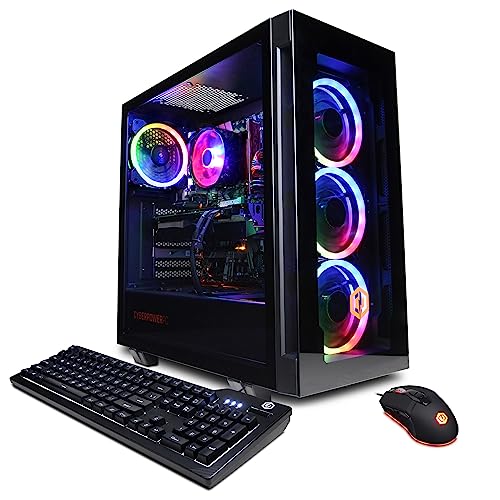
Quick Picks
As an Amazon Associate we earn from qualifying purchases
| Product | Best for | Key spec from title |
|---|---|---|
| Skytech Nebula Gaming PC Desktop | A first tower for 1080p and lighter 1440p play | NVIDIA RTX 4060 with 1TB NVMe SSD |
| MSI Codex R2 Gaming Desktop A14NUD5-213US | Buyers who want keyboard and mouse included | GeForce RTX 4060 Ti with 16GB DDR5 |
| CyberPowerPC Gamer Xtreme VR GXiVR8040A14 | Players wanting more graphics memory in this class | GeForce RTX 4060 Ti 16GB |
| iBUYPOWER Y60 Y60BA9N47TS03 | A showcase tower for high-refresh 1440p and 4K play | RTX 4070 Ti Super 16GB with 2TB NVMe |
How to Choose
Start with the graphics card and your monitor
The graphics card sets the ceiling for resolution and settings, so match it to the display you already own instead of a display you might buy someday. An RTX 4060 class card suits a 1080p monitor and can handle lighter 1440p play, while an RTX 4060 Ti adds headroom for heavier titles at 1440p. The RTX 4070 Ti Super in the largest pick here belongs with a high-refresh 1440p or 4K screen. Buying far beyond your monitor wastes budget that could go toward storage or memory, and buying below it leaves settings permanently turned down.
Check the processor alongside the graphics card
A tower lives or dies on balance. A strong graphics card paired with an older, slower processor can stall in strategy games, large multiplayer matches, and streaming sessions where the CPU carries extra work. Look at the exact processor named in the listing, not just the brand family: the picks here range from an Intel Core i5 13400F and i5-14400F to a Core i7-13700F and an AMD Ryzen 9 7900X. That spread matters most if you record gameplay, run voice chat and a browser at once, or edit the clips afterwards.
Separate memory generation from memory size
Listings make memory easy to misread because two numbers compete for attention. Capacity tells you how much you can keep open at once, while the generation and speed in the title, such as DDR4 3200 or DDR5 5200, tell you which platform the machine sits on and what replacement sticks it will accept later. Sixteen gigabytes appears in three picks here and suits gaming-focused use. Thirty-two gigabytes in the iBUYPOWER Y60 suits heavier multitasking and content work. Never assume a DDR4 tower can accept DDR5 later; the slots are different.
Look at storage, power supply, and room to grow
One terabyte fills quickly once a few large modern games, their updates, and captured video share a drive, so note whether the listing names an NVMe SSD and how large it is. The 2TB drive in the top pick delays that problem considerably. Also read the power supply line where the listing gives one, such as a 600W Gold unit or an 80+ Gold unit, because a future graphics upgrade depends on it. Finally, a DIY-friendly or showcase chassis is worth more to upgraders than decorative lighting alone.
The 4 Best Options
Skytech Nebula Gaming PC Desktop
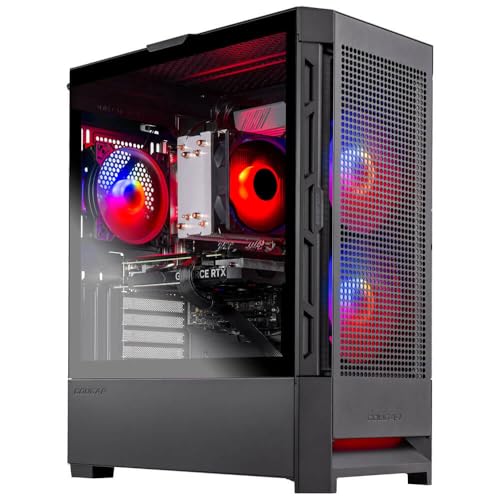
This Nebula configuration is the straightforward starting point in the group for someone moving from a console or an old laptop to a proper tower. The listing pairs an Intel Core i5 13400F with an NVIDIA RTX 4060, a combination aimed at 1080p play with room for lighter 1440p use. Its 1TB NVMe SSD is a sensible size for a first library, and the 600W Gold power supply named in the title gives the specification a clear, readable foundation instead of vague promises.
Specs
- Processor: Intel Core i5 13400F 2.5 GHz
- Graphics: NVIDIA RTX 4060
- Storage: 1TB NVMe SSD
- Memory: 16GB DDR4 RAM 3200
- Power supply: 600W Gold PSU
- Wireless: 11AC Wi-Fi
- Operating system: Windows 11 Home 64-bit
- Colour: Black
Best for: First-time tower buyers targeting 1080p, plus lighter 1440p play.
Watch out for: The memory is DDR4, so confirm you are comfortable with that platform before choosing it over a DDR5 tower.
ASIN: B0C9PNZJCF
MSI Codex R2 Gaming Desktop A14NUD5-213US
The Codex R2 suits a buyer who wants the box to arrive with the practical extras already sorted. Its Amazon title lists a keyboard and mouse in the package, describes the design as DIY friendly, and pairs an Intel Core i5-14400F with a GeForce RTX 4060 Ti. Memory moves to DDR5 here, which will appeal to anyone planning to keep and upgrade the machine. The 1TB M.2 NVMe SSD and 80+ Gold power supply complete a specification that reads as balanced rather than skewed toward one headline part.
Specs
- Processor: Intel Core i5-14400F
- Graphics: GeForce RTX 4060 Ti
- Memory: 16GB DDR5
- Storage: 1TB M.2 NVMe SSD
- Power supply: 80+ Gold PSU
- Connectivity: WiFi
- Included: Keyboard and mouse
- Design: DIY friendly
- Operating system: Windows 11 Home
- Model: A14NUD5-213US
Best for: Buyers who want peripherals included and a DDR5 tower they can open up later.
Watch out for: Confirm the included keyboard and mouse match how you play, since serious competitive players may still replace them.
ASIN: B0CTLSP2XB
CyberPowerPC Gamer Xtreme VR GXiVR8040A14
This Gamer Xtreme VR configuration steps up in two specific places: the processor and the graphics memory. The listing names an Intel Core i7-13700F and a GeForce RTX 4060 Ti with 16GB of graphics card memory, which distinguishes it from 4060 Ti builds carrying less. That makes it interesting for players who keep texture settings high, use a 1440p monitor, or run streaming and chat software beside the game. The rest of the title stays conventional, with 16GB DDR5 memory and a 1TB NVMe SSD.
Specs
- Processor: Intel Core i7-13700F 2.1GHz
- Graphics: GeForce RTX 4060 Ti
- Graphics card memory: 16GB
- Memory: 16GB DDR5
- Storage: 1TB NVMe SSD
- Wireless: Wi-Fi ready, 802.11ac listed on the product page
- Operating system: Windows 11 Home
- Model: GXiVR8040A14
- Dimensions listed: 18.5 x 8.2 x 18.7 inches
- Weight listed: 34.2 pounds
Best for: 1440p players who want the 16GB version of this graphics class and a Core i7 processor.
Watch out for: Measure your desk or floor space against the listed dimensions, and plan for a second drive if your library grows past the 1TB SSD.
ASIN: B0CBL8N3FC
iBUYPOWER Y60 Y60BA9N47TS03

The Y60 is the clear step up in this guide, and its listing explains why without needing any embellishment. It combines an AMD Ryzen 9 7900X processor with an NVIDIA GeForce RTX 4070 Ti Super 16GB graphics card, doubles the system memory of the other picks to 32GB, and doubles storage to a 2TB NVMe drive. That specification suits a high-refresh 1440p or 4K monitor, heavy multitasking, and creators who render or edit on the same machine they game on. It is a showcase tower, bought for headroom rather than adequacy.
Specs
- Processor: AMD Ryzen 9 7900X
- Graphics: NVIDIA GeForce RTX 4070 Ti Super 16GB
- Memory: 32GB DDR5 RGB 5200MHz RAM
- Storage: 2TB NVMe SSD
- Connectivity: WiFi ready
- Operating system: Windows 11 Home
- Model: Y60BA9N47TS03
- Colour: Black
Best for: High-refresh 1440p and 4K players, streamers, and creators who want the most headroom here.
Watch out for: Make sure your monitor justifies this graphics tier, because pairing it with a basic 1080p screen leaves much of its capability unused.
ASIN: B0DDZ92PD5
Which One Fits Your Situation
You are replacing a console with your first tower
Choose the Skytech Nebula. Its RTX 4060 specification, 1TB NVMe SSD, and Core i5 13400F processor cover the move to PC gaming without pushing you into the highest tier on day one. You get a complete Windows 11 tower with Wi-Fi in the listing, and you can spend the difference on the monitor, headset, and games that a first setup also needs.
You want one delivery that lets you start playing
Choose the MSI Codex R2, because its listing explicitly includes a keyboard and mouse alongside the tower itself. The RTX 4060 Ti and DDR5 memory give it more headroom than the entry pick, and the DIY-friendly description in the title will matter later if you add storage. For a spare-room or family setup bought in one order, that completeness is the deciding detail.
You play at 1440p and keep other apps running
Choose the CyberPowerPC Gamer Xtreme VR in its GXiVR8040A14 configuration. The Core i7-13700F gives you a stronger processor than the two i5 picks, and the listing specifies 16GB of graphics memory on its RTX 4060 Ti. That combination fits a player who games, talks, records, and browses at the same time without wanting the flagship tower in this guide.
You edit video or stream on the same machine
Choose the iBUYPOWER Y60. The Ryzen 9 7900X, 32GB of DDR5 memory, and 2TB NVMe SSD all point the same way: this is the pick built for workloads beyond the game itself. Its RTX 4070 Ti Super also serves a demanding monitor properly. If one tower has to cover work, creation, and play for years, this specification asks the fewest compromises.
Common Mistakes
- Choosing by the case lighting or the word gaming in the name instead of the exact graphics card, processor, and drive named in the listing title.
- Buying a tower far stronger than the monitor connected to it, then discovering the screen, not the PC, is limiting the picture.
- Confusing system memory with graphics memory, which are separate figures in these listings and affect different parts of performance.
- Ignoring whether memory is DDR4 or DDR5, then ordering the wrong upgrade sticks later because the two generations do not interchange.
- Forgetting to measure the space for a full tower and to check what the box actually includes, such as whether a keyboard and mouse are listed.
Frequently Asked Questions
Is a prebuilt tower better than building my own for a first gaming PC?
For a first machine, a prebuilt tower removes parts compatibility, assembly, and initial troubleshooting from the purchase, and Windows is already installed on every pick here. Building can suit experienced buyers who enjoy the process. If your goal is simply to start playing on a complete, matched system, a prebuilt configuration is the lower-risk route.
How much storage does a gaming tower actually need?
Treat 1TB as a workable starting point, not a generous one. Several large games, their updates, and saved recordings can consume it faster than new buyers expect. If you keep many titles installed at once or capture a lot of video, the 2TB drive in the iBUYPOWER Y60, or a plan to add storage later, makes ownership easier.
Does DDR5 matter enough to choose one tower over another?
DDR5 matters mainly for platform longevity and for matching future memory upgrades, rather than transforming a game on its own. The MSI, CyberPowerPC, and iBUYPOWER picks here list DDR5, while the Skytech Nebula lists DDR4 3200. Either can game well with the right graphics card, but you cannot swap one generation into the other later.
Which of these towers should I buy for a 4K monitor?
The iBUYPOWER Y60 is the natural match, because its listing pairs an RTX 4070 Ti Super 16GB graphics card with a Ryzen 9 7900X and 32GB of memory. The other picks centre on 1080p and 1440p use. At 4K, graphics capability becomes the limiting factor quickly, so choosing the strongest card here avoids turning settings down immediately.
Related guides
More from Amazon
Programs that pair well with the guide above. Offers and eligibility are set by Amazon and may change.
A free business account with business pricing and bulk-buying tools for work, shop or home office.
Create a business accountFree shipping on eligible items, Prime Video and more. Eligible new members can start with a free trial.
Start a Prime free trialAudiobooks and podcasts to listen to on the go. Eligible new members can start with a free trial.
Try Audible freeAd-free music streaming. Eligible new subscribers can start with a free trial.
Try Music Unlimited freeAs an Amazon Associate we earn from qualifying purchases.


