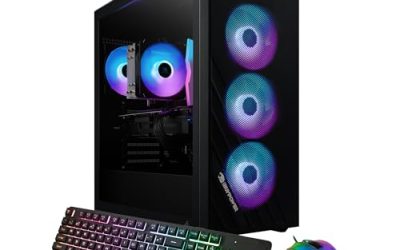
The best PC you can build in 2026 pairs a GeForce RTX 5090 with a Ryzen 7 9800X3D, 32–64GB of DDR5-6000, a PCIe 5.0 NVMe SSD and a quality ATX 3.1 power supply of at least 1000W. No single machine is “best” for everyone, though. Past the RTX 5080 tier, each extra step buys small gains in frame rate and a large jump in cost, heat and power draw. The right “best PC ever” depends on your monitor, your workload and how much noise you will tolerate.
As an Amazon Associate we earn from qualifying purchases at no extra cost to you.


Our Top Picks


Top 3 picks at a glance
Quick comparison: the no-compromise tiers
| Pick | Best for | Key specs (per manufacturer spec sheets) | Budget class |
|---|---|---|---|
| Flagship: RTX 5090 + Ryzen 7 9800X3D | 4K at 144–240Hz, maximum settings, ray tracing | 32GB GDDR7, 512-bit bus, 575W board power; 8 cores with 3D V-Cache | Ultra-premium |
| Flagship hybrid: RTX 5090 + Ryzen 9 9950X3D | Gaming plus rendering, compiling, video work | 16 cores, 170W TDP; 64GB RAM recommended | Ultra-premium |
| Sweet spot: RTX 5080 + Ryzen 7 9800X3D | 4K at 60–120Hz, 1440p at very high refresh | 16GB GDDR7, 256-bit bus, 360W board power | Premium |
| Value high end: RTX 5070 Ti or Radeon RX 9070 XT + 9800X3D | Strong 4K with upscaling, excellent 1440p | 16GB VRAM, 256-bit bus, roughly 300W board power | Upper mid-range to premium |
| Quiet and compact: RTX 5080 or 5070 Ti in a small-form-factor case | Living-room or desk-corner builds | Needs a 2–2.5 slot card, SFX-L PSU, 280–360mm AIO or a large air cooler | Premium |
Best overall: RTX 5090 + Ryzen 7 9800X3D
This is the closest thing to a no-compromise gaming PC. The RTX 5090 has 32GB of GDDR7 on a 512-bit bus, and the 9800X3D is widely regarded in published reviews as the fastest gaming CPU of its generation. Together they run 4K at high refresh rates with ray tracing, and they leave headroom for heavy texture mods and VR.
Who it suits: owners of a 4K 240Hz or 5K ultrawide display who want to stop upgrading for years.
Main trade-off: cost, heat and power. The card alone is rated at 575W, so the case needs strong airflow and the PSU must be sized correctly (see the calculation below). On a 1440p 144Hz screen, much of this power goes unused.
Best for gaming plus heavy work: RTX 5090 + Ryzen 9 9950X3D
If the PC also compiles code, renders 3D scenes or edits 4K video, 16 cores make a real difference. The 9950X3D keeps 3D V-Cache for games and adds the extra cores for production work. Pair it with 64GB of DDR5 so large projects do not spill to disk.
Main trade-off: for pure gaming it performs close to the 9800X3D, which costs noticeably less. Buy it only if the extra cores earn their keep.
Best sweet spot: RTX 5080 + Ryzen 7 9800X3D
With 16GB of GDDR7 and a 360W rating, the RTX 5080 delivers high-end 4K gaming with DLSS upscaling at a more sensible power and cost level. An 850W PSU is NVIDIA’s recommended minimum for this card, and a 1000W unit leaves comfortable headroom.
Main trade-off: 16GB of VRAM is enough today but has less margin than 32GB for 4K with path tracing and high-resolution texture packs. It is the choice for people who want a top-tier PC without chasing the last 20–30%.
Best value high end: RTX 5070 Ti or RX 9070 XT
Both cards carry 16GB on a 256-bit bus and draw around 300W. They are strong at 1440p and capable at 4K with upscaling. The Radeon often wins on price-to-performance in raster games, while GeForce cards lead in ray tracing, DLSS support and most creative applications.
Main trade-off: expect to lower a few settings in the heaviest 4K titles. Both cards are well suited to a 750W PSU.
Worked example: sizing the power supply for the flagship build
Do not size a PSU from the GPU’s headline number alone. For an RTX 5090 + Ryzen 7 9800X3D system:
- GPU board power: 575W
- CPU under gaming load: about 100–150W (the 9800X3D has a 120W TDP, and package power can briefly exceed that)
- Motherboard, 64GB RAM, two NVMe SSDs, fans, pump and RGB: about 80–100W
- Sustained total: roughly 755–825W
- Add 20–25% for transient spikes: about 900–1030W
That is why NVIDIA recommends 1000W for the RTX 5090, and why a quality 1000–1200W ATX 3.1 unit is the practical choice. Buy a model with a native 12V-2×6 cable rather than an adapter, and push the connector in until it seats fully. For the 9950X3D (170W TDP), move to the upper end of that range.
Worked example: does your monitor cable support the refresh rate?
A 4K 240Hz 10-bit signal needs about 3840 × 2160 × 240 × 30 bits ≈ 59.7 Gbps before blanking overhead. That is too much for HDMI 2.1 (48Gbps link, roughly 42Gbps usable) without Display Stream Compression. DisplayPort 2.1 UHBR20 (80Gbps link) carries it uncompressed. The RTX 50 series supports DisplayPort 2.1b, according to NVIDIA. If you buy a 4K 240Hz monitor, check that it lists UHBR13.5 or UHBR20. Otherwise the connection will lean on DSC, which is visually near-lossless but can limit some features, such as certain multi-monitor setups.
Decision matrix: match your situation to a build
| Your situation | Choose | Why |
|---|---|---|
| 4K 240Hz or 5K2K ultrawide, money not the limit | RTX 5090 + 9800X3D, 1000–1200W PSU | Only tier with 32GB VRAM and enough raster headroom |
| 4K 120Hz TV or monitor, using DLSS | RTX 5080 + 9800X3D, 850–1000W PSU | Meets the target at far lower power and cost |
| 1440p 165–240Hz competitive play | RTX 5070 Ti or RX 9070 XT + 9800X3D | The CPU matters more than the GPU at these frame rates |
| Streaming, video editing and gaming on one box | 9950X3D, 64GB RAM, RTX 5080 or 5090 | Cores and memory capacity pay off in production |
| Small apartment, noise-sensitive | RTX 5080 or 5070 Ti, large air cooler or 360mm AIO | Lower heat output is easier to keep quiet |
| VR with high-resolution headsets | RTX 5090 + 9800X3D | VR renders two high-resolution views at 90Hz or more |
The supporting parts that decide whether it is truly “best”
Memory
For gaming, 32GB of DDR5-6000 CL30 in a 2x16GB kit is the sweet spot on AMD’s AM5 platform. Go to 64GB for production work or heavily modded games. Using two modules rather than four keeps the memory controller happier at EXPO speeds.
Storage
A 2TB PCIe 4.0 or 5.0 NVMe SSD is the baseline for a top-end build, and 4TB is better if you keep many large games installed. PCIe 5.0 drives read faster in benchmarks, but game load times differ little from good PCIe 4.0 drives, so spend the difference on capacity and a drive with DRAM and a solid endurance rating. Note that PCIe 5.0 drives run hot and need a motherboard heatsink.
Cooling and case
Choose a case with a mesh front and at least three intake fans. A 360mm AIO or a dual-tower air cooler comfortably handles the 9800X3D. For the RTX 5090, confirm the card’s length and thickness against the case’s GPU clearance in the manufacturer’s specs, since many models occupy 3 or more slots.
Motherboard
An X870E or X870 board is plenty. Look for solid VRMs, a PCIe 5.0 x16 slot, USB4 or fast USB ports, and BIOS Flash Back so you can update easily.
How to choose: a short checklist
- Start with the screen. Pick the GPU that suits your resolution and refresh rate, not the other way around.
- Buy the CPU for games first. The 9800X3D is the default for gaming; step up to the 9950X3D only for production.
- Size the PSU from the real load. Use the sustained total plus 20–25% headroom, and require ATX 3.1 with a native 12V-2×6 cable.
- Check clearances. Measure GPU length, thickness and cooler height against the case.
- Plan for noise. A 575W GPU needs airflow, so budget for good fans and a roomy case.
Performance varies by game, settings, resolution, CPU and patch. Published reviews generally show the RTX 5090 running demanding 4K titles at high settings well above 60 fps, often 100+ fps with upscaling or frame generation. Treat those ranges as approximate and check recent reviews for the games you play.
Frequently Asked Questions
What is the best PC you can buy in 2026?
For gaming, it is a PC with an RTX 5090 and a Ryzen 7 9800X3D, backed by 32–64GB of DDR5-6000, a fast NVMe SSD and a 1000W or larger ATX 3.1 PSU. If you also do heavy production work, swap in the Ryzen 9 9950X3D and 64GB of RAM.
Is the RTX 5090 worth it over the RTX 5080?
It is worth it if you play at 4K with high refresh rates, run VR, or use heavy ray or path tracing. For 4K at 60–120Hz with DLSS, or for 1440p, the RTX 5080 delivers most of the experience at lower cost, power draw and heat. The 5090’s 32GB of VRAM also helps in creative and AI workloads.
Do I need a prebuilt or should I build it myself?
Building lets you choose a quality PSU, motherboard and cooling, which prebuilts sometimes skimp on. A prebuilt from a reputable system integrator can still make sense if you want a single warranty and no assembly. Check the exact PSU, RAM speed and cooler listed before buying.
How much RAM does the best gaming PC need?
32GB is enough for nearly all games in 2026. Choose 64GB if you stream, edit video, run virtual machines or use heavily modded games. Faster DDR5-6000 CL30 kits generally matter more for gaming than extra capacity beyond what you use.
Will a top-end PC stay “the best” for long?
Flagship hardware stays strong for several years, but new generations will eventually overtake it. The AM5 platform is designed for future CPU upgrades, and a quality PSU and case can be reused across builds. Buying the right platform now matters more than chasing the single fastest part.
Related guides
More from Amazon
Programs that pair well with the guide above. Offers and eligibility are set by Amazon and may change.
A free business account with business pricing and bulk-buying tools for work, shop or home office.
Create a business accountFree shipping on eligible items, Prime Video and more. Eligible new members can start with a free trial.
Start a Prime free trialAudiobooks and podcasts to listen to on the go. Eligible new members can start with a free trial.
Try Audible freeAd-free music streaming. Eligible new subscribers can start with a free trial.
Try Music Unlimited freeAs an Amazon Associate we earn from qualifying purchases.