
Our Top Picks
 JAGTRADE Fan Memory Active Heatsink Cooling Solution for120x62x28mm4.72 x 2.44 x 1.1 inches0.6 poundsCheck on Amazon
The Short Answer
No—not automatically. You need low-profile DDR5 RAM for an air cooler only when the cooler’s front fan overlaps the memory slots and cannot be raised without interfering with your case, side panel, or cooling performance. If your air cooler clears your chosen memory kit, standard-height DDR5 is perfectly fine.
The important detail is that “low profile” is not a universal height standard. Basic DDR5 modules may measure roughly 31–36 mm from the motherboard, while gaming kits with tall heat spreaders or RGB lighting can reach approximately 40–45 mm or more. A large tower cooler can easily cover the first RAM slot, making those extra millimeters matter.
As an Amazon Associate we earn from qualifying purchases at no extra cost to you.

Before buying memory, check the CPU cooler manufacturer’s RAM-clearance specification, the cooler’s installation manual, and your motherboard layout. In many builds, the second, third, and fourth DIMM slots are usable even when the first slot is partially covered. The question is not whether DDR5 is compatible with air cooling; it is whether your specific cooler, RAM, motherboard, and case fit together.
What You Actually Get
Low-profile DDR5 RAM is memory with a shorter top edge, usually achieved by using a compact heat spreader or leaving off tall RGB hardware. It does not automatically run cooler, faster, or more reliably than a taller kit with the same specifications. A low-profile 32GB DDR5-6000 kit and a tall 32GB DDR5-6000 kit can deliver essentially the same memory capacity and rated performance.
The primary benefit is physical clearance. Large dual-tower air coolers often have a front fan positioned directly above the DIMM slots. If that fan is mounted at its lowest position, tall RAM may collide with it. You can sometimes slide the fan upward to clear the modules, but that increases the cooler’s total height. A fan moved upward by 10–15 mm can turn a cooler that fits comfortably into a case into one that presses against, or fails to clear, the side panel.
RAM height also matters during installation. Even if the modules technically fit beneath the fan, very tight spacing can make it difficult to release DIMM latches, connect motherboard cables, or remove memory later. Compact modules give you more working room and reduce the chance of scraping the heat spreader against the cooler fan clips.
Look beyond the advertised kit name. “Low profile” may refer to the memory’s heat spreader, but the actual height can vary by capacity, speed, lighting, or revision. Confirm the measurement in the manufacturer’s specifications. Also note that a memory kit’s height is measured from the motherboard, while a cooler’s clearance figure may refer to the space available beneath its fan. Those numbers need to be compared directly.
For most current desktop systems, 32GB is a practical starting point, while 64GB is useful for heavy multitasking, content creation, virtual machines, and demanding games with background applications. Capacity and stable specifications should come before RGB styling. If two kits have the same capacity, timings, voltage, and speed, the shorter one is often the easier choice for a crowded build.
Pros
- Better cooler compatibility: Short modules are less likely to interfere with a front fan on a single-tower or dual-tower air cooler.
- More case flexibility: You can keep the cooler fan in its intended position instead of raising it and risking a case-height problem.
- Easier installation: Lower modules leave more room for fan clips, DIMM latches, and motherboard connections.
- Cleaner appearance: A low-profile kit can create a less crowded look beneath a large heatsink, especially in a non-RGB build.
- No meaningful performance penalty by itself: A shorter heat spreader does not make DDR5 inherently slower. Performance depends on capacity, speed, timings, memory controller support, and the selected profile.
- Good choice for compact systems: Small cases and motherboards with crowded socket areas benefit from minimizing component height.
Cons
- Fewer styling options: Many of the most visually elaborate RGB kits use tall light bars and heat spreaders.
- Potentially narrower selection: The exact speed, timings, capacity, and color you want may be easier to find in a standard-height kit.
- No automatic temperature advantage: Low-profile memory is not a substitute for adequate case airflow. DDR5 modules generally do not need an added fan in a normal desktop gaming or productivity system.
- Labels can be vague: “Low profile” is used inconsistently. A product described as compact may still be too tall for a particular cooler.
- Moving the cooler fan may be enough: If your case has generous CPU-cooler clearance, paying extra or limiting your memory choices may provide no practical benefit.
- Active RAM cooling can add clutter: Separate memory fans and heatsinks occupy space, add cables, and may create more installation problems than they solve.
Who Should Buy It
Buy low-profile DDR5 if you are pairing memory with a large air cooler whose front fan sits over the DIMM slots. It is especially sensible when the case has only a few millimeters of spare CPU-cooler height, or when the cooler manufacturer lists limited RAM clearance.
It is also a smart choice for compact workstations, quiet PCs, and builds where you want to install the cooler once and avoid adjusting its fan position. Choose it if you have already selected a motherboard and cooler but have not yet purchased RAM; memory height is inexpensive insurance at that stage.
Low-profile memory is worth prioritizing for a system with four DIMM slots that may eventually be fully populated. The first slot can be the most obstructed, and adding another kit later may be harder if your initial modules are unusually tall.
Who Should Skip It
Skip the low-profile requirement if your cooler has ample clearance beneath its fan, your case supports the cooler’s maximum height, and your preferred standard-height kit fits according to the manufacturer’s measurements. A taller kit is not a problem merely because it has large heatsinks.
You can also skip it when using a compact single-tower cooler with an offset design, a top-down cooler, or a cooler that does not extend over the memory slots. In these cases, module height may have little or no effect on compatibility.
Do not buy a separate RAM cooler simply because the memory looks warm or has a large heat spreader. A normal DDR5 desktop kit usually benefits more from sensible case airflow than from a tiny fan mounted directly over the DIMMs.
Cheaper Alternatives
| Option | Cost | Trade-off |
|---|---|---|
| Choose standard-height DDR5 after checking cooler clearance | $80–$220 for common 32GB–64GB kits | More memory choices, but you must verify the exact module height and fan position. |
| Raise the air-cooler front fan slightly | $0 | Works only if the case has roughly 5–15 mm of spare cooler-height room; it can make side-panel clearance tight. |
| Use the motherboard’s second and fourth DIMM slots | $0 | Often clears the cooler, but follow the motherboard manual and do not assume every slot arrangement is equivalent. |
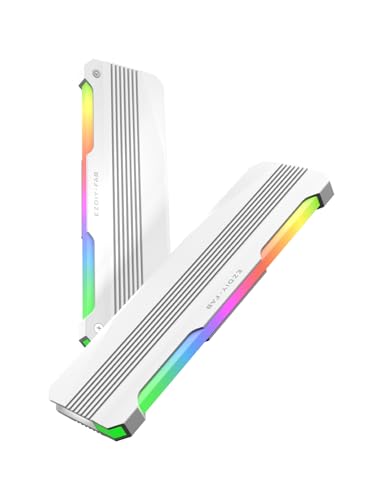
| EZDIY-FAB RH01 ARGB RAM Heatsink, 2-pack | Check on Amazon | Adds appearance and a heatsink shell, but it does not solve a physical height conflict and may make modules taller. |
| JAGTRADE active memory cooling solution | Check on Amazon | The listed 120 x 62 x 28 mm assembly adds fans and bulk; it is a specialized cooling accessory, not a clearance solution. |
The least expensive solution is usually planning: select memory that fits beneath the cooler before ordering anything. Add-on heatsinks cannot make an obstructed RAM kit shorter. In fact, products such as decorative or active RAM coolers may increase the height above the motherboard and make a close-fitting air cooler incompatible.
FAQ
How tall is low-profile DDR5 RAM?
There is no single required height. Many compact DDR5 modules are around 31–36 mm tall, while RGB or heavily armored kits may be approximately 40–45 mm or taller. Always use the manufacturer’s listed measurement rather than relying on the “low profile” label.
Can tall RAM damage an air cooler?
Usually, the issue is fit rather than damage. A fan clip may press against the memory, prevent the fan from sitting correctly, or force the fan upward. Do not bend clips or apply pressure to the DIMM. If the fan touches the module, reposition it or choose shorter memory.
Does low-profile DDR5 run cooler?
Not necessarily. The shorter design mainly improves physical compatibility. Memory temperature depends on the memory chips, voltage, workload, case airflow, and ambient temperature. For a typical desktop, a well-ventilated case matters more than adding a dedicated RAM fan.
Should I buy low-profile RAM for a new PC in 2026?
Buy it when your cooler clearance is uncertain, your case is compact, or you want maximum installation flexibility. Otherwise, compare complete specifications and price. Standard-height DDR5 is fine when it fits, and it may offer more choices in capacity, speed, timings, and appearance.









