A quiet CPU cooler is usually a large air tower with big, slow fans and a heat rating well above what your processor draws. All nine coolers here are air towers, none are liquid AIOs, and the most useful number in each title is the TDP rating, because a cooler working at half its rating rarely needs to spin fast. We sort them by that headroom, then by fan size and extras such as semi-passive modes. Everything below comes from listing titles and general cooling principles. Nobody on the team has installed these coolers, so clearance and noise questions are flagged for you to confirm on the listing and in your case and motherboard manuals.
Our Top Picks
Top 3 picks at a glance
Quick comparison of the nine towers
As an Amazon Associate we earn from qualifying purchases at no extra cost to you.



| Model | Key point from title | Price tier | Best for |
|---|---|---|---|
| be quiet! Pure Rock Pro 3 Black | Double tower, 250W TDP, two 120mm PWM fans, six 6mm heatpipes | Mid-range | Quiet cooling for mainstream CPUs |
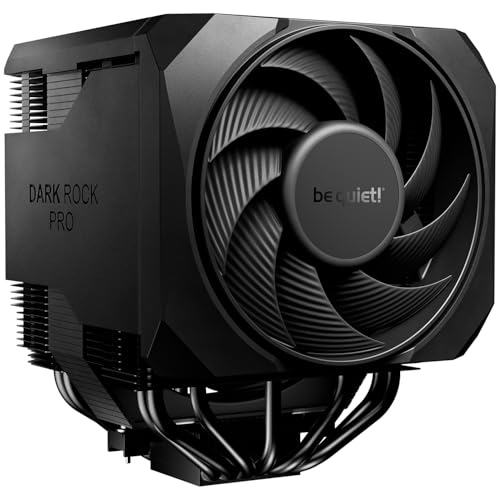
| be quiet! Dark Rock Pro 6 | 7 heatpipes, 300W TDP, two PWM fans, semi-passive mode | Premium | Highest heat headroom and a switchable profile |
| be quiet! Dark Rock 5 | 6 heatpipes, one Silent Wings 4 120mm FDB PWM fan | Mid-range | Single-tower quiet cooling |
| be quiet! Pure Rock Pro 3 Silver | Same cooler as the Black version, silver finish | Mid-range | Silver or light-coloured builds |
| ID-COOLING FROZN A620 PRO SE | Dual tower, 157mm, 260W, six heatpipes, dual 120mm fans at 27.2dB(A) max | Budget | Heat headroom without a big spend |
| Cooler Master Hyper 212 Black | 4 heatpipes, PWM fan, 152mm, AM5/AM4 and LGA1851/1700 | Budget | Simple upgrade over a stock cooler |
| be quiet! Pure Rock 3 LX Black | 190W TDP, one 120mm PWM ARGB fan, four heatpipes | Budget | Compact quiet cooler with light accents |
| be quiet! Dark Rock Elite | Two Silent Wings 135mm FDB PWM fans, 2-mode switch, front fan rail | Premium | Quiet high-end air cooling |
| Thermalright Assassin X 120R Digital ARGB Black | 4 heatpipes, 12cm PWM fan up to 2000RPM, digital top screen | Budget | Entry price with a display on top |
Cooler-by-cooler breakdown
be quiet! Pure Rock Pro 3 Black
The title lists a double-tower body, a 250W TDP rating, two silent 120mm PWM fans and six 6mm heatpipes, plus high RAM and VRM compatibility. A 250W rating is generous headroom for most gaming CPUs, so the fans should rarely need to hurry. Check the listing for height and your case clearance.
Pros
- 250W rating leaves headroom for slow fans
- Two fans spread airflow across the fin stacks
Cons
- Double tower is bulky, so confirm case and RAM fit
- Listed as a compact double tower, but check the actual height
Who it’s for: Builders who want a balanced quiet cooler for a mid-to-high-end processor.
be quiet! Dark Rock Pro 6
The highest TDP rating in the set at 300W, with seven heatpipes, two Silent Wings 135mm fans and a semi-passive mode, which stops the fans at low load. A two-mode speed switch lets you choose a quieter or stronger profile. It is a big cooler, so verify case width and RAM clearance before ordering.
Pros
- 300W rating and semi-passive mode suit a near-silent idle
- Speed switch gives a quick quiet-versus-power choice
Cons
- Large and heavy, so case fit is the first check
- Premium tier for a CPU that may not need this much headroom
Who it’s for: Owners of hot, high-wattage CPUs who want the quietest fan speed possible.
be quiet! Dark Rock 5
A single-tower design with six heatpipes and one Silent Wings 4 120mm fluid-dynamic-bearing PWM fan. The title promises high RAM and VRM cooler compatibility, which suits builds with tall memory. The title does not give a TDP rating, so check the listing.
Pros
- Single tower leaves room around memory slots
- FDB fan named in the title for steady low-speed running
Cons
- One fan only, so less spread than dual-fan towers
- No TDP figure in the title
Who it’s for: People who want a slimmer quiet tower with a single FDB-bearing fan.
be quiet! Pure Rock Pro 3 Silver
This listing mirrors the black Pure Rock Pro 3: a double tower, 250W TDP, two silent 120mm PWM fans and six 6mm heatpipes. Only the colour is different per the title. If your build is not light-themed, the black one is functionally the same choice.
Pros
- Same cooling spec as the Black version
- Finish fits light themes
Cons
- Near-duplicate of the black listing
- Check listing prices for any colour difference
Who it’s for: Builders with silver or white-leaning parts who want the same cooler.
ID-COOLING FROZN A620 PRO SE
A dual-tower cooler listed at 157mm tall with a 260W rating, six heatpipes and dual 120mm fans. The 27.2dB(A) maximum is a seller claim, not something we checked. Support for Intel LGA1851, 1700, 1200 and 115X and AMD AM5 and AM4 is listed, which is broad.
Pros
- 260W rating at a budget-leaning tier
- Wide socket support is listed in the title
Cons
- The noise figure is a seller claim
- 157mm height needs case clearance confirmed
Who it’s for: Shoppers who want dual-tower headroom and broad socket support for less.
Cooler Master Hyper 212 Black
A compact single tower, 152mm tall per the title, with four heatpipes and a 120mm PWM fan. It is the smallest cooler in the set, which makes it easier to fit, but it has the least heat headroom of the towers here. The title says quiet cooling and gives no TDP figure.
Pros
- Compact size eases case and RAM fit
- Title lists AM5, AM4, LGA1851 and LGA1700
Cons
- Fewer heatpipes than the premium towers
- No TDP rating in the title, so a hot CPU may push the fan harder
Who it’s for: Budget builders with a modest CPU who want less noise than the stock cooler.
be quiet! Pure Rock 3 LX Black
A single-tower with a 190W rating, four 6mm heatpipes, HDT technology and one silent 120mm PWM ARGB fan. The lower TDP still covers many mainstream CPUs. The ARGB fan adds lighting, which is optional but not strictly a noise feature.
Pros
- 190W rating is enough for many mid-range CPUs
- Easy installation is claimed in the title
Cons
- Lowest heatpipe count tied with two others
- Single fan limits the peak you can sustain quietly
Who it’s for: Mainstream gaming builds that want to stay quiet and a bit lit up.
be quiet! Dark Rock Elite
The title lists two 135mm FDB PWM fans, a two-mode speed switch and a front fan rail system, plus high RAM and VRM compatibility. It carries no TDP number in the title, so the headroom has to be confirmed on the listing. The 135mm fans are the quiet-leaning part of the story.
Pros
- Two large fans can move air at low speed
- Two-mode switch and fan rail add flexibility
Cons
- Title omits TDP, heatpipe count and height
- Large size means checking case clearance carefully
Who it’s for: Overclockers or heavy workload users who still want a low-noise setup.
Thermalright Assassin X 120R Digital ARGB Black
A four-heatpipe tower with a 12cm PWM fan at up to 2000RPM and a digital screen on the top cover. The screen is a feature, not a cooling advantage. A 2000RPM ceiling is higher than the quiet-focused fans above, so a gentle curve matters here.
Pros
- Budget-leaning with socket support for AM4, AM5 and several Intel boards
- Digital top cover gives readouts if you want them
Cons
- A 2000RPM ceiling is louder than larger slow fans
- Digital screen adds no cooling and may need setup
Who it’s for: Budget builders who like the look and will keep the fan curve gentle.
Basis for the shortlist
The list comes from titles, published specifications, manufacturer documentation and buyer reviews, with the editorial team as author. Nobody on the team used or measured these units, so no decibel or temperature results appear here. We ranked each cooler by visible headroom (TDP rating, heatpipe count), fan size, extras like semi-passive mode, and sockets named in the title. Two be quiet! listings are the same cooler in different colours, and two titles omit a TDP figure; we point those out so you can verify before buying.
What makes a cooler quiet in practice
Headroom first, then fans
Noise grows with fan speed, and fan speed grows with how hard the cooler works. A cooler rated far above your CPU’s power draw can sit on a lower fan speed for the same temperature. Larger fans, such as 135mm, move more air per rotation, so they can turn slower still.
Headroom calculator
Use this rule of thumb with stated assumptions. Find your CPU’s peak power draw from its spec sheet (say 125W base, 170W boost), then multiply by 1.3 for a quiet margin: 170 times 1.3 is about 221W. A 250W-rated cooler clears that; a 190W one does not. If you overclock, size on the overclocked draw. TDP ratings from coolers are manufacturer claims, so treat the result as a guide only.
Tower design and fan count
Dual-tower coolers with two fans spread airflow across more fin area. Single towers are lighter and leave space for memory. Heatpipe count helps move heat to the fins, but the fin area and fan quality matter as much.
Clearance checklist
Before you order, check cooler height against your case’s listed limit, memory height under the front fan, the top-slot spacing on your motherboard, and the cooler’s weight on your board. Check the socket list in the listing against your CPU. Our guide on how to install a CPU cooler walks through mounting steps and thermal paste, and the Ryzen 9 7900X3D cooler guide covers heavier processors.
Fan curves and semi-passive modes
A semi-passive mode keeps fans stopped at low temperature and starts them above a threshold. In a warm room it may start more often. Set a flat, low curve for desktop work and let it climb only under games.
Mistakes that cost you silence
Buying the biggest TDP number without checking fit. A 300W cooler that blocks your RAM or hits a side panel is no use. Measure first.
Expecting an AIO to be quieter by default. Pumps and radiator fans make noise too. A large air tower can be just as quiet at the same load.
Ignoring the socket list. The titles list supported sockets; if yours is missing, check the listing and the mounting kit.
Leaving the fan curve on default. A default curve often ramps early. Spend a few minutes in BIOS to flatten it.
Skipping case airflow. The best cooler cannot make up for a sealed case with no intake. Keep some fresh air moving through.
Our pick by situation
If you want the safest quiet pick for a mainstream gaming CPU, the be quiet! Pure Rock Pro 3 offers 250W of rated headroom with two silent fans. Choose the Dark Rock Pro 6 for hot, high-wattage chips, accepting its size. The ID-COOLING FROZN A620 PRO SE is the value path to dual-tower headroom. For small budgets and light CPUs, the Hyper 212 Black or Pure Rock 3 LX Black is enough. Treat the Thermalright model as a budget buy where you set the fan curve yourself.
Questions about quiet CPU cooling
Is an air cooler quieter than a liquid cooler?
It can be. A large tower with slow fans has no pump, so it removes one noise source. Liquid coolers add pump and radiator fan noise, though a big radiator can run slowly too. Compare your CPU’s power draw with the rating on each model, and check the listing for fan details.
Does a higher TDP rating mean a quieter cooler?
Not by itself, but it gives headroom. A cooler rated above your CPU’s power draw can keep fans slower for the same temperature. The rating is the maker’s claim, so use it as a guide and confirm the listing before you rely on it for a hot processor.
Are 135mm fans better than 120mm fans for noise?
Larger fans move more air per turn, so they can run at lower RPM for similar airflow. That often helps noise. The gain depends on the blade and bearing design, so it is a tendency, not a guarantee. Check cooler height and width in the listing before buying.
Will these coolers fit any case?
No. Tower height and width vary, and some titles give no height at all. The ID-COOLING lists 157mm and the Hyper 212 lists 152mm; for the others, check the listing and your case’s cooler height limit. Also check memory clearance under the front fan, because tall modules can collide with the fin stack.
What does semi-passive mode do?
It stops the fans when the CPU is cool and starts them when the temperature passes a threshold. The Dark Rock Pro 6 title lists it. It can make desktop use near-silent, but the fans will spin up under load, so set a sensible curve for gaming.
Related guides
- Replacement Cables For Gaming Mice And Headsets
- Indoor Security Cameras Without Subscription
- Nvidia Control Panel Best Settings For Gaming
Related guides
- Best Quiet PC Fans: Nine 120mm Options Sorted by Noise Goal: 9 Compared (2026)
- Best RGB PC Fans: 12 ARGB 120mm Fan Packs Compared by Connection and Speed: 10 Compared (2026)
- Best Mid Tower PC Case: 12 ATX Options Compared by Airflow and Clearance: 10 Compared (2026)
- Best Upgradeable Prebuilt Gaming PC: Standard Parts That Last: 6 Compared (2026)