
A fast NVMe SSD can turn a compact desk setup into a small heat-management problem. In a tower PC, the M.2 slot may sit beneath a graphics card with limited airflow; in a PS5, the expansion bay has its own tight fit considerations. A passive heatsink gives the drive more surface area to shed heat without adding another fan, cable, or source of noise.
This roundup focuses on passive options for M.2 2280 NVMe drives, from simple aluminum covers to more substantial copper-fin and heat-pipe designs, plus two SSDs that arrive with heatsinks installed. For 2026 buyers, the best choice depends less on flashy styling than on clearance, single- versus double-sided coverage, and whether you need a cooler alone or a complete storage upgrade.
As an Amazon Associate we earn from qualifying purchases at no extra cost to you.


Our Top Picks
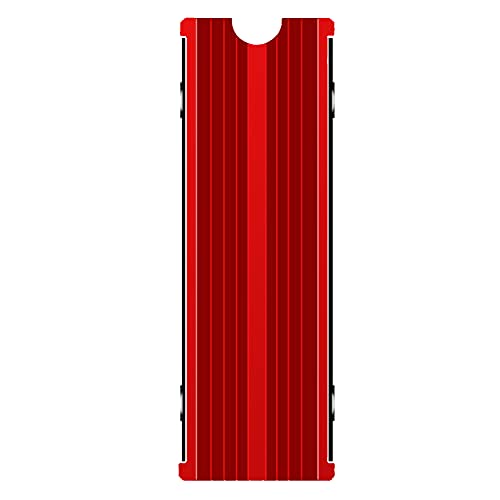 M.2 Heatsink Cooler 2280 SSD Double-Sided Heat Sink3"L x 0.95"W x 0.4"H3 x 0.95 x 0.4 inches0.1 poundsCheck on Amazon

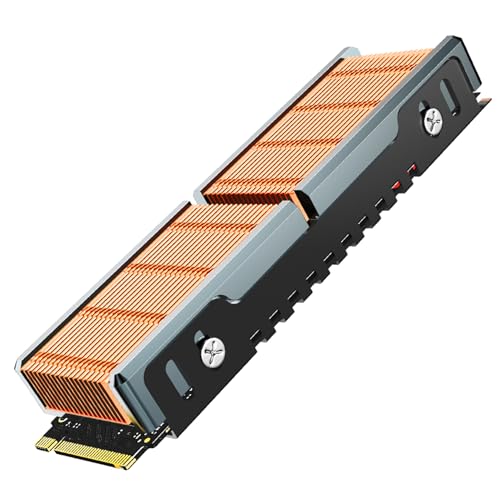


Top 3 picks at a glance
Quick Picks
| Product | Best for | Price |
|---|---|---|
| GLOTRENDS 2-Pack M.2 NVMe SSD Heatsink 22x70x3mm, Aluminum Heatsink | Budget-minded builders cooling two drives | Check on Amazon |
| M.2 Heatsink Cooler 2280 SSD Double-Sided Heat Sink with Thermal Silicone pad for PS5/PCPCIE NVME M2 SSD (red) | Low-cost double-sided coverage with a bold look | Check on Amazon |
| JEYI M.2 NVMe SSD Heatsink, Copper Fins Passive Cooler for M.2 2280 SSD | Builders prioritizing a copper-fin passive design | $16.9 |
| Thermalright HR09 2280 PRO SSD Heatsink Cooler | Desktop M.2 cooling with double-sided coverage | Check on Amazon |
| M.2 Heatsink Cooler 2280 SSD Double-Sided Heat Sink with Thermal Silicone pad for PS5/PC PCIE NVME M2 SSD(Black)) | Affordable, understated PS5 or PC builds | Check on Amazon |
| Thermalright HR10 2280 SSD Cooler | High-performance desktop cooling where clearance allows | Check on Amazon |
| Fikwot FN960 512GB M.2 NVMe SSD PCIe Gen4 x4 2280 Internal Solid State Drive with Heatsink | A complete 512GB PCIe Gen4 SSD-and-heatsink purchase | Check on Amazon |
| fanxiang 1TB NVMe Internal Gaming SSD for PS5 with Heatsink | PS5-focused 1TB storage with a preinstalled heatsink | Check on Amazon |
How We Compared
We ranked these choices by the information that matters before installation: M.2 2280 compatibility, passive cooling design, thermal-pad inclusion, double-sided coverage where specified, and likely use case. We also considered whether each listing is a standalone heatsink or a full SSD package, since those are fundamentally different purchases despite appearing in the same shopping results.
Price is part of the value equation, but it is not the only one. A around $5 cooler may suit a modest, accessible M.2 slot, while a more elaborate unit can make sense in a desktop with room around the drive. We did not assign unsupported temperature reductions, benchmark scores, or fit guarantees. Always inspect your motherboard’s M.2 area, any existing heatsink, and console clearance before ordering.
The 8 Best Picks
1. GLOTRENDS 2-Pack M.2 NVMe SSD Heatsink 22x70x3mm, Aluminum Heatsink
The GLOTRENDS two-pack is the practical pick for a desktop owner with more than one compatible M.2 drive or a builder who wants a spare cooler ready for a future upgrade. Each aluminum heatsink measures 22x70x3mm, a compact profile aimed at 2280-style installations. Its main appeal is straightforward value: two heatsinks for around $7 and a thin design that may be easier to accommodate than bulkier fin stacks. It is best for basic passive cooling rather than a showcase build.
- Pros: Includes two aluminum heatsinks for around $7.
- Pros: Slim 22x70x3mm dimensions suit space-conscious layouts.
- Con: The listing does not describe double-sided cooling coverage.
Skip it if you need a clearly specified double-sided cooler or are purchasing a complete SSD rather than an add-on heatsink.
2. M.2 Heatsink Cooler 2280 SSD Double-Sided Heat Sink with Thermal Silicone pad for PS5/PCPCIE NVME M2 SSD (red)
This red double-sided M.2 2280 cooler is for shoppers who want broad coverage and included thermal silicone pad material at the lowest listed price. At around $5, it is an inexpensive way to outfit a compatible PS5 or PC NVMe M.2 SSD without buying a separate thermal interface component. The red finish is a distinguishing feature for visible desktop builds, while the double-sided format is useful for drives whose component placement calls for coverage on both sides. Its budget positioning also means buyers should be especially careful about physical clearance.
- Pros: Double-sided heat-sink design for M.2 2280 SSDs.
- Pros: Thermal silicone pad is included at a around $5 price.
- Con: The red finish will not suit every build theme.
Skip it if you prefer a neutral appearance or if your motherboard already has an M.2 cover that occupies the available space.
3. JEYI M.2 NVMe SSD Heatsink, Copper Fins Passive Cooler for M.2 2280 SSD
The JEYI heatsink is aimed at the buyer who specifically wants a copper-fin passive cooler for an M.2 2280 SSD. Copper and finned construction make it the most material-focused standalone choice in this group, and it is a sensible fit for enthusiasts who value a more substantial passive-cooling approach over the cheapest possible cover. At $16.9, it costs more than the simple aluminum and double-sided budget models, so its value depends on whether its copper-fin design matches your build priorities and physical layout.
- Pros: Copper-fin construction is purpose-built for passive cooling.
- Pros: Specifically intended for M.2 2280 SSDs.
- Con: It is one of the pricier standalone heatsinks here at $16.9.
Skip it if your priority is the lowest-cost cooler or if you need confirmed compatibility with a tightly enclosed console bay.
4. Thermalright HR09 2280 PRO SSD Heatsink Cooler
Thermalright’s HR09 2280 PRO is a balanced desktop-oriented choice for users who want a named cooler with double-sided heat-sink coverage and a thermal silicone pad included. Designed for M.2 SSD and desktop computer cooling, it sits between basic budget covers and the more elaborate heat-pipe option below. The around $12 price feels appropriate for a buyer who wants more than a minimal plate but does not necessarily need a high-profile cooler. It is most compelling in a PC where the M.2 slot is accessible and the surrounding component layout has been checked first.
- Pros: Double-sided heat-sink cooling is specified.
- Pros: Includes a thermal silicone pad.
- Con: At around $12, it costs more than the two around $5 double-sided options.
Skip it if a very low-profile solution is essential or if you are looking for a storage drive with a heatsink already attached.
5. M.2 Heatsink Cooler 2280 SSD Double-Sided Heat Sink with Thermal Silicone pad for PS5/PC PCIE NVME M2 SSD (Black))
This black version offers the same core proposition as the red budget model: a double-sided heat sink for 2280 SSDs, thermal silicone pad material, and compatibility listed for PS5 and PC PCIe NVMe M.2 SSD use. It is the better visual fit for understated black desktop interiors and for buyers who do not want a colorful component showing through a case window. At around $5, it is one of the least expensive ways to get specified double-sided coverage. Its simple value proposition makes it an easy default for compatible builds.
- Pros: Double-sided cooling design is clearly stated.
- Pros: Black finish blends into many PC builds.
- Con: The listing does not provide dimensions for clearance planning.
Skip it if you need confirmed measurements before installation or prefer a copper-fin or heat-pipe construction.
6. Thermalright HR10 2280 SSD Cooler
The Thermalright HR10 2280 is the standout for desktop users seeking a more ambitious passive cooler design. It combines double-sided cooling with four copper heat pipes and includes thermal pads, making it the most feature-forward standalone cooler in this ranking on paper. Despite that design, its listed around $10 price is below the HR09 2280 PRO and JEYI options. That makes it appealing for a performance-focused desktop builder, provided there is enough room around the M.2 slot. Heat-pipe structures can demand more clearance than a flat SSD cover.
- Pros: Uses four copper heat pipes.
- Pros: Double-sided design and thermal pads are included.
- Con: Its more substantial cooling structure may not suit cramped installations.
Skip it for a console installation or any M.2 location directly constrained by a graphics card, motherboard shroud, or case panel.
7. Fikwot FN960 512GB M.2 NVMe SSD PCIe Gen4 x4 2280 Internal Solid State Drive with Heatsink
The Fikwot FN960 is not merely a heatsink; it is a complete 512GB M.2 2280 PCIe Gen4 x4 SSD with a heatsink. It is for buyers starting from scratch who need storage and cooling in one purchase, rather than those trying to cool an existing drive. The drive is listed at up to 4,800MB/s and includes Dynamic SLC Cache, while the built-in heatsink simplifies the component-matching step. It is also listed as compatible with PS5 internal SSD use. At around $85, however, it is a much larger purchase than a standalone cooler.
- Pros: Includes both a 512GB PCIe Gen4 x4 SSD and a heatsink.
- Pros: Listed for up to 4,800MB/s and PS5 internal SSD compatibility.
- Con: It is not the right value for someone who already owns an SSD.
Skip it if you only need passive cooling hardware, or if 512GB is not enough capacity for your game or project library.
8. fanxiang 1TB NVMe Internal Gaming SSD for PS5 with Heatsink
The fanxiang 1TB NVMe gaming SSD is the premium all-in-one pick for PS5 owners who want a larger storage upgrade with a heatsink already included. It is a PCIe Gen4 M.2 SSD listed at up to 7000MB/s and marketed for gamers, professionals, and creators. The 1TB capacity gives it a broader role than a heatsink alone: it can expand storage while avoiding the need to separately select and mount a cooler. Its around $190 price is the major consideration, especially for buyers whose existing drive only needs thermal help.
- Pros: Combines 1TB of storage with an included heatsink.
- Pros: Listed at up to 7000MB/s and compatible with PS5 storage expansion.
- Con: At around $190, it is the most expensive item in this roundup.
Skip it if you already have a capable M.2 drive or if a standalone passive heatsink will solve your immediate problem for far less.
Buying Guide
Confirm Your SSD Size and Slot Clearance
Most standalone products here target M.2 2280 drives, but physical compatibility is about more than drive length. Look for an existing motherboard M.2 shield, nearby graphics card, and any shroud that may conflict with the heatsink. The GLOTRENDS model’s 22x70x3mm measurement is useful as a reference for a slim design; other listings do not provide dimensions, so inspect their product details before purchase.
Choose Single-Sided or Double-Sided Cooling
Double-sided options can be attractive when you want coverage on both sides of an M.2 SSD. The red and black M.2 2280 coolers, Thermalright HR09 2280 PRO, and Thermalright HR10 2280 all specify double-sided designs. A single-sided or slimmer design may be easier to fit where clearance is limited. Do not stack an aftermarket cooler on top of a motherboard heatsink.
Decide Between an Add-On Cooler and a New SSD
If your NVMe drive is already installed and working well, a around $5 to $16.9 standalone heatsink is the logical category to shop. If you need capacity as well, the Fikwot provides 512GB for around $85, while the fanxiang offers 1TB for around $190. Complete SSD packages reduce installation decisions, but they should not be compared strictly as heatsink bargains.
Our Verdict
For the best overall passive heatsink design for a high-speed desktop NVMe SSD, choose the Thermalright HR10 2280 if your M.2 area has sufficient clearance: its four copper heat pipes, double-sided construction, and included thermal pads make it the most compelling feature set at around $10. For a simpler low-profile value pick, the around $7 GLOTRENDS two-pack is hard to overlook. PS5 and PC shoppers wanting an inexpensive double-sided option should choose the black around $5 model, while buyers who need a new drive should look to the pre-heatsinked Fikwot or fanxiang SSDs.
FAQ
Do high-speed NVMe SSDs need a passive heatsink?
Not every drive requires an aftermarket cooler, but a passive heatsink can be useful in cramped PC layouts or storage expansion bays. Check whether your motherboard already includes an M.2 heatsink before adding another one.
Will a desktop M.2 heatsink fit in a PS5?
Do not assume it will. Several products are listed for PS5 use, but fit depends on the expansion bay and the cooler’s complete installed profile. Verify console-specific clearance before ordering.
Are thermal pads included with these coolers?
The red and black double-sided M.2 coolers list thermal silicone pads. The Thermalright HR09 2280 PRO lists a thermal silicone pad, and the HR10 2280 lists thermal pads included.
Is a heatsink-included SSD better than adding one separately?
It is more convenient when you are purchasing new storage. The Fikwot FN960 and fanxiang SSD already include heatsinks. If you already own a compatible M.2 2280 SSD, a standalone heatsink is usually the more direct purchase.









