
Choosing between an active fan and a passive NVMe SSD heatsink is less about buying the most powerful cooler and more about matching the cooling method to your computer, room, and tolerance for noise. An active cooler uses a small fan to move air across the SSD. A passive heatsink relies on aluminum or copper fins to absorb and spread heat without moving parts.
For most home PCs, game consoles, and everyday upgrades, the real decision is simple: do you need maximum cooling in a restricted space, or do you value silence, simplicity, and long-term reliability? An active fan can help a high-performance drive maintain speed during long transfers, video work, or gaming. A passive NVMe heatsink is usually easier to install, quieter, and less likely to become another maintenance item.
As an Amazon Associate we earn from qualifying purchases at no extra cost to you.


Before buying, check the SSD size and clearance. Most desktop NVMe drives use the M.2 2280 format, measuring approximately 22 by 80 mm, while many heatsinks are around 22 by 70 mm or designed to fit a specific motherboard or console. Also confirm whether your motherboard already includes an M.2 cover, since adding a second heatsink can create fit problems.
Our Top Picks
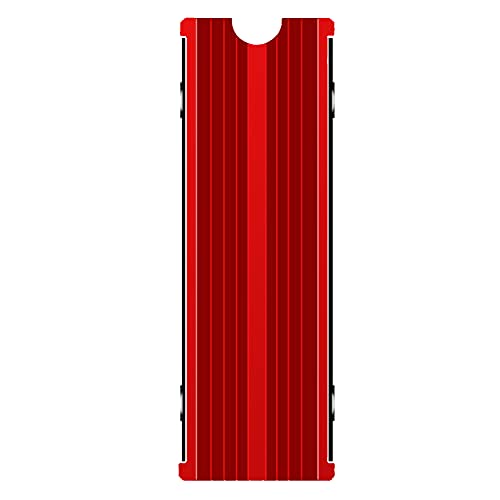 M.2 Heatsink Cooler 2280 SSD Double-Sided Heat Sink3"L x 0.95"W x 0.4"H3 x 0.95 x 0.4 inches0.1 poundsCheck on Amazon


Top 3 picks at a glance
Quick Verdict
Choose an active fan NVMe heatsink if you have a fast PCIe 4.0 or PCIe 5.0 SSD, limited airflow around the drive, or frequent workloads involving large file transfers, 4K video, 3D rendering, or sustained game installation. The fan can lower peak temperatures more aggressively, but it adds noise, dust exposure, power use, and another component that can eventually fail.
Choose a passive NVMe SSD heatsink for a quiet home office, a typical gaming PC, a console-compatible upgrade, or an SSD used for ordinary documents, photos, applications, and occasional transfers. A passive model has no motor, often weighs roughly 20 to 45 grams, and may cost only $6 to $20. It is the better default for most buyers.
In 2026, the best choice is still determined more by workload and case airflow than by the cooler’s appearance or advertised cooling claims. A well-mounted passive heatsink in a ventilated case can be more practical than a small fan installed in a cramped, dusty space.
Side by Side
| Factor | Active fan heatsink | Passive NVMe heatsink |
|---|---|---|
| Comfort | May produce a soft but noticeable fan sound, commonly around 20 to 35 dB depending on design and speed. | Silent during operation, making it better for bedrooms, offices, and media rooms. |
| Durability | Aluminum body can last for years, but the small fan has bearings and may eventually wear out. | Usually extremely durable because it has no moving parts; pads may need replacement if removed. |
| Price range | About $15 to $50, with premium models costing more for larger fans or elaborate brackets. | About $6 to $25 for common M.2 2280 models; console-specific versions may cost more. |
| Maintenance | Needs occasional dust removal around the fan and fins; a failed fan may require replacement. | Usually only needs dusting when the computer is cleaned. |
| Space needed | Often 22 mm wide but may add 8 to 18 mm of height and require a motherboard header or USB power. | Commonly adds about 3 to 8 mm of height, though double-sided models can be thicker. |
| Look | More visible and technical, sometimes with a fan grille or lighting. | Low-profile and understated, often hidden beneath a motherboard cover. |
| Resale | May be attractive to performance-focused buyers, but fan noise and age can reduce appeal. | Easy to include with a used SSD or PC because it is quiet and unlikely to have a mechanical defect. |
| Power use | Typically low, often under 1 watt, but may require a motherboard fan header or USB connection. | Uses no additional power. |
| Best for | Heavy sustained workloads, hot drives, restricted airflow, and performance-oriented builds. | Most home computers, consoles, quiet rooms, and everyday storage tasks. |
Where Active Fan Wins
An active fan is most useful when an NVMe SSD repeatedly reaches high temperatures during sustained work. Modern drives can be extremely fast, but their peak speeds are often available only until the controller or flash memory becomes too warm. Once thermal limits are reached, the drive may reduce performance temporarily to protect itself.
Moving air across the heatsink helps carry heat away faster than a solid block of metal sitting in still air. This matters in compact desktops, small-form-factor cases, and systems where the M.2 slot is positioned beneath a graphics card. It can also help when the SSD is used as a scratch disk for video editing, a work drive for large photo catalogs, or a destination for repeated multi-gigabyte transfers.
Active cooling may also be useful for PCIe 5.0 drives, which can run warmer than older generations. However, the fan needs room to breathe. A cooler wedged directly against a graphics card, cable bundle, or side panel may produce more noise without moving enough air. Check the cooler’s total height, fan direction, and connector before installation.
The drawbacks are practical rather than dramatic. A tiny fan can collect dust quickly, especially in a home with pets. Its sound may be minor in a desktop tower but distracting in a quiet office or bedroom. Fan vibration can also be irritating if the cooler is mounted loosely. Finally, active models add another failure point: even if the heatsink remains useful, a seized or noisy fan may require replacing the entire unit.
Where Passive Nvme Ssd Heatsink Wins
Passive cooling wins on simplicity. An aluminum heatsink draws heat from the SSD through a thermal pad and spreads it across a larger surface area. There is no fan curve to configure, no cable to route, and no motor to wear out. Installation usually involves placing the pad over the controller and memory chips, then securing the top and bottom sections with clips or screws.
For everyday home use, the difference between passive and active cooling may not be noticeable. Opening applications, browsing, managing a photo library, and playing games usually create short bursts of activity rather than continuous maximum writes. In those situations, a passive heatsink can provide useful thermal mass without introducing sound.
Passive models are also easier to fit into furniture-friendly setups. A quiet desktop in a living room, study, or built-in workstation benefits from fewer audible components. The low profile can be important when a motherboard manufacturer supplies its own M.2 shield or when a console has a tightly specified drive bay.
Low cost is another advantage. A GLOTRENDS two-pack of M.2 NVMe heatsinks, listed at around $7, illustrates how inexpensive basic passive cooling can be. A red double-sided M.2 heatsink for a 2280 SSD is listed at around $5. These products are examples of the broader passive category, not substitutes for checking your own SSD’s thickness, component layout, or installation clearance.
Thermal pads deserve attention. A pad that is too thick can bend the drive or prevent a cover from closing, while a pad that is too thin may not make proper contact. Remove any protective film, position the pad over the chips rather than empty areas of the circuit board, and avoid overtightening screws.
Cost Over 5 Years
A passive heatsink generally has the lower five-year cost. At an initial price of $6 to $25, it consumes no electricity and rarely needs parts. The only likely extra expense is a replacement thermal pad costing about $3 to $8 if the original pad is damaged or the heatsink is moved to another drive.
An active model may cost $15 to $50 at purchase. Its electricity use is small, but replacement is the bigger concern. If the fan becomes noisy or stops working after several years, a new cooler could cost another $15 to $40. Dust-cleaning supplies are inexpensive, yet the time and inconvenience still matter. For a drive that does not routinely throttle, the extra cost provides little practical benefit.
There is also an indirect cost: space. If an active cooler interferes with a graphics card, motherboard cover, or side panel, you may need a different mounting position or a replacement cooler. Measure first, especially in compact cases and console enclosures.
Which One for Your Home
Small apartment
Choose a passive heatsink for a small apartment, particularly if your computer shares space with a sofa, television, or sleeping area. Silence has real value when a low background fan sound is more noticeable. Prioritize a ventilated case and keep the computer a few inches from walls and fabric.
Family with kids or pets
Passive is usually the safer household choice because it has no exposed small fan that can clog with hair and dust. Clean the PC’s case filters regularly. If children or pets make the room especially dusty and the SSD performs sustained heavy work, improve overall case airflow before adding a tiny active cooler.
Do not confuse a wearable personal fan with an SSD cooler. Products such as the around $31 AMACOOL Portable Waist Fan Clip On and the around $9 Rechargeable Personal Fan are designed to move air around a person, not cool computer components. They may be useful household comfort products, but they do not replace an M.2 heatsink.
Rental
A passive heatsink is convenient for renters because it needs no permanent changes to furniture, walls, or electrical layouts. It also avoids adding another powered accessory to a shared workstation. Use the motherboard’s existing M.2 cover when possible and keep the original hardware for future moves or resale.
Long-term home
For a long-term home office or dedicated performance PC, choose based on workload. A passive unit remains the best low-maintenance option for general computing. An active fan makes sense when you regularly move hundreds of gigabytes, edit video, run databases, or use a PCIe 5.0 SSD in a compact case. Pair it with dust filters and a quiet fan profile.
FAQ
Is an active NVMe heatsink better than a passive one?
Not universally. Active cooling can remove heat more aggressively during sustained workloads, while passive cooling is quieter, simpler, and more reliable over time. For typical home use, passive is usually sufficient.
Does every NVMe SSD need a heatsink?
No. Many drives operate normally without one, especially in a well-ventilated desktop. A heatsink is more useful for high-speed drives, cramped installations, and workloads involving long continuous transfers.
Will an active heatsink make my computer noisy?
It can. Small fans often run quietly at low speed, but dust, vibration, poor bearings, or aggressive fan settings can make them clearly audible. Look for a controllable fan and confirm that your motherboard has a suitable header.
Can I use a passive heatsink in a PS5 or compact PC?
Only if its dimensions and thickness match the manufacturer’s requirements. A double-sided heatsink may not fit even when the SSD itself does. Check the enclosure clearance, SSD length, and thermal-pad thickness before installation.









