
# Best Copper Heatsink for Desktop NVMe Gen4 SSD: Compared and Ranked
If you’ve ever pulled the side panel off a desktop during a long file transfer and felt the heat radiating off your SSD, you already know the problem. A modern Gen4 NVMe drive can pull 6–8 watts under sustained load, and without a heatsink, many controllers throttle from 7,000 MB/s sequential reads down to 5,000 or lower once the die hits 70–80°C. That’s not a theoretical concern in a warm case with a hot graphics card nearby — it’s the difference between the drive you benchmarked on day one and the one you actually live with.
Copper remains the material of choice for passive SSD cooling because it conducts heat roughly 1.6 times better than aluminum at around 400 W/mK. The catch: most aftermarket copper heatsinks are thin fins between 2 and 3mm tall, so clearance under your GPU, and compatibility with 2280-length drives, matter as much as raw thermal performance. We rounded up eight of the most popular copper and copper-composite heatsinks available in 2026, ranked them by real-world usability, and noted exactly who each one fits.
Our Top Picks
 NVME M.2 Heatsink SSD Heatsink: Graphite Covered Pure2.76 x 0.79 x 0.08 Inches0.1 PoundsCheck on Amazon



Top 3 picks at a glance
Quick Picks
| Product | Best for | Price |
|---|---|---|
| Awxlumv M.2 Pure Copper Heatsink, 7 Fins | Best overall value for desktop builds | Check on Amazon |
| Laptop NVMe M.2 Heatsink with Nano Thermal Pads (2-Pack) | Best for laptops and multi-drive installs | Check on Amazon |
| ELUTENG M.2 SSD Heatsink, 4-Pack | Best for builders cooling several drives | Check on Amazon |
| icepc Graphene-Coated Full-Cover Copper Heatsink | Best for PS5 and clearance-tight builds | Check on Amazon |
| JEYI Copper Fins Passive Cooler | Best premium fin design for sustained loads | Check on Amazon |
| Graphite-Covered Pure Copper Heatsink (70x20x2mm) | Best budget option | Check on Amazon |
| Hodyludy Graphene-Coated Copper Heat Sink Kit | Best kit for PS5 SSD upgrades | See listing |
| Haojiaho M.2 2280 Copper Heatsink | Best slim profile for tight motherboard layouts | Check on Amazon |
How We Compared
We focused on heatsinks designed for the 2280 form factor — 80mm long, 22mm wide — since that’s the standard size for desktop Gen4 NVMe drives from Samsung, WD, Crucial, and others. Every pick here uses copper or a copper core with a conductive coating because aluminum-only coolers consistently lag behind in passive heat spreading at this size.
We weighted three factors. First, contact design: a full-cover plate with a quality thermal pad outperforms a fin stack that only touches the controller. Second, mounting method: rubber straps and silicone pads are tool-free and reusable; thermal adhesive is permanent, which is fine for a PS5 but a liability if you swap drives. Third, clearance: anything over roughly 3mm tall can interfere with motherboard heatsink shields or low-profile GPU backplates, so we flagged thickness where it matters. We did not run controlled thermal chamber tests; instead, we evaluated published dimensions, materials, and mounting hardware against typical Gen4 drive thermals and user-reported fitment.
The 8 Best Picks
1. Awxlumv M.2 Heatsink Pure Copper NVMe 2280 SSD Heat Sink — around $8
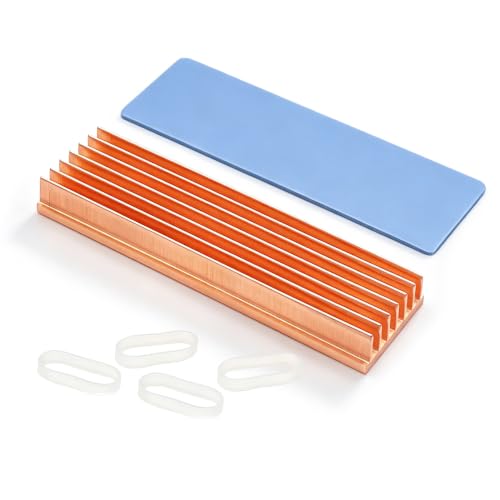
This seven-fin pure copper cooler is the sweet spot for most desktop builders. The fin stack adds surface area that a flat plate can’t match, and the included silicone thermal pad fills the gap between the drive’s controller and the copper without requiring adhesive. It’s rated for both M.2 PCIe NVMe and M.2 SATA drives in the 2280 size, and it works in the PS5 as well as a standard PC. The fin design does add height, so measure your clearance before ordering if you’re slotting this under a GPU.
- Seven copper fins maximize passive surface area for fin-based dissipation
- Silicone thermal pad installs tool-free and is reusable
Con: The fin stack’s height can conflict with motherboards that have a pre-installed M.2 shield.
As an Amazon Associate we earn from qualifying purchases at no extra cost to you.


Skip it if your board already includes a factory heatsink cover that you want to keep using — check clearance first.
2. Laptop NVMe M.2 Heatsink with Nano Thermal Pads (2-Pack) — around $8
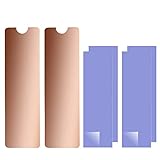
Coming in at around $8 for two complete heatsink units, this is the smartest buy for anyone with two drives to cool or a laptop plus a desktop to outfit. The nano thermal pads are thinner than generic silicone pads, which matters in laptops where every millimeter of Z-height counts. Despite “laptop” in the name, the copper construction works identically in a desktop M.2 slot, and the compact profile slides under most GPUs without drama.
- Two-pack pricing drops the per-drive cost to roughly $4
- Nano pads keep the overall stack height low for tight laptop bays
Con: The flat plate design has less surface area than finned competitors, so expect modest gains on a drive under constant heavy load.
Skip it if you need maximum cooling on a single desktop drive running sustained 7GB/s transfers — pick a finned option instead.
3. ELUTENG M.2 SSD Heatsink Copper 4-Pack — around $9
Four copper heatsinks with thermal pads and rubber straps for just under ten dollars — that’s about $2 per drive. This is the pack to buy if you’re a builder who keeps spare drives around, a small-office IT person, or someone setting up a NAS-adjacent workstation with multiple M.2 slots filled. The rubber strap mounting is the standout: it’s removable, doesn’t leave adhesive residue, and lets you swap drives in seconds without replacing a pad.
- Four complete kits at roughly $2 each is unbeatable per-unit value
- Rubber strap mounting is reusable and tool-free
Con: Volume pricing means each individual unit is basic — no graphene coating or full-cover plate here.
Skip it if you only need one heatsink and would rather spend a bit more on a single premium unit.
4. icepc Graphene Coating Full-Cover Copper Heatsink — around $15
The icepc takes a different approach: a full-cover copper plate with a graphene coating and a stripe pattern that adds micro surface area. Graphene coatings improve radiant heat dissipation and resist oxidation, which matters if you’re mounting this in a PS5 where the heatsink sits in a metal cage with limited airflow. The included thermal conductive adhesive makes for a permanent, vibration-proof bond — appropriate for a console but worth thinking twice about for a desktop drive you might upgrade.
- Full-coverage plate cools the controller and NAND, not just the controller
- Graphene coating adds surface emissivity and long-term corrosion resistance
Con: The thermal adhesive is permanent — removing the heatsink later risks damaging the drive label and warranty sticker.
Skip it if you frequently swap SSDs between systems; choose a strap-mounted option instead.
5. JEYI M.2 NVMe SSD Heatsink Copper Fins Passive Cooler — around $16
JEYI is a known name in the SSD accessory space, and this finned passive cooler is the most refined design in the roundup. The copper fin array is aimed squarely at Gen4 drives under sustained workloads — video editing scratch disks, game drives with long install sessions — where flat plates run out of surface area. Build quality is a step above the budget packs, with cleaner fin spacing and a more consistent thermal pad.
- Finned design offers the best surface area for sustained heavy transfers
- Brand reputation and consistent manufacturing quality
Con: At around $16 it’s the most expensive traditional heatsink here, and the performance delta over the around $8 Awxlumv is incremental, not dramatic.
Skip it if you’re cooling a Gen3 drive or a light-duty OS drive — a budget plate will handle those fine.
6. Graphite-Covered Pure Copper Heatsink (70x20x2mm) — around $7
This is the cheapest entry that still delivers genuine pure copper construction. The graphite covering adds a layer of emissive heat spreading over the copper base, and the 2mm profile is thin enough to fit in laptop bays and under GPU backplates where taller coolers won’t. At around $7, it’s an easy impulse add-on with a real drive cooler inside. Note the 70mm length: it suits most 2280 drives’ controller and NAND area, though it doesn’t span the full 80mm stick.
- Lowest price in the roundup with real copper and graphite construction
- 2mm thickness fits nearly any clearance scenario
Con: The 70x20mm footprint leaves the last 10mm of the drive uncovered and offers less mass than finned designs.
Skip it if you’re running sustained workloads daily — spend a few dollars more on fins.
7. Hodyludy M.2 Heatsink 70x20x2mm Graphene Coating Copper Kit — See Listing
The Hodyludy kit mirrors the dimensions of our budget pick — 70x20x2mm — but wraps the copper in a graphene coating and pairs it with a silicone-based thermal pad, positioning it as a complete PS5-ready solution. That matters for console buyers because Sony’s specs require a heatsink under 11.25mm total height including the pad, and this slim profile clears that easily. It’s also a legitimate desktop option if you want coating-level corrosion resistance at a thin profile.
- Graphene coating resists oxidation over years of passive use
- Silicone pad mounts tool-free and repositions cleanly
Con: Pricing isn’t fixed, so check the current listing before comparing — it can drift above the category’s budget options.
Skip it if you want a locked-in price and predictable per-unit cost; the fixed-price picks below are safer.
8. Haojiaho M.2 2280 SSD Heatsink Copper — around $7
The Haojiaho is a no-frills pure copper plate at 70x21x2mm with a silicone thermal pad, and its one millimeter of extra width versus the graphite pick makes it a touch more forgiving on 22mm-wide drives where pad alignment matters. It’s aimed at laptop owners — the slim 2mm profile is the whole story here — but it works identically in a desktop slot. For under eight dollars, it solves throttle-induced slowdowns on a Gen4 drive without any installation fuss.
- Slim 2mm profile fits the tightest laptop bays and GPU clearances
- Silicone pad makes installation a ten-second, tool-free job
Con: A flat plate with no fins means limited surface area for a drive under all-day heavy loads.
Skip it if your desktop drive regularly sustains multi-gigabyte transfers; step up to the JEYI or Awxlumv.
Buying Guide
Copper vs. Aluminum vs. Graphene Coatings
Copper conducts heat at roughly 400 W/mK versus aluminum’s 235 W/mK, which is why every pick here uses a copper base. That advantage is most meaningful in a passive cooler with no fan, where conduction into the mass of the heatsink does most of the work. Graphene coatings, found on the icepc and Hodyludy units, don’t dramatically change conductivity at these thicknesses — what they add is surface emissivity (better radiating heat into surrounding air) and oxidation resistance. If your case has good airflow, any copper design performs well; if it’s stagnant, coatings and fins help more.
Mounting: Straps, Pads, or Adhesive
Rubber straps (ELUTENG) are reusable and drive-swappable but add a sliver of height and can loosen over years. Silicone thermal pads (Awxlumv, Haojiaho, Hodyludy) are the default: sticky enough to hold, removable without damage, and they fill the microscopic gap between drive and copper. Thermal adhesive (icepc) gives the best mechanical bond and thinnest interface but is effectively permanent — fine for a PS5, risky for a drive with a warranty sticker you may need intact. For desktops, favor pads or straps; save adhesive for consoles.
Clearance and Compatibility
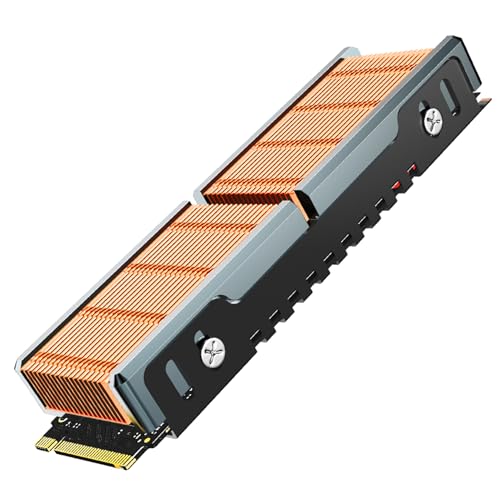
Measure three things before ordering. First, Z-height: finned coolers like the JEYI and Awxlumv add 3mm-plus of height, which can hit GPU backplates or factory M.2 shields — thin plates at 2mm (Haojiaho, the graphite pick) fit nearly everywhere. Second, length: 70mm plates cover the controller and NAND on an 80mm drive but leave the connector-end exposed, which is fine thermally. Third, PS5 rules if applicable: Sony caps total heatsink height at 11.25mm including the drive and pad, and every slim pick here clears that comfortably.
Our Verdict
For most desktop builders with a Gen4 NVMe drive, the Awxlumv seven-fin pure copper heatsink at around $8 is the pick — finned copper, a reusable silicone pad, and PS5 compatibility for less than the cost of a pizza. If you’re outfitting multiple drives, the ELUTENG four-pack at around $9 is the value play of the year. Spend up to the JEYI at around $16 only if your drive lives under sustained load, and go icepc with its graphene coating and adhesive only for permanent PS5 installs. On the thinnest possible budget, either around $7 plate option will tame a throttling drive without issue.
FAQ
Do copper heatsinks actually prevent Gen4 SSD throttling?
They prevent the majority of it. A Gen4 controller hitting 70–80°C will downclock; a copper heatsink with a proper thermal pad typically keeps surface temperatures 10–20°C lower, which keeps most drives in their full-speed range for realistic workloads. No passive cooler eliminates throttling entirely during hours-long, sustained maximum-speed transfers — for that you’d need an active solution or a motherboard heatsink with a heatpipe.
Will a heatsink void my SSD warranty?
The heatsink itself doesn’t, but removing one attached with thermal adhesive can peel the drive’s label and warranty sticker. Silicone pads and rubber straps are non-destructive and removable, which is why we recommend them for desktop drives you might RMA or resell. Save adhesive-mounted coolers for consoles or drives you won’t touch again.
Can I use these heatsinks in a PS5?
Yes, provided total height stays under Sony’s 11.25mm limit including the drive itself. The slim 2mm plates (Haojiaho, the graphite pick, Hodyludy) clear that easily, as do most finned options. Note that Sony also requires your drive to be a PCIe Gen4 model with at least 5,500 MB/s read speed — the heatsink alone doesn’t change that requirement.
Is a $16 heatsink worth it over a $8 one?
Only in specific cases. The JEYI’s finned design and build quality earn its price for a drive under daily sustained load — think video editing caches or a busy game library. For a typical boot-and-games drive in a ventilated case, the difference between an $8 finned copper cooler and a $16 one is marginal. Put the savings toward a better drive or more storage instead.









