Disclosure: As an Amazon Associate, we earn from qualifying purchases made through links on this page, at no additional cost to you.
Mounting a monitor changes a gaming desk more than almost any other single upgrade. The factory stand disappears, the space underneath the screen becomes usable again, and the display can sit at exactly the height, distance, and angle your neck and eyes prefer. For dual setups, mounting is often the only practical way to align panels edge to edge without bulky stands fighting for desk surface.
Not every monitor can be mounted, though, and that is the trap in this category. Some popular gaming displays have no VESA holes at all, some hide them behind a stand bracket that needs an adapter, and some use a less common pattern that limits which arms fit. The safest approach is simple: choose a monitor whose product listing clearly states a VESA mounting pattern, either 100 x 100 mm or 75 x 75 mm, before you think about refresh rate or resolution. Every pick in this guide meets that test. They are all standard monitors with a stated VESA pattern in the listing, covering compact 1080p esports screens, a curved 1440p option, a 4K flagship, and a wide ultrawide for people mounting a single large panel.
Our Top Picks
Top 3 picks at a glance
Quick picks
- Best compact 1080p pick for most mounted desks: ASUS TUF Gaming VG249Q1A, VESA 100 x 100 mm — View on Amazon
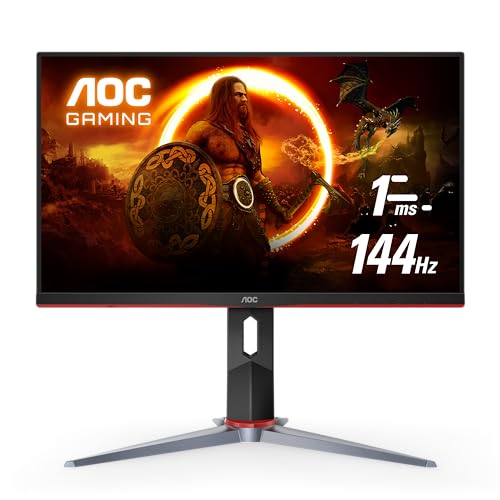
- Best 1080p alternative with legacy ports: AOC 24G2, VESA 100 x 100 mm — View on Amazon
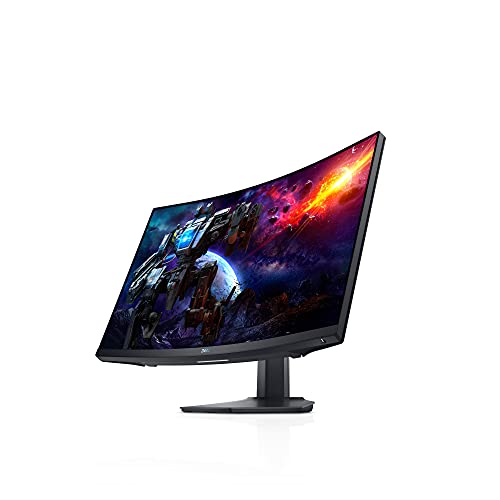
- Best curved 1440p pick: Dell S2722DGM, VESA 100 x 100 mm — View on Amazon
- Best 4K pick for PC and console: LG UltraGear 27GP950-B, VESA 100 x 100 mm — View on Amazon
- Best ultrawide pick: Samsung Odyssey G5 34-inch, VESA 75 x 75 mm — View on Amazon
1. ASUS TUF Gaming VG249Q1A — compact 1080p screen that mounts cleanly

The ASUS TUF Gaming VG249Q1A is the most straightforward recommendation for a mounted gaming desk. Its listing describes a 23.8-inch Full HD IPS panel and explicitly calls the monitor VESA mountable, while ASUS specifications list VESA wall mounting at 100 x 100 mm. That standard pattern fits the great majority of single and dual monitor arms, desk poles, and wall brackets, so you are not locked into a proprietary adapter.
On the arm, this size makes sense. A 23.8-inch panel is light enough for basic arms to hold without sagging, and it works as a main screen for competitive play or a portrait side screen. The IPS panel keeps colours consistent when the screen is angled toward you.
Gaming specifications are strong for the class. The listing states a 165Hz refresh rate with 144Hz support, a 1ms response time figure, Extreme Low Motion Blur, and FreeSync Premium,. Connectivity in the listing includes DisplayPort and HDMI, and the monitor includes built-in speakers, which can be handy for a secondary mounted screen even if most gamers will use a headset or separate speakers for the main setup.
Key specifications from the product listing:
- Panel: 23.8-inch IPS, 1920 x 1080 Full HD
- Refresh rate: 165Hz, with 144Hz support noted in the listing
- Response time: 1ms as stated in the listing
- Adaptive sync: FreeSync Premium
- VESA mounting: 100 x 100 mm, described as VESA mountable in the listing
- Ports: DisplayPort 1.2 and two HDMI 1.4 ports per ASUS specifications, plus a headphone jack
- Extras: built-in speakers, Extreme Low Motion Blur, Shadow Boost
Pros:
- Standard 100 x 100 mm VESA pattern fits most arms and wall brackets
- Fast IPS panel suits competitive games and mixed everyday use
- Compact size works well for dual setups and portrait side screens
- Built-in speakers add flexibility for a secondary display
Cons:
- 1080p resolution looks less sharp than 1440p at larger sizes
- Brightness is modest compared with higher tier panels
- The included stand becomes redundant once mounted, so store it safely for later use
View the ASUS TUF Gaming VG249Q1A on Amazon
2. AOC 24G2 — 1080p option with height-friendly design and legacy inputs
The AOC 24G2 is another 24-inch class monitor built for an arm. Its Amazon listing describes a frameless gaming IPS monitor at Full HD resolution, lists mounting type as VESA Mount, and states that the monitor is VESA mountable. AOC specifications give the VESA wallmount pattern as 100 x 100 mm, matching the same broad arm ecosystem as the ASUS above.
Where the AOC earns its place is flexibility. The listing includes HDMI, DisplayPort, and VGA, which is increasingly rare and useful if the screen must serve a gaming PC, a work laptop, and older hardware. The frameless design also keeps the gap small in multi-monitor arrays.
Performance is aimed at smooth 1080p play. The listing states a 144Hz refresh rate and a 1ms response time figure, with FreeSync support for tear-free gaming with compatible graphics cards. The IPS panel provides wide 178-degree viewing angles, useful when the monitor is tilted on an arm or shared between a desk chair and a standing position.
Key specifications from the product listing:
- Panel: 24-inch class IPS, 1920 x 1080 Full HD
- Refresh rate: 144Hz
- Response time: 1ms as stated in the listing
- Adaptive sync: FreeSync
- VESA mounting: 100 x 100 mm, listed as VESA Mount
- Ports: two HDMI 1.4, one DisplayPort 1.2, and VGA per the listing and AOC specifications
- Design: three-sided frameless bezel
Pros:
- Standard 100 x 100 mm VESA pattern for wide arm compatibility
- VGA input alongside HDMI and DisplayPort suits mixed older hardware
- Frameless design works well in dual and triple mounted arrays
- IPS panel keeps the image consistent at arm-adjusted angles
Cons:
- 144Hz is a step below the fastest 1080p panels in this guide
- No USB-C video input for single-cable laptop docking
- Panel size is best for 1080p; text is less crisp than on 1440p screens
3. Dell S2722DGM — curved 1440p screen for a single mounted centrepiece
If you want one mounted monitor to do everything, the Dell S2722DGM moves the resolution up to 1440p and adds curvature. Its listing describes a 27-inch QHD curved gaming monitor with a 2560 x 1440 resolution, a 1500R curved display, and a 165Hz refresh rate over DisplayPort. Dell designs this class of monitor with a VESA mounting interface at 100 x 100 mm, so it attaches to standard arms rated for 27-inch panels.
Mounting a curved 27-inch screen lets you set the exact viewing distance where the 1500R curve feels natural, and raise the panel so its centre lines up with your eyes.
The VA panel and QHD resolution make this a strong middle ground. You get noticeably sharper text and game detail than 1080p, without the graphics card demands of 4K. The listing highlights HDMI and DisplayPort connectivity and height and tilt adjustability on the included stand, although once the monitor is on an arm, the arm provides those movements instead.
Key specifications from the product listing:
- Panel: 27-inch curved VA, 2560 x 1440 QHD, 1500R curvature
- Refresh rate: 165Hz over DisplayPort as stated in the listing
- VESA mounting: 100 x 100 mm
- Ports: HDMI and DisplayPort connectivity as stated in the listing
- Stand in the box: height and tilt adjustable, removable for mounting
Pros:
- 1440p resolution is sharper for work and games than 1080p at 27 inches
- 100 x 100 mm VESA pattern fits standard arms for this size
- Curved panel benefits from the precise distance control an arm provides
- 165Hz refresh rate suits fast games as well as everyday use
Cons:
- Heavier than 24-inch panels, so check your arm weight rating carefully
- VA panel viewing angles are narrower than IPS when viewed far off centre
- Curved screens can reflect room lights differently once raised on an arm
View the Dell S2722DGM on Amazon
4. LG UltraGear 27GP950-B — 4K mounting pick for PC and console

The LG UltraGear 27GP950-B is the high-resolution option in this guide. Its Amazon listing describes a 27-inch UltraGear UHD monitor at 3840 x 2160 with a Nano IPS panel, a 1ms response time figure, and a 144Hz refresh rate, with NVIDIA G-SYNC compatibility and AMD FreeSync Premium Pro. Comparison data for this model lists its VESA mount as 100 x 100 mm, and the design accepts standard 100 x 100 VESA mounts, so it can go on the same arms as the other 27-inch pick despite its flagship specifications.
Mounting matters at 4K because pixel density rewards a carefully set viewing position. On an arm you can bring the panel to the distance where fine detail looks right, then push it back for controller gaming. The listing also notes HDMI 2.1 with variable refresh rate up to 120Hz at UHD, suiting a desk shared between a PC and a console.
Colour specifications are a step up. The listing states DCI-P3 coverage of 98 percent and VESA DisplayHDR 600, which suits gamers who also edit photos or video under the same mounted screen. The four-sided virtually borderless design keeps multi-monitor gaps small if you mount two of them, although the graphics hardware needed to drive two 4K high-refresh panels is substantial.
Key specifications from the product listing:
- Panel: 27-inch Nano IPS, 3840 x 2160 UHD 4K
- Refresh rate: 144Hz, with overclock to 160Hz noted in the listing details
- Response time: 1ms as stated in the listing
- Adaptive sync: G-SYNC Compatible and FreeSync Premium Pro
- VESA mounting: 100 x 100 mm
- Ports: HDMI 2.1 and DisplayPort with DSC per the listing details
- Colour and HDR: DCI-P3 98 percent, VESA DisplayHDR 600 as stated in the listing
Pros:
- Sharp 4K image with high refresh rate for both PC and console play
- Standard 100 x 100 mm VESA pattern despite flagship specifications
- HDMI 2.1 suits a shared desk with a console mounted alongside a PC
- Strong colour specification for editing work on the same screen
Cons:
- Needs a powerful graphics card to use 4K at high refresh rates in games
- Premium panel weight still needs an arm rated for 27-inch monitors
- Console and PC cable routing on an arm needs extra planning
View the LG UltraGear 27GP950-B on Amazon
5. Samsung Odyssey G5 34-inch — ultrawide that uses the smaller VESA pattern

The Samsung Odyssey G5 34-inch takes a different approach: one wide curved panel instead of two separate monitors. Listings for this model, LC34G55TWWNXZA, describe a 34-inch ultrawide gaming monitor at 3440 x 1440 with a 165Hz refresh rate, a 1000R curved screen, and HDR10. Its VESA mount is 75 x 75 mm, not the 100 x 100 mm pattern used by the other picks, and that single detail decides which arms and adapter plates you need.
That smaller pattern is not a problem if you plan for it. Many arms include both 75 x 75 and 100 x 100 mounting plates, but some heavy-duty ultrawide arms and wall brackets are drilled only for 100 x 100. Check the plate in the box before ordering, and confirm the arm weight rating covers a 34-inch ultrawide, because width adds leverage even when the headline weight looks manageable.
Mounted, an ultrawide gives a very clean desk: no centre bezel, no second stand, and only one panel to align. Racing and strategy games fill the 21:9 view, and the pronounced 1000R curve benefits from setting the exact distance on an arm.
Key specifications from the product listings:
- Panel: 34-inch curved ultrawide, 3440 x 1440, 1000R curvature
- Refresh rate: 165Hz
- Response time: 1ms as stated in model listings
- VESA mounting: 75 x 75 mm
- HDR: HDR10 as stated in model listings
- Aspect ratio: 21:9
Pros:
- Single mounted ultrawide replaces a dual setup with no centre bezel
- 75 x 75 mm VESA pattern is clearly stated in model listings
- Wide 3440 x 1440 resolution suits games and side-by-side work windows
- Strong curve benefits from precise arm positioning
Cons:
- 75 x 75 mm pattern does not fit arms drilled only for 100 x 100 mm
- Wide panel needs a stronger arm and careful balance adjustment
- Some games and videos do not fill a 21:9 screen natively
View the Samsung Odyssey G5 34-inch on Amazon
How to choose the right monitor for mounting
Start with the VESA pattern, not the panel. Confirm the listing states 100 x 100 mm or 75 x 75 mm, then match it to the mounting plate on your arm or wall bracket. If the patterns differ, you need an adapter plate, and it is far easier to know that before the monitor arrives. Next, check weight without the stand against the arm rating. Manufacturers usually quote the panel weight separately, and that is the figure the arm actually carries. Ultrawides deserve extra headroom because their width stresses the tilt joint.
Also check recessed mounting areas. Some monitors place the VESA holes in a shallow recess where a large plate or thick plugs can foul the plastic. Look for four clearly visible holes, clearance for the plate, and ports that do not point straight into the arm.
Resolution and size come after fit. A mounted 24-inch 1080p panel is ideal for competitive play and as a secondary screen. A 27-inch 1440p panel is the balanced single-screen choice. A 27-inch 4K panel rewards a strong graphics card and a desk shared with a console. A 34-inch ultrawide replaces two screens but demands the strongest arm. In every case, mounting improves ergonomics only if the arm range lets you place the top of the screen near eye level and the panel at roughly an arm length away.
Finally, plan cables. Measure the run from the PC to the furthest point the arm reaches, add slack, and route cables along the arm. Leave a gentle loop at both ends and test the full range of motion before tightening everything down.
FAQs
What does VESA 100 x 100 mean?
It means the four mounting holes on the back of the monitor are spaced 100 mm apart horizontally and 100 mm vertically. It is the most common pattern for 24-inch to 32-inch gaming monitors, and most monitor arms include a plate for it. The 75 x 75 mm pattern uses the same idea with tighter spacing and appears on some smaller and ultrawide models.
Can any monitor be mounted with an adapter?
Some monitors without VESA holes can use clamp-style adapter brackets that grip the panel edges, but these are less secure and can block ports or bezels. For a gaming desk that gets adjusted often, a monitor with proper VESA holes in the listing, like every pick here, is the safer and cleaner choice.
Do I need a different arm for an ultrawide monitor?
Often, yes. Ultrawides are wider and can be heavier than standard panels, and models like the Samsung Odyssey G5 34-inch use a 75 x 75 mm pattern. Choose an arm rated for the panel weight and width, confirm it includes a 75 x 75 plate, and expect to spend a few minutes balancing the spring tension after installation.
Is wall mounting or a desk arm better?
A desk arm is more flexible and leaves no holes in the wall, and it lets you adjust distance and height daily. A wall mount is tidier for a fixed setup and frees the whole desk, but the position is permanent and you must fix into a stud or suitable wall structure. Both use the same VESA holes on the monitor.
Will mounting void my monitor warranty?
Removing a stand and using the manufacturer-provided VESA holes as intended is a normal use of the product. Keep the stand, screws, and any cover plates in a labelled bag so you can refit them if the monitor ever needs service or later use, and never force a mounting plate that does not align with the holes.
Conclusion
The best monitors for mounting are simply good gaming monitors whose listings prove they belong on an arm: a clearly stated VESA pattern, sensible weight, and ports that route cleanly. For most people, the ASUS TUF Gaming VG249Q1A covers competitive 1080p play on a standard 100 x 100 mount, while the AOC 24G2 adds legacy connectivity for mixed setups. The Dell S2722DGM is the balanced curved 1440p centrepiece, the LG UltraGear 27GP950-B brings 4K and HDMI 2.1 to a mounted PC and console desk, and the Samsung Odyssey G5 34-inch shows why checking for a 75 x 75 pattern matters before you buy an ultrawide arm. Measure your space, match the pattern and weight to your mount, and any of these picks will give you back your desk.
Related guides
More from Amazon
Programs that pair well with the guide above. Offers and eligibility are set by Amazon and may change.
A free business account with business pricing and bulk-buying tools for work, shop or home office.
Create a business accountFree shipping on eligible items, Prime Video and more. Eligible new members can start with a free trial.
Start a Prime free trialAudiobooks and podcasts to listen to on the go. Eligible new members can start with a free trial.
Try Audible freeAd-free music streaming. Eligible new subscribers can start with a free trial.
Try Music Unlimited freeAs an Amazon Associate we earn from qualifying purchases.