The PS4 outputs 1080p at 60 frames per second, so the real decision is not about chasing the highest numbers on a box. It is about matching a monitor to what the console actually sends: a sharp 1080p picture, a fast response that keeps controls feeling direct, and sound that works without extra gear. A monitor built for a PC can waste money on features the PS4 never uses, while a screen made for consoles keeps the setup simple.
This guide is for PS4 owners who play on a desk or in a bedroom, from story-driven single-player fans to competitive players who need every input to land on time. It also fits families sharing one console and players moving from a TV to a closer screen. The five monitors below were chosen from names and specs on Amazon product pages, with 1080p resolution, HDMI input, and low input lag as the baseline for every pick.
Top 3 picks at a glance

Quick Picks
As an Amazon Associate we earn from qualifying purchases
| Product | Best for | Key spec from title |
|---|---|---|
| Sceptre E248W-19203R | Everyday PS4 play with sound built in | 24-inch 1080p monitor with built-in speakers |
| BenQ RL2455HM | Competitive console play with minimal lag | 24-inch console gaming monitor with 1ms response |
| HP 24mh | A colorful IPS screen that adjusts to your desk | 23.8-inch IPS display with built-in speakers |
| ASUS VG245H | Console gaming with dual HDMI inputs | 24-inch 1080p 1ms console gaming monitor |
| Acer SB220Q bi | A compact second screen for a small desk | 21.5-inch IPS ultra-thin zero-frame monitor |
How to Choose
Match the resolution to the console
The PS4 renders games at 1080p and outputs at 60 frames per second, so a 1920 x 1080 screen shows exactly what the console produces with no scaling softness. A 1440p or 4K panel can still accept the signal, but it adds cost and often upscales the image, which can blur fine detail in distant scenery. A native 1080p monitor keeps text, menus, and HUD elements crisp at 24 inches, and it leaves the console doing the work instead of the display. If you also connect a PC later, a higher refresh rate is a bonus, but for PS4 alone, 1080p at 60Hz is the sweet spot.
Check input lag, not just response time
Response time measures how fast a pixel changes color, while input lag measures how long a button press takes to appear on screen, and input lag is the number that matters most for PS4 games. A monitor with a 1ms response time can still feel sluggish if its processing adds delay, so look for models built for consoles or with a low-lag game mode. Fighting games, shooters, and rhythm games punish even small delays, because a late block or a missed shot comes from the display, not from the player. A screen that keeps lag low makes controls feel connected, and that connection separates a good console monitor from an average one.
Decide how sound will work
The PS4 sends audio through HDMI, so a monitor with built-in speakers gives you sound with no extra gear, which suits a bedroom or a shared room where a soundbar would take up space. Built-in speakers are small, so they handle dialogue and game effects well enough for casual play but fall short for cinematic sound. If a monitor has no speakers, you can plug a headset into the DualShock 4 controller, which is how many PS4 players already listen. Check the audio path before buying: a screen with speakers, a headphone jack, or an audio output keeps the setup simple, while a screen with none of these leaves you hunting for a workaround.
Think about size, panel, and ports
A 24-inch screen suits most desks and keeps 1080p looking sharp at arm’s length, while a 27-inch panel at the same resolution can look softer because the same pixels stretch further. A 21.5-inch screen fits a tight corner and works well as a second display, but it can feel cramped for split-screen play. TN panels respond fastest and cost less, while IPS panels show wider viewing angles and richer color, which helps when friends watch from the side. Two HDMI ports matter if you also connect a streaming stick or a second console, because swapping cables behind a desk gets old fast.
The 5 Best Options
1. Sceptre E248W-19203R

The Sceptre E248W-19203R is the most complete PS4 screen in this group, pairing a 24-inch 1080p panel with two HDMI ports and built-in speakers, so the console, sound, and picture all work from one cable and one box. Its 1ms response keeps fast action readable, and the wide color coverage makes bright game worlds look vivid on a desk. FreeSync smooths out frame pacing when the console dips below its target, and the slim frame leaves room for a second device beside it. For a player who wants a simple plug-and-play PS4 setup, this is the easiest pick.
Specs
- 24-inch Full HD 1920 x 1080 LED display
- 60Hz refresh rate, 1ms response time
- 2 HDMI ports plus VGA
- Built-in speakers
- FreeSync adaptive sync
- 250 cd/m2 brightness, 178-degree viewing angle
- 5.77 pounds, tilt adjustment, 1-year warranty
Best for: PS4 owners who want one cable, built-in sound, and a sharp picture with no extra gear.
Watch out for: The built-in speakers handle dialogue and effects but stay basic for cinematic sound, so add a headset for big story moments.
2. BenQ RL2455HM
The BenQ RL2455HM was built for console play, and it shows in the details that matter on a PS4: a 1ms response, a 60Hz panel that matches the console frame for frame, and preset modes for different game types that adjust the picture without digging through menus. Its Black eQualizer brightens dark corners so hidden enemies and paths stay visible, while ZeroFlicker keeps long sessions easier on the eyes. Two HDMI ports take the console plus a second device, and the built-in speakers cover sound without extra boxes. For competitive console players, this is the most focused pick here.
Specs
- 24-inch Full HD 1920 x 1080 display
- 60Hz refresh rate, 1ms GTG response time
- 2 HDMI ports plus DVI and D-sub
- Built-in 2W x 2 speakers
- Black eQualizer and ZeroFlicker technology
- RTS and FPS preset game modes
- 3-year warranty
Best for: Competitive PS4 players who want minimal lag and game modes tuned for shooters and fighting games.
Watch out for: The TN panel narrows viewing angles, so picture quality drops when friends watch from the side.
3. HP 24mh
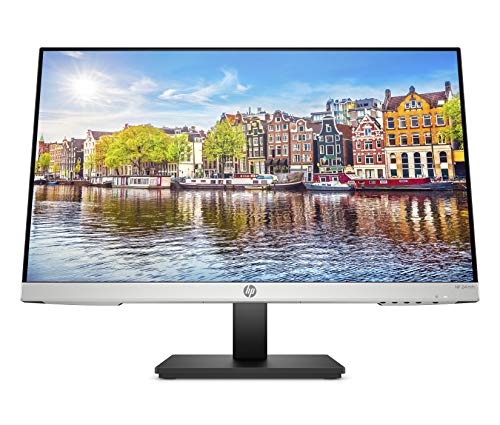
The HP 24mh brings an IPS panel to PS4 play, which means colors stay true and the picture holds up when friends sit off to the side. Its 75Hz refresh adds a touch of smoothness over a standard 60Hz screen, and the height-adjustable stand lifts the display to eye level without a stack of books. Built-in speakers handle game audio straight from the HDMI cable, and the micro-edge bezel keeps the screen looking modern on a desk. The DisplayPort and VGA inputs also leave room for a PC or an older device beside the console.
Specs
- 23.8-inch Full HD 1920 x 1080 IPS display
- 75Hz refresh rate
- Built-in 2W speakers
- HDMI, DisplayPort, and VGA ports
- 178-degree viewing angles
- Height adjustment with 100mm travel, tilt adjustment
- Low blue light mode, 1-year limited warranty
Best for: PS4 players who share the screen with friends and want accurate color plus an adjustable stand.
Watch out for: The built-in speakers sit at a modest volume by default, so check the on-screen menu volume before judging the sound.
4. ASUS VG245H
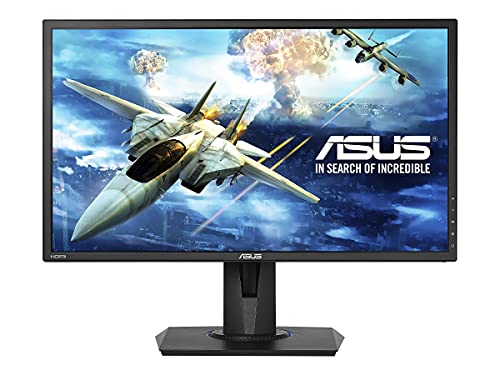
The ASUS VG245H is a console-first monitor with two HDMI ports, a 1ms response, and a 75Hz refresh rate that gives PS4 games a small smoothness edge over a plain 60Hz screen. Its GamePlus crosshair and timer tools sit on the screen for shooters, and the flicker-free backlight with a blue light filter helps during long evening sessions. FreeSync keeps tearing in check when frame rates waver, and the slim stand fits a crowded desk. For players who want a purpose-built console display with room for a second HDMI device, this ASUS covers the brief well.
Specs
- 24-inch Full HD 1920 x 1080 display
- 75Hz refresh rate, 1ms response time
- 2 HDMI ports plus VGA
- FreeSync adaptive sync
- Eye Care flicker-free technology and blue light filter
- GamePlus crosshair and timer functions
Best for: PS4 players who want a console-tuned screen with two HDMI ports and game tools on screen.
Watch out for: No built-in speakers are listed for this model, so plan on a headset through the controller or external speakers for sound.
5. Acer SB220Q bi
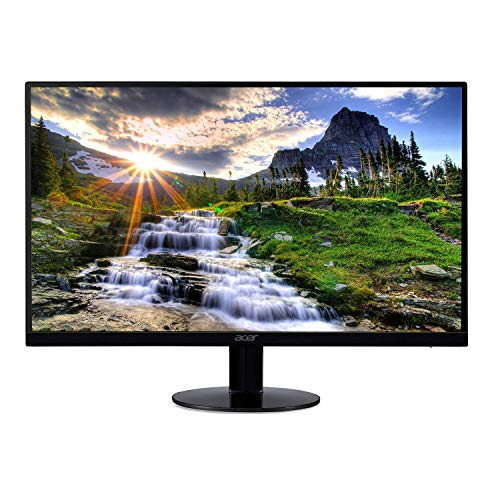
The Acer SB220Q bi is the compact pick in this group, with a 21.5-inch IPS panel that fits a small desk, a dorm corner, or a bedroom setup where a 24-inch screen would crowd the space. Its 75Hz refresh and 4ms response keep PS4 motion smooth, and FreeSync steadies the picture when frame rates dip. The zero-frame design looks clean from the front, and the single HDMI port takes the console directly. For a second screen, a first PS4 monitor, or a tight space, this Acer does the job without taking over the desk.
Specs
- 21.5-inch Full HD 1920 x 1080 IPS display
- 75Hz refresh rate, 4ms response time
- 1 HDMI port plus VGA
- FreeSync adaptive sync
- 250 cd/m2 brightness, 178-degree viewing angles
- Zero-frame ultra-thin design
- 3-year limited warranty
Best for: Small desks, dorm rooms, and first-time PS4 monitor buyers who want a compact IPS screen.
Watch out for: No built-in speakers are listed, so sound needs a headset through the controller or separate speakers.
Which One Fits Your Situation
You play competitive shooters and fighting games
Pick the BenQ RL2455HM. Its 1ms response and console-tuned game modes keep inputs feeling direct, and the Black eQualizer helps you spot movement in dark corners. The 60Hz panel matches the PS4 frame for frame, so nothing is wasted on refresh the console cannot use. Add the Sceptre if you also want built-in speakers for casual sessions.
You play story games in a bedroom
Pick the HP 24mh. Its IPS panel keeps colors rich for story-driven worlds, and the height adjustment puts the screen at eye level for long sessions. The built-in speakers carry dialogue without extra gear, and the low blue light mode helps late at night. The Sceptre is the fallback if you want a larger-feeling screen with the same simple setup.
You have a small desk or a tight budget
Pick the Acer SB220Q bi. Its 21.5-inch panel leaves room for the console, a controller, and a drink, and the IPS screen still looks good from an angle. Plan on a headset for sound, since no speakers are built in. The Sceptre is the step up when you have room for a 24-inch screen and want speakers included.
You want one screen for PS4 and a PC
Pick the ASUS VG245H. Its two HDMI ports take the console and a PC without cable swaps, and the 75Hz refresh gives PC games a small smoothness lift. The GamePlus tools help in shooters on either machine. Check the live listing first to confirm the exact inputs, and pair it with a headset or speakers since no built-in speakers are listed.
Common Mistakes
- Buying a 4K monitor for a PS4 and paying for resolution the console cannot output at 60 frames per second.
- Ignoring sound and discovering too late that the monitor has no speakers and no headphone jack.
- Judging a monitor by response time alone while overlooking input lag, which is what makes controls feel slow.
- Placing a TN panel where friends watch from the side, then wondering why the colors wash out.
- Forgetting to check HDMI ports and ending up swapping one cable between the console and a streaming stick.
Frequently Asked Questions
Does the PS4 need a 144Hz monitor?
No. The PS4 outputs games at up to 60 frames per second, so a 144Hz screen shows no extra frames from the console. A 60Hz or 75Hz monitor matches what the PS4 produces, and the money saved can go toward a better panel, built-in speakers, or a second HDMI port. High refresh only helps if you also connect a PC.
Can I use any HDMI monitor with a PS4?
Almost any monitor with an HDMI input works with a PS4, since the console sends standard 1080p video over HDMI. The differences are in the details: input lag, response time, built-in speakers, and how the panel handles 60Hz. A TV works too, but a monitor sits closer, responds faster, and fits a desk setup better for most players.
Do I need built-in speakers on a PS4 monitor?
Not always, but they make setup simpler. The PS4 sends audio over HDMI, so built-in speakers give you sound with no extra gear. Without them, you can plug a headset into the DualShock 4 controller or connect external speakers to the monitor audio output. Check the speaker situation before buying so game audio is covered on day one.
What size monitor is best for PS4 gaming?
A 24-inch 1080p monitor is the sweet spot for most PS4 players, keeping the picture sharp at desk distance without crowding the space. A 21.5-inch screen fits small desks and dorm rooms, while a 27-inch panel at 1080p can look soft because the same pixels stretch wider. Sit at arm’s length and let the desk decide.
Related guides
More from Amazon
Programs that pair well with the guide above. Offers and eligibility are set by Amazon and may change.
A free business account with business pricing and bulk-buying tools for work, shop or home office.
Create a business accountFree shipping on eligible items, Prime Video and more. Eligible new members can start with a free trial.
Start a Prime free trialAudiobooks and podcasts to listen to on the go. Eligible new members can start with a free trial.
Try Audible freeAd-free music streaming. Eligible new subscribers can start with a free trial.
Try Music Unlimited freeAs an Amazon Associate we earn from qualifying purchases.