Eye strain rarely comes from one bad setting. It builds up over a long day: a backlight that flickers at low brightness, a screen that stays glaring while the room light changes, and text that is just small enough to make you lean in. The real decision here is which combination of flicker-free backlighting, low blue light filtering and automatic brightness adjustment matches the way you actually sit at your desk.
This shortlist suits three kinds of buyers: office workers on eight-hour screen days, gamers who play into dim evening light, and anyone replacing an older panel that leaves their eyes tired by mid-afternoon. Every model below was picked from its Amazon product page name and specifications, where BenQ’s Eye-Care and Brightness Intelligence features and ASUS Eye Care technology headline the listings, so the comparison rests on stated eye-comfort hardware rather than marketing labels.
Top 3 picks at a glance

Quick Picks
As an Amazon Associate we earn from qualifying purchases.
| Product | Best for | Key spec from title |
|---|---|---|
| BenQ GW2790 | All-day desk work at 1080p | 27-inch IPS with Brightness Intelligence |
| BenQ GW2790Q | Sharper text for reading and documents | 27-inch QHD IPS with Eye-CareU |
| BenQ GW2490 | Compact desks and smaller rooms | 24-inch IPS with Low Blue Light Plus |
| BenQ GW2490T | Shared desks needing posture adjustment | 24-inch IPS with height-adjustable stand |
| ASUS VA27EQSB | Full ergonomic adjustment on a budget desk | 27-inch IPS with TÜV-certified Eye Care |
How to Choose
Flicker-Free Backlight and Low Blue Light Filtering
A flicker-free backlight matters most if you work at reduced brightness, because cheaper PWM dimming can pulse visibly in a dim room and fatigue your eyes over hours. Look for the certification or feature named on the listing: BenQ lists flicker-free operation across this range, while the ASUS VA27EQSB carries TÜV Rheinland-certified Flicker-Free and Low Blue Light with four filter settings you can raise in the evening. Low Blue Light Plus on the BenQ models filters the harsher part of the spectrum while trying to keep colours closer to natural than older, heavily yellowed blue-light modes.
Adaptive Brightness That Follows Your Room
Room light changes through the day, and a fixed brightness setting that felt right at noon can glare by dusk. BenQ’s Brightness Intelligence, fitted across the GW models here and in Gen2 form on the GW2790Q, uses a light sensor to adjust screen brightness as ambient light shifts, so you are not digging through menus every time clouds move or lamps come on. If your desk sits near a window or you work mixed day and night shifts, treat adaptive brightness as a core feature rather than a bonus, and check the listing names it explicitly.
Resolution and Screen Size for Comfortable Text
Text size drives posture: if characters are too small you lean forward, and the neck and shoulder ache gets blamed on the chair. A 27-inch 1080p panel like the GW2790 or VA27EQSB gives large, relaxed text for documents and browsing. The 27-inch QHD GW2790Q packs more pixels into the same footprint, so text edges stay crisp even when you scale the interface down for spreadsheets. The 24-inch GW2490 and GW2490T suit smaller desks where a 27-inch screen would force you to sit closer than is comfortable.
Stand Adjustment, Mounting and Ports
Eye level is an eye-strain issue: the top of the screen should sit near eye height, and a tilt-only stand cannot fix a desk that is too low. The GW2490T adds height adjustment to its 24-inch frame, and the VA27EQSB goes further with tilt, swivel, pivot and height adjustment for shared or standing desks. All five models here are VESA or wall mountable, so a monitor arm remains an option later. Finally, confirm the port mix matches your machine: the BenQ models pair DisplayPort with HDMI, while the ASUS adds a USB hub and D-Sub for older hardware.
The 5 Best Options
BenQ GW2790

The GW2790 is the straightforward pick for a full-size desk: a 27-inch IPS panel at 1920×1080 with a 100 Hz refresh rate, so everyday scrolling and casual gaming feel smoother than a basic 60 Hz office screen. Its Eye-Care technology combines low blue light filtering with a flicker-free backlight, and Brightness Intelligence adjusts brightness as your room light changes. Anti-glare coating and Eyesafe certification round out a listing aimed squarely at long, mixed work-and-play days in front of one screen.
Specs
- 27-inch IPS panel, 1920×1080 FHD
- 100 Hz refresh rate, 99% sRGB
- Eye-Care technology: low blue light and flicker-free
- Brightness Intelligence adaptive brightness
- Anti-glare coating, Eyesafe certified
- DisplayPort and 2× HDMI
- Built-in speakers, tilt stand, VESA mountable
Best for: Desk workers who want one 27-inch screen for office hours and light gaming.
Watch out for: The stand is tilt-only, so check your desk height or plan on the VESA mount if you need the screen higher.
ASIN: B0CP9WK81R
BenQ GW2790Q
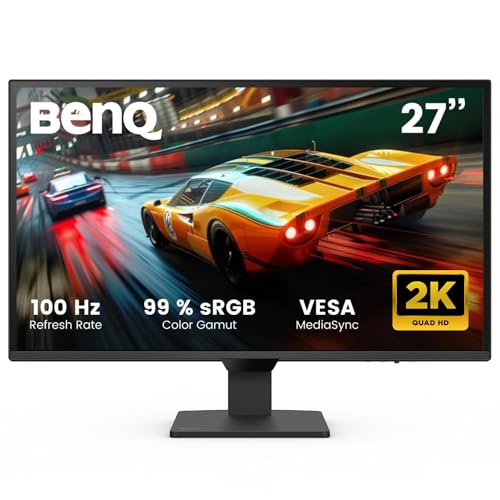
Step up to the GW2790Q if you read and write on screen all day: its 27-inch QHD panel at 2560×1440 renders visibly sharper text than the 1080p models here, which helps when documents sit open for hours. Eye-CareU and Brightness Intelligence Gen2 manage brightness and colour temperature together, Low Blue Light Plus handles the filtering, and the ultra-slim bezel keeps a dual-screen setup tidy. Dual HDMI plus DisplayPort and built-in speakers make it an easy single-cable-style hub for a home office that doubles as an entertainment screen after hours.
Specs
- 27-inch IPS panel, 2560×1440 QHD
- 100 Hz refresh rate, 99% sRGB
- Eye-CareU with Brightness Intelligence Gen2
- Low Blue Light Plus, Eyesafe certified
- VESA MediaSync, ultra-slim bezel
- Dual HDMI and DisplayPort
- Built-in speakers, wall mountable
Best for: Readers, writers and spreadsheet users who want crisper text at 27 inches.
Watch out for: Your laptop or mini PC needs to drive 2560×1440 comfortably; older hardware may default to 1080p and waste the panel.
ASIN: B0DF491FRC
BenQ GW2490
The GW2490 shrinks the same eye-care formula into a 24-inch frame for desks where a 27-inch monitor would crowd the workspace or force you too close. You still get an IPS panel at 1920×1080, a 100 Hz refresh rate and 99% sRGB coverage, with Eye-Care Tech and Low Blue Light Plus handling the comfort side and adaptive brightness adjusting to the room. The thin bezel keeps it neat in pairs, and built-in speakers remove one more box from a small desk. It is the natural choice for students, spare rooms and compact home offices.
Specs
- 24-inch (23.8-inch class) IPS panel, 1920×1080 FHD
- 100 Hz refresh rate, 99% sRGB
- Eye-Care Tech with Low Blue Light Plus
- Adaptive brightness
- Thin bezel design
- DisplayPort and HDMI
- Built-in speakers, VESA and wall mountable
Best for: Small desks, student rooms and anyone who sits close to the screen.
Watch out for: Confirm the exact HDMI port count on the live listing before ordering if you plan to connect two devices at once.
ASIN: B0CP9THGP2
BenQ GW2490T

The GW2490T takes the compact 24-inch format and fixes its most common weakness: the stand. Alongside tilt, it adds height adjustment, so the screen can meet your eye line on a standard desk without books or a riser underneath. The panel matches its sibling — 1920×1080 IPS at 100 Hz — with Eye-Care Tech, low blue light filtering, anti-glare coating and adaptive brightness for rooms whose light changes during the day. Built-in speakers and DisplayPort plus HDMI keep the setup simple, making this the pick for shared family desks and hot-desking corners.
Specs
- 24-inch IPS panel, 1920×1080 FHD
- 100 Hz refresh rate
- Eye-Care Tech with low blue light filtering
- Anti-glare coating, adaptive brightness
- Height and tilt adjustable stand
- DisplayPort and HDMI
- Built-in speakers
Best for: Shared desks and shorter or taller users who need the screen at their own height.
Watch out for: Height adjustment range is finite; very tall users may still prefer a VESA arm for full positioning freedom.
ASIN: B0CXBB31TS
ASUS VA27EQSB

The VA27EQSB is the ergonomics-first alternative to the BenQ models: a 27-inch frameless IPS panel at 1920×1080 and 75 Hz with Adaptive-Sync, wrapped around the most adjustable stand in this group — tilt, swivel, pivot and height adjustment are all built in. Its Eye Care suite carries TÜV Rheinland-certified Flicker-Free and Low Blue Light with four filter levels, plus a Rest Reminder that nudges you to take breaks and Color Augmentation for users who struggle to distinguish certain shades. A USB hub, DisplayPort, HDMI and D-Sub make it the easiest fit for mixed old-and-new office hardware.
Specs
- 27-inch IPS panel, 1920×1080 FHD, frameless design
- 75 Hz refresh rate, Adaptive-Sync, 5 ms GTG
- TÜV Rheinland-certified Flicker-Free and Low Blue Light, four filter settings
- Eye Care Rest Reminder and Color Augmentation
- Tilt, swivel, pivot and height adjustable stand (height 0–150 mm)
- DisplayPort, HDMI, USB hub and D-Sub
- Built-in speakers, wall mountable, 300 cd/m² brightness
Best for: Users who want full stand adjustment and legacy ports without buying a separate arm.
Watch out for: Availability signals for this listing conflict — a tracker price point is stale and the manufacturer’s own store shows the model out of stock — so confirm a live featured offer for the exact ASIN B09XJN7ZJR on the product page before ordering.
ASIN: B09XJN7ZJR
Which One Fits Your Situation
You Work Long Office Hours in Changing Light
Pick the BenQ GW2790Q if your budget allows, or the GW2790 if it does not. Brightness Intelligence is the feature that earns its keep here: the screen dims and warms as evening comes instead of staying at midday glare. The QHD model adds sharper text for document-heavy roles, while the 1080p model keeps things simple and cheaper to drive from any laptop.
Your Desk Is Small or Shared With Family
The GW2490 fits a compact desk without overwhelming it, and its 100 Hz IPS panel still feels modern for work and video. If several people of different heights use the same desk, step up to the GW2490T instead: the height-adjustable stand lets each person set the screen at eye level in seconds, which does more for comfort than any filter setting.
Your Eyes Tire During Evening Gaming Sessions
The GW2790 pairs a flicker-free backlight and low blue light filtering with a 100 Hz refresh rate, so long evening sessions stay smooth without the harsh brightness that makes eyes ache in a dark room. Set the low blue light level higher after sunset and let adaptive brightness handle the transition instead of manually re-tuning the screen every night.
You Need Maximum Adjustment for Posture Problems
Choose the ASUS VA27EQSB. Its stand tilts, swivels, pivots and raises up to 150 mm, covering seating positions the tilt-only BenQ models cannot reach, and the Rest Reminder helps if you tend to sit for hours without a break. Just verify the listing shows a live featured offer for this exact model before you commit, as its stock signals are inconsistent.
Common Mistakes
- Buying a brighter monitor to fight glare instead of choosing anti-glare coating and adaptive brightness, which solve the actual problem.
- Ignoring stand height and stacking books under the monitor, when a height-adjustable model or VESA mount fixes eye level properly.
- Assuming every low blue light mode is equal; stronger settings shift colours more, so check how many filter levels the monitor offers.
- Picking 27 inches at 1080p for dense text work, then leaning in because interface elements look soft; QHD suits reading-heavy jobs better.
- Forgetting port compatibility and discovering your laptop needs an adapter for the monitor’s DisplayPort or HDMI inputs after delivery.
Frequently Asked Questions
Does a flicker-free monitor really reduce eye strain?
It removes one common cause of fatigue: backlight pulsing at low brightness, which many people sense as tiredness or headaches during long sessions without knowing why. Flicker-free operation will not fix poor posture, glare or uncorrected vision, so treat it as one part of a comfortable setup alongside sensible brightness, viewing distance and regular breaks.
Is QHD worth it over FHD for eye comfort?
At 27 inches, yes for text-heavy work. The GW2790Q’s 2560×1440 panel renders letters with cleaner edges, so your eyes work less to resolve small fonts across a long document. For mostly video and casual browsing, the 1080p GW2790 at the same size looks fine and is easier for older laptops to drive at its full 100 Hz.
How strong should I set the low blue light filter?
Start with a low or medium setting during the day so colours stay accurate for photos and design work, then raise it in the evening when colour fidelity matters less. Monitors like the VA27EQSB offer several filter levels precisely because one fixed strength suits nobody; if the picture looks heavily yellow at noon, the setting is stronger than you need.
Can these monitors help if I game at night?
They help with the screen side of the problem: flicker-free backlights, low blue light modes and adaptive brightness all reduce the harshness that builds up over a long evening session. The 100 Hz BenQ models also keep motion smooth for gaming. Room lighting still matters, so a soft lamp behind the monitor does more than running the panel at full brightness in darkness.
Related guides
More from Amazon
Programs that pair well with the guide above. Offers and eligibility are set by Amazon and may change.
A free business account with business pricing and bulk-buying tools for work, shop or home office.
Create a business accountFree shipping on eligible items, Prime Video and more. Eligible new members can start with a free trial.
Start a Prime free trialAudiobooks and podcasts to listen to on the go. Eligible new members can start with a free trial.
Try Audible freeAd-free music streaming. Eligible new subscribers can start with a free trial.
Try Music Unlimited freeAs an Amazon Associate we earn from qualifying purchases.