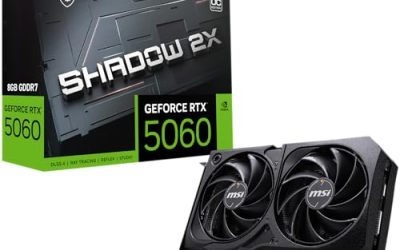
The best graphics card for video decoding in 2026 is the Intel Arc B580 for most people, because it hardware-decodes AV1, HEVC, VP9 and H.264 and handles several simultaneous transcodes while still being a capable 1080p/1440p gaming card. If you only need decode and encode on a budget in a small or low-power PC, the Arc A310 does the job at 75W or less. If your workflow is Premiere Pro or DaVinci Resolve, an RTX 50-series card such as the RTX 5060 Ti 16GB is the safer pick.
Note on the search term: “decoding graphics card” almost always means a GPU with a strong hardware video decoder (NVDEC on Nvidia, VCN on AMD, Quick Sync/Xe media engine on Intel) for 4K playback, Plex or Jellyfin transcoding, or editing compressed footage. Raw gaming speed matters very little for that, so this guide ranks cards by codec support, idle power and software support first.
As an Amazon Associate we earn from qualifying purchases at no extra cost to you.


Our Top Picks
 ASUS Dual GeForce RTX 5060 Ti 16GB GDDR7RTX5060Ti|OC|16GB9 x 4.7 x 2 inches1.4 poundsCheck on Amazon


Top 3 picks at a glance
Quick comparison of the picks
| Pick | Best for | Key specs (per manufacturer spec sheets) | Typical price range |
|---|---|---|---|
| Intel Arc B580 | Best overall: media server plus gaming | 12GB, 192-bit, about 190W board power, AV1/HEVC/VP9/H.264 decode, AV1 encode | $250–$320 |
| Intel Arc A310 | Best budget / low-profile | 4GB, 64-bit, about 75W, AV1 decode and encode, low-profile variants exist | $90–$150 |
| GeForce RTX 5060 Ti 16GB | Best for video editing and Nvidia software | 16GB GDDR7, 128-bit, about 180W, 9th-gen NVENC / NVDEC with 4:2:2 support | $430–$550 |
| Radeon RX 9060 XT 16GB | Best AMD pick for gaming plus 4K playback | 16GB, 128-bit, roughly 160–180W, AV1/HEVC/VP9/H.264 decode | $350–$450 |
| Radeon RX 9070 XT | Best high-end gaming card that also decodes well | 16GB, 256-bit, about 300W, current-gen VCN media engine | $600–$750 |
Best overall: Intel Arc B580
Intel’s Quick Sync lineage gives Arc a very mature media engine, and Plex, Jellyfin, Emby, FFmpeg and HandBrake all support it. The B580’s 12GB of VRAM leaves room for multiple 4K streams and tone-mapping, and it also plays modern games at 1080p and 1440p. Trade-off: it needs a recent platform with Resizable BAR for best gaming performance, and idle power can run higher than you want in a 24/7 server unless you set ASPM correctly in the BIOS and OS.
Best budget and low-profile: Intel Arc A310
The A310 is a small card with the same style of media engine, including AV1 hardware encode, which many older Nvidia cards lack. It suits a NAS, mini-ITX box or an old office PC with a weak power supply. Trade-off: 4GB of VRAM and a 64-bit bus make it a poor gaming card, and it can struggle with many simultaneous 4K HDR tone-mapped streams. The slightly larger Arc A380 is a reasonable step up if you can find one.
Best for video editing: GeForce RTX 5060 Ti 16GB
Blackwell GeForce cards decode AV1, HEVC and H.264, and per Nvidia’s spec sheet they add hardware decode for 4:2:2 chroma footage, the format many mirrorless cameras record. Premiere Pro and DaVinci Resolve use NVDEC and NVENC extensively, so timeline scrubbing of long-GOP footage is much smoother. The 16GB model avoids VRAM pressure in heavy timelines. Trade-off: it costs more than Arc for the same Plex streaming result, and Nvidia has historically capped concurrent encode sessions on GeForce cards (decode is not capped the same way), so check current driver limits before building a many-user server.
Best AMD pick: Radeon RX 9060 XT 16GB
RDNA 4 cards decode all mainstream codecs, including AV1, and their encode quality is much improved over older Radeon generations. Choose the 16GB version if you play games at 1440p and also watch 4K HDR. Trade-off: software support for AMD hardware transcoding in media servers is patchier than Intel or Nvidia, and Windows driver behavior varies by application.
Best high-end all-rounder: Radeon RX 9070 XT
This is for people who want a 4K gaming card first and strong decoding as a bonus. It will handle any single 8K or 4K stream you throw at it. Trade-off: at about 300W it is a heavy, expensive way to decode video; do not buy it for a server.
How to choose: the numbers that matter
1. Codec support (the real gate)
Check that the card decodes the codecs you actually use. AV1 decode arrived in Nvidia RTX 30-series, AMD RDNA 2 and Intel Arc. Anything older (GTX 10/16 series, RX 500/Vega) cannot hardware-decode AV1, so YouTube and some streaming services fall back to the CPU. HEVC 10-bit and VP9 are covered by nearly everything made since 2017–2018.
2. Worked example: idle power cost for a 24/7 server
Decode work is short-lived; idle draw is what you pay for. Assume $0.15 per kWh:
- 10W idle: 10 × 24 × 365 = 87.6 kWh, about $13 per year.
- 25W idle: 219 kWh, about $33 per year.
- 45W idle: 394 kWh, about $59 per year.
Over four years, a card idling 35W higher than an alternative costs roughly $80 extra, which can exceed the price gap between a budget and a mid-range card. Idle figures vary by driver, monitor setup and BIOS power settings, so treat them as typical ranges rather than guarantees.
3. Worked example: bandwidth and VRAM for multiple 4K streams
A 4K UHD remux often runs 60–80 Mbps. If three family members stream three different remuxes, the server must send 3 × 70 = 210 Mbps, which already exceeds Fast Ethernet and strains weak Wi-Fi, so wire it with gigabit. Decoding one 10-bit 4K frame in P010 format takes about 3840 × 2160 × 1.5 × 2 bytes ≈ 25 MB. A decoder holding 8–16 reference frames plus tone-mapping buffers lands around 300–600 MB per stream in practice. Four simultaneous 4K transcodes might therefore use 1.5–2.5 GB of VRAM, so even a 4GB card copes, while a 12GB or 16GB card has room left for gaming. Actual usage varies by software.
4. Decision matrix
| Your situation | Choose | Why |
|---|---|---|
| Plex/Jellyfin server, 1–3 transcodes, small case | Arc A310 or A380 | Low power, AV1 support, excellent software support |
| Plex server that also games at 1080p/1440p | Arc B580 | 12GB, strong media engine, reasonable price |
| Editing 4:2:2 mirrorless footage | RTX 5060 Ti 16GB or higher | Hardware 4:2:2 decode in Nvidia’s current generation |
| Only watching 4K/YouTube on a desktop | Your integrated GPU or any card from the last 5 years | Modern iGPUs decode AV1/HEVC fine |
| Linux server | Intel Arc or AMD | Open-source driver stacks with VA-API support |
| Weak PSU (under 300W), no PCIe power connector | Arc A310/A380 or a slot-powered low-profile card | Draws power from the slot only |
5. Do not overpay for gaming performance
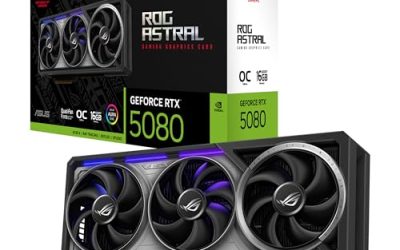
A decode engine is usually the same on a card’s entire product family. An RTX 5060-class card and an RTX 5080 do not differ much in single-stream decode ability; the higher models mostly add more engines or throughput for many streams. Buy the cheapest card that has the codecs and VRAM you need.
Frequently Asked Questions
Do I need a dedicated GPU just to decode video?
Usually not. Recent Intel and AMD CPUs with integrated graphics decode 4K HEVC and AV1 well, and Plex or Jellyfin can use them. A discrete card makes sense when you need more simultaneous transcodes, a CPU without integrated graphics, or editing and gaming on the same machine.
Is AV1 decode support important in 2026?
Yes. YouTube, Netflix and many other services serve AV1 for some content, and a card without AV1 hardware decode pushes the work onto the CPU, which can cause stutter on weaker systems. Nvidia RTX 30 series and newer, AMD RDNA 2 and newer, and Intel Arc all support it.
Is decoding the same as encoding?
No. Decoding unpacks compressed video for playback or editing, while encoding compresses it for streaming or export. A transcode in Plex uses both, so check both when buying. For example, older RTX 30-series cards decode AV1 but cannot encode it.
Which brand is best for Plex or Jellyfin hardware transcoding?
Intel Arc and Intel integrated graphics are widely preferred because of mature Quick Sync support and low power. Nvidia is also well supported and powerful, though GeForce cards have had concurrent encode session limits. AMD works, but has historically had less consistent media-server support.
How much VRAM do I need for decoding?
Decode alone needs little: a few hundred megabytes per 4K stream. The larger VRAM requirements come from gaming, editing timelines with effects, or tone-mapping several HDR streams. For a dedicated media server, 4–6GB is enough; for editing or gaming, 12–16GB is a safer target.
Can an old GPU still handle 4K HEVC playback?
Many can. GPUs from around 2016–2017 onwards, such as Nvidia’s GTX 10 series, decode HEVC 10-bit in hardware. They lack AV1 decode, however, so the CPU handles those streams, which is why a newer low-cost card is a worthwhile upgrade.
Related guides
More from Amazon
Programs that pair well with the guide above. Offers and eligibility are set by Amazon and may change.
A free business account with business pricing and bulk-buying tools for work, shop or home office.
Create a business accountFree shipping on eligible items, Prime Video and more. Eligible new members can start with a free trial.
Start a Prime free trialAudiobooks and podcasts to listen to on the go. Eligible new members can start with a free trial.
Try Audible freeAd-free music streaming. Eligible new subscribers can start with a free trial.
Try Music Unlimited freeAs an Amazon Associate we earn from qualifying purchases.