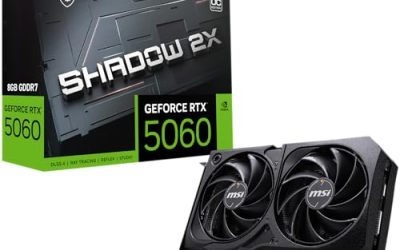
If you searched for the best graphics cards for a “7870”, you most likely own a Radeon HD 7870 and want to know what to buy next. The best all-round replacement in 2026 is a current 16GB mid-range card such as the Radeon RX 9060 XT 16GB. The best value pick is the Intel Arc B580, provided your motherboard supports Resizable BAR. If your power supply is old and weak, the GeForce RTX 5060 or RTX 3050 6GB are the safer choices. (If you meant the newer Radeon RX 7800 XT or RX 7700 XT, those are covered in the “newer 7000 series” FAQ below.)
As an Amazon Associate we earn from qualifying purchases at no extra cost to you.


Our Top Picks


Top 3 picks at a glance
Why the HD 7870 is past its limit
Per AMD’s original spec sheet, the HD 7870 GHz Edition is a 2012 GCN 1.0 card with 1280 stream processors, 2GB of GDDR5 on a 256-bit bus (about 154 GB/s) and a 175W board power. AMD has since moved it to legacy driver status, so there are no new game-ready drivers. Several recent titles also require hardware features that GCN 1.0 lacks, such as newer DirectX 12 feature levels and hardware ray tracing. Two gigabytes of VRAM is the other wall. Many modern games want 6-8GB at 1080p with medium or higher textures.
In practice, expect a modern entry-level card to deliver several times the frame rate of an HD 7870 in current games. The exact gain varies with game, settings, CPU and patch. The card you pick matters less than whether the rest of your system can feed it.
Quick comparison of the best replacements
| Pick | Best for | Key specs (per manufacturer) | Price range |
|---|---|---|---|
| Radeon RX 9060 XT 16GB | Best overall 1080p/1440p upgrade | 16GB GDDR6, 128-bit, about 322 GB/s, roughly 180W board power, PCIe 5.0 x16 | Mid-range |
| Intel Arc B580 | Best value | 12GB GDDR6, 192-bit, about 456 GB/s, roughly 190W, PCIe 4.0 x8 | Budget to lower mid-range |
| GeForce RTX 5060 | Best for older PSUs and Nvidia features | 8GB GDDR7, 128-bit, about 448 GB/s, roughly 145W, PCIe 5.0 x8 | Mid-range |
| GeForce RTX 3050 6GB | Cheapest, no extra power cable | 6GB GDDR6, 96-bit, about 168 GB/s, roughly 70W, PCIe 4.0 x8 | Budget |
| GeForce RTX 5070 | 1440p and high-refresh gaming | 12GB GDDR7, 192-bit, about 672 GB/s, roughly 250W | Upper mid-range |
Best overall: Radeon RX 9060 XT 16GB
This is the card for someone who wants to buy once and not think about VRAM again. Sixteen gigabytes is eight times what the HD 7870 had, so texture-heavy games will not stutter at 1080p or 1440p. AMD’s FSR 4 upscaling is supported on this generation. The main trade-off is that it is a PCIe 5.0 card with a 128-bit bus, and the cheaper 8GB version of the same GPU undercuts the reason to buy it. Get the 16GB model. Board power varies by partner design, so check the connector on the specific model.
Best value: Intel Arc B580
The Arc B580 offers 12GB of VRAM and a 192-bit bus, which gives it more memory bandwidth than the RX 9060 XT. It usually costs less too. The catch is platform support. Intel’s guidance is that Arc cards need Resizable BAR (ReBAR) enabled, and many older boards from the HD 7870 era lack it. Without it, performance can drop sharply. The B580 is also an x8 card, so a PCIe 3.0 slot is workable but a PCIe 2.0 slot is not ideal. The cut-down Arc B570 (10GB) is a cheaper step down with the same platform requirements.
Best for older power supplies: GeForce RTX 5060
At roughly 145W, the RTX 5060 draws less than the HD 7870 did, and it typically needs a single 8-pin connector. That makes it the easiest upgrade on a modest 450-500W unit. It also brings DLSS and good ray-tracing support. The trade-off is 8GB of VRAM, which is fine for most 1080p play but is the first limit you will hit in the newest games at high texture settings. Like the B580 it is an x8 card, so it prefers PCIe 3.0 or newer.
Best cheapest option: GeForce RTX 3050 6GB
This card is the “just get me off the HD 7870” choice. Its board power of about 70W means many models need no power cable at all, which helps in small office-style cases with a weak PSU. It supports modern DirectX 12 features and DLSS. The trade-off is the 96-bit bus (about 168 GB/s, barely above the old card) and only 6GB of VRAM. You will be using medium settings in new games. Consider it only if your budget is very tight.
Best for 1440p: GeForce RTX 5070
If your monitor is 1440p or you want 100+ FPS in esports and many AAA games, the RTX 5070 is the step up. It has 12GB of GDDR7 and a 672 GB/s bus. At roughly 250W it needs a quality 600W-class PSU, and it will be held back by any CPU older than about 2018 in many games. Do not pair it with a Sandy Bridge or FX-era processor.
Used cards worth a look
On the used market, the Radeon RX 6600 (8GB, about 130W) and GeForce RTX 3060 12GB are the classic HD 7870 successors. They offer fine 1080p performance for little money. The risks are mining wear, no warranty, and shorter driver support horizons. Buy only from sellers with a return window and test the card under load for at least an hour.
Worked example: will your old PSU handle it?
Take a typical HD 7870-era build: a quad-core CPU with a 77W TDP (such as an Ivy Bridge i5), about 40W for board and RAM, and about 30W for drives and fans, so 70W for everything except the CPU and GPU. Add the GPU board power, then multiply by 1.3 for headroom, since PSUs run best below roughly 75% load and degrade with age.
| GPU | CPU | Rest | GPU power | Total peak | With 30% headroom | Suggested PSU |
|---|---|---|---|---|---|---|
| HD 7870 (old) | 77W | 70W | 175W | 322W | about 419W | 450W |
| RTX 3050 6GB | 77W | 70W | 70W | 217W | about 282W | 350-450W |
| RTX 5060 | 77W | 70W | 145W | 292W | about 380W | 450-500W |
| RX 9060 XT 16GB | 77W | 70W | 180W | 327W | about 425W | 500W |
| Arc B580 | 77W | 70W | 190W | 337W | about 438W | 500W |
| RTX 5070 | 77W | 70W | 250W | 397W | about 516W | 600W |
The calculation shows why wattage alone is rarely the problem. A PSU that ran an HD 7870 usually has enough capacity for a 145-190W card. The real constraints are connectors (the HD 7870 used two 6-pin plugs, while most new cards want one 8-pin, so check for a 6+2 pin lead) and PSU age. A unit over 8-10 years old, or from a no-name brand, is worth replacing regardless.
How to choose: a compatibility matrix
| Your situation | Best choice | Why |
|---|---|---|
| Pre-2013 CPU (Sandy Bridge, early FX), PCIe 2.0, no ReBAR | RTX 3050 6GB or a cheaper used card | CPU caps the gain, and Arc needs ReBAR |
| 2015-2018 CPU (Skylake to Coffee Lake or Ryzen 1000-2000), PCIe 3.0 | RTX 5060 or RX 9060 XT | Good balance, and ReBAR may need a BIOS update |
| Ryzen 3000+ or Intel 10th gen+, ReBAR available | Arc B580 or RX 9060 XT 16GB | Platform is modern enough to use the full card |
| Weak PSU (under 450W) or no spare 8-pin | RTX 3050 6GB or RTX 5060 | Lowest power draw |
| 1440p or 144Hz target | RTX 5070 with a newer CPU | Needs bandwidth and CPU headroom |
Check these four things before buying
- VRAM: choose at least 8GB, and 12-16GB if you plan to keep the card for years.
- Slot and CPU: x8 cards on a PCIe 3.0 slot lose a little; on PCIe 2.0 they lose more. A very old CPU will hold back any of these cards.
- UEFI and ReBAR: enable Above 4G Decoding and Resizable BAR in the BIOS if available. This is essential for Arc.
- Physical fit and connectors: measure case clearance, and check PSU leads for the 8-pin or 12V-2×6 plug a model requires.
Frequently Asked Questions
Can I still use a Radeon HD 7870 in 2026?
It still displays a desktop and runs older and lightweight games, but it is on legacy drivers and has only 2GB of VRAM. Many recent releases will not launch or will run poorly on it. It is a stopgap, not a gaming card for new titles.
Will a new graphics card work with my old motherboard?
Usually yes, because PCIe is backward compatible. Performance is the issue, not function. PCIe 3.0 is fine for most current cards, while PCIe 2.0 and very old CPUs can limit them. Windows 10 or 11 in UEFI mode is the safest setup, and Arc cards in particular need ReBAR.
Is the HD 7870 the same as the newer 7000 series cards?
No. The HD 7870 is a 2012 GCN 1.0 card. The Radeon RX 7700 XT and RX 7800 XT are 2023 RDNA 3 cards with 12GB and 16GB of VRAM. They are far faster and, if you want AMD, still a good alternative to the picks above, especially when found at a discount.
Is 8GB of VRAM enough when upgrading from 2GB?
For 1080p gaming it is generally adequate, but newer games at high texture settings can exceed it. If you want to avoid turning settings down in two or three years, 12GB or 16GB is the safer buy.
Do I need a new power supply?
Not necessarily. If your PSU is a decent unit of 450W or more and has the right connector, a card of 145-190W is generally fine. Replace it if it is very old, an unbranded model, or lacks an 8-pin PCIe lead and an adapter is your only option.
Should I upgrade the CPU first?
If you still have a dual-core or early quad-core CPU from the HD 7870 era, a new graphics card will help but will leave performance on the table. In that case, consider a platform upgrade together with the GPU, or choose the lower-cost options so the money goes toward a CPU and motherboard.
Related guides
More from Amazon
Programs that pair well with the guide above. Offers and eligibility are set by Amazon and may change.
A free business account with business pricing and bulk-buying tools for work, shop or home office.
Create a business accountFree shipping on eligible items, Prime Video and more. Eligible new members can start with a free trial.
Start a Prime free trialAudiobooks and podcasts to listen to on the go. Eligible new members can start with a free trial.
Try Audible freeAd-free music streaming. Eligible new subscribers can start with a free trial.
Try Music Unlimited freeAs an Amazon Associate we earn from qualifying purchases.