The best graphics card you can buy for most gamers in 2026 is the GeForce RTX 5070 Ti or the Radeon RX 9070 XT: both have 16GB of VRAM and a 256-bit memory bus, and both handle 1440p at high refresh rates and entry-level 4K. For tighter budgets, the Radeon RX 9060 XT 16GB and GeForce RTX 5060 Ti 16GB are the sensible picks. Only buy the RTX 5090 if you want maximum 4K performance and have a 1000W-class power supply.
“Available” matters as much as “best” this year. Street prices for current cards have often drifted above launch list prices, and stock changes week to week. This guide therefore ranks by spec class and decision criteria, so you can pick the right tier and then buy whichever model of that card is fairly priced when you shop.
As an Amazon Associate we earn from qualifying purchases at no extra cost to you.


Our Top Picks

Top 3 picks at a glance
Quick comparison of the best current graphics cards
| Pick | Best for | Key specs (per manufacturer spec sheets) | Price tier |
|---|---|---|---|
| GeForce RTX 5070 Ti | Best overall, 1440p ultra and 4K | 16GB GDDR7, 256-bit, about 300W board power | Upper mid-range to premium |
| Radeon RX 9070 XT | Best raster value at 1440p/4K | 16GB GDDR6, 256-bit, about 304W | Upper mid-range |
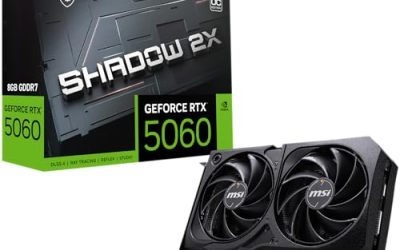
| GeForce RTX 5060 Ti 16GB | Best mid-range 1080p/1440p | 16GB GDDR7, 128-bit, about 180W | Mid-range |
| Radeon RX 9060 XT 16GB | Best value 1440p with big VRAM | 16GB GDDR6, 128-bit, about 160W | Mid-range |
| Intel Arc B580 | Best budget card | 12GB GDDR6, 192-bit, about 190W | Budget |
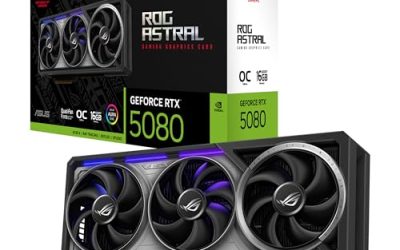
| GeForce RTX 5080 | High-refresh 4K without flagship cost | 16GB GDDR7, 256-bit, about 360W | Premium |
| GeForce RTX 5090 | No-compromise 4K, AI and creator work | 32GB GDDR7, 512-bit, about 575W | Flagship |
Best overall: GeForce RTX 5070 Ti
The RTX 5070 Ti hits the point where 16GB of VRAM, a wide bus and a manageable 300W power draw come together. It runs 1440p at maximum settings comfortably, and with DLSS upscaling and frame generation it is a workable 4K card. NVIDIA’s feature set (DLSS 4, strong ray tracing, mature creator-app support) is the main reason to choose it over AMD.
Trade-off: It costs noticeably more than the RX 9070 XT in most markets, and frame generation adds latency, so it is not a substitute for real rendering speed in competitive shooters.
Best raster value: Radeon RX 9070 XT
AMD’s RX 9070 XT matches the 5070 Ti class in many rasterized games and carries the same 16GB of memory. FSR 4 closed much of the upscaling-quality gap with DLSS on this generation. The non-XT RX 9070 is a slightly cooler, cheaper alternative if you can find it near the XT’s price.
Trade-off: Path-traced games and some creator or AI workloads still favor NVIDIA, and FSR 4 support depends on the game.
Best mid-range: RTX 5060 Ti 16GB or RX 9060 XT 16GB
Both cards target 1080p at high refresh and 1440p at high settings. Make sure you buy the 16GB version: both lines also had 8GB variants, and 8GB is now the weak link in newer games at 1440p. The RTX 5060 Ti has the better feature set and lower power needs for its class. The RX 9060 XT usually undercuts it and uses a bit less power.
Trade-off: The 128-bit bus limits bandwidth, so these cards fall off faster at 4K than the 256-bit models.
Best budget: Intel Arc B580
The Arc B580 gives 12GB of VRAM at a budget price, more than competing 8GB cards. It is a good fit for 1080p and light 1440p gaming. The smaller Arc B570 (10GB) is cheaper if stock is thin.
Trade-off: Intel’s drivers have improved, but older DirectX 11 titles and CPU overhead on slower processors can cost performance. Check that your motherboard supports Resizable BAR, which Arc cards rely on.
Best for high-refresh 4K: GeForce RTX 5080
The RTX 5080 is faster than the 5070 Ti by a meaningful but not enormous margin, with the same 16GB capacity and a higher-bandwidth memory configuration. It makes sense if you target 4K at 90 to 120 FPS with upscaling and do not want the cost and power of a 5090.
Trade-off: It costs far more than the 5070 Ti for a modest gain, and 16GB may become tight for heavily modded 4K games.
Best no-compromise: GeForce RTX 5090
With 32GB of GDDR7 on a 512-bit bus, the RTX 5090 is the only card that handles 4K maximum settings with ray tracing without leaning on upscaling. It is also the best consumer card for local AI models and 3D rendering.
Trade-off: It draws about 575W, needs a robust 12V-2×6 cable connection and a large case, and sits in a price class beyond most gaming budgets.
How to choose: match the card to your screen
| Your situation | Choose | Why |
|---|---|---|
| 1080p, 60-144Hz, tight budget | Arc B580 or RTX 5060 class | Enough power; 12GB or more avoids texture stutter |
| 1440p, 144Hz+ | RTX 5060 Ti 16GB, RX 9060 XT 16GB, or step up to RX 9070 | 16GB handles high texture settings |
| 1440p ultra with ray tracing | RTX 5070 Ti | Better RT and DLSS support |
| 4K, 60-90 FPS with upscaling | RX 9070 XT or RTX 5070 Ti | 256-bit bus and 16GB |
| 4K at 120Hz, max settings | RTX 5080 or 5090 | Highest bandwidth and raw throughput |
| Local AI, video and 3D work | RTX 5090, or a 16GB NVIDIA card | VRAM capacity and CUDA support |
Worked example: memory bandwidth
Bandwidth in GB/s equals bus width divided by 8, multiplied by the memory data rate in Gbps. It shows why two 16GB cards can behave very differently at 4K, using figures from the manufacturers’ spec sheets:
- RTX 5060 Ti: 128 ÷ 8 × 28 = 448 GB/s
- Arc B580: 192 ÷ 8 × 19 = 456 GB/s
- RX 9070 XT: 256 ÷ 8 × 20 = 640 GB/s
- RTX 5070 Ti: 256 ÷ 8 × 28 = 896 GB/s
- RTX 5080: 256 ÷ 8 × 30 = 960 GB/s
- RTX 5090: 512 ÷ 8 × 28 = 1,792 GB/s
A 5060 Ti has half the bandwidth of the 5070 Ti, which is why it is a 1080p/1440p card even though it also has 16GB. AMD and NVIDIA use caches differently, so compare bandwidth within a vendor first.
VRAM rules of thumb by resolution
- 1080p: 8GB works for older and esports titles, but 12GB is safer for new releases at high textures.
- 1440p: 12GB is the practical minimum; 16GB gives headroom for ray tracing and texture packs.
- 4K: 16GB is the floor for high settings; 24GB or more only matters with mods, path tracing or creator workloads.
The framebuffer itself is tiny (a 3840×2160 buffer at 4 bytes per pixel is about 33MB). Textures, geometry, ray-tracing structures and frame-generation buffers use the rest, so game settings matter more than resolution alone.
Worked example: power supply sizing
Add the card’s board power, your CPU’s peak draw and about 100W for the board, drives, fans and RAM, then add 30% headroom for transient spikes.
- RTX 5070 Ti build: 300W + 125W CPU + 100W = 525W, × 1.3 ≈ 680W. A quality 750W unit fits, which matches NVIDIA’s recommendation of around 750W.
- RX 9060 XT build: 160W + 105W + 100W = 365W, × 1.3 ≈ 475W. A 550W unit is adequate.
- RTX 5090 build: 575W + 170W + 100W = 845W, × 1.2 ≈ 1,015W. A 1000W or larger ATX 3.x unit is the practical choice.
Look for a power supply with a native 12V-2×6 connector for higher-end cards. If an adapter is needed, seat it fully and avoid tight bends near the plug.
Before you buy: availability and compatibility checks
- Check card length and slot width. Many 5070 Ti and 9070 XT models are over 300mm and occupy three slots. Compare against your case’s maximum GPU length.
- Confirm the VRAM version. The 5060 Ti and 9060 XT each have 8GB and 16GB variants with nearly identical names.
- Pair it with a suitable CPU. A fast card on an older quad-core or six-core chip will be CPU-limited at 1080p and 1440p.
- Compare against the list price. If a card is selling well above the manufacturer’s suggested price, consider the next tier down or the closest alternative from the other brand.
- Consider used only with care. Previous-generation cards can offer value, but check the warranty, mining history and cooler condition.
As a rough guide, published reviews of cards in these classes typically show 1440p high-settings results from about 60 to 100+ FPS for the mid-range tier and 100 to 160+ FPS for the upper tier in many modern games. These numbers vary a great deal with game, settings, CPU and driver patch, so check recent benchmarks for the titles you play.
Frequently Asked Questions
What is the best graphics card for most people in 2026?
For most gamers, the RTX 5070 Ti or RX 9070 XT is the best balance. Both have 16GB of VRAM and strong 1440p performance, and both can run 4K with upscaling. If your budget is lower, step down to a 16GB RTX 5060 Ti or RX 9060 XT.
Is 8GB of VRAM enough in 2026?
It still works for esports titles and older games at 1080p, but recent releases at high textures can exceed it and cause stutter or forced texture downgrades. For a new purchase, 12GB is the practical minimum and 16GB is the safer choice, especially at 1440p.
Should I choose NVIDIA, AMD or Intel?
Pick NVIDIA if you want the best ray tracing, DLSS support and creator or AI software compatibility. Pick AMD for stronger value in rasterized games and generous VRAM at each price tier. Intel’s Arc cards suit tight budgets at 1080p, provided your system supports Resizable BAR.
Do I need a new power supply for a new graphics card?
Not always. Compare your current unit’s wattage and connectors with the card’s recommended power supply rating. Cards around 300W usually need 750W, while 150W to 180W cards run on 550W to 600W. High-end NVIDIA cards need a 12V-2×6 connector, either native or through the bundled adapter.
Is the RTX 5090 worth it for gaming?
Only if you play at 4K with maximum settings and ray tracing, or use the card for AI and rendering. For 1440p, the 5090 offers little visible benefit over the 5070 Ti or 9070 XT and costs far more to buy and run.
Should I buy a used graphics card instead?
A used previous-generation card can be good value when new stock is overpriced. However, you lose the warranty and the newest features like DLSS 4 frame generation on RTX 50-series cards. Look for sellers who offer returns, and check temperatures under load after you buy.
Related guides
More from Amazon
Programs that pair well with the guide above. Offers and eligibility are set by Amazon and may change.
A free business account with business pricing and bulk-buying tools for work, shop or home office.
Create a business accountFree shipping on eligible items, Prime Video and more. Eligible new members can start with a free trial.
Start a Prime free trialAudiobooks and podcasts to listen to on the go. Eligible new members can start with a free trial.
Try Audible freeAd-free music streaming. Eligible new subscribers can start with a free trial.
Try Music Unlimited freeAs an Amazon Associate we earn from qualifying purchases.