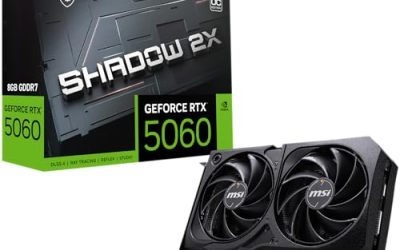
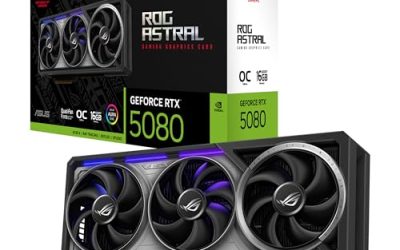
The best graphics card for Star Wars Battlefront in 2026 is the Radeon RX 9060 XT 16GB or GeForce RTX 5060 Ti for 1080p and 1440p high-refresh play, and the Radeon RX 9070 or GeForce RTX 5070 if you want 1440p at 165 Hz or more with headroom. Both Battlefront (2015) and Battlefront II (2017) are old Frostbite titles with no ray tracing, so any current mid-range card runs them well. Spend more only for 4K or very high refresh rates, and make sure your CPU can keep up in 40-player and 64-player modes.
As an Amazon Associate we earn from qualifying purchases at no extra cost to you.


Our Top Picks
 ASUS TUF Gaming GeForce RTX 5070 Ti 16GBRTX5070Ti|OC|Black|Standard13 x 5.5 x 2.5 inches3.6 poundsCheck on Amazon
 msi Gaming RTX 3050 Ventus 2X 6G OC1.7" x 4.3" x 7.4"7.4 x 4.3 x 0.1 inches1.3 poundsCheck on Amazon


Top 3 picks at a glance
What Battlefront actually asks of a GPU
Battlefront (2015) and Battlefront II (2017) were built for hardware from the GTX 1060 era. Per EA’s published requirements, the recommended GPUs for Battlefront II were a GeForce GTX 1060 or Radeon RX 480 class card. Every card in this guide is several times faster than that. The result is a game that is easy to run at 1080p and 1440p, where the real limits are often your CPU and your monitor, not the GPU.
The game has no ray tracing and no DLSS or FSR in its own menu, so the features that make new cards expensive do little here. Raw rasterization speed, a sensible amount of VRAM and driver stability matter most. Frame-rate figures below are rough ranges that vary with settings, resolution, CPU, map, player count and patch.
The 2024 Battlefront Classic Collection (the original 2004 and 2005 games) is far lighter still. Any card here, or even an integrated GPU, handles it.
Quick comparison of the picks
| Pick | Best for | Key specs (per manufacturer) | Price tier |
|---|---|---|---|
| Intel Arc B580 | Best budget, 1080p | 12 GB GDDR6, 192-bit, about 190 W | Budget |
| Radeon RX 9060 XT 16GB | Best value, 1080p to 1440p | 16 GB GDDR6, 128-bit, about 160 W | Lower mid-range |
| GeForce RTX 5060 Ti 16GB | Best for NVIDIA features and streaming | 16 GB GDDR7, 128-bit, about 180 W | Mid-range |
| Radeon RX 9070 | Best for 1440p high refresh | 16 GB GDDR6, 256-bit, about 220 W | Upper mid-range |
| GeForce RTX 5070 | Best overall for 1440p | 12 GB GDDR7, 192-bit, about 250 W | Upper mid-range |
| Radeon RX 9070 XT | Best for 4K and 1440p ultrawide | 16 GB GDDR6, 256-bit, about 304 W | High-end |
| GeForce RTX 5070 Ti / RTX 5080 | 4K at very high refresh, other games too | 16 GB GDDR7, 256-bit, about 300 W / 360 W | Premium |
Best overall: GeForce RTX 5070
The RTX 5070 suits players on a 1440p monitor at 144 to 240 Hz who also play newer games. Its 12 GB of GDDR7 is plenty for Battlefront, whose VRAM use stays well within that at 1440p. Expect Battlefront II at ultra to land well above 144 fps in most scenes at 1440p, usually in the 150 to 250 fps range depending on CPU and map. Its trade-off is that 12 GB can become a limit in newer games at 4K with maximum textures, and you pay for features Battlefront never uses.
Best value: Radeon RX 9060 XT 16GB
This is the pick for a 1080p or 1440p monitor and a sensible budget. It has 16 GB, which is far more than Battlefront needs but helps with newer titles, and it draws about 160 W, so a modest power supply works. Its trade-off is a 128-bit memory bus, which can fall behind the RX 9070 at 4K. Avoid the 8 GB version of this and similar cards unless it is clearly cheaper, since 8 GB is the weak point in current games even though Battlefront is fine with it.
Best budget: Intel Arc B580
The Arc B580 gives 12 GB of VRAM on a 192-bit bus at a budget price. Battlefront II at 1080p ultra should run comfortably above 100 fps on a decent CPU. The trade-off is driver maturity and CPU overhead. Arc cards can lose more performance than Radeon or GeForce cards when paired with an older processor, so check that you have a recent 6-core or better CPU. Resizable BAR should also be enabled in your BIOS, since Intel recommends it for Arc.
Best for streaming and NVIDIA features: GeForce RTX 5060 Ti
The RTX 5060 Ti suits you if you stream or record while playing and want NVIDIA’s NVENC encoder. Choose the 16 GB version over the 8 GB version. Both run Battlefront at 1080p and 1440p with ease, but only the 16 GB card is comfortable for newer games. The trade-off is that it costs more than the RX 9060 XT for similar Battlefront frame rates.
Best for 4K and ultrawide: Radeon RX 9070 XT or RTX 5070 Ti
At 4K, Battlefront II is the one scenario where a high-end card pays off. The RX 9070 XT or RTX 5070 Ti can typically hold 100 fps or more at 4K ultra in published results for similar Frostbite games, but this varies by scene. The RTX 5080 and RTX 5090 are only worth it if you also play demanding modern games or drive a 4K 240 Hz display. For Battlefront alone they are overkill.
How to choose: a worked example with resolution and refresh
GPU load in a game like this scales roughly with pixel count when the GPU is the bottleneck. These are the pixel counts:
| Resolution | Pixels per frame | Load vs 1080p | Pixels per second at 144 Hz |
|---|---|---|---|
| 1920×1080 | 2.07 million | 1.0× | about 299 million |
| 2560×1440 | 3.69 million | 1.78× | about 531 million |
| 3440×1440 | 4.95 million | 2.39× | about 713 million |
| 3840×2160 | 8.29 million | 4.0× | about 1,194 million |
Suppose a card reaches about 240 fps at 1080p in your favorite map. At 1440p expect roughly 240 ÷ 1.78 ≈ 135 fps, and at 4K roughly 240 ÷ 4 ≈ 60 fps. Real scaling is usually a bit kinder than this, but it is a safe way to estimate. So if you want 4K at 120 fps or more, you need a card with about twice the 1080p throughput of a 4K 60 fps card.
Decision matrix
| Your situation | Choose | Why |
|---|---|---|
| 1080p, 60 to 144 Hz, tight budget | Arc B580 or RX 9060 XT | Far above Battlefront’s needs, with room for other games |
| 1440p, 144 Hz | RX 9060 XT 16GB or RTX 5060 Ti 16GB | About 1.8× the pixels of 1080p, still well within reach |
| 1440p, 240 Hz | RTX 5070 or RX 9070 | Extra headroom to reach very high frame rates |
| Ultrawide 3440×1440 | RX 9070 or higher | About 2.4× the pixel load of 1080p |
| 4K, 60 to 120 Hz | RX 9070 XT or RTX 5070 Ti | About 4× the load of 1080p |
| Older CPU (4 cores, pre-2018) | Spend less on the GPU, upgrade the CPU first | Large multiplayer modes are CPU-sensitive |
Power budget example
Take an RTX 5070 at about 250 W, a mid-range CPU drawing about 120 W under gaming load, and about 75 W for the motherboard, RAM, drives and fans. That totals about 445 W. Adding roughly 30 percent headroom for transient spikes gives around 580 W, so a quality 650 W power supply is sensible. An RX 9070 XT at about 304 W brings the total to about 500 W and suggests an 700 to 750 W unit. Check the card maker’s recommended PSU rating, which may be higher than this.
Settings that matter once you have the card
- Resolution scale 100%: lowering it makes the image soft, and your new GPU does not need it.
- Frame rate limit at 3 below your refresh rate (for example 141 on a 144 Hz display) with a variable refresh display: this keeps you inside the G-Sync or FreeSync range and cuts input lag.
- Anti-aliasing: TAA is the default and looks clean. Turn off Motion Blur and Chromatic Aberration if you prefer a sharper image.
- DirectX 11 vs 12: many players report DirectX 11 as the more stable choice on Battlefront II. Switch to 12 only if you see a clear benefit on your system.
- Driver updates: use a current driver from NVIDIA, AMD or Intel, since older Frostbite games can reveal driver quirks.
Used cards: a cheaper route
Because Battlefront is light, an older card can be enough. Cards such as the GeForce RTX 3060 or Radeon RX 6600 class are plenty for 1080p at high settings. Check the seller’s return policy and the card’s condition, and avoid very old cards that no longer get driver updates.
Frequently Asked Questions
What is the minimum graphics card for Star Wars Battlefront II?
EA’s published minimum was a GeForce GTX 660 or Radeon HD 7850 class card, and the recommended spec was around a GTX 1060 or RX 480. In 2026 that means most entry-level cards from the last several years will run it at 1080p. For a smooth 60 fps at high settings, a recent budget card is more than enough.
Do I need 16 GB of VRAM for Battlefront?
No. Battlefront and Battlefront II run comfortably on 6 to 8 GB at 1080p and 1440p. The 12 GB and 16 GB cards in this guide are recommended for other, newer games you may play, not because Battlefront needs them.
Does Battlefront II support DLSS, FSR or ray tracing?
No, the game does not offer ray tracing, and it does not include DLSS or FSR in its own settings. You can use driver-level options such as image sharpening or NVIDIA’s DSR and AMD’s VSR for supersampling if you have spare GPU power. These are optional and not essential.
Why is my frame rate low even with a good GPU?
Check CPU usage during large modes such as Galactic Assault. If one or two cores are near 100 percent while the GPU sits well below full load, the CPU is the limit. Also confirm that your game runs on the dedicated GPU rather than integrated graphics, and that the frame limit is set correctly.
Is an RTX 5090 worth it for Battlefront?
Not for Battlefront alone. Even at 4K, the game does not need a top-end card, and a mid-range to high-end GPU will hit high frame rates. The RTX 5090 only makes sense if you also play very demanding modern titles at 4K with maximum settings.
AMD, NVIDIA or Intel for Battlefront?
All three run the game well. Radeon often offers the best value for pure rasterization, GeForce adds strong streaming and software features, and Intel Arc is a budget option that works best with a newer CPU. Choose by budget, monitor resolution and the other games you play.
Related guides
More from Amazon
Programs that pair well with the guide above. Offers and eligibility are set by Amazon and may change.
A free business account with business pricing and bulk-buying tools for work, shop or home office.
Create a business accountFree shipping on eligible items, Prime Video and more. Eligible new members can start with a free trial.
Start a Prime free trialAudiobooks and podcasts to listen to on the go. Eligible new members can start with a free trial.
Try Audible freeAd-free music streaming. Eligible new subscribers can start with a free trial.
Try Music Unlimited freeAs an Amazon Associate we earn from qualifying purchases.