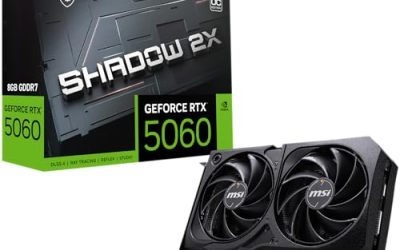
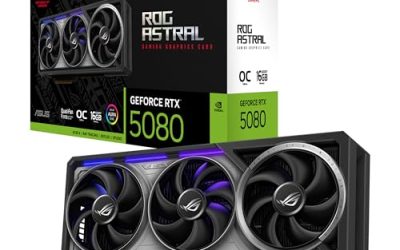
The best esports graphics card for most players in 2026 is the GeForce RTX 5060 Ti or Radeon RX 9060 XT for 1080p and 1440p at 240 Hz or higher, and the RTX 5070 or RX 9070 if you want 1440p at 360 Hz with headroom for heavier titles like Fortnite and Apex Legends. In competitive games, frame-time consistency, 1% lows and low input latency matter more than peak FPS or ray tracing. Most esports titles are also limited by the CPU first, so a very expensive GPU often adds nothing.
Quick comparison of the best esports GPU picks
| Pick | Best for | Key specs (per manufacturer spec sheets) | Price tier |
|---|---|---|---|
| Intel Arc B580 | Budget 1080p, 144-240 Hz in lighter games | 12 GB GDDR6, 192-bit, about 190 W | Budget |
| GeForce RTX 5060 | Budget-to-mid 1080p at 240 Hz, small PSUs | 8 GB GDDR7, 128-bit, about 145 W | Budget / lower mid-range |
| Radeon RX 9060 XT 16 GB | Best value 1080p/1440p all-rounder | 16 GB GDDR6, 128-bit, about 182 W | Mid-range |
| GeForce RTX 5060 Ti 16 GB | Best overall for 1440p esports with Reflex | 16 GB GDDR7, 128-bit, about 180 W | Mid-range |
| GeForce RTX 5070 | 1440p at 360 Hz, demanding battle royales | 12 GB GDDR7, 192-bit, about 250 W | Upper mid-range |
| Radeon RX 9070 | 1440p high refresh with large VRAM headroom | 16 GB GDDR6, 256-bit, about 220 W | Upper mid-range |
| GeForce RTX 5080 | 4K or 1440p 480 Hz+ monitors, streaming and gaming on one PC | 16 GB GDDR7, 256-bit, about 360 W | Premium |
Board-partner cards vary in clocks and power limits, so check the exact model’s listing. Street prices also move, so compare tiers rather than chasing a single number.
What actually matters for esports
1. CPU-bound games shrink the GPU’s role
CS2, Valorant, League of Legends and Dota 2 lean heavily on single-thread CPU speed and memory latency. If your CPU already caps you at a certain frame rate, a faster GPU won’t raise it. Spend on the CPU or RAM first if your GPU usage sits well below 90% at competitive settings.
2. 1% lows beat average FPS
A card that averages 400 FPS but dips to 150 during smokes and multi-player fights feels worse than a steadier one. Published reviews that list 1% lows are more useful than average-FPS charts.
3. Latency features
NVIDIA Reflex is supported in many popular esports titles and reduces the render queue. AMD’s Anti-Lag 2 does something similar in games that integrate it, such as CS2. Frame generation is a poor fit for competitive play because it adds latency and the extra frames aren’t real game-state updates. Leave it off and use native rendering.
4. VRAM is rarely the bottleneck
At competitive low-to-medium settings, 1080p esports titles typically use a few gigabytes of VRAM, with usage varying by game, texture setting and patch. 8 GB is enough for pure esports at 1080p. 12-16 GB makes sense at 1440p, with high-resolution textures, or if you also play newer single-player games.
Worked calculation: how much GPU does your monitor need?
Every refresh rate gives your system a fixed time to finish each frame. To hit 360 FPS, the CPU and GPU together must produce a frame every 2.78 ms (1000 ÷ 360). At 240 Hz the budget is 4.17 ms, and at 540 Hz it is 1.85 ms.
Pixel throughput is a rough guide to GPU load, since the pixel count scales with resolution:
| Target | Pixels per frame | Frame-time budget | Pixels per second |
|---|---|---|---|
| 1080p at 240 Hz | 2,073,600 | 4.17 ms | about 498 million |
| 1080p at 360 Hz | 2,073,600 | 2.78 ms | about 746 million |
| 1440p at 240 Hz | 3,686,400 | 4.17 ms | about 885 million |
| 1440p at 360 Hz | 3,686,400 | 2.78 ms | about 1.33 billion |
| 4K at 240 Hz | 8,294,400 | 4.17 ms | about 1.99 billion |
Moving from 1080p to 1440p at the same refresh rate demands 1.78 times the pixels (3,686,400 ÷ 2,073,600). A card that holds 360 FPS at 1080p in a given game will often land near 200-250 FPS at 1440p, assuming the GPU is the limit. Real scaling is not perfectly linear, so treat this as a planning estimate. A 1440p 360 Hz monitor therefore needs roughly 1.8 times the GPU of a 1080p 360 Hz monitor in GPU-limited games, which is why the upper mid-range cards suit that target.
Best overall: GeForce RTX 5060 Ti 16 GB
This is the safest all-round choice if you play a mix of competitive titles and want 1440p headroom. It pairs 16 GB of GDDR7 with a modest power draw of about 180 W. It also brings Reflex support and NVIDIA’s broad driver and streaming (NVENC) ecosystem. Published reviews generally show it handling CS2, Valorant, Overwatch 2 and League well above 240 FPS at competitive settings, with results depending on CPU and map. The trade-off is the narrow 128-bit memory bus, which is not a problem at 1080p but gives less advantage over cheaper cards in some heavier 1440p scenes. Note that an 8 GB variant also exists, so check the listing before buying.
Best value: Radeon RX 9060 XT 16 GB
AMD’s card offers the same 16 GB capacity at a similar power level (about 182 W) and is typically priced competitively against the RTX 5060 Ti. It suits players who want a strong 1080p or 1440p card without paying for NVIDIA features, and Anti-Lag 2 works in supported games. The trade-off is that Reflex-only titles don’t benefit from it, and some streamers prefer NVIDIA’s encoder. As with the NVIDIA card, an 8 GB version exists, so make sure you’re buying the 16 GB model if you want longevity.
Best budget: GeForce RTX 5060 or Intel Arc B580
For a 1080p 144-240 Hz monitor, the RTX 5060 is a solid budget pick. Its 145 W draw works on modest power supplies and in compact cases. The Intel Arc B580 offers 12 GB of VRAM for less money, which helps in heavier titles. Its trade-off is that driver and CPU overhead behavior can vary by game, and older DirectX 9/11 esports titles have historically been less consistent on Intel. Check recent reviews for your exact games, especially CS2 and Valorant 1% lows, before choosing it. The RTX 5060’s trade-off is its 8 GB of VRAM, which is fine for esports but limits you in newer single-player games.
Best for 1440p at 360 Hz: GeForce RTX 5070 or Radeon RX 9070
These two suit the player who wants high refresh at 1440p and also plays demanding games like Fortnite (with high-detail settings), Apex Legends or Marvel Rivals. The RTX 5070 has 12 GB of GDDR7 at about 250 W. The RX 9070 has 16 GB of GDDR6 on a 256-bit bus at about 220 W. Choose the RTX 5070 for Reflex and NVIDIA’s software tools. Choose the RX 9070 if you want more VRAM at similar money. The trade-off for both is that they cost noticeably more than the 60-class cards, and in lighter esports titles they can leave a CPU bottleneck, so the extra spend only pays off if your monitor and CPU can use it.
Best premium: GeForce RTX 5080
The RTX 5080 (16 GB GDDR7, 256-bit, about 360 W) makes sense for 4K high-refresh monitors, 480 Hz-plus 1440p panels, or a single PC that games and streams at once. It is overkill for CS2 on a 1080p monitor. The trade-offs are the price, the higher power draw and a larger cooler. Players who care mainly about competitive FPS usually get more from a faster CPU than from this card.
Decision matrix: your situation to your card
| Your setup | Primary games | Recommended class |
|---|---|---|
| 1080p, 144-240 Hz | Valorant, CS2, League, Dota 2 | Arc B580 or RTX 5060 |
| 1080p, 360 Hz+ | CS2, Valorant, Overwatch 2 | RTX 5060 Ti or RX 9060 XT (and invest in the CPU) |
| 1440p, 240 Hz | Mixed esports, Apex, Fortnite | RTX 5060 Ti 16 GB or RX 9060 XT 16 GB |
| 1440p, 360 Hz | Heavier shooters, battle royales | RTX 5070 or RX 9070 |
| 4K or 480 Hz+, plus streaming | Everything | RTX 5080 class |
| Small case or 450-550 W PSU | Any | RTX 5060 or RTX 5060 Ti |
Power budget example
A simple estimate: GPU board power + CPU peak power + about 75 W for the motherboard, RAM, drives and fans, then add roughly 30% headroom for transients. For an RTX 5060 Ti (180 W) with a 120 W CPU: 180 + 120 + 75 = 375 W, and 375 × 1.3 is about 488 W, so a quality 550 W PSU fits. For an RTX 5070 (250 W) with a 150 W CPU: 250 + 150 + 75 = 475 W, times 1.3 is about 618 W, so aim for 650-750 W. For an RTX 5080 (360 W) with a 150 W CPU: 360 + 150 + 75 = 585 W, times 1.3 is about 760 W, so choose 850 W. Always check the manufacturer’s recommended PSU wattage for the specific card.
Settings that matter more than a GPU upgrade
- Turn on Reflex or Anti-Lag 2 where the game supports it, to cut the render queue.
- Use low shadows and effects: they reduce GPU load and visual clutter, which also helps spotting enemies.
- Enable the monitor’s full refresh rate in the OS and the driver, since many monitors default to 60 Hz after setup.
- Cap FPS just below refresh only if your game feels uneven with adaptive sync. Uncapped is usually lower latency.
- Update the BIOS and enable XMP/EXPO for memory, which helps CPU-bound titles like CS2.
Frequently Asked Questions
Is 8 GB of VRAM enough for esports in 2026?
Yes, for 1080p competitive play at low-to-medium settings, 8 GB is enough in games like CS2, Valorant, League and Overwatch 2. It starts to limit you at 1440p with high textures or in newer single-player games. If you want one card to last several years, 12-16 GB is safer.
Should I buy NVIDIA, AMD or Intel for esports?
NVIDIA offers Reflex in many competitive titles and strong streaming tools. AMD often gives more VRAM for the money and Anti-Lag 2 in supported games. Intel’s Arc B-series cards are good for budget builds but check recent reviews for your specific games, since performance can vary more by title.
Do I need a high-end GPU for CS2 or Valorant?
Usually not. These games depend heavily on CPU speed, so a mid-range GPU paired with a fast CPU and tuned memory often performs as well as a premium card. A high-end GPU only helps if you play at 1440p or 4K on a high-refresh monitor.
Is frame generation good for competitive games?
No, not for most competitive play. Frame generation adds latency, and the generated frames don’t reflect new game input. Use native rendering with Reflex or Anti-Lag 2 and keep frame generation for single-player titles.
What GPU do I need for a 360 Hz monitor?
At 1080p, a mid-range card such as the RTX 5060 Ti or RX 9060 XT can reach 360 FPS in lighter esports titles, provided your CPU keeps up. At 1440p, an RTX 5070 or RX 9070 gives more headroom. Results depend on the game, settings, CPU and patch, so check published reviews for your specific titles.
Is it better to upgrade my CPU or GPU for more FPS?
Check your GPU usage while playing. If it stays well below 90% and one CPU core is near its limit, upgrade the CPU or memory first. If the GPU sits at 95-100% at your target resolution, a faster card will help.
Related guides
More from Amazon
Programs that pair well with the guide above. Offers and eligibility are set by Amazon and may change.
A free business account with business pricing and bulk-buying tools for work, shop or home office.
Create a business accountFree shipping on eligible items, Prime Video and more. Eligible new members can start with a free trial.
Start a Prime free trialAudiobooks and podcasts to listen to on the go. Eligible new members can start with a free trial.
Try Audible freeAd-free music streaming. Eligible new subscribers can start with a free trial.
Try Music Unlimited freeAs an Amazon Associate we earn from qualifying purchases.