For gaming, the best “dual graphics card” setup in 2026 is one fast single card, such as an RTX 5080 or RTX 5090, because SLI and CrossFire are effectively dead. Two GPUs only make sense for specific jobs: splitting AI models across 32GB of combined VRAM, running a second card for frame generation with Lossless Scaling, or adding render and encode throughput in a workstation. This guide maps your situation to the right choice, with the power and PCIe numbers you need.
As an Amazon Associate we earn from qualifying purchases at no extra cost to you.


Top 3 picks at a glance
Why classic dual-GPU gaming is no longer a buying option
NVIDIA stopped adding new SLI driver profiles after January 1, 2021, per its own announcement. The RTX 3090 was the last GeForce card with an NVLink connector, and the RTX 40 and 50 series have none. AMD retired CrossFire years ago. DirectX 12 and Vulkan do allow explicit multi-GPU, but developers must build it into the game, and almost none do.
The result is that a second card in a gaming PC usually adds nothing to frame rate. It can also add stutter, heat and a larger power bill. Two cheaper cards almost never beat one faster card at the same total price.
Quick comparison of the picks
| Pick | Best for | Key specs (per manufacturer) | Typical price |
|---|---|---|---|
| GeForce RTX 5090 (single card) | Best overall: the “dual-GPU” speed without the dual-GPU problems | 32GB GDDR7, 512-bit, 575W board power | $2,000–$3,000+ |
| GeForce RTX 5070 Ti or Radeon RX 9070 XT | Best value high-end single card | 16GB each; 300W and 304W | $700–$950 |
| 2× GeForce RTX 5060 Ti 16GB | Best two-card setup for local AI | 2×16GB GDDR7, 180W each, PCIe 5.0 x8 interface | $850–$1,100 for the pair |
| RTX 5080 plus a ~160W-class second card | Best for Lossless Scaling dual-GPU frame generation | 16GB main card at 360W, plus a Radeon RX 9060 XT 16GB-class second card | $1,200–$1,600 combined |
| 2× RTX PRO 6000 Blackwell Max-Q | Best for professional rendering and large-model work | 96GB each, 300W each, blower-style workstation cooling | $7,000–$10,000+ each |
Best overall: one GeForce RTX 5090
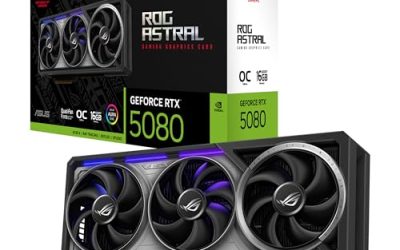
If you were considering two cards to chase 4K at high refresh rates, the RTX 5090 is the practical answer. It has 32GB of GDDR7 on a 512-bit bus, and it needs no game-side multi-GPU support. Every game and every driver update treats it as one device.
Trade-off: the 575W board power demands a high-quality ATX 3.x PSU with a 12V-2×6 connector and a large case. Prices also sit far above the rest of the lineup.
Best value: RTX 5070 Ti or Radeon RX 9070 XT
Both carry 16GB of VRAM and handle 1440p at high settings. Both are also capable at 4K with upscaling. The RTX 5070 Ti suits you if you want DLSS and NVIDIA’s encoder. The RX 9070 XT suits you if you want the lowest price per frame in rasterized games. Exact frame rates vary with game, settings, CPU and driver patch, so check recent published reviews for your titles.
Trade-off: neither has VRAM headroom for the largest local AI models. For those you need more total memory, which is where a pair of cards comes in.
Best two-card setup for local AI: 2× RTX 5060 Ti 16GB
Two 16GB cards give you 32GB across the pair for roughly the price of one RTX 5080. Inference tools such as llama.cpp can split a model’s layers across both GPUs. That lets you run a quantized model that would not fit in 16GB. Total draw is 2 × 180W = 360W, about the same as a single RTX 5080.
Trade-off: the memory is not pooled like NVLink would pool it. Each card holds its own layers, and data crosses PCIe between them. Token speed is therefore lower than on a single 32GB card, and training workloads suffer more than inference. You also need a motherboard with a second x8 or x4 slot, and a case with two cards’ worth of airflow.
Best for frame generation: RTX 5080 plus a small second GPU
The one gaming use of two cards that works today is the dual-GPU mode in the Lossless Scaling app on Steam. The strong card renders the game. A cheaper second card generates the extra frames, which takes the load off the main GPU. The two cards can even come from different vendors. Pair an RTX 5080 with a 16GB Radeon RX 9060 XT-class card and you get a modest-power helper.
Trade-off: it adds latency like any frame generation, it needs manual setup in Windows graphics settings, and it is not supported by game developers. It suits single-player games, not competitive shooters.
Worked example: is PCIe fast enough for the second card?
One 4K frame at 8 bits per channel with alpha is 3840 × 2160 × 4 bytes ≈ 33.2MB. At a 60 fps base frame rate, the render card sends about 33.2MB × 60 ≈ 2.0GB/s to the second card. If you instead feed the second card at 120 fps, the transfer is about 4.0GB/s. A PCIe 4.0 x4 link gives roughly 7.9GB/s, so even a chipset-attached slot has headroom. An x8 slot with 15.8GB/s has far more. HDR and 16-bit formats raise this, but the link is rarely the limit. The usual real bottleneck is the second GPU’s own compute.
Best for workstations: 2× RTX PRO 6000 Blackwell Max-Q
For professional rendering, simulation or very large model inference, two 96GB workstation cards give 192GB across the pair. The Max-Q variant is rated at 300W each, so two of them draw 600W together. That is about the same as one RTX 5090, and the blower-style cooling suits tightly packed cases. This is a business purchase, not a gaming one.
Trade-off: the price is several times that of a gaming flagship, and the cards are tuned for stability and memory rather than gaming value.
How to choose: a decision matrix
| Your situation | Best choice | Why |
|---|---|---|
| Gaming only, 1440p high refresh | One RTX 5070 Ti or RX 9070 XT | 16GB VRAM, no multi-GPU dependency |
| Gaming only, 4K maximum settings | One RTX 5090 (or RTX 5080 with upscaling) | Everything works in every game |
| Local LLMs above 16GB models | 2× RTX 5060 Ti 16GB, or one 32GB card | Layer splitting across both cards’ VRAM |
| Want smoother single-player 4K via frame generation | Main GPU + 150–180W second GPU | Offloads frame generation from the render card |
| Streaming and gaming on one PC | One modern card with a hardware encoder | The NVENC or AV1 encoder in current cards is separate from the shader load |
| Pro rendering, large datasets | 2× workstation cards | Memory capacity and driver certification |
Check your power budget before buying a second card
Add up the board power of every part, then add headroom for transient spikes. A reasonable rule is to multiply the sum by about 1.2.
- RTX 5090 alone: 575W GPU + 170W high-end CPU + 100W for board, drives, fans and RAM = 845W. With 20% headroom, about 1,010W. A 1,000–1,200W PSU is the right class.
- RTX 5080 + 160W second card: 360 + 160 + 150 + 100 = 770W. With 20% headroom, about 925W. A 1,000W PSU fits.
- 2× RTX 5060 Ti 16GB: 360 + 150 + 100 = 610W. With 20% headroom, about 730W. An 850W PSU is comfortable.
Also check physical fit. A dual-slot spacing between cards is the minimum, and many large gaming cards are 2.5 to 3.5 slots thick. A card sitting directly over another one will throttle both.
Motherboard and PCIe checklist
- Second slot lanes: mainstream CPUs offer 16 PCIe lanes to graphics. Boards that split them give x8/x8. Others run the second slot at x4 from the chipset. For AI layer splitting, x4 works but loads models more slowly. For frame generation, x4 is enough, as the 4K calculation above shows.
- Slot spacing: look for at least three slots between the two x16-length slots.
- Case airflow: you want front intake fans plus a rear and top exhaust. The lower card often sits close to the PSU shroud.
- Monitor connection: in a Lossless Scaling dual-GPU setup, connect the display to the second card, and select the render card for the game in Windows graphics settings.
Frequently Asked Questions
Does SLI or CrossFire still work in 2026?
Not in any meaningful way. NVIDIA ended SLI profile updates after January 1, 2021, and current RTX cards have no NVLink connector. AMD has also retired CrossFire. Only a handful of old or specially coded DirectX 12 titles can use two cards at all.
Will two GPUs double my frame rate?
No. In nearly all modern games a second card adds zero rendering performance. The only common gaming gain comes from using the second card for frame generation in a tool like Lossless Scaling, which creates extra frames instead of rendering them.
Can I mix an AMD and an NVIDIA card in one PC?
Yes, Windows can run cards from different vendors at the same time. This is how many Lossless Scaling dual-GPU builds work. You need to keep both drivers installed and assign the render GPU per application in Windows graphics settings. It will not combine their power in games that don’t support it.
Do two 16GB cards act like one 32GB card for AI?
Not exactly. Tools like llama.cpp can split a model across both cards so it fits in the combined 32GB, but each card only holds its own share. Data moves over PCIe between them, so it is slower than a single 32GB card such as the RTX 5090.
Does “dual fan” or “dual slot” mean a dual graphics card?
No. “Dual fan” means the cooler has two fans, and “dual slot” means the card occupies two expansion slots in the case. Both describe one GPU. Dual-slot cards are useful if you plan to install a second card, because they leave room between the two.
Are there any single cards with two GPUs on them left to buy?
Cards like the GTX 690 or Radeon Pro Duo were made in the SLI and CrossFire era. They only appear on the used market, and they rely on the same multi-GPU support that games no longer provide. A single modern card is faster in almost every current title.
Related guides
More from Amazon
Programs that pair well with the guide above. Offers and eligibility are set by Amazon and may change.
A free business account with business pricing and bulk-buying tools for work, shop or home office.
Create a business accountFree shipping on eligible items, Prime Video and more. Eligible new members can start with a free trial.
Start a Prime free trialAudiobooks and podcasts to listen to on the go. Eligible new members can start with a free trial.
Try Audible freeAd-free music streaming. Eligible new subscribers can start with a free trial.
Try Music Unlimited freeAs an Amazon Associate we earn from qualifying purchases.