Our Short List of 3

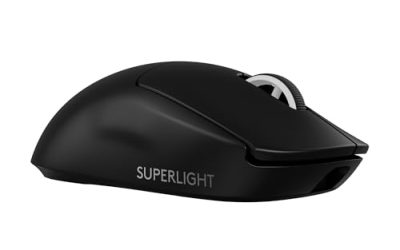
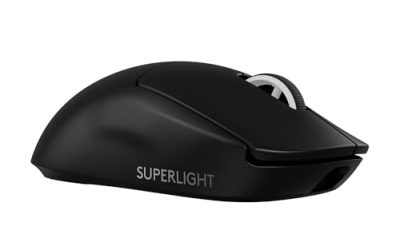
- Best for: Competitive shooter players using claw or fingertip grip who want a light, simple layout.
- Wireless gaming mouse for PC and Mac, black finish
- 60g pro-grade lightweight design from the listing title
- 44k DPI sensor
- 8kHz report rate

- Best for: Right-handed palm-grip players with medium to large hands who play shooters and action games.
- Wireless gaming mouse, black finish
- 63g ultra lightweight design
- Focus Pro 30K optical sensor
- Fast optical switches Gen-3

- Best for: Players who want many remappable controls, a free-spin wheel, and RGB in one PC mouse.
- Wireless gaming mouse for PC and Mac, black finish
- LIGHTSPEED wireless connection
- LIGHTFORCE hybrid switches
- LIGHTSYNC RGB lighting
All 4 Picks at a Glance
| Product | Specs | Action |
|---|---|---|
| Logitech G PRO X Superlight 2 Wireless Gaming Mouse – Black |
| Check price on Amazon |
| Razer DeathAdder V3 Pro Wireless Gaming Mouse – Black |
| Check price on Amazon |
| Logitech G502 X Plus Wireless Gaming Mouse – Black |
| Check price on Amazon |
 SteelSeries Rival 3 Wireless Gen 2 Gaming Mouse – Black |
| Check price on Amazon |
Choosing a gaming mouse for a PC is less about chasing the highest DPI number and more about a shape decision you will live with for thousands of flicks. A symmetrical shell that suits a fingertip grip can feel cramped in a relaxed palm grip, an ergonomic hump that supports a large hand can block quick lifts, and a button-heavy body that helps in an MMO can simply add weight you never use in a shooter.
This guide is for competitive shooter players, ergonomic-shape fans, MMO and strategy players who need extra controls, and everyday PC gamers who want one wireless mouse for play and work. The picks below were chosen from product names and specifications on the Amazon pages, comparing weight, sensor, polling, battery claims, and button layout.
Our Top Picks
- Logitech G Pro X Superlight 2 Lightspeed WirelessClassic1.57 x 2.5 x 4.92 inches0.1 poundsCheck on Amazon
- Razer DeathAdder V3 Pro Wireless Gaming Mouse1000 Hz5.01 x 2.65 x 1.69 inches0.1 poundsCheck on Amazon
- Logitech G502 X Plus Wireless RGB Gaming MouseWireless7.1 x 4.6 x 2.7 inches0.84 poundsCheck on Amazon
Top 3 picks at a glance
Quick Picks
As an Amazon Associate we earn from qualifying purchases
| Product | Best for | Key spec from title |
|---|---|---|
| Logitech G PRO X Superlight 2 Wireless Gaming Mouse – Black | Competitive fingertip and claw players | 60g, 44k DPI sensor, 8kHz report rate |
| Razer DeathAdder V3 Pro Wireless Gaming Mouse – Black | Palm-grip players with medium to large hands | 63g, Focus Pro 30K optical sensor, 90 hr battery |
| Logitech G502 X Plus Wireless Gaming Mouse – Black | Players who want many buttons and RGB | HERO 25K sensor, 13 buttons, LIGHTSYNC RGB |
| Razer Viper V3 Pro Wireless Esports Gaming Mouse – Black | Symmetrical-shape esports players | 54g, 8K polling, 35K DPI optical sensor |
| SteelSeries Rival 3 Wireless Gen 2 Gaming Mouse – Black | PC and laptop switching on one mouse | 2.4GHz and Bluetooth, 18000 DPI TrueMove Air sensor |
How to Choose
Shape and grip before sensor numbers
Start with how your hand actually rests. Palm-grip players who lay the whole hand on the shell usually prefer a taller ergonomic hump, such as the DeathAdder shape, because it fills the palm and reduces finger drag. Claw and fingertip players, who steer mostly with the fingers and wrist, often prefer a flatter symmetrical shell that is easier to lift and reposition. Hand size matters just as much: a long mouse can force a small hand into an stretched reach for the front side buttons, while a short mouse can leave a large hand unsupported. Check the listed length against your current mouse before switching families.
Weight and what it changes in play
Weight changes how a mouse starts and stops, not just how heavy it feels on a desk. The listings here span from the Viper V3 Pro at 54g to the button-heavy G502 X Plus, which carries extra controls, a dual-mode wheel, and RGB hardware. Lighter shells suit low-sensitivity shooter players who make long, repeated swipes and lift often. A heavier, feature-rich shell can feel steadier for slower tracking, desktop work, and games where extra buttons matter more than repeated flicks. Neither end is automatically better; match the weight to the games and the sensitivity you already use, rather than assuming lighter always wins.
Wireless mode, polling, and battery claims
All five picks use a dedicated wireless connection for gaming, but they differ in extras. The Rival 3 Wireless Gen 2 adds Bluetooth alongside 2.4GHz, which helps when moving between a gaming PC and a laptop. Polling claims also differ: the Superlight 2 lists an 8kHz report rate and the Viper V3 Pro lists 8K polling, while other listings focus on their standard wireless link. Battery figures in the titles range up to 90 hours on the DeathAdder V3 Pro and 95 hours on the Viper V3 Pro, with the G502 X Plus listing under 130 hours. Treat those as manufacturer figures under their own conditions, and expect RGB and higher polling to shorten real intervals between charges.
Buttons, wheel, and software needs
Count the controls your games genuinely map. Shooter players often need only two reliable side buttons, so extra buttons add weight without benefit. MMO, MOBA, and strategy players may use the G502 X Plus layout, which the listing puts at 13 buttons, plus a scroll wheel that toggles between free spin and ratcheting and tilts for two more inputs. Also check what needs configuring: DPI steps, polling, lighting, and button remaps are handled in each brand’s PC software, so confirm your operating system is supported and decide whether you want a mouse that stores your main settings on board for use on another PC.
The 5 Best Options
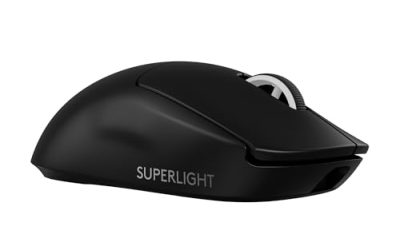
Logitech G PRO X Superlight 2 Wireless Gaming Mouse – Black
- Best for: Competitive shooter players using claw or fingertip grip who want a light, simple layout.
- Wireless gaming mouse for PC and Mac, black finish
- 60g pro-grade lightweight design from the listing title
- 44k DPI sensor
- 8kHz report rate
Competitive shooter players using claw or fingertip grip who want a light, simple layout.
There is no Bluetooth in the title specs, so check your plan for connecting to a second machine, and confirm the symmetrical shape suits your hand size.
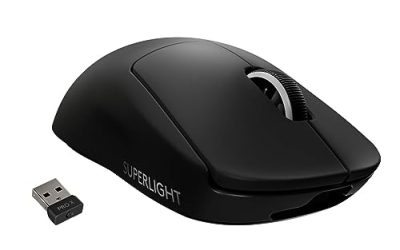
This is the straightforward competitive pick for PC players who want a light symmetrical shell without a long list of extras. The listing puts the weight at 60g, pairs it with a 44k DPI sensor and an 8kHz report rate, and keeps the layout to five programmable buttons, which suits claw and fingertip players who map only a couple of actions to the side. USB-C charging is listed, so the same cable type used by many modern keyboards and headsets can top it up. Players who want Bluetooth or a tilt wheel should look elsewhere in this guide.
Razer DeathAdder V3 Pro Wireless Gaming Mouse – Black
- Best for: Right-handed palm-grip players with medium to large hands who play shooters and action games.
- Wireless gaming mouse, black finish
- 63g ultra lightweight design
- Focus Pro 30K optical sensor
- Fast optical switches Gen-3
Right-handed palm-grip players with medium to large hands who play shooters and action games.
The ergonomic shell is right-handed only, and higher polling accessories are separate, so check exactly what connection hardware is included in the listing you choose.
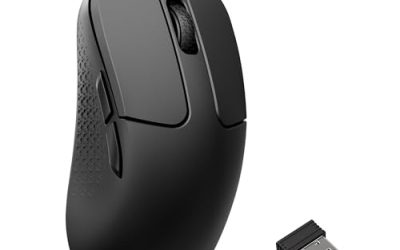
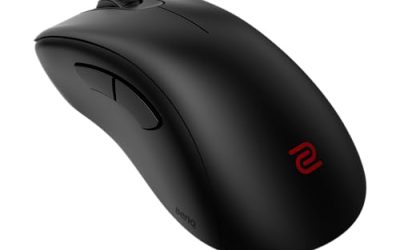
The DeathAdder V3 Pro is the ergonomic alternative to the symmetrical esports shells in this list. Its listing describes a 63g lightweight design with a Focus Pro 30K optical sensor, fast optical switches in generation three, HyperSpeed wireless, and five programmable buttons, with battery life listed up to 90 hours. That combination fits right-handed palm and relaxed claw players, especially those with medium to large hands who found flatter mice tiring over long sessions. The shape is the reason to buy it, so hand fit matters more here than the sensor headline.
Logitech G502 X Plus Wireless Gaming Mouse – Black
- Best for: Players who want many remappable controls, a free-spin wheel, and RGB in one PC mouse.
- Wireless gaming mouse for PC and Mac, black finish
- LIGHTSPEED wireless connection
- LIGHTFORCE hybrid switches
- LIGHTSYNC RGB lighting
Players who want many remappable controls, a free-spin wheel, and RGB in one PC mouse.
Check the weight and button reach against your hand, and note that the wireless charging system named in the listing is a separate accessory rather than the standard charging method.
The G502 X Plus takes the opposite approach from the ultralight models: it trades low weight for controls. The listing names LIGHTSPEED wireless, LIGHTFORCE switches, LIGHTSYNC RGB, and a HERO 25K sensor, and a fuller title version lists 13 buttons, an infinite scroll toggle, battery life under 130 hours, USB-C, and PowerPlay wireless charging capability. That suits PC players who split time between shooters, MMOs, strategy games, and desktop work, and who actually remap the extra inputs. If you play only tactical shooters with two side buttons in use, this layout is more than you need.
Razer Viper V3 Pro Wireless Esports Gaming Mouse – Black
The Viper V3 Pro is the lightest pick here, with the listing stating 54g in black, a symmetrical shape, 8K polling, a 35K DPI optical sensor, Gen-3 optical switches, eight programmable buttons or controls, and battery life up to 95 hours. That spec sheet points to fingertip and claw players who want a symmetrical shell that moves with very little effort and who play at low sensitivity with frequent lifts. Compared with the Superlight 2, the decision comes down to shell shape and button feel rather than headline sensor numbers, since both target the same competitive PC audience.
Specs
- Wireless esports gaming mouse, symmetrical shape, black finish
- 54g lightweight design
- 8K polling
- 35K DPI optical sensor
- Gen-3 optical switches
- 8 programmable buttons listed
- Up to 95 hr battery life listed
Best for: Fingertip and claw players who want the lightest symmetrical option in this guide.
Watch out for: Confirm the symmetrical shape and side button placement suit your grip, and check whether the polling setting you plan to use changes the battery interval you expect.
ASIN: B0CW25XR5R
SteelSeries Rival 3 Wireless Gen 2 Gaming Mouse – Black
- Best for: PC gamers who also connect to a laptop and want one mouse with both gaming wireless and Bluetooth.
- Wireless gaming mouse, black finish
- 2.4GHz and Bluetooth connectivity
- 18000 DPI TrueMove Air optical sensor
- 60 million click durability listed
PC gamers who also connect to a laptop and want one mouse with both gaming wireless and Bluetooth.
Check the battery type and life details on the listing for this generation, and confirm the shell size suits your hand, since versatility does not fix a poor grip fit.
The Rival 3 Wireless Gen 2 is the flexibility pick for a PC setup that is not only about competitive play. Its listing names both 2.4GHz and Bluetooth, an 18000 DPI TrueMove Air optical sensor, 60 million click durability, a lightweight build, and 100 percent PTFE feet. The dual connection makes it practical for moving between a gaming desktop and a work or study laptop without swapping mice, while the 2.4GHz mode covers gaming sessions. It does not chase the extreme polling or sensor figures of the esports models above, so its appeal is versatility rather than maximum specification.
Which One Fits Your Situation
You play competitive shooters most nights
Pick between the Viper V3 Pro and the G PRO X Superlight 2 by shape, not by DPI. Both listings target light, fast play with high polling, but the shells differ, and the one that matches your claw or fingertip grip will track more consistently. The Viper lists the lower weight at 54g, while the Superlight 2 lists 60g, five programmable buttons, and USB-C charging.
Your hand aches with flat, small mice
The DeathAdder V3 Pro is the natural starting point because its ergonomic form is built to support a relaxed palm grip, particularly for medium to large right hands. The listing still keeps weight at 63g and battery up to 90 hours, so choosing support does not mean accepting a heavy mouse. Left-handed players should instead choose a symmetrical model from this guide.
You play MMOs and also work at the same desk
The G502 X Plus fits this mixed use best. Its 13 listed buttons and dual-mode scroll wheel serve game abilities, shortcuts, and long-document scrolling, while LIGHTSYNC RGB and LIGHTSPEED wireless keep it in a gaming setup. Accept the extra size as the trade for those controls, and only choose it if you will genuinely map the additional buttons.
You switch between a gaming PC and a laptop
The Rival 3 Wireless Gen 2 is built for that pattern, with 2.4GHz for the gaming PC and Bluetooth for the second machine listed in its title. That avoids unplugging a receiver every time you move. Its sensor and durability figures are listed plainly, at 18000 DPI and 60 million clicks, which is plenty for mixed gaming and everyday use across two computers.
Common Mistakes
- Buying by maximum DPI alone, when shape, grip, and weight have a far larger effect on everyday aim and comfort.
- Choosing an ergonomic right-handed shell for a left-handed player, or a small symmetrical shell for a large palm grip, without checking dimensions.
- Picking a button-heavy mouse for a single shooter and never mapping the extra controls, while carrying the added size in every match.
- Assuming a high polling setting is free, without checking how it affects battery intervals and whether the included receiver supports it.
- Ignoring the second-machine connection, then discovering the mouse has no Bluetooth for a laptop after the gaming PC setup is finished.
Frequently Asked Questions
Is a lighter gaming mouse always better for PC shooters?
No. A lighter shell can help with long swipes and frequent lifts, which is why the listings here include models at 54g, 60g, and 63g, but control still depends on grip and sensitivity. Some players track more steadily with a larger ergonomic shape. Choose the lightest mouse whose shape you can hold comfortably for a full session.
Does a higher DPI sensor make aim more accurate?
Not by itself. The listings range from 18000 DPI to 44k DPI, yet most players use a far lower in-game setting. A modern optical sensor mainly needs to track cleanly at the sensitivity you actually use. Shape, feet condition, mousepad surface, and stable wireless connection influence the result more than a headline maximum you will never select.
Should a PC gaming mouse have Bluetooth as well as 2.4GHz?
Only if you regularly use a second computer. A dedicated 2.4GHz connection is the gaming link on these picks, while Bluetooth, listed on the Rival 3 Wireless Gen 2, is convenient for a laptop or office machine. If the mouse never leaves one gaming PC, Bluetooth adds little, and an esports model without it may suit you better.
How many programmable buttons do most PC gamers need?
Most shooter and action players need two side buttons plus the standard clicks and wheel. Players of MMOs, strategy games, and simulation titles can use more, which is where the G502 X Plus and its 13 listed buttons make sense. Count the abilities and shortcuts you already press awkwardly on a keyboard before paying for extra mouse controls.
Related guides
More from Amazon
Programs that pair well with the guide above. Offers and eligibility are set by Amazon and may change.
A free business account with business pricing and bulk-buying tools for work, shop or home office.
Create a business accountFree shipping on eligible items, Prime Video and more. Eligible new members can start with a free trial.
Start a Prime free trialAudiobooks and podcasts to listen to on the go. Eligible new members can start with a free trial.
Try Audible freeAd-free music streaming. Eligible new subscribers can start with a free trial.
Try Music Unlimited freeAs an Amazon Associate we earn from qualifying purchases.