Our Short List of 3

- Best for: Claw and fingertip players who want a symmetrical shell, hybrid switches, and a touch more weight for stopping control.
- Sensor: HERO 2
- Maximum sensitivity: 44,000 DPI, as stated in the product title
- Polling: 8K polling, as stated in the product title and style information
- Switches: LIGHTFORCE hybrid switches

- Best for: Palm and relaxed claw players with medium to larger hands who want ergonomic support for steadier aim.
- Sensor: Focus Pro 30K Optical Sensor
- Switches: Fast Optical Switches Gen-3
- Connectivity: HyperSpeed Wireless
- Buttons: 5 programmable buttons, as stated in the product title

- Best for: Right-handed claw and palm-claw players who want ergonomic guidance without leaving the Superlight sensor family.
- Sensor: HERO 2, with 44k DPI stated in the product title
- Polling: Up to 8 kHz polling, as stated in the product title
- Buttons: 5 programmable buttons
- Weight: 60 grams, listed as 2.12 ounces in the product details
All 4 Picks at a Glance
| Product | Specs | Action |
|---|---|---|
| Logitech G PRO X Superlight 2 |
| Check price on Amazon |
| Razer DeathAdder V3 Pro |
| Check price on Amazon |
| Logitech G PRO X Superlight 2 DEX |
| Check price on Amazon |
 Pulsar Gaming Gears X2 v2 |
| Check price on Amazon |
Precision aim rarely fails because a sensor lacks headline DPI. It fails in smaller moments: a flick that overshoots by a few pixels, a correction that starts late, or a shape that forces your fingers to fight the shell while you try to hold a tight angle. Choosing well means matching sensor behaviour, click response, weight, and grip shape to the way you actually move the mouse.
This guide serves competitive shooter players, fingertip and claw users who make constant micro-adjustments, and palm players who want steadier control without giving up speed in fast rounds. Every pick was selected from the names and specifications printed on its Amazon product page, with close attention to optical sensors, polling rate, listed weight, balance, and grip shape.
Our Top Picks
- Logitech G Pro X Superlight 2 Lightspeed WirelessClassic1.57 x 2.5 x 4.92 inches0.1 poundsCheck on Amazon
- Razer DeathAdder V3 Pro Wireless Gaming Mouse1000 Hz5.01 x 2.65 x 1.69 inches0.1 poundsCheck on Amazon
Top 3 picks at a glance
Quick Picks
As an Amazon Associate we earn from qualifying purchases
| Product | Best for | Key spec from title |
|---|---|---|
| Razer Viper V3 Pro | Fingertip and claw aim at the lightest weight | 35K DPI Optical Sensor |
| Logitech G PRO X Superlight 2 | Symmetrical control with hybrid switches | 44k DPI Sensor |
| Razer DeathAdder V3 Pro | Palm and claw players who want an ergonomic hold | Focus Pro 30K Optical Sensor |
| Logitech G PRO X Superlight 2 DEX | Right-handed ergonomic precision | 44k DPI Sensor |
| Pulsar Gaming Gears X2 v2 | Fingertip, claw, and palm claw micro-adjustments | PAW3395 Sensor |
How to Choose
Sensor model and tracking behaviour
Start with the named sensor, not the largest DPI number on the box. The listings here name the Razer Focus Pro 35K Optical Sensor Gen-2, the Logitech HERO 2, the Razer Focus Pro 30K, and the PixArt PAW3395 in the Pulsar mouse. Those names matter because they identify the tracking generation behind the mouse. Also read the stated speed and acceleration figures where the page prints them, since a sensor that holds tracking through a fast swipe helps a flick land where your hand intended, rather than spinning out or smoothing the final correction.
Polling rate and click response
Polling describes how often the mouse reports its position. A standard listing may state 1000 Hz, while the Viper V3 Pro, Superlight 2, and Superlight 2 DEX listings describe polling up to 8K, or 8000 Hz. Higher polling can deliver position updates more frequently, which suits high-refresh play, but it only helps if the included dongle and software setup support it. Click response matters alongside polling. Optical and hybrid switches, such as Razer Optical Switches Gen-3 and Logitech LIGHTFORCE hybrid switches, are listed as ways to register clicks without relying solely on a traditional mechanical contact.
Weight, balance, and stopping control
A lighter mouse is easier to start moving, yet precision also depends on how confidently you can stop it. The mice below range from the Viper V3 Pro at 54 grams to the DeathAdder V3 Pro at 63 grams, with the Pulsar at 53 grams and both Logitech models at 60 grams. That spread is small on paper and noticeable in a swipe. Fingertip players often prefer the lightest shells for quick corrections, while players who overshoot may settle better with a slightly heavier ergonomic shape that gives the hand more to anchor against.
Shape and grip for micro-adjustments
Shape decides whether a strong sensor feels usable. Symmetrical shells such as the Viper V3 Pro, Superlight 2, and Pulsar X2 v2 leave room for fingertip and claw grips and let either side of the hand guide small movements. Ergonomic right-handed shells such as the DeathAdder V3 Pro and Superlight 2 DEX fill the palm more and can steady a relaxed claw or palm hold. Measure your current mouse, note where your fingers contact it, and compare length and grip style before assuming a popular shape will improve your aim.
The 5 Best Options
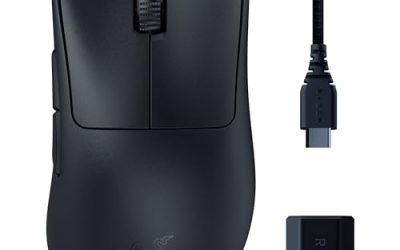
Razer Viper V3 Pro
For players who aim mostly with their fingers and wrist, the Viper V3 Pro makes the clearest precision case in this group. Its symmetrical shell and 54-gram weight in the black listing suit fingertip and claw grips where tiny corrections happen constantly. Razer lists the Focus Pro 35K Optical Sensor Gen-2, 1-DPI step adjustments in its product description, and tracking on a wide variety of surfaces including glass. The included HyperPolling Wireless Dongle is central to the design, because the stated 8000 Hz wireless polling depends on using that dongle rather than a generic receiver.
Specs
- Sensor: Focus Pro 35K Optical Sensor Gen-2
- Maximum sensitivity: 35,000 DPI
- Maximum speed: 750 IPS, as printed in the Amazon comparison table
- Maximum acceleration: 70G, as printed in the Amazon comparison table
- Polling: Up to 8000 Hz with the included HyperPolling Wireless Dongle
- Switches: Razer Optical Mouse Switches Gen-3
- Weight: 54 grams for the black model
- Battery life: Up to 95 hours at 1000 Hz
- Connectivity: Razer HyperSpeed Wireless and wired
- Colour: Black
- Model number: RZ01-05120100-R3U1
Best for: Fingertip and claw players who want the lightest listed mouse with 8000 Hz polling included.
Watch out for: The listing instructs users to place the dongle on the desk with a clear line of sight and close to the mousepad, so check your desk layout before buying.
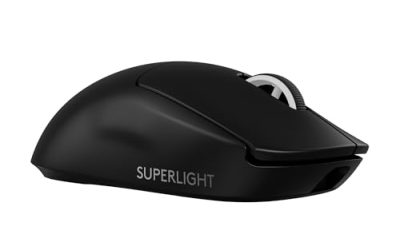
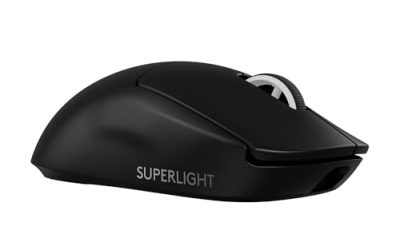
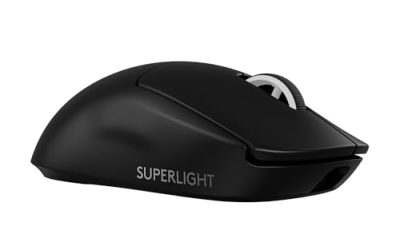
Logitech G PRO X Superlight 2
- Best for: Claw and fingertip players who want a symmetrical shell, hybrid switches, and a touch more weight for stopping control.
- Sensor: HERO 2
- Maximum sensitivity: 44,000 DPI, as stated in the product title
- Polling: 8K polling, as stated in the product title and style information
- Switches: LIGHTFORCE hybrid switches
Claw and fingertip players who want a symmetrical shell, hybrid switches, and a touch more weight for stopping control.
Confirm the black model and model number on the listing, because other Superlight 2 colours and variants use separate listings.
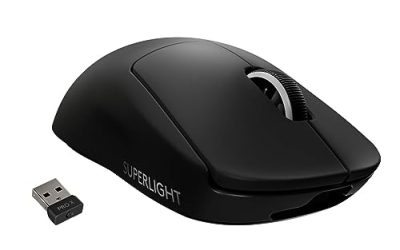
The symmetrical Superlight 2 suits players who want a familiar, low-profile shape that does not push the hand into one fixed posture. Logitech describes that shape as enabling fast movement and stable control, which fits claw and fingertip players who alternate between wide swipes and short stops. Its listing names the HERO 2 sensor, LIGHTFORCE hybrid switches, LIGHTSPEED wireless, and an 8K polling style. At 60 grams it carries a little more stopping mass than the lightest picks here, a trade-off some players prefer when a very light shell feels hard to settle on a target.
Watch out for: Confirm the black model and model number on the listing, because other Superlight 2 colours and variants use separate listings.
Razer DeathAdder V3 Pro
- Best for: Palm and relaxed claw players with medium to larger hands who want ergonomic support for steadier aim.
- Sensor: Focus Pro 30K Optical Sensor
- Switches: Fast Optical Switches Gen-3
- Connectivity: HyperSpeed Wireless
- Buttons: 5 programmable buttons, as stated in the product title
Palm and relaxed claw players with medium to larger hands who want ergonomic support for steadier aim.
This is a right-handed ergonomic shape, so left-handed players and committed fingertip users should choose a symmetrical model instead.
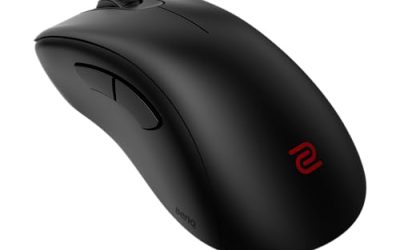
Not every precise player aims from the fingertips. The DeathAdder V3 Pro is the ergonomic option for medium to larger hands that settle into palm or relaxed claw, where a fuller right-handed shape can reduce the small hand movements that disturb a held angle. Its Amazon title names the Focus Pro 30K Optical Sensor, Optical Switches Gen-3, HyperSpeed Wireless, and a 63-gram weight. That makes it the heaviest mouse in this guide, though still firmly in lightweight territory. For a player whose misses come from an unstable grip rather than slow flicks, the added shape support may matter more than chasing the lowest weight.
Watch out for: This is a right-handed ergonomic shape, so left-handed players and committed fingertip users should choose a symmetrical model instead.
Logitech G PRO X Superlight 2 DEX
- Best for: Right-handed claw and palm-claw players who want ergonomic guidance without leaving the Superlight sensor family.
- Sensor: HERO 2, with 44k DPI stated in the product title
- Polling: Up to 8 kHz polling, as stated in the product title
- Buttons: 5 programmable buttons
- Weight: 60 grams, listed as 2.12 ounces in the product details
Right-handed claw and palm-claw players who want ergonomic guidance without leaving the Superlight sensor family.
The shape is right-handed only, and the white listing is separate from other colours, so verify both colour and model number before ordering.
The Superlight 2 DEX takes the HERO 2 and 8K polling formula from the symmetrical Superlight 2 and places it in an asymmetrical shell built only for the right hand. Logitech positions the shape around right-hand control and dexterity, with programmable side thumb buttons set for that hand. That distinction is the reason to pick it: a claw or palm-claw player who likes the Superlight sensor package but wants the palm filled and the fingers guided may find the DEX easier to keep oriented during repeated corrections. It matches the symmetrical model on listed weight and battery life while changing the contact points completely.
Watch out for: The shape is right-handed only, and the white listing is separate from other colours, so verify both colour and model number before ordering.
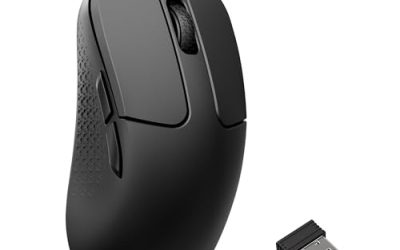
Pulsar Gaming Gears X2 v2
- Best for: Fingertip, claw, and palm claw players who prioritise a very light symmetrical shell and optical clicks.
- Sensor: PixArt PAW3395
- Resolution: 26,000 DPI
- Speed: 650 IPS, as printed in the Amazon specification table
- Acceleration: 50G, as printed in the Amazon specification table
Fingertip, claw, and palm claw players who prioritise a very light symmetrical shell and optical clicks.
The listing describes 4K polling as ready with the Pulsar 4K Wireless Dongle, so do not assume that dongle is included with the base mouse.
The Pulsar X2 v2 is the specialist pick for players who change grip pressure through a match. Pulsar explicitly recommends its symmetrical shape for claw, palm claw, and fingertip grip, and at 53 grams it is the lightest mouse listed here. Its page names the PixArt PAW3395 sensor, optical switches, a Pulsar Blue Encoder, and a stable 1 ms report rate over 2.4 GHz wireless or wired use. Unlike the 8K models above, the base listing states 1000 Hz polling and describes 4K polling as ready with a separate Pulsar 4K Wireless Dongle, so read the configuration carefully.
Watch out for: The listing describes 4K polling as ready with the Pulsar 4K Wireless Dongle, so do not assume that dongle is included with the base mouse.
Which One Fits Your Situation
You aim with your fingertips and make constant small corrections
Choose the Razer Viper V3 Pro if the included HyperPolling dongle fits your desk, or the Pulsar X2 v2 if you want the lightest symmetrical shell at 53 grams. Both leave the fingers room to steer the mouse without resting the whole palm on it. The Viper brings the higher stated polling ceiling in the box, while the Pulsar keeps its base setup simpler at 1000 Hz.
You use a palm grip and hold angles for long stretches
The Razer DeathAdder V3 Pro fits this situation best. Its ergonomic shape gives a palm player more shell to rest against, and its 63-gram weight remains light enough for deliberate swipes. The Focus Pro 30K sensor and Gen-3 optical switches keep the focus on tracking and click response, while the fuller shape addresses the stability problem that a small symmetrical mouse may not solve.
You want Logitech tracking but cannot decide between symmetrical and ergonomic
Pick the Logitech G PRO X Superlight 2 for a low-profile symmetrical shell that leaves grip choice open. Pick the Superlight 2 DEX when you already know a right-handed ergonomic shape suits your claw or palm-claw hold. Both list the HERO 2 sensor, 44k DPI, up to 8K polling, 60-gram weight, and 95-hour battery life, so the decision rests almost entirely on hand shape.
You play on a high-refresh setup and care about frequent position updates
The Viper V3 Pro, Superlight 2, and Superlight 2 DEX all list polling up to 8000 Hz, making them the natural shortlist here. Choose among them by shape first: symmetrical Viper or Superlight 2 for fingertip and claw freedom, DEX for a guided right-handed hold. Set the dongle up as the listing directs, because a high polling figure does not help if the receiver sits hidden behind the computer.
Common Mistakes
- Buying by maximum DPI alone and ignoring the named sensor, stated tracking speed, and the shape that controls how you use that sensor.
- Choosing a symmetrical mouse for a committed palm grip, or an ergonomic right-handed mouse for fingertip play, without comparing it to your current shell.
- Assuming a high polling rate is active by default, without checking whether the required dongle is included and whether software settings must be changed.
- Chasing the lightest possible weight when your real problem is overshooting, where a slightly heavier or fuller shape may stop more predictably.
- Ordering the wrong colour or variant listing, which can change the exact model, weight figure, or included dongle for otherwise similar mouse names.
Frequently Asked Questions
Does a higher DPI setting make aim more precise?
Not by itself. DPI sets how far the cursor moves for a given hand movement, and a very high setting can make small corrections harder to control. The mice here list maximum figures from 26,000 to 44,000 DPI, but most precision comes from choosing a comfortable sensitivity, a sensor that tracks cleanly, and a shape you can stop consistently.
Is 8000 Hz polling worth using for precision?
It can be, because the mouse reports position more often than at 1000 Hz, which suits fast, small movements on a high-refresh setup. The trade-off is setup and battery demand, and the benefit depends on using the correct dongle and settings. If your desk cannot keep the receiver close and unobstructed, a well-placed 1000 Hz connection may feel more consistent.
Which grip benefits most from a symmetrical mouse?
Fingertip and claw grips usually benefit most, because a symmetrical shell does not force the palm into a fixed ergonomic curve and lets the fingers guide micro-adjustments. The Viper V3 Pro, Superlight 2, and Pulsar X2 v2 follow that approach. Palm players who want the hand supported should look first at the DeathAdder V3 Pro or the Superlight 2 DEX.
Should precision players choose the lightest mouse available?
Only if they can stop it reliably. A lighter shell starts and redirects with less effort, which helps fingertip corrections, but some players overshoot when there is too little mass or shape support. Compare the 53-gram Pulsar and 54-gram Viper with the 60-gram Logitech models and 63-gram DeathAdder, then decide by grip stability rather than weight alone.
Related guides
More from Amazon
Programs that pair well with the guide above. Offers and eligibility are set by Amazon and may change.
A free business account with business pricing and bulk-buying tools for work, shop or home office.
Create a business accountFree shipping on eligible items, Prime Video and more. Eligible new members can start with a free trial.
Start a Prime free trialAudiobooks and podcasts to listen to on the go. Eligible new members can start with a free trial.
Try Audible freeAd-free music streaming. Eligible new subscribers can start with a free trial.
Try Music Unlimited freeAs an Amazon Associate we earn from qualifying purchases.