Cutting the cable used to mean accepting input lag, and for shooter players that trade was never worth making. The real decision now is narrower: which wireless mouse pairs a genuinely fast 2.4 GHz link with a shell your hand can flick all evening, and how much polling rate and battery life you give up to get there.


This roundup is for competitive FPS players in tactical shooters and arena titles, plus ranked climbers upgrading from a wired mouse. Every pick below was chosen from the names and specification fields on its Amazon product page, and each one is a dedicated wireless gaming mouse rather than an office model with a gaming label. The shapes cover claw, fingertip and palm grips, and where a headline feature needs extra hardware or a software switch before it works, the product notes say so plainly.
Our Top Picks
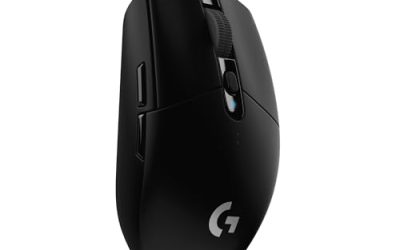
- Logitech G Pro X Superlight 2 Lightspeed WirelessClassic1.57 x 2.5 x 4.92 inches0.1 poundsCheck on Amazon
Top 3 picks at a glance

Quick Picks
As an Amazon Associate we earn from qualifying purchases.
| Product | Best for | Key spec from title |
|---|---|---|
| Razer Viper V3 Pro | Claw-grip players who want 8K polling included | 54 g with 8K polling and 35K DPI optical sensor |
| Logitech G PRO X SUPERLIGHT 2 | Symmetrical-shape fans who play long sessions | 60 g with 44K DPI sensor and 95-hour battery |
| Pulsar X2 V2 | Fingertip and claw players on a tighter spec sheet | 53 g with PAW3395 sensor and 26,000 DPI |
| Razer DeathAdder V3 Pro | Palm-grip players with medium to large hands | 63 g ergonomic shape with 90-hour battery |
| ASUS ROG Harpe Ace Aim Lab Edition | Players who also need Bluetooth for a second device | 54 g with tri-mode connectivity and 36K DPI sensor |
How to Choose
Polling rate and what it actually changes
Polling rate is how often the mouse reports its position each second. A standard 1000 Hz link reports every millisecond, which already feels instant on a 144 Hz monitor. Moving to 4000 Hz or 8000 Hz shortens that interval further, and the difference shows most on 240 Hz or faster displays during quick flicks. The catch is battery drain: the Viper V3 Pro drops from up to 95 hours at 1000 Hz to about 17 hours at 8000 Hz, so treat high polling as a match-day setting rather than a default.
Weight and shell shape for your grip
In fast shooters, a lighter mouse is easier to stop precisely after a flick, which is why every pick here sits between 53 g and 63 g. Shape matters as much as grams, though. Symmetrical shells like the Viper V3 Pro and Pulsar X2 V2 suit claw and fingertip grips, while the DeathAdder V3 Pro carries a taller right-handed ergonomic hump built for palm grip. Measure your hand before ordering: a shell that is too long pushes the side buttons out of comfortable thumb reach.
Sensor headroom beyond the DPI headline
DPI numbers run far past what anyone plays at, so look at tracking speed and acceleration instead. The Focus Pro 35K Gen-2 in the Viper V3 Pro tracks at 750 IPS with 70 G acceleration, and the HERO 2 in the SUPERLIGHT 2 reaches 888 IPS, so neither will spin out during a hard swipe across a large pad. What matters in practice is clean tracking at the 400 to 1600 DPI range most FPS players use, with no smoothing quietly reshaping small movements.
Battery life and connection modes
Wireless freedom ends the moment a battery dies mid-match, so compare runtimes at the polling rate you will actually use, not the headline figure. The SUPERLIGHT 2 and DeathAdder V3 Pro both reach roughly 90 to 95 hours at 1000 Hz, while the Corsair-style trade-off appears in the Harpe Ace: its tri-mode design adds Bluetooth for a laptop or tablet, but serious play belongs on the 2.4 GHz receiver. Also check what sits in the box, because some mice include their high-polling dongle and others sell it separately.
The 5 Best Options
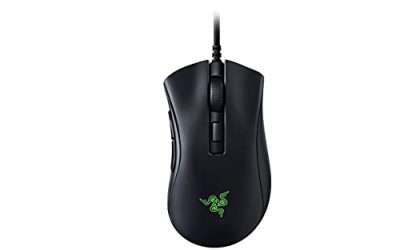
Razer Viper V3 Pro
Razer’s flagship is the most complete FPS package in this group because the high-polling hardware is already in the box. Its symmetrical shell weighs 54 g in black, the Focus Pro 35K Gen-2 sensor tracks on surfaces including glass, and the included HyperPolling Wireless Dongle unlocks a true 8000 Hz wireless report rate without a second purchase. Gen-3 optical switches remove debounce delay from clicks, and eight programmable buttons give tactical-shooter players room for ping, push-to-talk and utility binds within thumb reach.
Specs
- Sensor: Razer Focus Pro 35K Optical Sensor Gen-2, up to 35,000 DPI
- Tracking: 750 IPS, 70 G acceleration
- Polling rate: Up to 8000 Hz wireless via included HyperPolling Wireless Dongle
- Connectivity: Razer HyperSpeed Wireless (2.4 GHz) and wired USB-C
- Switches: Razer Optical Mouse Switches Gen-3
- Buttons: 8 programmable
- Weight: 54 g (black)
- Battery life: Up to 95 hours at 1000 Hz, up to 17 hours at 8000 Hz
- Model: RZ01-05120100-R3U1
Best for: Claw and fingertip players who want maximum polling rate without buying extra hardware.
Watch out for: Battery life falls sharply at 8000 Hz, so plan on charging far more often if you run it there full time.
ASIN: B0CW25XR5R
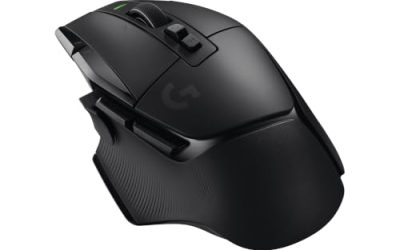
Logitech G PRO X SUPERLIGHT 2
Logitech’s second-generation Superlight keeps the symmetrical shape that became the default on pro desks and updates nearly everything inside it. The HERO 2 sensor reaches 44,000 DPI with tracking past 888 IPS, LIGHTSPEED wireless supports an 8 kHz report rate once enabled in G HUB, and LIGHTFORCE hybrid switches blend optical actuation with a mechanical click feel. At 60 g with up to 95 hours of battery and USB-C charging, it is the pick for players who set their settings once and then stop thinking about their mouse for weeks.
Specs
- Sensor: HERO 2 optical, up to 44,000 DPI
- Tracking: Over 888 IPS, 88 G acceleration
- Polling rate: Up to 8 kHz report rate
- Connectivity: LIGHTSPEED wireless (2.4 GHz) and USB-C wired
- Switches: LIGHTFORCE hybrid switches
- Buttons: 5 programmable
- Weight: 60 g
- Battery life: Up to 95 hours
- Model: 910-006628
Best for: Players who want the proven symmetrical shape with the longest spec sheet in Logitech’s line.
Watch out for: The 8 kHz report rate is switched on through G HUB software, so check that your setup is updated before expecting it.
ASIN: B09NBWL8J5
Pulsar X2 V2
Pulsar built its name on shapes borrowed from classic competitive mice, and the X2 V2 pairs a wide-waist, low-hump symmetrical shell with flagship internals. The PixArt PAW3395 sensor delivers 26,000 DPI and 650 IPS tracking, optical main switches keep clicks consistent, and the whole mouse weighs 53 g in the medium size. It reports at 1000 Hz from the included receiver, with a 4K mode available if you add Pulsar’s separate wireless dongle later, which makes it a sensible route for players who want the shape now and the polling upgrade later.
Specs
- Sensor: PixArt PAW3395 optical, up to 26,000 DPI
- Tracking: 650 IPS, 50 G acceleration
- Polling rate: 1000 Hz stock, 4K ready with Pulsar 4K Wireless Dongle
- Connectivity: 2.4 GHz wireless and wired
- Switches: Optical switches, Pulsar Blue encoder
- Buttons: 5
- Weight: 53 g (medium)
- Battery life: 70 hours per the Amazon listing
- Model: PX2222
Best for: Claw and fingertip players who like a low, wide symmetrical shell and clean, simple hardware.
Watch out for: The 4K polling mode needs Pulsar’s separate 4K dongle, which is not in the box; also confirm a live offer before ordering, since listing snapshots for this model can lag behind current stock.
ASIN: B0CH9Z587R
Razer DeathAdder V3 Pro
The DeathAdder shape has anchored palm-grip setups for years, and the V3 Pro trims it down to 63 g while keeping the tall, right-handed ergonomic curves. Inside, the Focus Pro 30K sensor tracks at 750 IPS, Gen-3 optical switches actuate in 0.2 ms per Razer’s listing copy, and HyperSpeed wireless holds up to 90 hours of play between charges. Five programmable buttons keep the layout uncluttered, which suits battle royale and tactical players who bind a small set of actions and rely on aim for everything else.
Specs
- Sensor: Razer Focus Pro 30K optical, up to 30,000 DPI
- Tracking: 750 IPS, 70 G acceleration
- Polling rate: 1000 Hz stock, higher rates via optional HyperPolling Wireless Dongle
- Connectivity: Razer HyperSpeed Wireless (2.4 GHz) and wired USB-C
- Switches: Razer Optical Mouse Switches Gen-3
- Buttons: 5 programmable
- Weight: 63 g (black)
- Battery life: Up to 90 hours
- Model: DeathAdder V3 Pro
Best for: Palm-grip players with medium to large hands who want an ergonomic shell that still flicks quickly.
Watch out for: Higher polling rates require the HyperPolling Wireless Dongle, which is sold separately for this model rather than included.
ASIN: B0B92HV8CP
ASUS ROG Harpe Ace Aim Lab Edition

Developed with Aim Lab, this 54 g symmetrical mouse is aimed squarely at aim training and tactical shooters. The ROG AimPoint sensor offers 36,000 DPI with under 1 percent CPI deviation according to ASUS, ROG Micro Switches handle the clicks, and the Aim Lab Settings Optimizer suggests sensitivity settings built around your own measured performance. Its tri-mode connection is the differentiator here: SpeedNova 2.4 GHz for matches, Bluetooth for a second machine, and wired USB when the battery runs low during a long session.
Specs
- Sensor: ROG AimPoint optical, 100 to 36,000 DPI
- Tracking: 650 IPS, 50 G acceleration
- Polling rate: 1000 Hz
- Connectivity: 2.4 GHz RF, Bluetooth 5.1 and wired USB
- Switches: ROG Micro Switches
- Buttons: 5 programmable
- Weight: 54 g
- Battery life: Up to 90 hours per the Amazon listing title
- Model: P713 ROG HARPE ACE AIM LAB EDITION/BLK
Best for: Players who split time between a gaming PC and a laptop, and aim trainers who like guided sensitivity tuning.
Watch out for: Polling tops out at 1000 Hz on the listing, so it gives up the high-polling option the two flagships above include; confirm a live offer before ordering, as some retailers have wound this model down.
ASIN: B0BSKX9V7C
Which One Fits Your Situation
You play tactical shooters on a high-refresh monitor
The Viper V3 Pro fits best here. Its included HyperPolling dongle delivers 8000 Hz out of the box, the 54 g shell stops cleanly after fast angle checks, and the Focus Pro 35K Gen-2 sensor tracks on glass desks as well as cloth pads. Just keep the charging cable nearby, because 8K mode shortens battery life to a fraction of the 1000 Hz figure.
You palm grip and have larger hands
Choose the DeathAdder V3 Pro. Its taller ergonomic hump fills the palm instead of forcing your fingers to hover, the 63 g weight stays easy to lift, and up to 90 hours of battery suits players who forget to charge between sessions. Symmetrical mice in this list will feel cramped by comparison if your hand measures toward the larger end.
You split gaming time between a PC and a laptop
The Harpe Ace Aim Lab Edition handles that split cleanly. Keep the 2.4 GHz receiver in your gaming PC for matches, pair Bluetooth with the laptop for everything else, and plug in the cable when the battery runs low. Its 1000 Hz ceiling is a fair trade for that flexibility, and the Aim Lab optimizer is a genuine bonus for deliberate practice.
You want one mouse to set up and forget
The SUPERLIGHT 2 is the low-maintenance pick. Up to 95 hours of battery, USB-C charging, optional POWERPLAY compatibility and a shape that works for nearly every grip mean fewer settings to revisit. Enable the higher report rate in G HUB once, save your DPI stages, and it simply stays ready on the desk.
Common Mistakes
- Playing over Bluetooth in a competitive match, where its higher latency gives back everything a gaming mouse is meant to fix; use the 2.4 GHz receiver for ranked play.
- Running 8000 Hz polling on a 60 Hz or 144 Hz office monitor, where the display cannot show the extra reports and the battery drains several times faster.
- Buying by DPI headline alone, when tracking speed, shell fit and switch feel decide far more about how a mouse aims.
- Ignoring hand size and grip style, then blaming aim when a shell that is too long or too flat causes the real problem.
- Assuming every high-polling mouse includes its dongle, when models like the DeathAdder V3 Pro and Pulsar X2 V2 sell that hardware separately.
Frequently Asked Questions
Is 8000 Hz polling worth it for FPS games?
It helps most on monitors running at 240 Hz or above, where the screen refreshes often enough to show the extra position reports during fast flicks. On a 144 Hz display the gain is small, and because battery life drops steeply at 8000 Hz, many players keep 1000 Hz for everyday play and switch up for important matches.
How light should a wireless FPS mouse be?
The competitive range in this list runs from 53 g to 63 g, and any of those weights will feel quick once you adjust. Lighter shells favour fingertip and claw grips and low sensitivity settings, while players who palm grip often prefer a few extra grams and a taller hump. Fit your grip first and treat the exact gram count as a secondary detail.
Can a wireless mouse really match a wired one for shooters?
On a 2.4 GHz gaming link, yes. Technologies like LIGHTSPEED, HyperSpeed and SpeedNova were built to hold a stable 1 ms or faster report rate, and every sensor here tracks well beyond the speed of a human swipe. The remaining differences are practical ones: charging habits, receiver placement and interference from crowded wireless environments.
How do I keep the wireless connection stable during matches?
Place the receiver close to the mouse, ideally on the included extension adapter at the edge of your desk pad, and keep it away from USB 3.0 hubs and routers that crowd the 2.4 GHz band. Charge before long sessions rather than mid-match, and if your mouse offers a wired mode, keep the cable within reach as a backup.
Related guides
More from Amazon
Programs that pair well with the guide above. Offers and eligibility are set by Amazon and may change.
A free business account with business pricing and bulk-buying tools for work, shop or home office.
Create a business accountFree shipping on eligible items, Prime Video and more. Eligible new members can start with a free trial.
Start a Prime free trialAudiobooks and podcasts to listen to on the go. Eligible new members can start with a free trial.
Try Audible freeAd-free music streaming. Eligible new subscribers can start with a free trial.
Try Music Unlimited freeAs an Amazon Associate we earn from qualifying purchases.