Our Short List of 3

- Best for: Remote workers and students who spend most of their PC time in meetings and calls.
- USB-A connection with digital audio
- Rotating noise-cancelling boom microphone
- In-line volume and mute controls on the cable
- 30 mm drivers

- Best for: A spare headset for a laptop, a school desk or a first work-from-home setup.
- Single 3.5 mm audio jack
- Rotating noise-cancelling boom microphone
- Microphone included, wired connection
- Item weight of 2.6 ounces
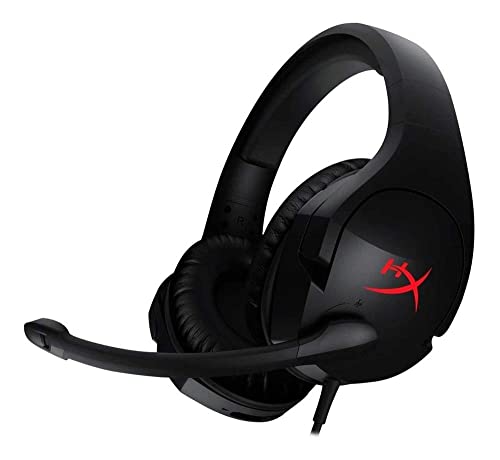
- Best for: Casual gamers who want one comfortable headset for work calls during the day and games in the evening.
- 50 mm directional drivers
- Swivel-to-mute noise-cancellation microphone
- 3.5 mm plug with extension Y-cable splitting to separate headphone and microphone plugs
- HyperX signature memory foam ear cushions
All 5 Picks at a Glance
| Product | Specs | Action |
|---|---|---|
| Logitech H390 |
| Check price on Amazon |
| Logitech H111 |
| Check price on Amazon |
| HyperX Cloud Stinger |
| Check price on Amazon |
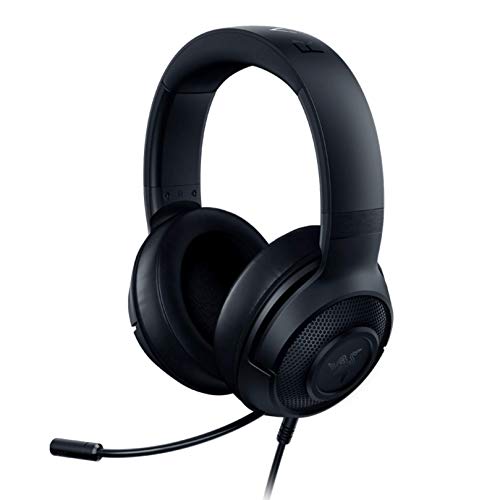 Razer Kraken X |
| Check price on Amazon |
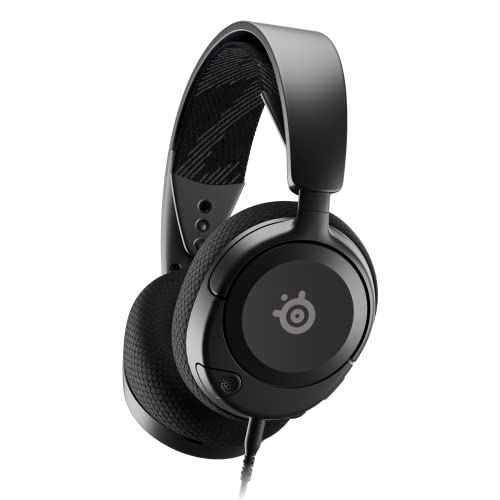 SteelSeries Arctis Nova 1 |
| Check price on Amazon |
A PC headset with a microphone does two jobs at once, and the affordable end of the shelf is where those two jobs most often pull in opposite directions. A model can sound fine for music yet leave your voice thin and distant on calls, or carry a decent microphone inside ear cups that press too hard after an hour. The real decision is not about chasing the biggest drivers or the longest feature list. It is about matching the connection, the microphone and the fit to the way you actually spend time at your desk.
This guide is for remote workers, students, casual gamers and anyone setting up a first desk headset without overspending. Every headset below was chosen from its Amazon product listing, looking for a microphone built for voice, a connection that suits desktop and laptop PCs, and a design meant to stay comfortable through long sessions.
Our Top Picks
Top 3 picks at a glance
Quick Picks
As an Amazon Associate we earn from qualifying purchases
| Product | Best for | Key spec from title |
|---|---|---|
| Logitech H390 | Call-heavy workdays on a PC | USB headset with noise-cancelling microphone |
| Logitech H111 | A spare headset for a laptop or study desk | Stereo headset with noise-cancelling microphone |
| HyperX Cloud Stinger | Casual gaming after work | Swivel-to-mute noise-cancellation microphone |
| Razer Kraken X | Lightweight gaming with clear team chat | Bendable cardioid microphone |
| SteelSeries Arctis Nova 1 | Clear voice in a noisy room | ClearCast Gen 2 microphone |
How to Choose
Start with the connection
USB and 3.5 mm headsets behave differently on a PC, and the difference matters more than any single specification. A USB headset carries its own digital audio path, so it sounds the same on any machine and sidesteps weak laptop jacks, ground-loop hum and front-panel ports that were wired as an afterthought. A 3.5 mm headset works with almost any device, from laptops to controllers, but it depends on your PC having a combined headset jack. Many desktop towers split audio out and microphone in, which means a single-plug headset needs a splitter in the box or an extra purchase before the microphone works at all.
Judge the microphone by placement and pickup
Microphone quality at this tier comes down to where the capsule sits and what it hears. A boom microphone holds a steady distance from your mouth, which keeps your volume even when you turn your head, and a noise-cancelling or cardioid capsule rejects keyboard clicks, fans and room chatter far better than an inline microphone dangling on a cable. Inline microphones are tidier and fine for occasional calls in a quiet room, but they pick up every rustle of the cable and every sound in the room. If you speak every day, whether in meetings or in game chat, a boom microphone is the single upgrade worth prioritising.
Treat comfort as a specification
A headset that hurts after an hour is a headset you stop wearing, whatever its sound quality. Over-ear cups with memory foam spread pressure best and suit long evenings, while lighter on-ear models run cooler, pack smaller and press on the ears sooner. Published weight is a useful guide: models under 250 grams tend to disappear during long sessions, while heavier frames need better padding to earn their place. Adjustable sliders and a padded headband matter more than they look, because a headset that fits loosely will slide and a headset that clamps will ache, and neither problem shows up in a driver specification.
Know where affordable models cut corners
Entry-level headsets keep their prices down by leaving things out, and knowing what is missing prevents disappointment. Expect basic plastic frames, thin ear pads and cables without braiding, and do not expect wireless connectivity, detachable cables or replaceable ear cushions at this tier. Software extras such as virtual surround sound can help with positional cues in games, but they run through a companion app and should count as a bonus rather than a reason to buy. Spend your attention on the connection, the microphone and the fit, because those three decide whether the headset earns its place on your desk.
The 5 Best Options
Logitech H390
- Best for: Remote workers and students who spend most of their PC time in meetings and calls.
- USB-A connection with digital audio
- Rotating noise-cancelling boom microphone
- In-line volume and mute controls on the cable
- 30 mm drivers
Remote workers and students who spend most of their PC time in meetings and calls.
USB-A only, so check your PC has a spare USB-A port or an adapter. Confirm it is still sold before buying.
The H390 is the headset to buy when your PC day is mostly calls. It connects over USB-A, so it carries its own digital audio path and sidesteps the weak jacks and ground-loop hum that plague some laptops and front-panel ports. Logitech fits a rotating noise-cancelling boom microphone that sits close to the mouth, and the cable carries in-line volume and mute controls, so muting takes one touch instead of a scramble through settings. A padded headband and leatherette ear cups suit long stretches at a desk, and the closed on-ear design keeps your audio from leaking into a nearby open microphone.
Watch out for: USB-A only, so check your PC has a spare USB-A port or an adapter. Confirm it is still sold before buying.
Logitech H111
- Best for: A spare headset for a laptop, a school desk or a first work-from-home setup.
- Single 3.5 mm audio jack
- Rotating noise-cancelling boom microphone
- Microphone included, wired connection
- Item weight of 2.6 ounces
A spare headset for a laptop, a school desk or a first work-from-home setup.
Thin on-ear pads and a basic plastic frame, so long sessions can press on the ears. Desktops with separate headphone and microphone jacks need a splitter. Confirm it is still sold before buying.
The H111 is the simplest headset here, and that simplicity is the point. One standard 3.5 mm plug carries audio and microphone together, so it drops straight into laptops and any PC with a combined headset jack, with nothing to install and nothing to charge. The microphone sits on a boom that rotates 180 degrees, so it can be worn on either side and tucked up out of the way when you only want to listen. Logitech lists a weight of just 2.6 ounces and a cable of 2.35 metres, which makes the H111 easy to forget during study sessions and easy to toss in a bag.
Watch out for: Thin on-ear pads and a basic plastic frame, so long sessions can press on the ears. Desktops with separate headphone and microphone jacks need a splitter. Confirm it is still sold before buying.
HyperX Cloud Stinger
- Best for: Casual gamers who want one comfortable headset for work calls during the day and games in the evening.
- 50 mm directional drivers
- Swivel-to-mute noise-cancellation microphone
- 3.5 mm plug with extension Y-cable splitting to separate headphone and microphone plugs
- HyperX signature memory foam ear cushions
Casual gamers who want one comfortable headset for work calls during the day and games in the evening.
No sidetone, so you cannot hear your own voice while speaking. Confirm it is still sold before buying.
The Cloud Stinger is a gaming headset first, and the comfort details show it. HyperX fits memory foam ear cushions and a padded headband into a 275-gram frame, light for a full over-ear design, and the ear cups rotate 90 degrees so the headset rests flat around your neck during breaks. Sound comes from 50 mm directional drivers, and the microphone is the standout feature at this tier: a noise-cancelling boom that mutes when you swivel it up, so there is no button to hunt for mid-game. A single 3.5 mm plug plus an extension cable that splits into separate headphone and microphone jacks covers desktop towers properly.
Watch out for: No sidetone, so you cannot hear your own voice while speaking. Confirm it is still sold before buying.
Razer Kraken X
- Best for: Gamers who want a light headset with clear team chat and do not mind a wired connection.
- 40 mm drivers
- Bendable cardioid boom microphone
- 7.1 surround sound on PC through Razer software
- Weight of 250 grams
Gamers who want a light headset with clear team chat and do not mind a wired connection.
A single 3.5 mm plug, so older desktops with separate jacks need a splitter. The surround sound needs Razer software on PC. Confirm it is still sold before buying.
The Kraken X is Razer’s entry-level wired headset, built around a frame the listing puts at 250 grams, and that lightness is the reason to pick it over heavier rivals. It uses 40 mm drivers with oval ear cushions shaped to reduce heat build-up, and the headband padding is placed to relieve pressure during long sessions. Its bendable cardioid boom microphone matters because the capsule picks up sound mainly from the front, so keyboard clicks and a fan behind you intrude less on calls and team chat. On PC it also offers 7.1 surround sound through Razer’s software, a bonus for positional cues rather than a reason to buy.
Watch out for: A single 3.5 mm plug, so older desktops with separate jacks need a splitter. The surround sound needs Razer software on PC. Confirm it is still sold before buying.
SteelSeries Arctis Nova 1
- Best for: Voice clarity in a noisy room, for calls and team chat alike.
- ClearCast Gen 2 microphone with AI-powered noise cancellation
- Nova Acoustic System with high-fidelity drivers
- 360-degree spatial audio
- 10-band parametric EQ through companion software
Voice clarity in a noisy room, for calls and team chat alike.
The EQ and spatial audio features depend on companion software. Confirm it is still sold before buying.
The Arctis Nova 1 is the pick for anyone whose room is never quiet. Its ClearCast Gen 2 microphone uses AI-powered noise cancellation to cut background sound before it reaches your callers, which matters more than raw driver size when a fan, a keyboard or a housemate sits nearby. The Nova Acoustic System pairs high-fidelity drivers with 360-degree spatial audio, and a 10-band parametric EQ runs through the companion software for anyone who likes to shape the sound. At 236 grams the frame is light enough for long sessions, and the design keeps the emphasis on voice clarity first.
Watch out for: The EQ and spatial audio features depend on companion software. Confirm it is still sold before buying.
Which One Fits Your Situation
Your day is mostly meetings and calls
Pick the Logitech H390. The USB connection gives it a consistent audio path on any PC, the boom microphone sits close to your mouth, and the in-line mute control means you can silence yourself without leaving the call window. Nothing else here is as single-minded about desk work, and the rotating boom keeps your voice close and clear all day.
You game most evenings
Pick the HyperX Cloud Stinger. The memory foam ear cushions and light frame suit long sessions, the 50 mm drivers carry game audio well, and the swivel-to-mute microphone lets you silence yourself mid-game with one motion. The splitter extension in the box also solves the separate-jacks problem on desktop towers.
You want the lightest headset possible
Pick the Logitech H111. At 2.6 ounces it is far lighter than any over-ear model here, and the rotating boom microphone still gives you proper voice pickup for calls. It is the right choice for a laptop, a study desk or a bag, as long as you accept thinner pads and a basic frame.
Your room is never quiet
Pick the SteelSeries Arctis Nova 1 or the Razer Kraken X. The Nova 1 has the stronger noise handling, with a ClearCast Gen 2 microphone that filters background sound, while the Kraken X uses a cardioid capsule that rejects noise from behind you. Either beats an inline microphone when keyboards and fans share the room.
Common Mistakes
- Buying a single-plug 3.5 mm headset for a desktop tower without checking whether the PC has separate headphone and microphone jacks, then finding the microphone does not work.
- Choosing on driver size alone, when microphone placement and pickup pattern decide how you sound to other people far more than a few extra millimetres of driver.
- Picking an on-ear headset for all-day wear without considering that thin pads press on the ears sooner than over-ear memory foam cushions.
- Assuming a headset with a microphone is ready for streaming or recording, when entry-level boom microphones are tuned for calls and game chat rather than broadcast voice.
- Expecting wireless convenience, detachable cables or replaceable ear cushions at this tier, then being disappointed by a fixed cable and basic plastic frame.
Frequently Asked Questions
Do I need a splitter to use a 3.5 mm headset on a desktop PC?
Only if your PC has separate headphone and microphone jacks, which many desktop towers do. Laptops and most modern devices use one combined jack, so a single-plug headset works directly. The HyperX Cloud Stinger includes a splitter extension in the box, and USB headsets such as the Logitech H390 avoid the question entirely.
Is USB or 3.5 mm better for a PC headset?
Neither is universally better. USB headsets process audio digitally, add in-line controls and behave the same on any PC, which suits call-heavy work. A 3.5 mm connection works with far more devices, including controllers and phones, and never needs drivers. Choose based on what else you want to plug the headset into.
Can an affordable headset microphone sound good on calls?
Yes, if the microphone sits on a boom close to your mouth. A noise-cancelling or cardioid boom capsule rejects keyboard and room noise far better than an inline microphone, and the models here use exactly that design. Keep the boom near the corner of your mouth and speak at a normal volume for the clearest results.
Will these headsets work on consoles as well as PC?
Most of them will, because a 3.5 mm connection is standard on modern controllers. The HyperX Cloud Stinger, Razer Kraken X and Logitech H111 all list console compatibility alongside PC, while the USB-only Logitech H390 is built for computers. Check the listing for your exact console before buying.
Related guides
More from Amazon
Programs that pair well with the guide above. Offers and eligibility are set by Amazon and may change.
A free business account with business pricing and bulk-buying tools for work, shop or home office.
Create a business accountFree shipping on eligible items, Prime Video and more. Eligible new members can start with a free trial.
Start a Prime free trialAudiobooks and podcasts to listen to on the go. Eligible new members can start with a free trial.
Try Audible freeAd-free music streaming. Eligible new subscribers can start with a free trial.
Try Music Unlimited freeAs an Amazon Associate we earn from qualifying purchases.









