Our Short List of 3
All 4 Picks at a Glance
| Product | Specs | Action |
|---|---|---|
 WD Red Pro 3TB WD3001FFSX | Check price on Amazon | |
 Seagate Exos X16 14TB ST14000NM001G | Check price on Amazon | |
 WD Black 6TB WD6003FZBX | Check price on Amazon | |
 Seagate Exos 7E2000 1TB SAS | Check price on Amazon |
Choosing the best internal hard drives for a business server is a decision that affects every person who relies on that server, from the accountant opening shared folders in the morning to the team saving project files late in the day. A business server stores the files, databases, backups and applications a company depends on, and it usually runs around the clock, so the drives inside it need to be built for continuous duty rather than occasional desktop use. A drive that is fine in a home computer can wear out early, drop out of a RAID array or slow down under multi-user load when it is asked to serve a whole office. This guide explains what separates a true business server drive from an ordinary desktop drive, compares five internal hard drives that suit business server duty, and helps you match a drive to the size and workload of your own server.
Our Top Picks
Top 3 picks at a glance
How to Choose
Workload Rating and Always-On Design
A business server rarely powers down, so the first specification to check is the workload rating, which describes how much data a drive is designed to read and write in a year. Desktop drives are generally rated for light, intermittent use, while NAS and enterprise drives carry annual workload ratings that run into hundreds of terabytes. A drive with a high workload rating is built with firmware and components that tolerate constant access from several users at once. Look for a drive that is explicitly rated for always-on operation, because that rating is a direct statement from the manufacturer that the drive is intended for the duty cycle a business server creates.
CMR or SMR Recording
Hard drives record data using one of two methods, conventional magnetic recording, known as CMR, or shingled magnetic recording, known as SMR. CMR writes each track separately, which keeps rewrite performance steady when files change often. SMR overlaps tracks to fit more data on each platter, which can slow down sustained rewrites and RAID rebuilds. For a business server that handles shared folders, databases and frequent file changes, CMR is the safer choice. Check the recording method in the drive specifications before buying, and favour CMR drives for any volume that will see regular writes or that will sit inside a RAID array.
Capacity and Bay Count
Capacity planning starts with the amount of data the business stores today, plus room for growth over the next few years. Add up shared folders, email archives, databases and backups, then allow headroom for growth, because a server that fills up forces an awkward migration later. The number of drive bays in the server chassis also matters: a compact tower with four bays needs larger individual drives than a rack server with twelve bays. Larger drives reduce the number of bays a given capacity consumes, but they also mean each drive holds more data, so a matched spare drive and a solid backup plan become more important as capacity per drive rises.
RAID Compatibility and Vibration Tolerance
Most business servers run their drives in a RAID array, which spreads data across several drives so that the server keeps working when one drive fails. Drives in an array vibrate against each other, and that vibration can slow a drive down or shorten its life if the drive is not designed for multi-drive enclosures. NAS and enterprise drives include vibration sensors and firmware that compensates for vibration from neighbouring drives, and they handle the error recovery timing that RAID controllers expect. A desktop drive can drop out of an array when it spends too long retrying a read error, which forces a rebuild and puts the remaining drives under extra strain.
Interface and Form Factor
Business servers typically use 3.5-inch SATA drives, while larger or more demanding servers may use SAS drives, which connect through a SAS controller and support features such as dual-port connections and longer command queues. Before ordering, confirm which interface the server backplane and controller support, because a SAS drive will not work in a plain SATA bay and a SATA drive cannot use SAS-only features. Also confirm the physical height of the bay, since some enterprise drives are thicker than standard desktop drives. Matching interface, form factor and controller support avoids a drive that physically fits but never appears in the storage configuration.
Warranty and Data Recovery Support
A business server drive is a component the whole company depends on, so the length and terms of its warranty deserve real attention. Enterprise and NAS drives commonly carry longer warranties than desktop drives, and some include data recovery services that can help retrieve files if a drive fails mechanically. A longer warranty does not prevent failure, but it does reduce the cost of replacement and signals that the manufacturer expects the drive to last under server duty. Keep a cold spare drive on the shelf as well, because even the longest warranty cannot restore uptime while a replacement ships.
Top Picks
Seagate IronWolf Pro 8TB ST8000NT001
The Seagate IronWolf Pro 8TB is a 3.5-inch SATA drive built for multi-bay, multi-user storage, and it is a natural fit for a small or mid-size business server. It spins at 7,200 RPM, uses CMR recording, and carries 256 MB of cache, which keeps sustained transfers steady when several people read and write shared files at the same time. Its annual workload rating is high enough for always-on business use, and its firmware includes health management features that report drive condition to compatible NAS and server systems, giving an administrator warning before a drive fails. The five-year warranty and included data recovery services add reassurance for a business that cannot afford to lose its shared data.
This drive suits a business server that serves a team of users from a RAID array, holds shared folders and backups, and runs continuously. Its 8TB capacity is a practical middle ground: large enough to hold years of business documents and several backup sets, yet small enough that a RAID rebuild finishes in a reasonable time. The main caveat is that it is a mechanical drive, so it cannot match the random-access speed of solid-state storage for database-heavy workloads; pair it with solid-state storage for the most latency-sensitive data if the server handles busy databases. It also draws more power and makes more noise than a slower desktop drive, which matters in a small office where the server sits near people.
Seagate IronWolf Pro 8TB ST8000NT001
WD Red Pro 3TB WD3001FFSX
The WD Red Pro 3TB is a NAS-rated 3.5-inch SATA drive designed for servers and storage systems that run around the clock. It spins at 7,200 RPM, uses CMR recording, and is built for multi-bay enclosures with vibration tolerance that keeps performance steady when neighbouring drives are active. Its workload rating is far above a desktop drive, and its firmware is tuned for RAID environments, with error recovery behaviour that suits hardware RAID controllers rather than desktop use. For a business server with many bays, the 3TB capacity is useful when the priority is spreading data across many smaller drives, which keeps rebuild times short and limits how much data rides on any single drive.
This drive is a good choice for a business server with eight or more bays, where several smaller drives in a RAID array give a better balance of redundancy and rebuild speed than a few very large drives. It also suits a server that stores critical business data, since the Red Pro line carries a long warranty and is designed for always-on duty. The caveat is capacity: a 3TB drive holds far less than modern high-capacity models, so a server with only two or four bays will run out of room quickly. Check the total capacity of the planned array before committing, and confirm that the server has enough bays to reach the capacity the business needs.
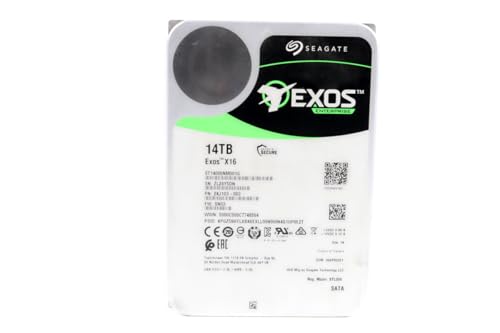
Seagate Exos X16 14TB ST14000NM001G
The Seagate Exos X16 14TB is an enterprise-class 3.5-inch SATA drive built for data centres and heavy business server duty. It holds 14TB on a helium-sealed platform, spins at 7,200 RPM, uses CMR recording and carries 256 MB of cache, with sustained transfer performance that suits large file movement and backup windows. Its annual workload rating is among the highest in this roundup, and it is rated for always-on operation in multi-drive enclosures, with vibration tolerance and power management designed for rack servers that run for years without a break. For a business that stores large archives, virtual machine images or years of backups, a single Exos X16 holds as much as several smaller drives.
This drive suits a business server with limited bays that still needs a large total capacity, and it is a strong pick for a backup server or archive volume where large sequential transfers dominate. Its enterprise rating also makes it a sensible choice for a server that will grow, since adding a second identical drive later doubles capacity without changing the drive model. The caveats are the ones that come with very large drives: a RAID rebuild after a failure takes longer because more data must be rewritten, and the drive is best used alongside a second copy of the data, since no single drive should ever be the only copy of business-critical files. Keep the firmware current and monitor drive health, because early warning matters more as capacity per drive rises.
Seagate Exos X16 14TB ST14000NM001G
WD Black 6TB WD6003FZBX
The WD Black 6TB is a high-performance 3.5-inch SATA drive that brings desktop-class speed to a business server that also needs capacity. It spins at 7,200 RPM, uses CMR recording and carries 256 MB of cache, with firmware tuned for responsive access to frequently used files. Its five-year warranty is longer than most desktop drives, and its stable platter technology helps keep performance consistent under vibration. While it is not a NAS-specific drive, its performance profile suits a business server volume that holds active project files, shared application data or a working set that users open and save many times a day.
This drive is a good fit for a small business server where one volume does double duty, holding both active working files and general shared storage, and where responsiveness matters more than the last word in always-on endurance. Its 6TB capacity is practical for a tower server with a handful of bays. The caveat is that it is a performance desktop drive rather than a NAS or enterprise drive, so for a large multi-bay array or a server that runs at full load around the clock, a NAS-rated or enterprise drive is the more conservative choice. Use it where speed and capacity matter and the array is modest in size, and keep backups current as with any single volume.
Seagate Exos 7E2000 1TB SAS
The Seagate Exos 7E2000 1TB is a 2.5-inch SAS drive for business servers that use a SAS backplane and need enterprise features rather than raw capacity. It uses a 12 Gb/s SAS interface, spins at 7,200 RPM and is built for always-on operation in dense server enclosures, with the command queuing and error handling that SAS controllers expect. Its 1TB capacity is modest, but SAS drives in this class are chosen for their interface, reliability characteristics and suitability for RAID arrays in rack servers, not for holding the largest archive. For a business server with a SAS controller, a set of these drives can form a fast, redundant array for operating systems, databases and applications.
This drive suits a rack server or tower server with a SAS backplane, where the storage controller, cabling and drive bays are already SAS, and where the workload is transactional rather than archival. It is also a sensible pick for a boot and application volume in a business server, with larger SATA drives handling bulk file storage alongside it. The caveats are clear: confirm SAS support before buying, because this drive will not work in a SATA-only bay, and do not expect it to hold a large file library on its own. Buy matching drives for the array, keep one spare on hand, and remember that even enterprise drives need a backup plan.
Comparison Table
| Drive | Capacity | Interface | Spindle Speed | Recording | Best For |
|---|---|---|---|---|---|
| Seagate IronWolf Pro 8TB ST8000NT001 | 8TB | SATA 6 Gb/s | 7,200 RPM | CMR | Multi-user RAID server |
| WD Red Pro 3TB WD3001FFSX | 3TB | SATA 6 Gb/s | 7,200 RPM | CMR | Many-bay RAID arrays |
| Seagate Exos X16 14TB ST14000NM001G | 14TB | SATA 6 Gb/s | 7,200 RPM | CMR | Large archives and backups |
| WD Black 6TB WD6003FZBX | 6TB | SATA 6 Gb/s | 7,200 RPM | CMR | Active working files |
| Seagate Exos 7E2000 1TB SAS | 1TB | SAS 12 Gb/s | 7,200 RPM | CMR | SAS rack servers |
Which One Is Right for You?
For most small and mid-size business servers, the Seagate IronWolf Pro 8TB is the safest starting point, because it combines NAS-rated always-on design, RAID-friendly firmware and a capacity that suits a team file server. If the server has many bays and the priority is short rebuild times and redundancy, build the array from WD Red Pro 3TB drives instead, accepting lower capacity per drive in exchange for more spindles and faster recovery. If the server must hold a very large archive or backup set in only a few bays, the Seagate Exos X16 14TB is the pick that reaches the largest capacity per bay. If the volume holds active project files that people open and save all day, the WD Black 6TB adds responsiveness to a smaller server. And if the server already runs on SAS, the Seagate Exos 7E2000 1TB is the enterprise SAS pick for boot, application and database volumes, with larger SATA drives alongside it for bulk storage. Whatever you choose, buy identical drives for the array, keep a spare on the shelf, and keep a backup that lives outside the server itself, because RAID protects against a failed drive, not against accidental deletion, ransomware or a failed controller.
Frequently Asked Questions
Can I use a desktop hard drive in a business server?
A desktop drive will physically fit and work in many servers, but it is not designed for the workload. Desktop drives are rated for light, intermittent use, lack the vibration tolerance of NAS and enterprise drives, and can drop out of a RAID array when error recovery takes too long. For a server that runs around the clock and serves several users, a NAS-rated or enterprise drive is the more dependable choice, and the difference in durability usually outweighs the difference in upfront cost.
How much capacity does a business server need?
Start with the data the business stores today, then add space for growth and for backups. A small office with shared documents and email may manage with a few terabytes, while a business that stores design files, video or virtual machines can need tens of terabytes. Plan for at least a few years of growth, because adding capacity later means either replacing drives or adding an enclosure, and both are easier to plan for in advance than to improvise under pressure.
Should all drives in a RAID array be the same model?
Using identical drives in an array is the simplest and most predictable approach. Identical drives share the same capacity, speed and firmware behaviour, which keeps the array balanced and makes replacement straightforward. Mixing capacities wastes the extra space on larger drives in most RAID levels, and mixing models can introduce small performance differences that the controller must work around. Keep at least one identical spare drive ready so a rebuild can start as soon as a drive fails.
Is SAS worth it over SATA for a business server?
SAS is worth it when the server hardware already supports it and the workload benefits from its features, such as deeper command queues, dual-port connections and enterprise error handling. For a small file server, SATA NAS drives are usually enough and cost less per terabyte. For a rack server running databases, virtual machines or many simultaneous users, SAS drives and a SAS controller give the storage subsystem more headroom. Match the drive interface to the server backplane and controller rather than buying a drive the server cannot use.
Disclosure: As an Amazon Associate, we may earn from qualifying purchases.
Related guides
More from Amazon
Programs that pair well with the guide above. Offers and eligibility are set by Amazon and may change.
A free business account with business pricing and bulk-buying tools for work, shop or home office.
Create a business accountFree shipping on eligible items, Prime Video and more. Eligible new members can start with a free trial.
Start a Prime free trialAudiobooks and podcasts to listen to on the go. Eligible new members can start with a free trial.
Try Audible freeAd-free music streaming. Eligible new subscribers can start with a free trial.
Try Music Unlimited freeAs an Amazon Associate we earn from qualifying purchases.