Our Short List of 3
All 4 Picks at a Glance
| Product | Specs | Action |
|---|---|---|
 Seagate IronWolf 8TB ST8000VNZ04 | Check price on Amazon | |
 Seagate IronWolf 3TB ST3000VN006 | Check price on Amazon | |
 Seagate BarraCuda 2TB ST2000DM008 | Check price on Amazon | |
 Seagate Exos X16 14TB ST14000NM001G | Check price on Amazon |
Choosing the best internal hard drives for HD video is mostly a question of capacity, stamina and smooth playback. HD video files are large, a single movie can occupy several gigabytes, a recorded television series can fill a drive on its own, and a home video collection grows every time a camera or phone adds new clips. The drive that holds that library usually runs for long hours, serves more than one screen at a time, and keeps working while new recordings arrive, so it needs to be built for continuous use rather than occasional desktop duty. This guide explains what matters in a drive for HD video storage and playback, compares five internal hard drives that suit HD video libraries, and helps you match a drive to the size of your collection.
Our Top Picks
Top 3 picks at a glance
How to Choose
Capacity and Library Size
HD video rewards capacity above almost everything else. Start by adding up the library you already have, then estimate how fast it grows: a household that records television daily, rips a disc collection or shoots family video will add terabytes over a year. A drive that is barely large enough today will be full within months, and moving a video library to a larger drive is a slow job that ties up the machine for hours. Choose a drive with room for at least a year or two of growth, and remember that a drive performs best when it is not completely full, so leave free space for new recordings and for the temporary files that playback and recording create.
Sustained Playback and Simultaneous Streams
Playing back HD video is a sustained read workload, and a household media setup often plays more than one stream at once, with a television in the living room, a tablet in another room and a recording starting in the background. A drive that sustains steady transfer rates keeps every stream smooth, while a drive that stutters under load causes buffering and dropped frames. A 7,200 RPM drive generally sustains higher transfer rates than a slower drive, and a larger cache helps when several streams request different files at the same time. For a single-screen setup the difference is small, but for a household server that serves several screens, sustained performance is worth paying attention to.
Always-On Design and Workload Rating
A drive that holds an HD video library often runs around the clock, recording scheduled programmes overnight, serving playback in the evening and syncing new files while the household sleeps. Desktop drives are rated for light, intermittent use, while NAS and enterprise drives carry annual workload ratings that run into hundreds of terabytes and are designed for continuous operation. A drive with a high workload rating is built to handle that duty cycle without wearing out early. Look for a drive that is explicitly rated for always-on use, because that rating is a direct statement that the drive is intended for the life a media server or video library drive actually leads.
CMR Versus SMR Recording
Hard drives record data using conventional magnetic recording, known as CMR, or shingled magnetic recording, known as SMR. CMR writes each track separately, which keeps performance steady when files are rewritten. SMR overlaps tracks to fit more data on each platter, which can slow down sustained rewrites once the drive fills up. An HD video library is mostly written once and read many times, which suits either method, but recordings, deletions and library reorganisations still involve rewriting, and a RAID rebuild on an SMR drive can be very slow. For a video library that lives in a RAID array or that sees frequent recording and deletion, CMR is the safer choice.
Vibration Tolerance in Multi-Drive Setups
Large video libraries often live in a machine with several drives, whether a dedicated media server, a home server or a desktop with extra bays. Drives in a multi-drive enclosure vibrate against each other, and that vibration can slow a drive down or shorten its life if the drive is not designed for it. NAS and enterprise drives include vibration sensors and firmware that compensates for vibration from neighbouring drives, and they handle the error recovery timing that RAID controllers expect. If the video library will share a case with other drives, favour a NAS-rated or enterprise drive over a desktop drive, even when the desktop drive looks similar on paper.
Noise, Heat and Power
A video library drive often lives in a living room media computer or a small server tucked into a corner, so noise, heat and power draw all matter. A drive that runs hot needs airflow, and a drive that hums or clicks loudly can intrude on a quiet film. Slower-spinning drives generally run cooler and quieter, while faster drives trade a little noise for higher transfer rates. Check the case airflow where the drive will sit, leave space around the drive bays, and remember that a drive that runs cool and quiet is more likely to last in a machine that stays on all day. Power draw matters too in a machine that never sleeps, since a few extra watts add up over a year of continuous operation.
Top Picks
Seagate IronWolf 8TB ST8000VNZ04
The Seagate IronWolf 8TB is a NAS-rated 3.5-inch SATA drive that suits an HD video library very well. It spins at 5,400 RPM, uses CMR recording and carries 256 MB of cache, with firmware tuned for always-on use in multi-drive enclosures and vibration tolerance that keeps playback steady when neighbouring drives are active. Its workload rating is far above a desktop drive, and its slower spindle speed means it runs cooler and quieter than faster drives, which is a real advantage in a living room media computer or a bedroom server. Sustained transfer performance is ample for several simultaneous HD streams, and its 8TB capacity holds a very large library of movies, recorded television and family video.
This drive is a good fit for a household media server, a home theatre computer or a desktop that doubles as a video library, where quiet, cool, always-on operation matters as much as raw speed. Its 8TB capacity is a practical size for a library that grows steadily without demanding constant archiving. The main caveat is spindle speed: for a setup that also edits video or moves very large files in a hurry, a 7,200 RPM drive will finish those jobs faster. For pure storage and playback, though, the IronWolf 8TB is a calm, dependable choice, and it should always sit alongside a backup, because a library that took years to build deserves a second copy.
Seagate IronWolf 8TB ST8000VNZ04
WD Red Plus 3TB WD30EFRX
The WD Red Plus 3TB is a NAS-rated 3.5-inch SATA drive designed for small multi-bay storage systems that run around the clock. It spins at 5,400 RPM, uses CMR recording and is built for always-on operation with vibration tolerance for enclosures that hold several drives. Its firmware is tuned for RAID environments, with error recovery behaviour that suits storage controllers rather than desktop use, and it runs cool and quiet, which suits a media server that sits in a living space. The 3TB capacity is modest by modern standards, but it is useful when a library is spread across many smaller drives, which keeps rebuild times short and limits how much video rides on any single drive.
This drive suits a media server with many bays, a household that is building a video library gradually, or a secondary volume for recorded television and family clips while a larger drive holds the main movie collection. It is also a sensible pick for a first media server, where several smaller drives in a RAID array give redundancy from the start. The caveat is capacity: a 3TB drive fills up quickly with HD video, so a server with only two or four bays will run out of room sooner than one built from larger drives. Plan the total capacity of the array before buying, and confirm that the server has enough bays to reach the size the library needs.
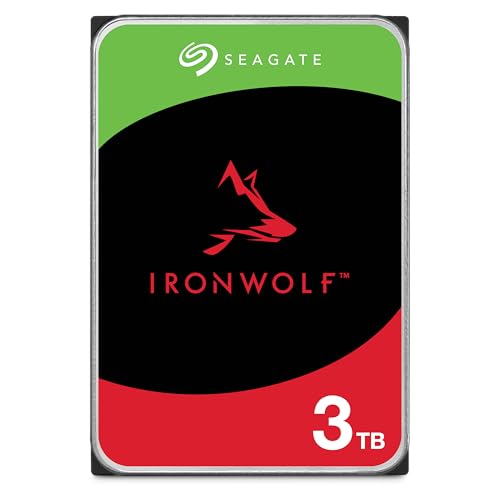
Seagate IronWolf 3TB ST3000VN006
The Seagate IronWolf 3TB is a NAS-rated 3.5-inch SATA drive for HD video libraries that are organised across several smaller drives. It spins at 5,400 RPM, uses CMR recording and carries 64 MB of cache, with firmware designed for always-on, multi-bay use and health reporting that warns an administrator before a drive fails. Its workload rating is well above a desktop drive, and its quiet, cool-running character suits a media server that lives near people. For a household that records television every day, a 3TB drive is a practical size for a single recording volume, holding weeks of programmes before older recordings need to be archived or deleted.
This drive is a good choice for a recording volume in a DVR or media server, for a secondary library drive, or for a multi-bay server where several 3TB drives in an array give a good balance of capacity, redundancy and rebuild speed. It is also useful as a dedicated drive for a single category of video, such as family clips or a children’s collection, keeping that library separate from the main movie store. The caveat is the same as with any smaller drive: capacity per bay is limited, so a server with few bays will need larger drives to hold a big library. Match the drive size to the bay count, and keep a backup of anything irreplaceable.
Seagate IronWolf 3TB ST3000VN006
Seagate BarraCuda 2TB ST2000DM008
The Seagate BarraCuda 2TB is an affordable 3.5-inch SATA drive for a smaller HD video collection or a dedicated recording volume. It spins at 7,200 RPM, uses CMR recording in this capacity and carries 256 MB of cache, which keeps it responsive when browsing a library, starting playback and recording a new programme at the same time. Its 2TB capacity holds a respectable collection of HD movies or several weeks of recorded television, and its low cost makes it easy to dedicate one drive to video while other drives handle documents, photos and backups.
This drive suits a desktop computer that doubles as a media library, a first media server built on a tight budget, or a dedicated drive for recorded television in a home theatre computer. It is also a good pick for a second video drive when the main library already lives on a larger NAS-rated drive. The caveat is capacity and duty rating: 2TB fills up quickly with HD video, and this is a desktop-class drive, so it is best used for a modest library or a recording volume rather than as the sole store for a large, always-on household media server. Keep a backup of the videos that cannot be replaced, such as family recordings.
Seagate BarraCuda 2TB ST2000DM008
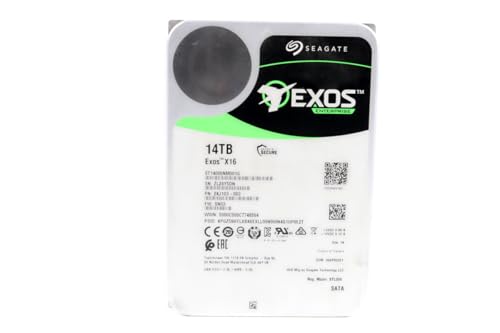
Seagate Exos X16 14TB ST14000NM001G
The Seagate Exos X16 14TB is an enterprise-class 3.5-inch SATA drive for households and small studios with a very large HD video library. It holds 14TB on a helium-sealed platform, spins at 7,200 RPM, uses CMR recording and carries 256 MB of cache, with sustained transfer performance that suits large file movement, library imports and several simultaneous HD streams. Its annual workload rating is among the highest of any drive in this roundup, and it is rated for always-on operation in multi-drive enclosures, with vibration tolerance and power management designed for servers that run for years without a break. A single Exos X16 can hold an entire movie collection, years of recorded television and a family video archive without forcing the household to shuffle files to external storage.
This drive suits a large home media server, a household that is digitising a disc collection, or a small video production setup that keeps a big library of HD footage online. It is also a strong pick for the main library drive in a two-drive setup, with a smaller, quieter drive handling recordings. The caveats are the ones that come with very large drives: a full drive takes a long time to back up, and a failure puts more video at risk at once, so a backup plan is not optional. It also runs warm under sustained load, so good case airflow matters, and it is best used where its capacity is genuinely needed rather than as a first drive for a small collection.
Seagate Exos X16 14TB ST14000NM001G
Comparison Table
| Drive | Capacity | Spindle Speed | Cache | Recording | Best For |
|---|---|---|---|---|---|
| Seagate IronWolf 8TB ST8000VNZ04 | 8TB | 5,400 RPM | 256 MB | CMR | Quiet household media server |
| WD Red Plus 3TB WD30EFRX | 3TB | 5,400 RPM | 256 MB | CMR | Many-bay RAID libraries |
| Seagate IronWolf 3TB ST3000VN006 | 3TB | 5,400 RPM | 64 MB | CMR | Recording volume |
| Seagate BarraCuda 2TB ST2000DM008 | 2TB | 7,200 RPM | 256 MB | CMR | Small library or DVR drive |
| Seagate Exos X16 14TB ST14000NM001G | 14TB | 7,200 RPM | 256 MB | CMR | Very large video libraries |
Which One Is Right for You?
For most households, the Seagate IronWolf 8TB is the best starting point for an HD video library, because it combines quiet, cool, always-on operation with enough capacity for a very large collection. If the media server has many bays and the priority is redundancy and short rebuild times, build the library from WD Red Plus 3TB or Seagate IronWolf 3TB drives instead, accepting lower capacity per drive in exchange for more spindles. If the collection is small, or the drive will hold recordings for a home theatre computer, the Seagate BarraCuda 2TB is the affordable pick that still spins fast enough for smooth playback and recording at the same time. And if the library is very large, or the household is digitising a whole disc collection, the Seagate Exos X16 14TB is the drive that holds it all in a single bay. Whatever you choose, keep a backup of the videos that cannot be replaced, because a library that took years to build should never live on a single drive.
Frequently Asked Questions
How much storage do I need for HD video?
It depends on how the library grows. A single HD movie can occupy several gigabytes, a recorded television series can fill tens of gigabytes, and a household that records daily will add terabytes over a year. Add up the library today, estimate a year of growth, and choose a drive with headroom beyond that, because moving a video library to a larger drive is slow work. For most households, 8TB is a practical starting point for a main library drive, with larger drives available when the collection keeps growing.
Can I use a desktop hard drive for an HD video library?
A desktop drive will work for a small library on a computer that is not always on, but it is not designed for the duty cycle of a media server. Desktop drives are rated for light, intermittent use, lack the vibration tolerance of NAS drives, and can drop out of a RAID array when error recovery takes too long. For a library that runs around the clock, serves several screens or lives in a multi-bay server, a NAS-rated or enterprise drive is the more dependable choice.
Should I use CMR or SMR drives for HD video?
CMR is the safer choice, especially for a library that lives in a RAID array or that sees frequent recording and deletion. CMR writes each track separately, so rewriting stays fast and predictable, while SMR overlaps tracks and can slow down sustained rewrites once the drive fills up. A video library is mostly written once and read many times, which suits either method, but recordings, deletions and RAID rebuilds all involve rewriting, and that is where CMR earns its keep.
How many HD streams can one hard drive serve at once?
A modern internal hard drive can usually serve several simultaneous HD streams without trouble, because HD playback needs only a modest sustained transfer rate per stream. The practical limit depends on the drive speed, the cache, and whether the drive is also recording or copying files at the same time. A 7,200 RPM drive with a large cache handles more simultaneous streams than a slower drive, and a NAS-rated drive keeps performance steadier when several streams request different files at once. For a household with many screens, a NAS-rated drive in a wired media server is the most dependable setup.
Disclosure: As an Amazon Associate, we may earn from qualifying purchases.
Related guides
More from Amazon
Programs that pair well with the guide above. Offers and eligibility are set by Amazon and may change.
A free business account with business pricing and bulk-buying tools for work, shop or home office.
Create a business accountFree shipping on eligible items, Prime Video and more. Eligible new members can start with a free trial.
Start a Prime free trialAudiobooks and podcasts to listen to on the go. Eligible new members can start with a free trial.
Try Audible freeAd-free music streaming. Eligible new subscribers can start with a free trial.
Try Music Unlimited freeAs an Amazon Associate we earn from qualifying purchases.