Our Short List of 3

- 27-inch QHD IPS panel for sharp, accurate images
- 180 Hz refresh rate for smooth motion
- HDMI and DisplayPort inputs for console and PC
- Game mode for low input lag

- 27-inch QHD IPS panel with wide viewing angles
- 165 Hz refresh rate for smooth motion
- Variable refresh rate support for tear-free gaming
- HDMI and DisplayPort inputs
- 24-inch 1080p IPS panel for fast, crisp motion
- 165 Hz refresh rate for competitive play
- HDMI and DisplayPort inputs
- Slim bezel suited to a multi-monitor desk
All 4 Picks at a Glance
| Product | Specs | Action |
|---|---|---|
| Samsung Odyssey G5 G50F 27-Inch QHD 180Hz Gaming Monitor |
| Check price on Amazon |
| ASUS TUF Gaming VG27AQ 27-Inch QHD 165Hz Gaming Monitor |
| Check price on Amazon |
| Acer Nitro VG240Y Pbiip 24-Inch 1080p 165Hz Gaming Monitor |
| Check price on Amazon |
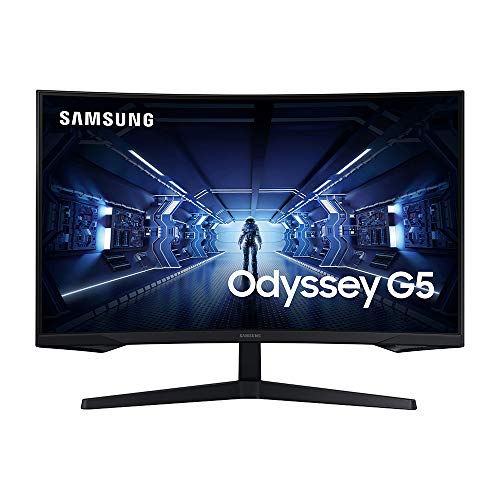 Samsung Odyssey G5 32-Inch QHD Gaming Monitor, LC32G55TQWNXZA |
| Check price on Amazon |
The best monitors for PS5 under 300 are the displays that make the most of the console without asking for a flagship panel. The PS5 plays best on a monitor with a fast refresh rate, low input lag, and a resolution the console can actually drive — and the under-300 tier is where those features meet a sensible outlay. A good monitor in this tier gives you smooth motion in fast games, a sharp image, and HDMI connectivity that just works with the console, without the cost of a high-end display.
This guide compares five gaming monitors suited to the PS5. Every pick is a display with a high refresh rate, a fast response, and HDMI input, and each one fits the under-300 tier. We explain what to check before you buy, then cover each monitor with its strengths and its limits. No prices are quoted in this guide, in line with the brief: the tier is described by the keyword itself, and the picks are chosen to fit it.
Our Top Picks
- ASUS TUF Gaming VG27AQ 27 Inch QHD 165Hz27” 2K WQHD IPS19.96 x 24.41 x 8.31 inches12.8 poundsCheck on Amazon
Top 3 picks at a glance
How to Choose
Refresh rate. The PS5 supports high refresh rates in many games, and a 120 Hz or faster display shows smoother motion than a standard 60 Hz screen. A 144 Hz or 165 Hz monitor is a good target in this tier, and it also suits PC gaming if you connect a computer later.
Resolution. The PS5 outputs up to 4K, but a 1440p monitor is the sweet spot in this tier: it is sharper than 1080p, easier to drive at high refresh rates, and the PS5 supports 1440p output. A 1080p monitor is fine for competitive play, where frame rate matters more than detail.
Input lag and response time. A gaming monitor should respond quickly to the console. Look for a fast response time and a low input lag figure, and a game mode that disables processing that adds delay. The difference is felt in fast games, where a slow display makes controls feel heavy.
HDMI connectivity. The PS5 connects over HDMI, so the monitor must have an HDMI input that supports the resolution and refresh rate you want. Check the HDMI version and the supported modes, because not every HDMI port on a monitor supports every combination.
Panel type. An IPS panel gives wide viewing angles and accurate colour, which suits most games. A VA panel gives deeper blacks and stronger contrast, which suits dark games and films, but can show smearing in fast motion. Either can work for a PS5; the choice is about what you play.
HDR support. HDR makes bright highlights and dark shadows look better in games that support it, but HDR quality varies widely in this tier. A monitor that lists HDR support is a bonus, not a guarantee of a great HDR image — treat it as a secondary feature.
Size and viewing distance. A 27-inch monitor is the standard size for a desk, while a 32-inch display suits a living-room setup or a deep desk. Sit at a distance where you can see the whole screen without turning your head, and check the stand adjustment before buying.
Top Picks
Samsung Odyssey G5 G50F 27-Inch QHD 180Hz Gaming Monitor
- 27-inch QHD IPS panel for sharp, accurate images
- 180 Hz refresh rate for smooth motion
- HDMI and DisplayPort inputs for console and PC
- Game mode for low input lag
Samsung Odyssey G5 G50F 27-Inch QHD 180Hz Gaming Monitor
The Samsung Odyssey G5 G50F is a 27-inch QHD gaming monitor with a 180 Hz refresh rate and an IPS panel, and it is a strong match for the PS5 in this tier. QHD resolution is sharper than 1080p and easier to drive at high refresh rates, the IPS panel keeps colours accurate from any viewing angle, and the fast refresh rate makes motion smooth in the games that support it. It connects over HDMI and DisplayPort, has a game mode that keeps input lag low, and its 27-inch size suits a desk or a bedroom setup. For a PS5 owner who wants a modern, fast, sharp display without a flagship outlay, this is the pick to start with.
Key specifications:
Who it is for: a PS5 owner who wants a fast, sharp QHD display for a desk or bedroom.
Watch for: It is a QHD monitor, not a 4K display, so it will not show the PS5’s highest resolution output, and HDR is a secondary feature in this tier.
ASUS TUF Gaming VG27AQ 27-Inch QHD 165Hz Gaming Monitor
- 27-inch QHD IPS panel with wide viewing angles
- 165 Hz refresh rate for smooth motion
- Variable refresh rate support for tear-free gaming
- HDMI and DisplayPort inputs
ASUS TUF Gaming VG27AQ 27-Inch QHD 165Hz Gaming Monitor
The ASUS TUF VG27AQ is a 27-inch QHD IPS gaming monitor with a 165 Hz refresh rate and a long record as a reliable gaming display. Its IPS panel gives wide viewing angles and accurate colour, the high refresh rate keeps motion smooth, and ASUS’s game features — including a low input lag mode and variable refresh rate support — help it stay in step with the console. It connects over HDMI and DisplayPort, and its stand adjusts in height, tilt, swivel, and pivot. For a PS5 setup that may also serve a PC, the VG27AQ is a proven, well-rounded choice that has been recommended for gaming for years.
Key specifications:
Who it is for: a PS5 owner who also games on a PC and wants a proven, well-rounded QHD display.
Watch for: It is a QHD panel, so it does not show the PS5’s 4K output, and it is an established model, so confirm the listing is for a new unit.
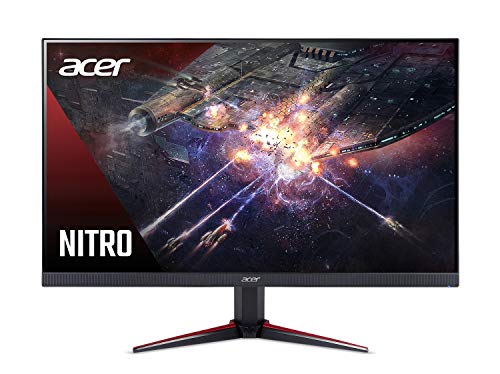
Acer Nitro VG240Y Pbiip 24-Inch 1080p 165Hz Gaming Monitor
- 24-inch 1080p IPS panel for fast, crisp motion
- 165 Hz refresh rate for competitive play
- HDMI and DisplayPort inputs
- Slim bezel suited to a multi-monitor desk
Acer Nitro VG240Y Pbiip 24-Inch 1080p 165Hz Gaming Monitor
The Acer Nitro VG240Y is the compact pick in this group: a 24-inch 1080p IPS display with a 165 Hz refresh rate, built for fast, competitive play. Its smaller size and lower resolution mean the PS5 can drive it at high frame rates with ease, and the fast refresh rate and low response time keep motion crisp in shooters and sports games. It connects over HDMI and DisplayPort, has a slim bezel that suits a multi-monitor desk, and its IPS panel keeps colours accurate. Choose it when you play competitive games, sit close to the screen, or want a second monitor beside a larger display — and when a smaller, faster screen suits your setup better than a larger, sharper one.
Key specifications:
Who it is for: a competitive player who sits close to the screen and values frame rate over resolution.
Watch for: It is a 1080p display, so it is less sharp than the QHD picks for story games and media, and the Nitro line has several close variants, so confirm the exact model on the listing.
Samsung Odyssey G5 32-Inch QHD Gaming Monitor, LC32G55TQWNXZA
- 32-inch QHD curved VA panel for deep blacks and strong contrast
- High refresh rate for smooth motion
- HDMI and DisplayPort inputs
- Curved screen for an immersive view
Samsung Odyssey G5 32-Inch QHD Gaming Monitor, LC32G55TQWNXZA
The Samsung Odyssey G5 32-inch is the large-screen pick in this tier: a 32-inch QHD display with a curved VA panel, a high refresh rate, and the deep blacks that make dark games and films look their best. The larger size suits a living-room setup or a deep desk, where you sit further back and want the screen to fill more of your view. The VA panel gives stronger contrast than an IPS display, which helps in horror games, space games, and films, and the curved screen draws your eyes into the image. It connects over HDMI and DisplayPort and has a game mode for low input lag. Choose it when size and contrast matter more than the widest viewing angles.
Key specifications:
Who it is for: a PS5 owner who plays in a living room or at a deep desk and wants a large, immersive screen.
Watch for: A VA panel can show smearing in very fast motion, and the curved screen needs a straight viewing position to look its best.
ASUS TUF Gaming VG259QM 24.5-Inch 1080p 280Hz Gaming Monitor
ASUS TUF Gaming VG259QM 24.5-Inch 1080p 280Hz Gaming Monitor
The ASUS TUF VG259QM is the fastest monitor in this group, with a 280 Hz refresh rate on a 24.5-inch 1080p IPS panel. That speed is far beyond what the PS5 needs, but it makes the monitor a superb choice for competitive play and for a PC, where the high refresh rate keeps motion exceptionally smooth. The IPS panel gives accurate colour and wide viewing angles, the response time is fast, and variable refresh rate support keeps the image tear-free. It connects over HDMI and DisplayPort and has a fully adjustable stand. It is the pick for a player who competes seriously and wants the fastest display in this tier, even if the PS5 itself will not use the full refresh rate.
Key specifications:
- 24.5-inch 1080p IPS panel with wide viewing angles
- 280 Hz refresh rate for exceptionally smooth motion
- Variable refresh rate support for tear-free gaming
- HDMI and DisplayPort inputs
- Fast response time for competitive play
- Height, tilt, swivel, and pivot adjustment
Who it is for: a competitive player who wants the fastest display in this tier for PS5 and PC play.
Watch for: Its 1080p resolution is the lowest here, so story games and media will look less sharp than on the QHD picks, and the high refresh rate exceeds what the PS5 outputs.
Comparison Table
| Monitor | Size and Resolution | Refresh Rate | Best For |
|---|---|---|---|
| Samsung Odyssey G5 G50F | 27-inch QHD | 180 Hz | Fast, sharp desk gaming |
| ASUS TUF VG27AQ | 27-inch QHD | 165 Hz | PS5 and PC gaming |
| Acer Nitro VG240Y | 24-inch 1080p | 165 Hz | Competitive play, close viewing |
| Samsung Odyssey G5 32-inch | 32-inch QHD | High | Large-screen immersion |
| ASUS TUF VG259QM | 24.5-inch 1080p | 280 Hz | Fastest competitive display |
Which One Is Right for You?
For most PS5 owners, the Samsung Odyssey G5 G50F or the ASUS TUF VG27AQ is the right choice: a 27-inch QHD display with a high refresh rate, accurate colour, and HDMI connectivity that just works. If you play competitively and sit close to the screen, the Acer Nitro VG240Y or the ASUS VG259QM gives you a smaller, faster display that suits shooters and sports games. If you play in a living room or at a deep desk, the 32-inch Samsung Odyssey G5 gives you the largest, most immersive image in this tier. Whichever you choose, connect over HDMI, enable the monitor’s game mode, and set the PS5 to output the resolution and refresh rate the monitor supports — a monitor only helps when the console and the display agree.
Frequently Asked Questions
Is QHD or 1080p better for a PS5 monitor?
QHD is sharper and suits story games, open worlds, and media, while 1080p is easier to drive at high frame rates and suits competitive play. The PS5 supports 1440p output, so a QHD monitor is a good middle ground in this tier, and a 1080p monitor is the right choice when frame rate matters most.
Do I need a 4K monitor for a PS5?
No. The PS5 can output 4K, but a good QHD monitor with a high refresh rate gives a smoother, sharper experience than a basic 4K display in this tier. A 4K monitor is worth it when the budget allows a high-quality panel, but it is not required to enjoy the console.
What refresh rate should a PS5 monitor have?
A 120 Hz or faster display suits the PS5, because the console supports high refresh rates in many games. A 144 Hz or 165 Hz monitor is a good target, and a faster panel also suits PC gaming if you connect a computer later.
Does a PS5 monitor need HDMI 2.1?
HDMI 2.1 is needed for the highest combinations of resolution and refresh rate, but many PS5 games play well over an HDMI connection that supports 1440p at high refresh rates. Check the monitor’s HDMI specifications against the modes you plan to use, rather than assuming a version number tells the whole story.
Disclosure: As an Amazon Associate, we may earn from qualifying purchases.
Related guides
- Best Latency for Server Hard Drives: A Guide to Low-Latency Storage (2026)
- Best 10 Inch Bass Guitar Speakers: Drivers for Punch, Definition, and Low End (2026)
- Best Monitors for Drafting: 5 Sharp, Colour-Accurate Picks for CAD Work
- Best Internal Hard Drives for Your PS4: 2TB Upgrades That Fit and Last (2026)
More from Amazon
Programs that pair well with the guide above. Offers and eligibility are set by Amazon and may change.
A free business account with business pricing and bulk-buying tools for work, shop or home office.
Create a business accountFree shipping on eligible items, Prime Video and more. Eligible new members can start with a free trial.
Start a Prime free trialAudiobooks and podcasts to listen to on the go. Eligible new members can start with a free trial.
Try Audible freeAd-free music streaming. Eligible new subscribers can start with a free trial.
Try Music Unlimited freeAs an Amazon Associate we earn from qualifying purchases.