Our Short List of 3
All 4 Picks at a Glance
| Product | Specs | Action |
|---|---|---|
 Jabra Evolve2 30 SE Stereo USB-C | Check price on Amazon | |
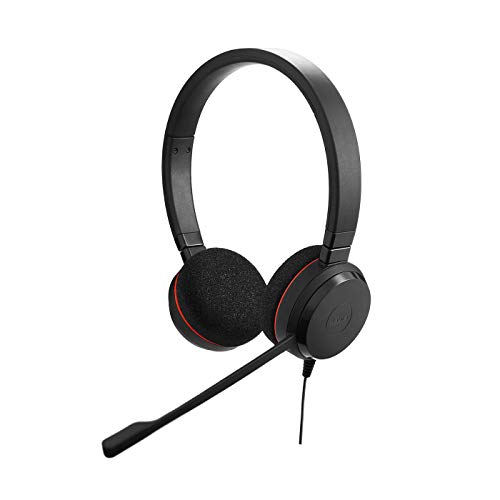 Jabra Evolve 20 MS Stereo | Check price on Amazon | |
 Poly Blackwire 3210 USB-A | Check price on Amazon | |
 Logitech H390 Wired USB Headset | Check price on Amazon |
A good headset with a microphone does not have to cost a lot. For calls, remote work, online classes and everyday voice chat, what matters is a microphone that keeps your voice clear, earcups that stay comfortable through a long day, and a connection that works the moment you plug it in. The best affordable headsets with mic deliver all three without the extras that push the cost up, and they are built for the kind of daily use that wears out a cheap headset in weeks.
This guide covers the best affordable headsets with mic for work and everyday use, from a lightweight stereo headset that suits all-day calls to a wired USB model that has been a desk staple for years. Every pick below is a real headset sold on Amazon US, and each one is matched to a different way of working, so you can find clear voice and lasting comfort at a modest outlay.
Our Top Picks
Top 3 picks at a glance
How to Choose
1. Microphone clarity
The microphone is the most important part of a call headset. A boom microphone that sits near your mouth picks up your voice clearly and rejects room noise better than a microphone built into an earcup or a cable. Look for a microphone with noise cancelling and a flexible boom you can position, and check whether it mutes when you flip it up or press a button.
2. Comfort for long sessions
A headset for work gets worn for hours, so weight and padding matter more than looks. Lightweight designs with soft ear cushions and a padded headband stay comfortable through a full day of calls, while a heavy headset with hard cushions becomes a distraction by the afternoon. On-ear models are lighter and cooler, while over-ear models block more background noise.
3. Wired or wireless
Wired headsets are simple: plug in and talk, with no battery to charge and no pairing to manage. Wireless headsets give you freedom to move around the room during a call, but they add a battery and a higher cost. For a desk setup, wired is usually the sensible choice; for moving between rooms, wireless earns its keep.
4. Connection type
USB headsets connect digitally and usually work with a computer without extra software, while a 3.5mm jack works with phones, tablets and laptops. Some headsets offer both USB and a 3.5mm connection, which is handy if you switch between a computer and a phone during the day. Check that the connector matches the devices you actually use.
5. Compatibility with call software
Most modern headsets work with the common meeting and calling apps, but some carry certification for a particular platform, which usually means the call controls on the headset work with that app. If your team uses one platform all day, a certified model saves you from fumbling with on-screen buttons mid-call.
6. Durability and build
An affordable headset still needs to survive daily use: being picked up, put down, carried in a bag and worn for hours. Look for a flexible headband, a sturdy microphone boom and a cable with strain relief where it meets the earcup. A headset that feels solid in the hand usually lasts longer than one that feels hollow and brittle.
7. Sound quality for the listener
The earcups matter too, because you need to hear the other person clearly. A headset with balanced sound and a little passive noise isolation helps you follow a call in a busy room, and stereo sound makes long calls less tiring than a single-ear design. You do not need audiophile sound for calls, but muddy or tinny audio wears you out.
Top Picks
Jabra Evolve2 30 SE Stereo USB-C
View the Jabra Evolve2 30 SE on Amazon
The Jabra Evolve2 30 SE is the best all-round affordable headset with a microphone in this guide, and it is the one to begin with when you want clear calls and all-day comfort at a modest outlay. It is a lightweight stereo headset with a flexible boom microphone, soft ear cushions and a USB-C connection that works with modern laptops and phones, and it is built for the kind of daily call load that remote work demands. The microphone carries noise cancelling that keeps your voice clear in a busy room, and the headset meets the standards of the major meeting platforms.
It is best for remote workers and students who spend hours on calls and want a headset that disappears on the head, and for anyone who uses a USB-C laptop or phone as their main device. The caveat is the connection: it is a USB-C model, so older computers with only USB-A ports need an adapter, and it has no 3.5mm jack for a phone without USB-C. Confirm the exact model and connector on the live Amazon page before ordering, since the Evolve2 30 line includes several variants.
Jabra Evolve 20 MS Stereo
View the Jabra Evolve 20 MS on Amazon
The Jabra Evolve 20 MS is the long-running workhorse of this guide, and it has earned its place through years of reliable daily use in offices and home setups. It connects over USB and a 3.5mm jack, so it works with a computer and a phone, and its boom microphone delivers clear voice with noise cancelling. The stereo earcups give you balanced sound for calls and music, and the inline call controls let you answer, mute and adjust volume without reaching for the screen.
It is best for a desk setup where you want one headset that works with everything, and for buyers who value a proven design over the newest features. The caveat is that some listings disagree about the 3.5mm connection, with a few buyer questions saying the model is USB-only, so confirm the exact variant and its connectors on the live Amazon page before ordering. It is also a slightly older design, so its ear cushions are simpler than the newer Evolve2 models.
Poly Blackwire 3210 USB-A
View the Poly Blackwire 3210 on Amazon
The Poly Blackwire 3210 is the lightweight, no-fuss pick, and it suits anyone who wants a headset that is easy to wear for hours and simple to connect. It is a mono or stereo headset with a flexible noise-cancelling microphone, a lightweight frame and a USB-A connection that plugs straight into most desktop and laptop computers. The ear cushions are soft and the headband is padded, and the inline controls cover volume and mute.
It is best for call-centre style use, long meeting days and anyone who prefers a light headset to a heavy over-ear model. The caveat is variant confusion: USB-C versions of the Blackwire 3210 exist under different codes, so confirm that the listing you order is the USB-A model with the code B07CTS6F8K on the live Amazon page. It also has no wireless option, so it stays tethered to the desk.
Logitech H390 Wired USB Headset
View the Logitech H390 on Amazon
The Logitech H390 is the classic affordable headset with a microphone, and it has been a desk staple for years because it does the basics well. It connects over USB, with a noise-cancelling boom microphone that rotates out of the way when you are not on a call, and its padded earcups and headband stay comfortable through long sessions. The inline controls cover volume and mute, and it works with the common meeting apps without extra software.
It is best for a home office or a study desk where you want a dependable wired headset that simply works, and for buyers who want the lowest outlay in this guide without giving up a proper boom microphone. The caveat is a code conflict: two codes circulate for the black H390, and the one used here is B005BFCNYU, which several sources tie to the standard black model. Confirm the exact listing on the live Amazon page before ordering, and note that the H390 is a wired-only headset with no wireless or Bluetooth option.
Comparison Table
| Headset | Connection | Microphone | Design | Best for |
|---|---|---|---|---|
| Jabra Evolve2 30 SE | USB-C | Boom, noise cancelling | Stereo, lightweight | All-day calls on USB-C devices |
| Jabra Evolve 20 MS | USB and 3.5mm | Boom, noise cancelling | Stereo | Desk setup, works with everything |
| Poly Blackwire 3210 | USB-A | Boom, noise cancelling | Lightweight | Long meeting days, light wear |
| Logitech H390 | USB | Boom, noise cancelling | Stereo, padded | Home office, dependable wired use |
Which One Is Right for You?
If you use a modern USB-C laptop or phone, the Jabra Evolve2 30 SE is the safest choice: it is light, comfortable and built for all-day calls. If you want one headset that connects to a computer and a phone, the Jabra Evolve 20 MS covers both, though you should confirm its connectors on the live page. If comfort and light weight matter most, the Poly Blackwire 3210 is the pick, and if you want the most proven wired headset at the lowest outlay, the Logitech H390 has earned its place on desks for years. Whichever you choose, confirm the exact model and connector on the live Amazon page, because each of these lines includes several close variants.
Frequently Asked Questions
Is a boom microphone better than a built-in microphone?
Yes, for calls. A boom microphone sits close to your mouth, so it picks up your voice clearly and rejects room noise, keyboard clicks and background chatter. A microphone built into an earcup or a cable sits further away and picks up more of the room, which makes you harder to understand on a busy call.
Do I need a wireless headset for remote work?
Not usually. A wired headset is simpler, has no battery to charge and never drops its connection mid-call. Wireless earns its keep when you move around during calls, such as walking to another room while staying on the line. For a desk setup, wired is the sensible choice.
Will these headsets work with my meeting app?
The headsets in this guide work with the common meeting and calling apps on Windows, macOS and mobile devices, because they use standard USB or 3.5mm audio. Some models carry certification for a particular platform, which usually means the call controls on the headset work with that app, but basic audio works everywhere.
How do I keep a headset comfortable for long calls?
Choose a lightweight model with soft ear cushions and a padded headband, and take the headset off for a few minutes between calls when you can. A headset that clamps too tightly or weighs too much will distract you by the afternoon, no matter how good its microphone is.
Disclosure: As an Amazon Associate, we may earn from qualifying purchases.
Related guides
More from Amazon
Programs that pair well with the guide above. Offers and eligibility are set by Amazon and may change.
A free business account with business pricing and bulk-buying tools for work, shop or home office.
Create a business accountFree shipping on eligible items, Prime Video and more. Eligible new members can start with a free trial.
Start a Prime free trialAudiobooks and podcasts to listen to on the go. Eligible new members can start with a free trial.
Try Audible freeAd-free music streaming. Eligible new subscribers can start with a free trial.
Try Music Unlimited freeAs an Amazon Associate we earn from qualifying purchases.









