Our Short List of 3
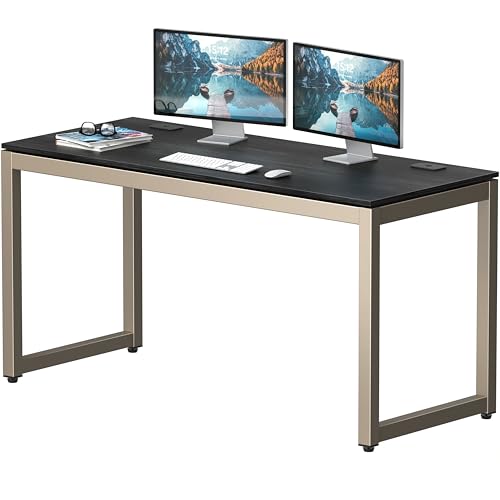
- Desktop: 55 x 28 inches
- Frame: steel with a commercial-grade top
- Shape: straight rectangle
- Colour: espresso

- Desktop: 55 x 28 inches
- Height: electric adjustable with memory preset
- Extras: built-in drawer
- Colour: cherry

- Desktop: 55 inches wide
- Lift: electric, quick assembly
- Extras: drawers and USB charging
- Colour: dark walnut top with black frame
All 3 Picks at a Glance
| Product | Specs | Action |
|---|---|---|
| SHW 55-Inch Commercial-Grade Office Computer Desk, Espresso |
| Check price on Amazon |
| SHW 55 x 28 Inches Electric Height Adjustable Standing Desk with Drawer, Cherry |
| Check price on Amazon |
| FLEXISPOT Comhar 55-Inch Electric Standing Desk with Drawers, Dark Walnut and Black |
| Check price on Amazon |
The best computer desk for two monitors starts with a simple measurement: two screens side by side need more width than most people expect. Two 27-inch monitors on their own stands need roughly 48 inches of clear desktop, and that is before a keyboard, a mouse, speakers, or a notebook. A desk that is too narrow forces the screens to the edges, pushes the keyboard forward, and leaves no room for anything else. This guide compares five desks that are wide enough for a genuine dual-monitor setup, with standing, L-shaped, and fixed options.
A good dual-monitor desk also has to be stable. Two screens add weight and leverage, especially on monitor arms, and a wobbly desktop makes typing and reading uncomfortable. The desks below are all 55 inches wide or larger, use steel frames, and are sized so that two monitors, a full keyboard, and a mouse all fit without crowding. The guide explains how to measure for a dual setup and which desk shape fits each room.
Our Top Picks
Top 3 picks at a glance
How to Choose
Desktop width and depth
Width is the first number to check. A 55-inch desktop fits two 24-inch or 27-inch monitors with room to spare, while a 48-inch desk leaves almost no margin. Depth matters too: a 28-inch deep top lets the screens sit back far enough for comfortable viewing distance and leaves space for a keyboard in front. Measure the monitors on their stands, add the keyboard depth, and compare the total against the desk dimensions.
Frame stability and weight capacity
Two monitors, a monitor arm, and a desktop computer add up to a meaningful load, and a desk that flexes will show it every time the keyboard is used. Look for a steel frame, cross supports, and a stated weight capacity that covers the monitors plus everything else on the desk. Standing desks should be checked for wobble at full height, because a desk that is steady when lowered can sway when raised.
Standing or fixed height
A standing desk lets the whole setup move between sitting and standing, which helps during long workdays, and it also makes it easy to set the screens at exact eye level. A fixed desk is simpler, cheaper, and often sturdier at the same width. Choose a standing desk when the setup will be used for many hours a day and the budget allows, and choose a fixed desk when the priority is maximum stability at the lowest cost.
Shape: straight or L-shaped
A straight desk suits a single wall and keeps both monitors in one line, which is the most natural layout for most people. An L-shaped desk adds a return wing for a second work area, a printer, or reference material, and it fits well into a corner. The L shape also gives more total surface, but it needs a corner with enough clearance on both walls, so measure both sides before ordering.
Cable management
Two monitors mean at least two display cables, two power cables, and often a USB hub, a dock, and a charger. A desk with a cable tray, grommet holes, or a rear channel keeps those cables off the floor and out of the way of knees and chair wheels. Built-in cable management is worth more in a dual-monitor setup than in a single-screen one, because the cable count doubles.
Assembly and materials
Most wide desks arrive flat-packed and need an hour or two of assembly, usually with two people for the desktop. Check the desktop thickness and material: a thicker top resists sagging under monitor arms, and a laminate or wood surface is easier to keep clean than a raw particleboard edge. Keep the assembly hardware and the instruction sheet, because a desk that needs to move rooms later will need both.
Top Picks
SHW 55-Inch Commercial-Grade Office Computer Desk, Espresso
- Desktop: 55 x 28 inches
- Frame: steel with a commercial-grade top
- Shape: straight rectangle
- Colour: espresso
Key specifications:
Who it is for: A straightforward dual-monitor workstation on a single wall, where a wide fixed desk with a deep top is all that is needed and a standing mechanism is not required.
Things to keep in mind: It is a fixed-height desk, so the screen height must be set with monitor stands or arms rather than by moving the desktop, and there is no built-in cable tray.
The SHW 55-inch desk is a simple, wide rectangle with a 28-inch depth, which is exactly the combination a two-monitor setup needs. Two 27-inch screens fit with room left for a keyboard and a notebook, and the steel frame keeps the top steady under the weight of screens and a desktop computer. It is the most affordable way to get a proper dual-monitor surface without giving up depth or stability.
SHW 55 x 28 Inches Electric Height Adjustable Standing Desk with Drawer, Cherry
- Desktop: 55 x 28 inches
- Height: electric adjustable with memory preset
- Extras: built-in drawer
- Colour: cherry
Key specifications:
Who it is for: People who work long hours at two monitors and want to alternate between sitting and standing, with a drawer for the small items that otherwise clutter a dual-screen desk.
Things to keep in mind: As with any standing desk, check for wobble at full height before loading it with two monitors on a single arm, and allow time for assembly with a second person.
This SHW standing desk keeps the same 55 by 28 inch top as the fixed model and adds an electric lift with a memory preset, so the sitting and standing heights can be recalled with one touch. The built-in drawer holds cables, notebooks, and small accessories that would otherwise crowd the space between the monitors. It is a strong middle option for a home office that needs both width and movement.
FLEXISPOT E6 Pro Standing Desk 55 x 28 Inch, Black Frame and Black Desktop
Key specifications:
- Desktop: 55 x 28 inches, whole-piece board
- Lift: dual motor, three-stage
- Load capacity: listed at 150 kg
- Colour: black frame and black desktop
Who it is for: A heavy dual-monitor setup with two screens on arms, a dock, and a desktop computer, where a dual-motor lift and a high load capacity keep the desk steady at any height.
Things to keep in mind: The whole-piece board is heavy, so assembly is a two-person job, and the desk needs a clear wall space of at least 55 inches plus room for the lift columns.
The FLEXISPOT E6 Pro uses a dual-motor, three-stage lift and a whole-piece desktop, which together make it one of the sturdiest standing desks at this width. The high load capacity covers two monitors on arms, a full keyboard, and a dock without strain, and the three-stage columns give a wide height range for both sitting and standing. It is the pick for buyers who want a standing desk that feels as solid as a fixed one.
FLEXISPOT Comhar 55-Inch Electric Standing Desk with Drawers, Dark Walnut and Black
- Desktop: 55 inches wide
- Lift: electric, quick assembly
- Extras: drawers and USB charging
- Colour: dark walnut top with black frame
Key specifications:
Who it is for: A home office dual-monitor setup that needs storage and phone charging built into the desk, with a warmer wood finish that suits a living room or bedroom office.
Things to keep in mind: The drawers reduce the knee space under part of the desktop, so check the layout against the chair position before ordering.
The Comhar pairs a 55-inch electric standing desk with built-in drawers and USB charging, which removes two of the most common sources of desk clutter: loose accessories and charging cables. The dark walnut top gives the desk a furniture look rather than an office look, which helps when the workspace shares a room with the rest of the home. It is a good choice when the dual-monitor setup also needs to stay tidy.
SHW 55-Inch Large Electric Height Adjustable L-Shaped Standing Desk, Oak
Key specifications:
- Desktop: 55-inch L-shaped top
- Lift: electric height adjustable
- Shape: L-shaped, right-facing corner
- Colour: oak
Who it is for: A corner dual-monitor setup where the screens sit on one wing and the second wing holds a laptop, documents, or a printer, with standing height adjustment for the whole desk.
Things to keep in mind: An L-shaped desk needs a corner with clear wall space on both sides, and the corner section is harder to reach, so it suits storage and secondary tasks better than a third monitor.
The SHW L-shaped standing desk gives a dual-monitor setup a second wing of surface without needing a second desk. The monitors sit along the main run while the return holds a laptop, a notebook, or a printer, and the electric lift raises the whole L together. For a corner office or a room where a straight desk would waste the corner, it is the most practical shape in this guide.
Comparison Table
| Product | Capacity / Size | Key Feature | Connection |
|---|---|---|---|
| SHW 55-Inch Computer Desk | 55 x 28 in | Fixed height, steel frame | Straight |
| SHW 55-Inch Standing Desk | 55 x 28 in | Electric lift, drawer | Straight |
| FLEXISPOT E6 Pro | 55 x 28 in | Dual motor, 150 kg capacity | Straight |
| FLEXISPOT Comhar 55-Inch | 55 in | Drawers, USB charging | Straight |
| SHW 55-Inch L-Shaped | 55 in L-shape | Electric lift, corner fit | L-shaped |
Which One Is Right for You?
For a simple dual-monitor setup on one wall, the SHW 55-inch fixed desk is the most direct answer: it is wide, deep, steady, and easy to assemble. The SHW electric standing desk is the better choice when the workday is long and alternating between sitting and standing matters.
Choose the FLEXISPOT E6 Pro when the setup is heavy, with two monitors on arms and a dock, because its dual-motor lift and high load capacity keep it steady. The Comhar suits a home office that needs drawers and charging built in, and the SHW L-shaped desk is the pick for a corner room where a second wing of surface earns its place.
Whatever the desk, measure the wall, the monitors on their stands, and the chair clearance before ordering, and set the screens so the top of each display sits at or just below eye level.
Frequently Asked Questions
How wide should a desk be for two monitors?
A 55-inch desk is a practical minimum for two 27-inch monitors on their stands, because the screens alone need about 48 inches. A 48-inch desk can work with two 24-inch monitors on a shared arm, but it leaves almost no room for a keyboard and other items.
Is a standing desk stable enough for two monitors?
A well-built standing desk with a steel frame and a dual-motor lift is steady at sitting height and usable at standing height, though some sway at full height is normal. A single monitor arm that clamps to the desk can add leverage, so a heavier desk and a wide base help.
Should I use monitor arms or the stands that come with the monitors?
Monitor arms free up desktop space and make it easier to align two screens at the same height, but they add leverage to the desk edge. The supplied stands are simpler and work well on a desk that is wide enough, especially when the screens are the same model.
Does an L-shaped desk work for two monitors?
Yes, and it works well when the monitors sit along one wing and the second wing holds a laptop or documents. The corner itself is not a good place for a monitor, because the viewing angle becomes awkward and the corner is hard to reach.
Disclosure: As an Amazon Associate, we may earn from qualifying purchases.
Related guides
More from Amazon
Programs that pair well with the guide above. Offers and eligibility are set by Amazon and may change.
A free business account with business pricing and bulk-buying tools for work, shop or home office.
Create a business accountFree shipping on eligible items, Prime Video and more. Eligible new members can start with a free trial.
Start a Prime free trialAudiobooks and podcasts to listen to on the go. Eligible new members can start with a free trial.
Try Audible freeAd-free music streaming. Eligible new subscribers can start with a free trial.
Try Music Unlimited freeAs an Amazon Associate we earn from qualifying purchases.









