Our Short List of 3
All 3 Picks at a Glance
| Product | Specs | Action |
|---|---|---|
 WD Black 6TB WD6003FZBX | Check price on Amazon | |
 Seagate BarraCuda 2TB ST2000DM008 | Check price on Amazon | |
 Seagate IronWolf 8TB ST8000VNZ04 | Check price on Amazon |
The best hard drives to edit video are drives that keep up with a timeline. Video editing punishes storage in ways that ordinary use never does: hours of high-bitrate footage, constant scrubbing back and forth, rendering that writes large files for long stretches, and libraries that grow by terabytes with every project. A slow drive turns editing into waiting — stuttering playback, lagging frames, and renders that crawl. A fast, well-chosen drive makes the same work feel fluid, and it protects the footage that took hours to shoot.
This guide covers internal hard drives for editing workstations and storage servers, from fast desktop drives that hold active projects to large-capacity drives for media libraries and backups. Every pick is a real drive with a confirmed model number, and each one is explained in terms of what it is for: active editing, media storage, or backup. We also cover the practical side: how to organize footage across drives, why recording method matters, and when a hard drive should give way to an SSD.
Our Top Picks
Top 3 picks at a glance
How to Choose
Sustained Speed Over Burst Speed
Editing cares about sustained throughput, not short bursts. A drive that reads and writes quickly for minutes at a time keeps playback smooth and renders moving, while a drive that slows down after its cache fills will stutter on long timelines. Look for drives with high sustained transfer rates and CMR recording, which handles long writes cleanly, rather than SMR designs that can slow down during heavy writes.
CMR Versus SMR Recording
Conventional magnetic recording, or CMR, writes data in parallel tracks and handles the random writes and long sequential writes of video editing well. Shingled magnetic recording, or SMR, overlaps tracks to raise density, which can slow sustained writes and rebuilds noticeably. For editing, CMR is the safer choice. Check the recording method before buying, since it is not always obvious from the product name.
Capacity and Project Size
Video projects are large: a single 4K project can use hundreds of gigabytes, and a library of finished projects can reach many terabytes. Size your editing drive for the active project plus headroom, and size your media drive for the whole library. A drive that begins half full stays fast and flexible; a drive that begins nearly full slows down and complicates the next project.
RPM and Workload Rating
A 7200 RPM drive spins faster and transfers data more quickly than a 5400 RPM drive, which matters for timeline playback and rendering. It also runs warmer and louder, so it needs airflow. A high workload rating matters too: editing moves far more data per year than ordinary desktop use, and a drive rated for heavy annual workloads will last longer under that strain.
Where the Drive Lives
Active projects belong on the quickest drive in the system, an SSD works best for the timeline and a fast hard drive for the media. Finished projects and backups belong on large-capacity hard drives, where cost per terabyte matters more than speed. A common setup is three tiers: an SSD for the operating system and cache, a fast hard drive for active media, and a large hard drive or NAS for backup and archive.
Reliability and Backup
No hard drive lasts forever, and a failed drive during a project is a disaster. Choose drives with solid warranties and a reputation for reliability, and treat every editing drive as part of a backup routine: active projects copied to a second drive daily, finished projects archived to a separate drive or NAS. A drive that holds the only copy of a project is a risk, not a solution.
Noise and Heat
A 7200 RPM drive makes noise and heat, especially during long renders. A workstation with good airflow and a solid case handles it well, but a drive in a cramped case or a quiet room can become annoying. Larger, slower drives run cooler and quieter, which suits a media library, while faster drives suit the active editing bay where their speed earns the noise.
Top Picks
Seagate IronWolf Pro 8TB ST8000NT001
View the Seagate IronWolf Pro 8TB on Amazon
The IronWolf Pro 8TB is a 7200 RPM CMR drive with a high workload rating and vibration tolerance, built for systems that work hard around the clock. For video editing, it suits a media drive that holds active projects and serves footage to the timeline: fast sustained reads, clean handling of long writes, and enough capacity for several 4K projects at once. It also works well in a NAS that backs up the editing workstation.
Who it is for: editors with a dedicated media drive, small studios, and anyone whose editing system runs several services at once. Caveats: it is a 7200 RPM drive, so it runs louder and warmer than a slower drive; give the case airflow and keep it out of a closed cabinet.
WD Black 6TB WD6003FZBX
View the WD Black 6TB on Amazon
The WD Black 6TB is a 7200 RPM desktop drive tuned for performance, with a large cache and firmware aimed at sustained throughput. It suits an editing workstation’s media drive, where its fast reads keep timeline playback smooth and its sustained writes handle renders without slowing down. Six terabytes holds a solid library of active projects, and the Black line’s performance focus shows in real editing work.
Who it is for: editors who want a fast desktop drive for active media, and workstations where the media drive is the bottleneck. Caveats: it is a performance drive, so it runs warmer and louder than a NAS or archive drive; use it for active work, not for quiet long-term storage.
Seagate BarraCuda 2TB ST2000DM008
View the Seagate BarraCuda 2TB on Amazon
The Seagate BarraCuda 2TB is a compact desktop drive for smaller editing setups, proxy workflows, and secondary storage. Two terabytes suits a single active project, a proxy media library, or a scratch volume for renders and cache files. It is a practical choice for a laptop dock, a second bay, or a budget editing build where the main media lives elsewhere.
Who it is for: smaller projects, proxy editing, and secondary storage in a budget build. Caveats: this model uses SMR recording, which suits media storage and playback but is less suited to heavy sustained writes — use it for media and proxies rather than as a cache or scratch drive, and confirm the exact model before ordering.
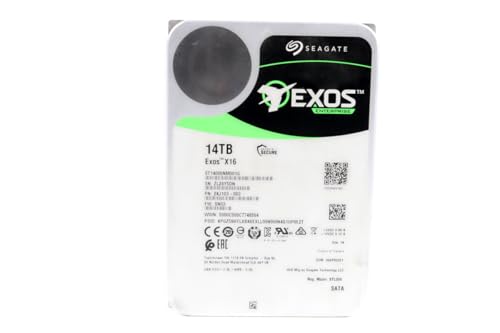
Seagate Exos X16 14TB ST14000NM001G
View the Seagate Exos X16 14TB on Amazon
The Seagate Exos X16 14TB is an enterprise drive with a large capacity, CMR recording, and a workload rating built for data centers — which makes it a strong choice for a video archive or a media server that holds a whole library. Fourteen terabytes holds years of finished projects, raw footage, and backups in a single drive, and the enterprise firmware handles sustained reads and writes without faltering. It suits a NAS, a DAS, or a workstation archive bay.
Who it is for: large libraries, archives, and media servers that need maximum capacity per bay. Caveats: it is an enterprise drive, so it runs louder than a consumer drive and needs airflow; many listings are refurbished, so confirm new condition and warranty before ordering.
Seagate IronWolf 8TB ST8000VNZ04
View the Seagate IronWolf 8TB on Amazon
The standard IronWolf 8TB is a 5400 RPM CMR NAS drive that suits a media library and backup volume for video work: quiet, cool, and reliable, with NAS firmware that handles always-on operation. It is the drive for finished projects, raw footage archives, and the backup copy of the editing workstation, where capacity and reliability matter more than maximum speed. Eight terabytes is a sensible size for a growing library.
Who it is for: media libraries, archives, and backup volumes in a NAS or a workstation bay. Caveats: at 5400 RPM it is slower than the Pro and Black picks, so use it for storage and backup rather than as the active timeline drive; confirm the exact model number before ordering.
Comparison Table
| Drive | Capacity | Speed | Recording | Best For |
|---|---|---|---|---|
| Seagate IronWolf Pro 8TB | 8TB | 7200 RPM | CMR | Active media, busy systems |
| WD Black 6TB | 6TB | 7200 RPM | CMR | Fast desktop editing drive |
| Seagate BarraCuda 2TB | 2TB | 7200 RPM | SMR | Proxies, small projects |
| Seagate Exos X16 14TB | 14TB | 7200 RPM | CMR | Archives, media servers |
| Seagate IronWolf 8TB | 8TB | 5400 RPM | CMR | Libraries, backup volumes |
Which One Is Right for You?
If you edit actively and need a media drive that keeps up with a timeline, the WD Black 6TB or the IronWolf Pro 8TB are the strongest choices, with the Pro better for a system that also runs a NAS or several services. Small projects and proxy workflows suit the BarraCuda 2TB, while the Exos X16 14TB is the pick for a large archive or media server. The standard IronWolf 8TB covers the library and backup tier quietly and reliably. Whichever you choose, organize footage across tiers — SSD for cache, fast drive for active media, large drive for archive — and back up every project before you call it done.
Frequently Asked Questions
Is a hard drive fast enough to edit 4K video?
Yes, for most 4K editing, provided it is a fast CMR drive at 7200 RPM with good sustained throughput. Very high-bitrate footage, multi-camera timelines, and heavy effects benefit from an SSD, so many editors keep the timeline on an SSD and the media on a fast hard drive.
Should I use CMR or SMR drives for video editing?
CMR, in almost every case. CMR handles sustained writes and random access cleanly, which is what editing demands. SMR can slow down during long writes and is better suited to media storage and playback than to active editing or scratch use.
How much storage do I need for video editing?
A single 4K project commonly uses hundreds of gigabytes once you count raw footage, proxies, and renders, and a library of projects reaches terabytes quickly. A 6TB to 8TB drive suits active work for most editors, with a larger drive or NAS for the archive.
How should I organize drives for editing?
A common setup is three tiers: an SSD for the operating system, cache, and rendered frames; a fast hard drive for active media and projects; and a large hard drive or NAS for finished projects and backups. Keep the active project on the quickest drive, and copy it to the backup tier every day.
Disclosure: As an Amazon Associate, we may earn from qualifying purchases.
Related guides
More from Amazon
Programs that pair well with the guide above. Offers and eligibility are set by Amazon and may change.
A free business account with business pricing and bulk-buying tools for work, shop or home office.
Create a business accountFree shipping on eligible items, Prime Video and more. Eligible new members can start with a free trial.
Start a Prime free trialAudiobooks and podcasts to listen to on the go. Eligible new members can start with a free trial.
Try Audible freeAd-free music streaming. Eligible new subscribers can start with a free trial.
Try Music Unlimited freeAs an Amazon Associate we earn from qualifying purchases.









