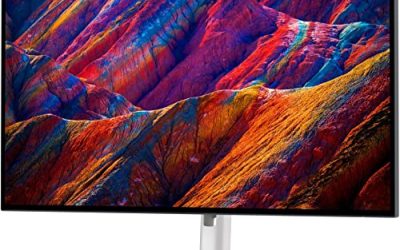
Our Short List of 3
All 5 Picks at a Glance
| Product | Specs | Action |
|---|---|---|
 Dell UltraSharp U2723QE 27-Inch 4K | Check price on Amazon | |
 LG 27UP850-W 27-Inch 4K | Check price on Amazon | |
 ASUS ProArt Display PA279CRV 27-Inch 4K | Check price on Amazon | |
 Dell UltraSharp U3223QE 32-Inch 4K | Check price on Amazon | |
 LG 32UN880-B UltraFine Ergo 32-Inch 4K | Check price on Amazon |
Watching a film on a computer monitor is a different experience from watching it on a television, and the right panel makes all the difference. A good movie monitor shows fine detail in dark scenes, reproduces skin tones and landscapes with natural colour, and fills enough of your view that the picture feels cinematic rather than cramped. The best computer monitors for movies combine a sharp high-resolution panel with wide colour coverage, good contrast and a screen size that suits watching from a desk or a couch.
This guide covers the best computer monitors for movies across several sizes, from a sharp 27-inch panel that fits a normal desk to a wide 32-inch display that turns a corner of the room into a small cinema. Every pick below is a real monitor sold on Amazon US, and each one is matched to a different way of watching, so you can find the panel that suits your space and your film collection.
Our Top Picks
 ASUS ProArt PA279CRV 27 Inch 4K UHD USB-C27 Inch24.1 x 8.46 x 16.07 Inches18.25 poundsCheck on Amazon
Top 3 picks at a glance
How to Choose
1. Resolution and detail
Resolution decides how sharp a film looks. A 4K panel shows four times the pixels of a 1080p display, which means finer detail in faces, textures and landscapes, and it pairs well with the growing number of films streamed in 4K. If your library is mostly high definition, a 4K panel still helps, because it upscales cleanly and shows the interface of your media player crisply.
2. Colour accuracy and coverage
Films are graded in wide colour spaces, and a monitor that covers most of the DCI-P3 or sRGB range reproduces those grades faithfully. Look for a panel that covers a high percentage of the DCI-P3 colour space if you watch modern films, and check whether the monitor is factory calibrated, which saves you from fiddling with settings to get natural skin tones.
3. Contrast and black levels
Dark scenes are where cheap monitors fail. A panel with strong contrast keeps shadows detailed instead of crushing them into grey or black, and it makes night scenes and moody cinematography readable. IPS panels offer accurate colour and wide viewing angles, while VA panels usually deliver deeper blacks; for a dark room, contrast matters more than peak brightness.
4. Screen size and viewing distance
A 27-inch monitor suits a normal desk and a viewing distance of an arm’s length, while a 32-inch panel works better if you sit further back or share the screen with someone beside you. Bigger is not always better: a screen that is too large for your desk forces you to turn your head, which gets tiring during a long film.
5. HDR support
High dynamic range, or HDR, expands the range between the most vivid highlights and the darkest shadows, which gives films more depth and realism. True HDR needs a bright panel with local dimming to shine, so treat basic HDR labels with caution and look at the peak brightness figure and the panel technology before deciding how much weight to give it.
6. Bezels and design
Slim bezels make a monitor feel more cinematic, because less frame distracts from the picture, and they matter if you ever add a second screen. A clean, minimal stand and a panel that tilts and adjusts in height also help, because the right viewing angle keeps colours accurate and reduces glare from windows and lamps.
7. Connectivity and speakers
A monitor for movies needs the right inputs for your player or streaming device, and HDMI is the most useful port for a set-top box, console or laptop. Built-in speakers are convenient for casual watching, but a good movie setup usually pairs the monitor with external speakers or headphones, so treat built-in audio as a bonus rather than a deciding factor.
Top Picks
Dell UltraSharp U2723QE 27-Inch 4K
View the Dell UltraSharp U2723QE on Amazon
The Dell UltraSharp U2723QE is the best all-round movie monitor in this guide, and it is the one to begin with when you want a sharp, colour-accurate 4K panel for a normal desk. Its 27-inch IPS Black panel delivers deeper blacks than a standard IPS display, with 4K resolution, wide colour coverage and factory calibration that keeps skin tones natural straight out of the box. The three-sided ultrathin bezel makes the picture feel larger than the cabinet, and the fully adjustable stand lets you set the height and tilt exactly right.
It connects over HDMI, DisplayPort and USB-C with power delivery, so a laptop docks with a single cable, and the built-in USB hub is handy for a streaming stick or an external drive. It is best for a desk-based movie setup where colour accuracy and contrast matter, and for anyone who also uses the same monitor for photo work or reading. The caveat is that its HDR support is modest, so it will not deliver the dramatic highlights of a dedicated HDR television; judge it on its colour and contrast rather than its HDR label. Confirm the exact listing on the live Amazon page, since third-party sellers are common for this model.
LG 27UP850-W 27-Inch 4K
View the LG 27UP850-W on Amazon
The LG 27UP850-W is a strong, slightly more affordable 4K movie monitor, and it suits viewers who want a bright, colourful picture with wide viewing angles. Its 27-inch IPS panel covers a wide colour range, supports HDR, and shows films with the warm, vivid look that suits modern streaming content. The slim white design and thin bezels suit a bright room, and the adjustable stand covers tilt, height and pivot for comfortable viewing from a desk or a couch.
USB-C with power delivery lets a laptop connect with one cable, and the two HDMI ports make it easy to switch between a computer and a streaming device. It is best for a living-room desk or a bedroom setup where the monitor doubles as a film screen and a work display, and for viewers who like a bright, punchy picture. The caveat is contrast: like most IPS panels, its blacks are not as deep as a VA panel in a dark room, so it shines most brightly in a room with some ambient light. Confirm the exact model on the live page before ordering.
ASUS ProArt Display PA279CRV 27-Inch 4K
View the ASUS ProArt Display PA279CRV on Amazon
The ASUS ProArt Display PA279CRV is the colour purist’s pick, and it is the monitor to choose when you want films to look the way the director graded them. It is a factory-calibrated 4K IPS panel with wide colour coverage across the sRGB and DCI-P3 spaces, and it supports hardware calibration for viewers who want to keep it accurate over time. The matte finish cuts reflections, which helps in a room with windows, and the slim bezels keep the focus on the picture.
It offers HDMI, DisplayPort and USB-C with power delivery, and its adjustable stand covers height, tilt, swivel and pivot. It is best for viewers who care about faithful colour, and for anyone who also edits photos or video on the same screen. The caveat is that it is tuned for accuracy rather than punch, so its picture can look less vivid than a consumer monitor until you get used to natural colour. There is also a conflicting code in some listings for this model line, so confirm the exact ASIN on the live Amazon page before ordering.
Dell UltraSharp U3223QE 32-Inch 4K
View the Dell UltraSharp U3223QE on Amazon
The Dell UltraSharp U3223QE is the big-screen pick, and it turns a desk into a small cinema with its 32-inch 4K IPS Black panel. The larger screen makes films feel more immersive, especially when you sit a little further back, and the IPS Black technology delivers deeper blacks and stronger contrast than a standard IPS display. Colour accuracy is excellent, with wide coverage and factory calibration, and the thin bezels keep the large cabinet looking clean.
Connectivity mirrors its smaller sibling, with HDMI, DisplayPort and a USB-C hub, so it works as both a movie screen and a workstation display. It is best for a dedicated viewing corner, a large desk, or a setup where two people watch together, and for viewers who want the most cinematic feel a desk monitor can offer. The caveat is size: it needs a deep desk and a sturdy stand position, and it dominates a small room. Confirm the exact listing on the live page, since this model is sold through several sellers.
LG 32UN880-B UltraFine Ergo 32-Inch 4K
View the LG 32UN880-B UltraFine Ergo on Amazon
The LG 32UN880-B UltraFine Ergo is the most flexible large movie monitor in this guide, thanks to its ergonomic arm that clamps to the desk and moves the screen in almost any direction. Its 32-inch 4K IPS panel shows films with sharp detail and wide colour, and the arm lets you pull the screen close for a film, push it back for work, or swivel it toward a couch for shared viewing. That flexibility makes it unusually good for a room where the monitor serves several purposes.
It connects over HDMI, DisplayPort and USB-C, and the arm frees up desk space that a normal stand would occupy. It is best for a multi-use room where the screen moves between a desk and a viewing position, and for viewers who want a large 4K picture without a bulky stand. The caveat is the arm itself: it needs a desk edge thick enough to clamp securely, and it takes a little setup to get the tension right. Confirm the exact model on the live Amazon page before ordering.
Comparison Table
| Monitor | Size | Resolution | Panel | Best for |
|---|---|---|---|---|
| Dell UltraSharp U2723QE | 27 inch | 4K | IPS Black | All-round movie watching at a desk |
| LG 27UP850-W | 27 inch | 4K | IPS | Bright, colourful picture |
| ASUS ProArt PA279CRV | 27 inch | 4K | IPS | Faithful, calibrated colour |
| Dell UltraSharp U3223QE | 32 inch | 4K | IPS Black | Big-screen cinema feel |
| LG 32UN880-B Ergo | 32 inch | 4K | IPS | Flexible viewing positions |
Which One Is Right for You?
If you want one monitor that does everything well, the Dell UltraSharp U2723QE is the safest choice: its IPS Black panel, 4K resolution and accurate colour cover the most situations. If you prefer a brighter, more vivid picture, the LG 27UP850-W is the pick, while the ASUS ProArt PA279CRV suits viewers who want colour they can trust. For a larger, more cinematic picture, the Dell U3223QE is the best big-screen option, and the LG 32UN880-B Ergo is the one to choose when the screen needs to move between a desk and a couch. Whichever you pick, sit at the right distance, dim the room lights, and let the panel do the work.
Frequently Asked Questions
Is 4K worth it for watching movies on a monitor?
Yes, if you watch modern films and stream in 4K. A 4K panel shows finer detail in faces, textures and landscapes, and it makes the interface of your media player look crisp. If your library is mostly older standard-definition content, the benefit is smaller, but a 4K panel still upscales cleanly and gives you a sharper picture overall.
Is IPS or VA better for movies?
IPS panels offer accurate colour and wide viewing angles, which suits shared viewing and bright rooms. VA panels usually deliver deeper blacks and stronger contrast, which suits dark rooms and moody films. For most viewers, an IPS panel with good contrast, such as the IPS Black models in this guide, is the best balance.
Do I need HDR on a movie monitor?
HDR can make films look more realistic, with brighter highlights and deeper shadows, but only a bright panel with local dimming shows it properly. Many monitors carry an HDR label without the hardware to back it up, so treat the label as a bonus and judge the monitor on its resolution, colour and contrast first.
How far should I sit from a movie monitor?
A good rule is to sit far enough back that you can take in the whole screen without turning your head, which is usually an arm’s length for a 27-inch panel and a little further for a 32-inch one. If you sit too close, the picture feels overwhelming; too far, and you lose the detail that a 4K panel offers.
Disclosure: As an Amazon Associate, we may earn from qualifying purchases.
Related guides
More from Amazon
Programs that pair well with the guide above. Offers and eligibility are set by Amazon and may change.
A free business account with business pricing and bulk-buying tools for work, shop or home office.
Create a business accountFree shipping on eligible items, Prime Video and more. Eligible new members can start with a free trial.
Start a Prime free trialAudiobooks and podcasts to listen to on the go. Eligible new members can start with a free trial.
Try Audible freeAd-free music streaming. Eligible new subscribers can start with a free trial.
Try Music Unlimited freeAs an Amazon Associate we earn from qualifying purchases.