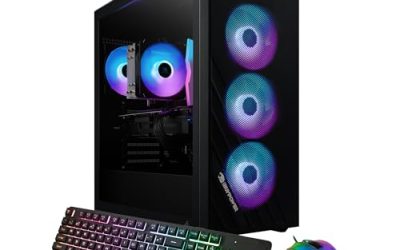
The best gaming PC right now is a 1440p-class machine built around a Ryzen 7 X3D-series CPU, a 16GB graphics card such as the Radeon RX 9070 XT or GeForce RTX 5070 Ti, 32GB of DDR5 and a 2TB NVMe SSD. It is the point where a higher price stops buying noticeably smoother play for most people. Spend less if you play at 1080p, and more only if you target 4K at high refresh rates.
This guide is built around decision criteria: which spec class fits your monitor, how much VRAM and power you actually need, and what to check in a prebuilt before you pay. Prices are described as market tiers because they move weekly.
As an Amazon Associate we earn from qualifying purchases at no extra cost to you.


Our Top Picks
 GIGABYTE GeForce RTX 4070 Super WINDFORCE OC 12G2" x 5" x 10.3"10.27 x 4.96 x 0.1 inches2.8 poundsCheck on Amazon
 ASUS TUF Gaming GeForce RTX 5070 Ti 16GBRTX5070Ti|OC|Black|Standard13 x 5.5 x 2.5 inches3.6 poundsCheck on Amazon


Top 3 picks at a glance
Quick comparison of the best gaming PC classes
| Pick | Best for | Key specs | Price tier |
|---|---|---|---|
| Best overall | 1440p high refresh | Ryzen 7 7800X3D or 9800X3D, RX 9070 XT or RTX 5070 Ti (16GB), 32GB DDR5, 2TB NVMe, 750-850W PSU | Upper mid-range |
| Best value | 1080p to 1440p | Ryzen 5 7600/9600X-class, RTX 5060 Ti 16GB or RX 9060 XT 16GB, 32GB DDR5, 1TB NVMe, 650W PSU | Mid-range |
| Best budget | 1080p esports and older titles | 6-core CPU, RTX 5060 (8GB) or similar, 16GB DDR5, 1TB NVMe, 550-650W PSU | Budget |
| Best for 4K | 4K 60-120Hz with upscaling | Ryzen 7 9800X3D, RTX 5080 (16GB), 32GB DDR5, 2TB NVMe, 850W PSU | Premium |
| Best no-compromise | 4K max settings, heavy ray tracing, AI work | Ryzen 9 9950X3D or 9800X3D, RTX 5090 (32GB), 32-64GB DDR5, 2TB+ NVMe, 1000W+ PSU | Enthusiast |
Best overall: the 1440p high-refresh machine
A fast gaming CPU with 3D V-Cache plus a 16GB GPU in the RTX 5070 Ti or RX 9070 XT class covers nearly every current game at 1440p with high settings. It also leaves room for 4K with upscaling. The 5070 Ti has a 256-bit bus and 16GB of GDDR7 with a 300W rated board power, per Nvidia’s spec sheet. The RX 9070 XT has 16GB of GDDR6 on a 256-bit bus and a 304W rating, per AMD.
Who it suits: anyone with a 1440p 144-240Hz monitor who wants to keep the system for four to five years. Trade-off: this tier costs a clear step more than mid-range, and at 1080p you will often hit a CPU limit before the GPU is fully used.
Best value: 16GB mid-range
The RTX 5060 Ti and RX 9060 XT both come in 8GB and 16GB versions. Choose the 16GB one. The 128-bit bus on both cards is the reason texture-heavy games can stutter once VRAM runs out, and the extra memory is the cheapest insurance against that. Pair it with a six- or eight-core Ryzen and 32GB of DDR5 if the budget allows.
Who it suits: 1080p high refresh and solid 1440p at medium-high settings. Trade-off: expect to lean on upscaling and frame generation in demanding new releases at 1440p.
Best budget: 1080p without regret
An RTX 5060 (8GB GDDR7, 128-bit, 145W rated, per Nvidia) in a six-core system handles esports and most older libraries at 1080p. At this tier, protect the non-GPU basics: dual-channel RAM, an NVMe SSD, and a decent PSU, because those parts are what prebuilt makers cut first.
Trade-off: 8GB of VRAM is the limit. Some recent games need medium textures at 1080p to avoid stutter, and 1440p ultra is not realistic.
Best for 4K: RTX 5080 class
The RTX 5080 pairs 16GB of GDDR7 with a 256-bit bus and a 360W rating. Combined with upscaling, it targets 4K at 60-120 fps in most titles, with the range depending on the game, ray tracing and the CPU. Pair it with a 9800X3D-class CPU so the processor does not bottleneck high frame rates.
Trade-off: 16GB is the same capacity as the cheaper cards, so you pay mainly for raw speed. For 4K ray tracing with path-traced games, the 5090 is the only card that doesn’t force compromises.
Best no-compromise: RTX 5090 class
The RTX 5090 offers 32GB of GDDR7 on a 512-bit bus and a 575W rated board power, per Nvidia. Nvidia recommends a 1000W power supply for it. This is the pick for 4K at high refresh, 4K ray tracing, or GPU-heavy creative and AI work. Trade-off: price, heat, and case and PSU requirements, which add cost beyond the card.
Memory bandwidth and VRAM: the specs that decide longevity
Memory bandwidth in GB/s equals bus width in bits divided by 8, multiplied by the data rate in Gbps. This explains why two cards with the same VRAM can behave differently at high resolutions.
| GPU | VRAM | Bus | Data rate | Bandwidth (calculated) | Rated board power |
|---|---|---|---|---|---|
| RTX 5060 | 8GB GDDR7 | 128-bit | 28 Gbps | 448 GB/s | 145W |
| RX 9060 XT 16GB | 16GB GDDR6 | 128-bit | 20 Gbps | 320 GB/s | about 160W |
| RTX 5070 | 12GB GDDR7 | 192-bit | 28 Gbps | 672 GB/s | 250W |
| RX 9070 XT | 16GB GDDR6 | 256-bit | 20 Gbps | 640 GB/s | 304W |
| RTX 5070 Ti | 16GB GDDR7 | 256-bit | 28 Gbps | 896 GB/s | 300W |
| RTX 5080 | 16GB GDDR7 | 256-bit | 30 Gbps | 960 GB/s | 360W |
| RTX 5090 | 32GB GDDR7 | 512-bit | 28 Gbps | 1,792 GB/s | 575W |
Bandwidth is not directly comparable between AMD and Nvidia because caches differ, but within one brand it shows why the 128-bit cards struggle most as resolution climbs.
VRAM by resolution (practical guidance)
- 1080p: 8GB works for most games at medium-high; 12GB gives headroom.
- 1440p: 12GB is the practical floor for high textures; 16GB is the comfortable choice.
- 4K: 16GB is the minimum for high settings; ray tracing and frame generation add several GB on top.
Worked example: sizing the power supply
Take the best-overall build: a Ryzen 7 9800X3D (AMD rates it at a 120W TDP; we budget 160W for peak package power), an RTX 5070 Ti (300W rated), and 75W for motherboard, RAM, SSD and fans.
- CPU 160W + GPU 300W + rest 75W = 535W sustained peak.
- PSUs run most efficiently and quietly at 50-70% load, so 535W / 0.70 = about 765W.
- Round up to a quality 750-850W unit with a native 12V-2×6 connector, which also absorbs short GPU power spikes.
Nvidia’s own recommendations are 550W for the 5060, 650W for the 5070, 750W for the 5070 Ti, 850W for the 5080 and 1000W for the 5090. If a prebuilt ships with less than that for its GPU, treat it as a warning sign.
Which build fits your situation
| Your situation | Choose | Why |
|---|---|---|
| 1080p 144Hz, esports | Budget or value tier | CPU speed and 8-16GB VRAM are enough |
| 1440p 165-240Hz | Best overall | 16GB VRAM, strong gaming CPU |
| 4K 120Hz TV or monitor | RTX 5080 class | Highest bandwidth below the flagship; upscaling closes the gap |
| Streaming plus gaming | Overall pick with 8+ core CPU | Spare CPU headroom for encoding, hardware encoders on GPU |
| Small apartment, quiet needs | Value tier in a mesh-front case | Lower heat and noise at 150-180W GPU power |
| Upgrade path matters | AM5 platform | AMD has supported AM5 across several CPU generations |
What to check before buying a prebuilt
- RAM configuration: two matched sticks (dual-channel) running at their rated speed, not one stick.
- Power supply: the named model and wattage, ideally 80 Plus Gold-class from a known maker, not “500W power supply” without a brand.
- SSD: NVMe, at least 1TB. Avoid QLC drives with no listed model.
- Motherboard: a standard ATX or micro-ATX board allows upgrades; proprietary layouts do not.
- Cooling: a tower cooler or 240-360mm AIO on high-end CPUs, with airflow in the case.
- Warranty: labor and parts coverage, and whether opening the case voids it.
Building yourself usually saves a modest amount and gives you part choice, but a well-specced prebuilt can match it when the parts list is transparent.
Frequently Asked Questions
Is it better to build or buy a prebuilt gaming PC in 2026?
Building gives you control over the PSU, motherboard and case, and often costs a bit less. A prebuilt is fine if the full parts list is shown and the warranty is solid. Compare the listed parts against the checklist above, not the headline GPU alone.
How much VRAM do I need for a gaming PC now?
For 1080p, 8GB still works, though 12GB is safer. For 1440p, aim for 12-16GB, and for 4K choose 16GB or more. Newer games with ray tracing and high-resolution textures are what push VRAM use up.
Is an AMD or Nvidia GPU better for gaming?
Nvidia leads in ray tracing performance, DLSS and the top end with the RTX 5090. AMD’s RX 9070 series often competes well on raster performance per unit of money. Choose based on the games you play and whether you use ray tracing or Nvidia-specific features.
How much RAM should a gaming PC have?
32GB of DDR5 is the sensible target in 2026. 16GB still works for many games but leaves little room for background apps, streaming or modded titles.
Do I need an X3D processor?
Not for every build. X3D chips mainly help at 1080p and 1440p with high refresh rates, where the CPU limits the frame rate. At 4K with a strong GPU, the gap to cheaper CPUs narrows.
How long will a gaming PC bought today last?
A 16GB mid-to-high-end build should handle new games at good settings for about four to five years, with a GPU upgrade extending that. An 8GB budget build will likely need a GPU swap sooner.
Related guides
More from Amazon
Programs that pair well with the guide above. Offers and eligibility are set by Amazon and may change.
A free business account with business pricing and bulk-buying tools for work, shop or home office.
Create a business accountFree shipping on eligible items, Prime Video and more. Eligible new members can start with a free trial.
Start a Prime free trialAudiobooks and podcasts to listen to on the go. Eligible new members can start with a free trial.
Try Audible freeAd-free music streaming. Eligible new subscribers can start with a free trial.
Try Music Unlimited freeAs an Amazon Associate we earn from qualifying purchases.