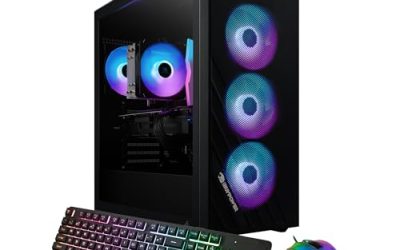
The best PC manufacturer for most gamers in 2026 is one that builds with standard, replaceable parts and publishes the exact component list. Corsair (Vengeance) and NZXT (Player series) fit that description for mainstream buyers, Falcon Northwest and Maingear for premium custom builds, and CyberPowerPC, iBuyPower or Skytech for value. Alienware, HP Omen and Lenovo Legion make sense when you want a big-brand warranty network or retail availability and can accept some proprietary parts.
Quick comparison of the best PC manufacturers
| Pick | Best for | Key traits | Price tier |
|---|---|---|---|
| Corsair Vengeance line | Best overall, upgrade-friendly | Standard ATX parts, Corsair PSU, cooler and RAM, clean cable work | Mid-range to premium |
| NZXT Player series | Best for simple, tidy builds | Standard parts, in-house case and cooling, easy configurator | Mid-range to premium |
| CyberPowerPC / iBuyPower / Skytech | Best value | Wide GPU and CPU choice, frequent sales, parts quality varies by config | Budget to mid-range |
| Alienware (Aurora, Area-51) | Best for design and big-brand support | Distinctive chassis, some Dell-specific parts, strong airflow in larger models | Mid-range to premium |
| HP Omen / Lenovo Legion Tower | Best for retail buying and sales | Sold in stores and online, frequent discounts, some proprietary parts | Budget to mid-range |
| Falcon Northwest / Maingear | Best premium boutique | Hand-built, custom configuration, tuned and burn-in tested, personal support | Premium |
Best overall: Corsair (Vengeance line)
Corsair’s advantage is that it makes many of the parts inside its own PCs, including power supplies, coolers, memory and cases. That keeps the component list predictable and the internals standard. A standard ATX power supply, motherboard and case mean you can swap in a bigger GPU or a new cooler in three years without hunting for an OEM part.
Trade-off: you pay for the integration and cable management, so the same specs from a value builder are often cheaper. Check which motherboard and PSU wattage a given configuration ships with, because they differ between models.
Best for tidy, simple builds: NZXT Player series
NZXT builds with its own cases, AIO coolers and fans and sells configurations through a simple online configurator. It suits buyers who want a clean, mainstream machine and a short list of choices. The parts are standard, so upgrades stay straightforward.
Trade-off: the configurator offers fewer options than a boutique builder or a value brand, and the premium over a DIY build is real.
Best value: CyberPowerPC, iBuyPower and Skytech
These system integrators sell a huge range of CPU and GPU combinations, often with strong sale pricing. They are the usual answer when the goal is the most GPU for the money in a prebuilt.
Trade-off: the savings often come from the parts you can’t see: a lower-tier motherboard, a PSU with little headroom, one stick of RAM running in single channel, or a small, slow SSD. Read the full parts list, not the headline specs.
Best for design and big-brand support: Alienware
Alienware (Dell) offers recognizable styling and, in its larger Area-51 desktop, a chassis designed around airflow. Dell’s service network is large, which matters if you don’t want to troubleshoot hardware yourself.
Trade-off: some models use non-standard internal parts, which can limit later upgrades. Check the PSU wattage, connector types and case clearance before planning a GPU swap.
Best for retail buying and sales: HP Omen and Lenovo Legion
HP’s Omen and Lenovo’s Legion towers are easy to find in stores and online, and they get frequent promotions. They suit buyers who want to see a machine, return it locally or pick it up quickly. Lenovo’s Legion and HP’s Omen laptops are also common choices if you need portability.
Trade-off: expect more proprietary motherboards, power supplies or front panels in some models, plus less choice over individual components.
Best premium boutique: Falcon Northwest and Maingear
Boutique builders hand-assemble to order, offer detailed customization and typically provide more direct, personal support. They are a good fit for compact high-end builds, quiet or tuned systems, or buyers who want one party responsible for the whole machine.
Trade-off: the cost. You pay a clear premium over similarly specced mainstream prebuilts, and lead times can be longer than for stocked systems.
How to choose: a weighted scorecard
Brand reputation alone is a poor guide, because every manufacturer sells both good and weak configurations. Score each candidate system (not just the brand) on these criteria. The weights below are a starting point; adjust them to your priorities.
| Criterion | Weight | What to check |
|---|---|---|
| GPU for your resolution | 30 | Exact GPU model and VRAM; 1080p, 1440p and 4K need different tiers |
| Power supply and cooling | 20 | PSU wattage, 80 Plus rating, ATX form factor, fan count, AIO or air cooler |
| Upgradeability | 15 | Standard ATX or micro-ATX board, free M.2 and RAM slots, standard PSU |
| Memory and storage | 15 | Two RAM sticks (dual channel), 32 GB for newer games, NVMe SSD of at least 1 TB |
| Warranty and support | 15 | Length, whether it covers parts and labor, shipping policy, per the maker’s published terms |
| Price premium vs. parts | 5 | Compare against the same parts priced separately |
For a quick pass, give each criterion a score from 0 to 10, multiply by its weight and add the results. A system that scores well on GPU, power and upgradeability usually beats a more famous brand with a weaker parts list.
Worked example: is the power supply big enough?
Power supplies are one of the easiest places for a prebuilt to cut corners. Take a system with a GeForce RTX 5070 Ti (board power about 300 W per NVIDIA’s spec sheet, which suggests a 750 W PSU) and a Ryzen 7 9800X3D (120 W TDP, with real draw sometimes higher under load).
- GPU: about 300 W
- CPU: about 120 to 160 W under gaming or mixed load; use 150 W for planning
- Motherboard, RAM, SSD, fans and USB devices: about 75 to 100 W; use 100 W
- Estimated peak: 300 + 150 + 100 = 550 W
A common rule of thumb is to keep sustained load around 60 to 70 percent of the PSU’s rating for efficiency, noise and headroom for transient spikes. Dividing 550 W by 0.7 gives roughly 785 W, so a 750 W to 850 W unit is the sensible choice. A 650 W PSU in that system would run at about 85 percent of its rating at peak, with little room to upgrade. If a manufacturer ships a 650 W unit with this GPU, ask for a bigger one or pick another config.
Which manufacturer fits your situation?
| Your situation | Best fit | Why |
|---|---|---|
| Want to upgrade the GPU in 2 to 4 years | Corsair, NZXT, boutique builders | Standard ATX PSU and case, easy swaps |
| Tight budget, want the most GPU | CyberPowerPC, iBuyPower, Skytech | Aggressive pricing; verify PSU, RAM and SSD |
| Want to buy in a store or return locally | HP Omen, Lenovo Legion | Retail presence and frequent promotions |
| Want a statement chassis and large service network | Alienware | Design focus and Dell support |
| Want a quiet, compact or fully tuned high-end PC | Falcon Northwest, Maingear | Hand-built and configured to order |
| Need portability | ASUS ROG, Lenovo Legion, MSI laptops | Established gaming laptop lines; check GPU wattage and cooling |
Red flags to check before you buy
- Unnamed parts: “750 W power supply” with no brand or rating, or “gaming motherboard” with no model.
- Single-channel RAM: one 16 GB stick instead of two 8 GB sticks can reduce performance noticeably in CPU-bound games.
- Tiny or slow storage: a small QLC SSD fills up quickly with modern game installs.
- Proprietary PSU or board: it makes later upgrades harder or impossible without replacing more parts.
- Vague warranty terms: look for whether parts and labor are covered, who pays shipping and how long repairs take.
Frequently Asked Questions
Who is the best PC manufacturer overall?
There is no single winner for everyone, but Corsair and NZXT are strong all-round choices because they use standard parts and publish clear specs. Boutique builders such as Falcon Northwest and Maingear are better if budget is not the main limit. Pick the specific configuration, not just the brand.
Is a prebuilt gaming PC worth it compared with building one?
It can be, if you value a single warranty, a finished system and no assembly time. Building yourself usually costs less for the same parts, but prebuilts can be competitive during sales, especially when GPUs are hard to find at list price. Compare the prebuilt’s parts list against the same components priced separately.
Are Alienware, HP Omen and Lenovo Legion good for gaming?
Yes, they offer capable gaming systems with wide availability and large support networks. The main drawback is that some models use proprietary or less common parts, which can limit upgrades. Check the PSU wattage, motherboard form factor and case clearance before buying.
Which brands are best for budget gaming PCs?
CyberPowerPC, iBuyPower and Skytech are common value choices, and HP Omen and Lenovo Legion often discount their towers. At the budget end, verify the PSU quality, dual-channel RAM and SSD size, because that is where costs are cut.
How much power supply do I need in a prebuilt?
Add up GPU, CPU and about 100 W for everything else, then divide by 0.7 to keep sustained load near 70 percent of the rating. For a 300 W GPU with a 150 W CPU, that works out to roughly 785 W, so aim for 750 W to 850 W. Always check the GPU maker’s recommended PSU rating as a floor.
Should I care about the warranty when choosing a manufacturer?
Yes. Compare how long it lasts, whether it covers parts and labor, and what the maker’s published terms say about shipping and turnaround. A system from a builder with responsive support can be worth more than a slightly cheaper one with vague terms.
Related guides
More from Amazon
Programs that pair well with the guide above. Offers and eligibility are set by Amazon and may change.
A free business account with business pricing and bulk-buying tools for work, shop or home office.
Create a business accountFree shipping on eligible items, Prime Video and more. Eligible new members can start with a free trial.
Start a Prime free trialAudiobooks and podcasts to listen to on the go. Eligible new members can start with a free trial.
Try Audible freeAd-free music streaming. Eligible new subscribers can start with a free trial.
Try Music Unlimited freeAs an Amazon Associate we earn from qualifying purchases.