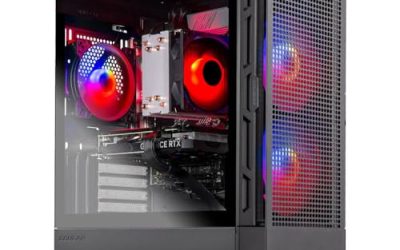
The best gaming PC available for most buyers in 2026 is a prebuilt or custom build around a 16GB GeForce RTX 5070 Ti, a Ryzen 7 X3D or comparable Core Ultra 7 CPU, 32GB of DDR5 and a 1TB-2TB NVMe SSD. It handles 1440p at high refresh and entry-level 4K without paying flagship prices. If your budget is smaller, an RTX 5070 system is the value pick. If you play at 4K, step up to an RTX 5080 or RTX 5090 system.
“Best” depends on your monitor, so this guide works backward from resolution and refresh rate, then maps that to a GPU class, then to the rest of the machine.
As an Amazon Associate we earn from qualifying purchases at no extra cost to you.


Our Top Picks


Top 3 picks at a glance
Quick comparison of the best gaming PC tiers
Prices are general market ranges for complete systems and move with GPU supply and memory pricing. GPU specs are from the manufacturers’ published spec sheets.
| Pick | Best for | Key specs | Typical price |
|---|---|---|---|
| Best overall: RTX 5070 Ti class | 1440p high refresh, light 4K | 16GB GDDR7, 256-bit, ~300W board power; Ryzen 7 / Core Ultra 7; 32GB DDR5 | Usually $2,000–$2,800 |
| Best value: RTX 5070 class | 1440p at 100-144 fps | 12GB GDDR7, 192-bit, ~250W; Ryzen 5 / 7; 32GB DDR5 | Usually $1,400–$2,000 |
| Best budget: RTX 5060 Ti 16GB or RX 9060 XT 16GB class | 1080p high refresh, entry 1440p | 16GB, 128-bit; 160–180W; Ryzen 5 / Core i5; 16–32GB DDR5 | Usually $1,000–$1,400 |
| Best for 4K: RTX 5080 class | 4K at 60-120 fps with upscaling | 16GB GDDR7, 256-bit, ~360W; 850W+ PSU | Usually $3,000–$3,800 |
| Best no-compromise: RTX 5090 class | Maxed 4K, high-refresh 4K, creator work | 32GB GDDR7, 512-bit, ~575W; 1000W+ PSU | Usually $4,500–$6,500+ |
| Best for esports: X3D CPU + mid GPU | 240-360 Hz 1080p/1440p | Ryzen 7 X3D; RTX 5060 Ti / 5070; fast DDR5 | Usually $1,300–$1,900 |
Best overall: RTX 5070 Ti class with an X3D or Core Ultra 7 CPU
This is the tier where price, 16GB of VRAM and a 256-bit memory bus line up. It suits a 1440p monitor at 144-240 Hz and also copes with 4K when you use upscaling. A Ryzen 7 7800X3D or 9800X3D gives the strongest gaming CPU performance in this class, according to most published CPU reviews. A Core Ultra 7 265K-class chip is a reasonable alternative if you also do heavy multithreaded work.
Main trade-off: it costs several hundred dollars more than an RTX 5070 system for a gain that is most visible at 4K and in games with heavy textures or ray tracing. If you only play at 1440p and are happy with 100-144 fps, the cheaper tier is easier to justify.
Best value: RTX 5070 class
An RTX 5070 pairs 12GB of GDDR7 on a 192-bit bus with about 250W of board power. That makes it easy to cool and easy to power. It is the sensible choice for a 1440p 144 Hz monitor. Pair it with a Ryzen 5 or Ryzen 7 non-X3D chip rather than overspending on the CPU.
Main trade-off: 12GB is adequate for 1440p today, but it leaves less headroom than 16GB for maxed textures, ray tracing and frame generation together. Expect to lower a few texture or ray-tracing settings in the newest games sooner than on a 16GB card.
Best budget: 16GB RTX 5060 Ti or RX 9060 XT class
Below roughly $1,000-$1,400, the most important thing to check is the VRAM variant. Both the RTX 5060 Ti and the RX 9060 XT were sold in 8GB and 16GB versions. Both use a 128-bit bus. The 16GB version costs a little more, and it is the one that stays comfortable as games grow. A plain RTX 5060 (8GB, 128-bit, ~145W) works for 1080p but is the tier most likely to feel limited within a couple of years.
Main trade-off: a 128-bit bus limits bandwidth at higher resolutions. This tier is best for 1080p high refresh and entry 1440p, not 4K.
Best for 4K and for no-compromise play
4K has about 8.29 million pixels, versus 3.69 million at 1440p. That is 2.25 times the pixels. A GPU one step faster does not close that gap on its own, which is why the RTX 5080 (16GB, 256-bit) is the practical floor for 4K at high settings without leaning on upscaling. The RTX 5090 (32GB, 512-bit) is the only card that comfortably targets high-refresh 4K with ray tracing. It is also useful if you edit video or run local AI workloads that need the VRAM.
Main trade-off: the RTX 5090 draws up to roughly 575W, needs a quality 1000W-class PSU and a case with strong airflow, and costs more than many complete mid-range PCs. Make sure the system has the matching 12V-2×6 power connector and a PSU rated for it.
Best for esports: CPU first
At 240 Hz and above, the CPU often sets the frame ceiling in titles like Valorant, Counter-Strike 2 and Fortnite in performance mode. A Ryzen X3D chip with fast DDR5 beats spending the same money on a bigger GPU. An RTX 5060 Ti or RTX 5070 is plenty. Match the monitor: a 360 Hz panel is wasted on a system that cannot hold that frame rate.
How to choose: work out your frame target first
Step 1: convert refresh rate into a frame-time budget
Each frame must be finished within 1000 ÷ refresh rate milliseconds. At 60 Hz that is 16.7 ms. At 144 Hz it is 6.9 ms. At 240 Hz it is 4.2 ms. If a game cannot reach that budget on your GPU at your settings, the monitor’s extra refresh rate is not helping. Decide whether you want 60, 120 or 240 fps in the games you actually play, then buy for that.
Step 2: match resolution to a GPU class
| Your monitor | Pixels per frame | Sensible GPU class | VRAM to aim for |
|---|---|---|---|
| 1080p, 144-240 Hz | 2.07 million | RTX 5060 / 5060 Ti | 8GB minimum, 16GB safer |
| 1440p, 144-165 Hz | 3.69 million | RTX 5070 / 5070 Ti | 12-16GB |
| 1440p ultrawide (3440×1440) | 4.95 million | RTX 5070 Ti | 16GB |
| 4K, 60-120 Hz | 8.29 million | RTX 5080 / 5090 | 16-32GB |
Step 3: do the power budget before trusting a listed PSU
A worked example for the best-overall build: an RTX 5070 Ti at about 300W, a Ryzen 7 9800X3D at roughly 120-160W under gaming-plus-boost load, and about 60-75W for the motherboard, RAM, SSDs and fans. That is roughly 480-535W peak. A 750W PSU puts that at about 64-71% load, which is a comfortable zone and leaves room for transient power spikes. For an RTX 5090 build, the same arithmetic gives about 575W + 150W + 75W = 800W, so a 1000W unit keeps you near 80% at worst. Per NVIDIA’s guidance, the RTX 5090 recommends a 1000W PSU, and the RTX 5080 recommends 850W.
Step 4: check the parts a spec sheet headline hides
- RAM in dual channel: two sticks (2x16GB) rather than one 32GB stick. Single-channel memory can cost noticeable performance in CPU-bound games.
- PSU brand and rating: look for a named model from a known manufacturer with an 80 Plus Gold or Bronze rating at least, not just “750W”.
- SSD: a 1TB NVMe drive fills quickly because many modern games are 100GB or more. Prefer 2TB if the price gap is small.
- Cooling: a tower air cooler or 240-360mm AIO for the CPU, and a case with a mesh front on the higher tiers.
- Motherboard: a B650/B850 or Intel B860-class board is enough. You rarely need a flagship board for gaming.
- Warranty: check who services the whole system, not just individual parts.
Decision matrix: your situation to the right pick
| If you… | Choose | Why |
|---|---|---|
| Play at 1080p and want to spend under about $1,300 | 16GB RTX 5060 Ti / RX 9060 XT class | Enough GPU for high refresh, VRAM for newer games |
| Have a 1440p 144 Hz monitor | RTX 5070 class | Meets the 6.9 ms frame budget in most titles |
| Want 1440p and a possible 4K upgrade | RTX 5070 Ti class | 16GB and a 256-bit bus give headroom |
| Own a 4K OLED or 4K 144 Hz display | RTX 5080 or RTX 5090 | 2.25x the pixels of 1440p |
| Mostly play competitive shooters | X3D CPU + mid-range GPU | CPU limits frame rate at 240 Hz+ |
| Stream or edit video as well | More cores (Ryzen 9 or Core Ultra 7/9), 32GB+ RAM | Extra threads help encoding and exports |
Common mistakes when buying a gaming PC
- Buying the wrong VRAM variant: two cards with the same name can have 8GB and 16GB. Read the exact configuration.
- Overspending on the CPU for a GPU-bound setup: at 4K, the GPU is nearly always the limit.
- Ignoring the monitor: a 4K-capable PC on a 1080p 60 Hz screen wastes most of its potential.
- Chasing a headline GPU with weak supporting parts: a low-quality PSU or single-channel RAM undermines it.
- Assuming frame generation fixes everything: it raises displayed frames but not responsiveness. Aim for a solid base frame rate first.
Frequently Asked Questions
What is the best gaming PC for most people in 2026?
A system with an RTX 5070 or RTX 5070 Ti, a Ryzen 5 or Ryzen 7 CPU, 32GB of DDR5 and a 1TB-2TB NVMe SSD covers most players. It handles 1440p at high refresh and many games at 4K with upscaling. Choose the 5070 Ti if you want 16GB of VRAM and extra headroom.
Is it better to buy a prebuilt or build my own?
Building usually saves some money and lets you choose each part, but it takes time and you handle troubleshooting. A prebuilt is faster to set up and comes with one warranty. It is worth it when the price is close to the cost of the parts and the listing names the PSU, motherboard and RAM configuration.
How much VRAM does a gaming PC need?
For 1080p, 8GB is workable but 16GB is safer when buying new. For 1440p, aim for 12-16GB. For 4K, 16GB is the practical minimum, and 32GB only matters for the RTX 5090 tier or for creator and AI workloads. Requirements vary by game and settings.
Do I need an X3D processor?
Not necessarily. Ryzen X3D chips lead in many CPU-limited games, especially high-refresh esports and simulation titles. At 4K, or when paired with a mid-range GPU at 1440p, the difference is smaller, and the money may be better spent on the graphics card.
What PSU wattage should I look for?
Add the GPU board power, the CPU peak power and roughly 75W for everything else, then pick a PSU that puts that total at about 60-70% load. That points to 650-750W for an RTX 5070-class build, 850W for an RTX 5080 and 1000W or more for an RTX 5090. Always check the GPU maker’s recommendation as well.
Will prices drop if I wait?
Prices on GPUs and memory have moved with supply and demand, so timing is hard to predict. Waiting makes sense if a new generation is imminent or a sale is close. If your current PC can’t run the games you want, buying the right tier now usually beats waiting for an uncertain discount.
Related guides
More from Amazon
Programs that pair well with the guide above. Offers and eligibility are set by Amazon and may change.
A free business account with business pricing and bulk-buying tools for work, shop or home office.
Create a business accountFree shipping on eligible items, Prime Video and more. Eligible new members can start with a free trial.
Start a Prime free trialAudiobooks and podcasts to listen to on the go. Eligible new members can start with a free trial.
Try Audible freeAd-free music streaming. Eligible new subscribers can start with a free trial.
Try Music Unlimited freeAs an Amazon Associate we earn from qualifying purchases.