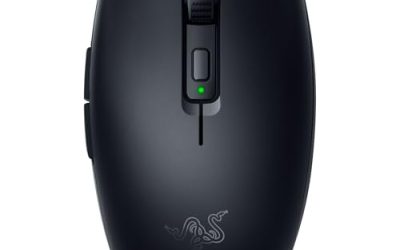
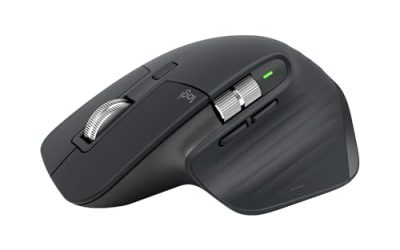
The best amateur gaming mouse is a lightweight, well-shaped model with a reliable sensor and a street price of about $20–$60. For most beginners that means the Logitech G203 Lightsync on a tight budget, the Logitech G305 Lightspeed if you want wireless, or the Razer Cobra if you want a light, modern wired shape. Skip $150 flagships: at casual skill levels, shape and comfort matter far more than a spec-sheet sensor lead.
Quick comparison of the best beginner gaming mice
| Pick | Best for | Key specs (per manufacturer) | Typical price range |
|---|---|---|---|
| Logitech G203 Lightsync | Best budget | Wired, 6 buttons, up to 8,000 DPI, about 85 g | $20–$40 |
| Logitech G305 Lightspeed | Best wireless for beginners | Wireless 2.4 GHz, HERO sensor up to 12,000 DPI, 1 AA battery, about 99 g with battery | $30–$60 |
| Razer Cobra | Best lightweight wired | About 58 g, optical switches, up to 8,500 DPI, symmetrical-leaning shape | $40–$60 |
| Razer Basilisk V3 | Best for MMOs and mixed use | 11 programmable controls, up to 26,000 DPI, about 101 g, tilting scroll wheel | $50–$70 |
| SteelSeries Rival 3 | Best for small-to-medium hands on a budget | Wired, 6 buttons, up to 8,500 CPI, about 77 g | $25–$40 |
Street prices shift with sales and regional stock, so treat these as general market ranges. Weights and DPI ceilings come from each manufacturer’s spec sheet.
Best budget: Logitech G203 Lightsync
The G203 suits anyone who wants a competent gaming mouse without spending much. It has a classic right-handed shape, six buttons, a simple software profile, and a sensor that is more than adequate for shooters, MOBAs and battle royales at amateur level. Its 8,000 DPI ceiling is irrelevant in practice, since most players use 400–1,600 DPI.
Trade-off: it is wired, and at roughly 85 g it is not light by current standards. If you find it tiring, look at the Razer Cobra.
Best wireless: Logitech G305 Lightspeed
The G305 is the usual answer when a beginner wants to drop the cable. Logitech’s Lightspeed connection runs on a 2.4 GHz USB receiver, and a single AA battery powers it. Logitech rates the battery at up to 250 hours at its default report rate. That works out like this:
- 2 hours of play per day: about 125 days per battery, if the rating held in real use.
- 4 hours per day: about 62 days.
Real-world life is usually lower than the rated figure, especially with lighting or higher polling, so plan on the lower end. Trade-off: it is on the heavy side at about 99 g with a battery, and its shape is medium-sized, which is awkward for very small hands.
Best lightweight wired: Razer Cobra
At about 58 g, the Cobra is the lightest pick here. It uses optical switches, which avoid the double-click problem that can eventually appear on older mechanical switches. A light mouse is easier to flick and stop, which helps in fast shooters when you are still developing aim control.
Trade-off: there are fewer extra buttons than on the Basilisk, and the cable, although flexible, is still a cable. A mouse bungee is a cheap fix if drag bothers you.
Best for MMOs and mixed use: Razer Basilisk V3
If you play MMOs, strategy games and shooters on the same mouse, the Basilisk V3’s extra programmable controls and tilting scroll wheel give you real flexibility. Its sculpted shape with a thumb rest is comfortable for palm grip. Trade-off: at about 101 g it is the heaviest on this list, and the shape is large for small hands.
Best for smaller hands on a budget: SteelSeries Rival 3
The Rival 3 is a simple, compact-leaning wired mouse around 77 g with six buttons and an 8,500 CPI sensor. It is a sensible alternative to the G203 if you find that mouse too long. Trade-off: software and button options are basic, and there is no wireless version at this price class.
How to choose: the criteria that actually matter
1. Hand size and grip come first
Measure from the base of your palm to the tip of your middle finger. Under about 17 cm is small, 17–19.5 cm is medium, and above that is large. Match the mouse length to that: roughly 115–120 mm for small hands, 120–128 mm for medium, and 128 mm and up for large. Claw and fingertip grips favor shorter, lighter mice. Palm grip favors longer, higher shapes.
2. Weight
For shooters, under 80 g is the sweet spot for beginners, though 60–70 g is not necessary. For MMO and general use, 85–105 g is fine. Do not sacrifice a shape that fits you to save 10 g.
3. Wired or wireless
Modern 2.4 GHz wireless is fast enough for amateur play. Pick wireless for a tidy desk and wired for zero battery management and typically lower price. Avoid Bluetooth-only mice for gaming, since latency and report rate are usually worse than a dedicated receiver.
4. Sensor: ignore the headline DPI
A sensor rated for 8,000 DPI and one rated for 26,000 DPI behave the same at the 800–1,600 DPI range most people use. What matters is that tracking is clean without acceleration or smoothing, which every mouse here handles.
5. Switches and buttons
Two main buttons you like clicking matter more than extra side buttons. If you play FPS, two side buttons are plenty. If you play MMOs, look at the Basilisk V3 or a mouse with a 12-button grid.
Worked example: setting DPI and sensitivity so you have a consistent aim
Many beginners change DPI and in-game sensitivity randomly and never build muscle memory. A better method is to pick a target for how far your hand travels for a full 360° turn, then calculate the settings.
The formula for games using a yaw value of 0.022 (the Source/CS-style engine) is: distance for 360° in inches = 360 ÷ (sensitivity × 0.022 × DPI). Multiply by 2.54 for centimeters.
| DPI | In-game sensitivity | eDPI (DPI × sens) | Distance for 360° |
|---|---|---|---|
| 800 | 1.0 | 800 | about 52 cm |
| 800 | 1.5 | 1,200 | about 35 cm |
| 800 | 2.0 | 1,600 | about 26 cm |
| 1,600 | 0.5 | 800 | about 52 cm |
Notice that 800 DPI at 1.0 and 1,600 DPI at 0.5 give the same distance, so the eDPI is what counts. For most amateurs on a typical desk and pad (about 40–45 cm wide), a 360° turn of 25–40 cm is a comfortable starting point. Start around 800 DPI with sensitivity 1.5, play for a week without changing it, then adjust by small steps of 10%. Other games use different yaw values, so use the game’s own converter or a sensitivity calculator for exact matches.
Decision matrix: which mouse for which situation
| Your situation | Choose | Why |
|---|---|---|
| Under $30, mostly FPS or battle royale | Logitech G203 Lightsync or SteelSeries Rival 3 | Proven shapes, low price, enough sensor quality |
| Want wireless without spending much | Logitech G305 Lightspeed | Reliable 2.4 GHz link, long AA battery life |
| Fast shooters, claw or fingertip grip | Razer Cobra | About 58 g, easy flicks |
| MMOs, strategy, mixed use, large palm grip | Razer Basilisk V3 | Extra buttons and a thumb rest |
| Small hands under 17 cm | SteelSeries Rival 3 or a dedicated small-form mouse | Shorter body reduces strain |
Common mistakes beginners make
- Chasing DPI numbers. A mouse labeled 30,000 DPI will not make you better at 800 DPI.
- Buying by looks. A shape that does not fit your grip causes fatigue and poor control.
- Ignoring the mouse pad. A decent cloth pad of about 400 × 300 mm improves consistency more than a $20 upgrade on the mouse.
- Leaving pointer acceleration on. Turn off “Enhance pointer precision” in Windows mouse settings so movement is consistent.
Frequently Asked Questions
What DPI should an amateur gamer use?
Most players do well between 400 and 1,600 DPI. A starting point of 800 DPI with a moderate in-game sensitivity works across most shooters. Keep it fixed for a few weeks so your aim becomes consistent.
Is a wireless gaming mouse good enough for beginners?
Yes. Modern 2.4 GHz wireless mice such as the Logitech G305 Lightspeed are responsive enough for casual and mid-level competitive play. Avoid Bluetooth-only connections for gaming, since they typically have higher latency.
Do I need a lightweight mouse as a beginner?
Not strictly. A mouse around 55–80 g helps with fast flick shots in shooters, but an 85–100 g mouse is fine if the shape fits and you mainly play slower games. Comfort and grip fit should come before weight.
How much should I spend on my first gaming mouse?
Usually $20–$60 gets you everything a beginner needs. Above that, you mostly pay for lower weight, premium materials and slightly better sensors. Put any extra money into a good mouse pad first.
How many buttons do I need?
For shooters and MOBAs, two main buttons, a scroll wheel and two side buttons are enough. MMO and strategy players benefit from more programmable buttons, which is where the Razer Basilisk V3 is useful.
When should I replace my mouse?
Replace it if you get double-clicks, a scroll wheel that skips, or cursor jitter that persists on a clean pad. Otherwise a quality budget mouse can last for years.
Related guides
More from Amazon
Programs that pair well with the guide above. Offers and eligibility are set by Amazon and may change.
A free business account with business pricing and bulk-buying tools for work, shop or home office.
Create a business accountFree shipping on eligible items, Prime Video and more. Eligible new members can start with a free trial.
Start a Prime free trialAudiobooks and podcasts to listen to on the go. Eligible new members can start with a free trial.
Try Audible freeAd-free music streaming. Eligible new subscribers can start with a free trial.
Try Music Unlimited freeAs an Amazon Associate we earn from qualifying purchases.