The best aftermarket graphics card for most gamers in 2026 is a well-cooled custom GeForce RTX 5070 Ti, such as the ASUS TUF Gaming model. Buyers who care more about price per frame should look at a Sapphire Nitro+ or Pulse Radeon RX 9070 XT. “Aftermarket” here means a board-partner design from ASUS, MSI, Gigabyte, Sapphire, PowerColor, XFX or Zotac, as opposed to a reference or Founders Edition card. The GPU chip is the same within a model tier, so what you are really choosing is the cooler, noise, power limits, size and warranty.
As an Amazon Associate we earn from qualifying purchases at no extra cost to you.


Our Top Picks
 ASUS TUF Gaming GeForce RTX 5070 Ti 16GBRTX5070Ti|OC|Black|Standard13 x 5.5 x 2.5 inches3.6 poundsCheck on Amazon


Top 3 picks at a glance
Quick comparison of the best custom graphics cards
| Pick | Best for | Key specs (per manufacturer spec sheets) | Typical price range |
|---|---|---|---|
| ASUS TUF Gaming GeForce RTX 5070 Ti | Best overall, 1440p high refresh and entry 4K | 16GB GDDR7, 256-bit, 300W reference board power | $750–$950 |
| Sapphire Nitro+ Radeon RX 9070 XT | Best AMD value, rasterization-focused play | 16GB GDDR6, 256-bit, ~304W reference total board power | $650–$850 |
| Sapphire Pulse Radeon RX 9060 XT 16GB | Best budget 1440p card | 16GB GDDR6, 128-bit, ~160W | $350–$470 |
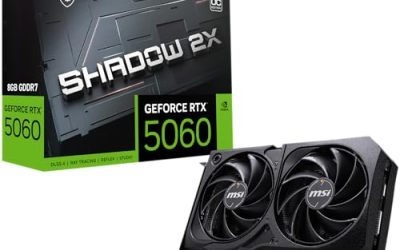
| ASUS Dual GeForce RTX 5060 Ti 16GB | Best compact / small-case card | 16GB GDDR7, 128-bit, 180W, dual-fan | $430–$560 |
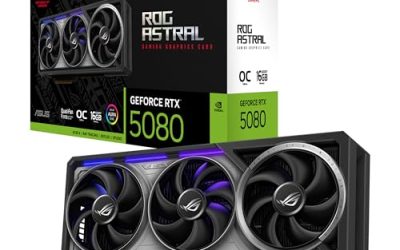
| ASUS ROG Astral GeForce RTX 5080 | Best premium 4K card | 16GB GDDR7, 256-bit, 360W reference, quad-fan cooler | $1,200–$1,700 |
| MSI Suprim (or Gigabyte Aorus Master) GeForce RTX 5090 | Best no-compromise flagship | 32GB GDDR7, 512-bit, 575W reference | $2,200–$3,500+ |
Prices swing with memory costs, stock and promotions, so treat these as general market ranges rather than quotes. Exact clocks, lengths and power limits differ between OC, non-OC and “Gaming” variants, so check the specific SKU.
Best overall: ASUS TUF Gaming GeForce RTX 5070 Ti
The RTX 5070 Ti sits in the sweet spot. Its 16GB of VRAM on a 256-bit bus handles 1440p with maxed textures and most 4K games with upscaling. The TUF design uses a large triple-fan cooler and a conservative factory profile, so it tends to run cooler and quieter than budget dual-fan cards on the same chip. Published reviews generally place this class at roughly 100–160 FPS in modern 1440p games at high settings, varying with the game, CPU and patch.
Trade-off: the TUF is a thick card, around 3.5 slots in many versions, and it costs more than entry-level 5070 Ti boards with near-identical performance.
Best AMD value: Sapphire Nitro+ Radeon RX 9070 XT
The RX 9070 XT gives you 16GB of VRAM and strong raster performance, usually landing close to the RTX 5070 Ti in non-ray-traced games according to published reviews. The Nitro+ adds a heavy cooler, good fan control and a higher power limit. If you want a cheaper option, the Sapphire Pulse or PowerColor Hellhound use the same GPU with smaller coolers.
Trade-off: ray tracing and path tracing still generally favor NVIDIA, and some games lean on DLSS features. Check the upscaling support in the games you play.
Best budget: Sapphire Pulse Radeon RX 9060 XT 16GB
For 1080p and 1440p gaming, VRAM is the thing to buy carefully. The 16GB version of the RX 9060 XT avoids the texture-streaming stutter that 8GB cards can show in newer games at high settings. The Pulse is a restrained, efficient design that works with a 650W power supply and mid-size cases.
Trade-off: the 128-bit bus limits it at 4K, and you should avoid the 8GB variant of this chip if you play new releases.
Best compact: ASUS Dual GeForce RTX 5060 Ti 16GB
Small-form-factor and mid-tower builders often get more value from a short, two-fan card than a flagship. A dual-fan 5060 Ti at 180W is easy to cool, uses a single 8-pin or 12V-2×6 connector depending on the board, and fits many cases that cannot take 330mm+ cards. It also supports DLSS 4 with multi-frame generation, which can boost frame rates in supported games.
Trade-off: a smaller cooler means a lower sustained boost and less headroom for overclocking.
Best premium 4K: ASUS ROG Astral GeForce RTX 5080
The RTX 5080 is a 4K-capable card with 16GB of GDDR7. Premium variants like the Astral add a bigger vapor-chamber cooler, higher-quality fans and a stronger power-delivery design. Premium models are usually quieter at load, and they often have a dual BIOS switch.
Trade-off: factory overclocks on premium 5080s usually add only about 1–3% performance. You are paying mostly for acoustics, build quality and looks. A mid-tier 5080 often gets you nearly the same frame rates for far less.
Best flagship: MSI Suprim or Gigabyte Aorus Master GeForce RTX 5090
The RTX 5090 has 32GB of GDDR7 on a 512-bit bus and a 575W reference board power. It is the only card that reliably pushes 4K at high refresh with heavy ray tracing, and it suits creators who need the VRAM. At this power level, a cooler that keeps noise down matters more than anywhere else in the range.
Trade-off: the price, the size and the demands on your PSU, cables and case airflow. Use only a native 12V-2×6 cable from a quality ATX 3.x power supply and seat it fully.
How to choose: the criteria that actually separate custom cards
1. Match VRAM and bus width to your resolution
As a rough rule from published game requirements and reviews: 8GB is marginal for new games even at 1080p high settings, 12GB is fine for 1440p, and 16GB is the safe target for 1440p ultra and 4K. For 4K with ray tracing and frame generation, 16GB is the floor, and 24GB or more only matters for heavy creative or AI workloads.
2. Do the power budget before you buy
The method: add the card’s board power, your CPU’s peak gaming draw and about 75W for the board, drives, RAM and fans. Then divide by 0.65 so the PSU runs at roughly 65% load, which keeps it efficient and leaves room for transient spikes. I assume a 125W CPU in the table below.
| Card class | Card power | + CPU 125W + 75W other | ÷ 0.65 target | Suggested PSU |
|---|---|---|---|---|
| RX 9060 XT 16GB | ~160W | ~360W | ~555W | 650W |
| RTX 5070 | 250W | 450W | ~690W | 750W |
| RX 9070 XT / RTX 5070 Ti | ~300W | ~500W | ~770W | 750–850W |
| RTX 5080 | 360W | 560W | ~860W | 850–1000W |
| RTX 5090 | 575W | 775W | ~1,190W | 1000–1200W |
My 65% target is deliberately conservative. Manufacturers often list lower minimums, such as 750W for the RTX 5070 Ti and 1000W for the RTX 5090, so follow the stated requirement of your exact card as the floor. Factory-overclocked models can draw 10–40W more than reference, so add that margin.
3. Check physical fit
Measure the space from the back of your case’s PCI bracket to the front fan or radiator, and note the card’s thickness. A 3.5-slot card needs the neighboring slots empty and can block an M.2 or second expansion card. Also confirm that the card will not sag: a 1.5 kg+ cooler benefits from a support bracket, and many premium cards include one.
4. Cooler and acoustics beat factory clocks
Factory overclocks are marginal, so the real differences are heatsink size, fan quality, memory temperature and coil whine. Dual-fan cards from the same maker can run 8–15°C warmer than their triple-fan siblings under load, which means more fan noise. Look for reviews that publish dBA at load and memory-junction temperatures rather than boost clocks alone.
5. Warranty and BIOS features
Warranty length varies by brand and region, typically 2–4 years, and some brands extend it when you register the card. A dual BIOS switch (performance and quiet) is a useful feature, and so are zero-RPM fan modes at idle.
Decision matrix: which card for your situation
| Your situation | Choose | Why |
|---|---|---|
| 1080p, 144Hz, tight budget | RX 9060 XT 16GB (Pulse-class) | Enough VRAM and a 650W PSU |
| 1440p, 165–240Hz | RTX 5070 Ti or RX 9070 XT, mid-tier custom | 16GB and strong 1440p frame rates |
| 4K 60–120Hz with upscaling | RTX 5080 or RX 9070 XT | Needs 16GB and a good upscaler |
| Small case, 650W PSU | Dual-fan RTX 5060 Ti or RX 9060 XT | Short card, low power |
| Quiet PC priority | Triple-fan premium model of any tier | Bigger heatsink means lower fan RPM |
| Heavy ray tracing / creative work | RTX 5080 or 5090 | RT performance, NVENC and VRAM |
Common mistakes with custom cards
- Paying $100+ more for a “OC” badge that delivers 1–3% extra performance.
- Buying an 8GB model of a card that also comes in 16GB because the lower price looks tempting.
- Ignoring the PCIe power connector: check whether your PSU has a native 12V-2×6 cable or you need an adapter.
- Forgetting that the card must fit the case, especially a 3.5-slot or 330mm+ model.
Frequently Asked Questions
What does “aftermarket graphics card” mean?
It is a graphics card built by a board partner such as ASUS, MSI, Gigabyte, Sapphire, XFX or Zotac, using a GPU from NVIDIA or AMD. These cards have custom coolers, circuit boards, power limits and warranties, unlike the reference or Founders Edition design.
Are aftermarket cards faster than Founders Edition or reference cards?
Slightly, at most. Factory overclocks and bigger coolers usually give roughly 1–5% higher sustained performance depending on the model. The bigger benefits are lower temperatures and noise, which are easier to notice than a handful of extra frames.
Is a premium model like the ROG Astral worth the extra money?
Only if you value low noise, build quality, extra features and looks. For pure frame rates, a mid-tier custom card on the same GPU is nearly identical. Premium boards make most sense on high-power cards like the RTX 5080 and 5090.
Nvidia or AMD: which is the better choice for a custom card?
NVIDIA generally leads in ray tracing, DLSS support and creative software. AMD often offers more raster performance per dollar and 16GB at lower prices. Choose based on the games and features you use rather than brand loyalty.
How much VRAM do I need in 2026?
For new games, aim for 12GB at 1440p and 16GB for high-end 1440p or 4K. An 8GB card can still work for older or esports titles, but it is the most likely to hit limits in new releases at high texture settings.
Which PSU wattage do I need for a custom RTX 5070 Ti or RX 9070 XT?
Both cards generally list a 750W minimum from the manufacturers, and 850W is a more comfortable choice with a high-end CPU or a factory-overclocked model. Always check the exact card’s spec sheet and make sure the PSU has the right power connectors.
Related guides
More from Amazon
Programs that pair well with the guide above. Offers and eligibility are set by Amazon and may change.
A free business account with business pricing and bulk-buying tools for work, shop or home office.
Create a business accountFree shipping on eligible items, Prime Video and more. Eligible new members can start with a free trial.
Start a Prime free trialAudiobooks and podcasts to listen to on the go. Eligible new members can start with a free trial.
Try Audible freeAd-free music streaming. Eligible new subscribers can start with a free trial.
Try Music Unlimited freeAs an Amazon Associate we earn from qualifying purchases.