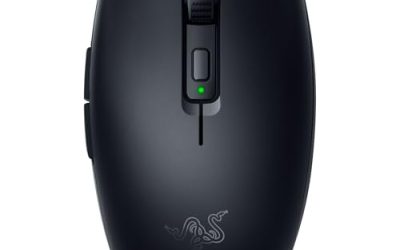
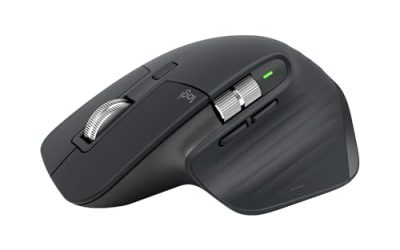
The best adjustable gaming mouse for most players is the Razer Basilisk V3 Pro 35K, because it lets you tune DPI, scroll-wheel resistance and button layout in software and on the mouse. If you want physical weight and balance tuning, the Corsair M65 RGB Ultra or the older Logitech G502 HERO are better and cheaper. “Adjustable” means different things, so pick the adjustment that fixes your actual problem: weight, shape, scroll feel, sensitivity or button layout.
Quick comparison of adjustable gaming mice
| Pick | Best for | What is adjustable | Key specs (per manufacturer) | Typical price |
|---|---|---|---|---|
| Razer Basilisk V3 Pro 35K | Best overall | DPI, scroll resistance, free-spin wheel, programmable buttons | Wireless, up to 35,000 DPI, about 112 g | $130–$170 |
| Corsair M65 RGB Ultra | Weight and balance tuning | Removable weights, balance, DPI | Wired, up to 26,000 DPI, FPS-style shape | $60–$90 |
| Logitech G502 HERO | Best budget | Five 3.6 g weights, DPI, free-spin wheel | Wired, up to 25,600 DPI, 11 buttons | $40–$70 |
| Corsair Scimitar RGB Elite | MMO and macro layouts | Sliding side-button panel, DPI | Wired, 17 buttons, up to 18,000 DPI | $50–$80 |
| Razer Naga V2 Pro | Premium modular layout | Swappable side plates, DPI, scroll behavior | Wireless, interchangeable button plates | $150–$200 |
Specs and prices are manufacturer figures and general market ranges. They change with revisions and sales, so check the current spec sheet before buying.
Best overall: Razer Basilisk V3 Pro 35K
This is the broadest set of adjustments in one mouse. The scroll wheel has a tension dial and a free-spin mode, so you can make it notchy for weapon switching or loose for browsing. DPI stages and button assignments are configurable in Razer Synapse, and the wireless version uses Razer’s HyperSpeed-class 2.4 GHz connection plus Bluetooth.
Trade-off: at roughly 112 g it is not a lightweight esports mouse, and you cannot change the weight physically. It suits shooters, RPGs and productivity players with medium to large hands who want a palm-friendly shape.
Best for weight and balance: Corsair M65 RGB Ultra
The M65 RGB Ultra is built around a tunable weight system, so you can change both total mass and where the mass sits. Corsair also gives it a sniper-style DPI button and a sharply angled, FPS-oriented shell. Because it is wired, you do not pay for a battery you do not need.
Trade-off: the angular shape fits a claw or fingertip grip better than a relaxed palm grip. Players with large hands may find it short.
Best budget: Logitech G502 HERO
The G502 HERO is still the cheapest way to get real physical adjustability. Per Logitech’s spec sheet, it ships with a weight tray holding up to five 3.6 g weights, so you can add up to 18 g. It also has a free-spin wheel toggle and 11 buttons. Be careful not to confuse it with the newer G502 X, which dropped the weight system.
Trade-off: it is a heavy, wired design with a large footprint. It suits players who prefer a planted, stable mouse over a fast, flick-oriented one.
Best for MMO and macro layouts: Corsair Scimitar RGB Elite
The Scimitar’s 12-button side panel slides forward and backward on a rail. That lets you line the thumb keys up with your thumb instead of adapting your thumb to the mouse. With 17 programmable buttons, it works for MMOs, MOBAs and productivity macros.
Trade-off: it is heavy and not well suited to fast FPS aiming.
Best premium modular option: Razer Naga V2 Pro
This mouse has swappable side plates, from a full 12-button grid down to simpler layouts. That gives it the most radical “shape” adjustment here. It suits players who switch between an MMO and a shooter on the same desk.
Trade-off: the price is high, and the weight is well above lightweight FPS mice.
Spec class to consider: adjustable-ergonomic mice
If hand fatigue is your problem, look at the small class of mice with adjustable palm rests and length (the Mad Catz R.A.T. line is the best-known example). Check the manufacturer’s current lineup before you buy, since availability varies. Their sensors are fine, but they are bulky and heavy, so they suit sim, strategy and long-session players more than competitive shooter players.
How to choose: match the adjustment to the problem
| Your situation | Adjustment to prioritize | Choose |
|---|---|---|
| Mouse feels floaty or overshoots flicks | Add weight, rebalance | Corsair M65 RGB Ultra or G502 HERO |
| Thumb cramps reaching side buttons | Movable or swappable button panel | Scimitar RGB Elite or Naga V2 Pro |
| Wheel scrolls past targets in weapon or item cycling | Scroll tension | Razer Basilisk V3 Pro 35K |
| You play several game types | On-device DPI stages and profiles | Basilisk V3 Pro 35K |
| Wrist or palm ache after long sessions | Adjustable palm rest and length | Adjustable-ergonomic class |
| Tight budget | Weights only | G502 HERO |
Worked example: weight tuning
Take a mouse with a roughly 121 g base and five 3.6 g weights, which is the G502 HERO’s approximate configuration per the manufacturer. Each weight adds 3.6 g, so the usable range is about 121 g with none, 130 g with two or three, and 139 g with all five. Most players notice a difference at around 7–10 g, so two weights is the practical first step. If you want to go lighter, a weight system cannot help, and you should look at a lightweight non-adjustable mouse instead.
Worked example: converting DPI to real aim distance
Adjustable DPI only helps if you keep the physical distance constant when you switch. In Valorant, the yaw is 0.07° per count, so a 360° turn at in-game sensitivity 0.35 takes 360 ÷ (0.07 × 0.35) ≈ 14,694 counts.
- At 800 DPI: 14,694 ÷ 800 ≈ 18.4 inches, or about 46.7 cm per 360°.
- At 1600 DPI: use sensitivity 0.175 to get the same 46.7 cm.
The same math works in other games once you know the per-count yaw, which sites like Mouse-Sensitivity calculators list. A practical rule is to set 800–1600 DPI and tune in-game sensitivity from there. Extremely high DPI settings gain you nothing on modern sensors, which are accurate across their full range per the manufacturers’ claims.
Check size before features
A common rule of thumb is that a mouse for claw or fingertip grip should be about 60–65% of your hand length, and for a palm grip up to roughly 70%. Measure from your wrist crease to the tip of your middle finger.
| Hand length | Size class | Approx. mouse length for claw grip |
|---|---|---|
| Under 17 cm | Small | Around 100–110 mm |
| 17–19 cm | Medium | Around 110–120 mm |
| Over 19 cm | Large | Around 120–130 mm |
No adjustable feature fixes a mouse that is the wrong size, so check the manufacturer’s dimensions first.
Wired or wireless
Modern 2.4 GHz wireless mice match wired mice for latency, according to manufacturer claims, but they cost more and add battery weight. If you plan to tune weight, wired models give you more control over the final mass. If you want to set DPI and buttons once, wireless is fine.
Frequently Asked Questions
What does “adjustable” mean on a gaming mouse?
It can mean adjustable weight, DPI, scroll-wheel tension, button position or swappable side plates. Manufacturers do not use the word consistently, so read the spec sheet to see which adjustment is physical and which is only in software.
Are adjustable-weight gaming mice still worth it?
Yes, if you like a heavier, more stable feel or want to fine-tune balance. They are less relevant if you prefer very light mice, because most lightweight models have no weight system at all.
What DPI should I use on an adjustable mouse?
Most players use 800–1600 DPI and tune in-game sensitivity from there. Pick a value, calculate your cm per 360° as in the example above, and change DPI only if you need finer cursor control on the desktop.
Is the Logitech G502 X the same as the G502 HERO?
No. The G502 X is a newer design with a different shell and switches, and it does not include the removable weight tray. If you want physical weights, look at the G502 HERO or the Corsair M65 RGB Ultra.
Can adjustable scroll-wheel resistance help in games?
Yes. A stiffer wheel reduces accidental weapon or item switches in games where you scroll to cycle. A loose, free-spin wheel is better for fast browsing and long documents, and the Basilisk V3 Pro 35K lets you switch between the two.
Do I need a wireless adjustable mouse?
No. Wired models such as the G502 HERO and M65 RGB Ultra are cheaper and let you tune weight without a battery changing the balance. Choose wireless if cable drag or a clean desk matters more to you than price.
Related guides
More from Amazon
Programs that pair well with the guide above. Offers and eligibility are set by Amazon and may change.
A free business account with business pricing and bulk-buying tools for work, shop or home office.
Create a business accountFree shipping on eligible items, Prime Video and more. Eligible new members can start with a free trial.
Start a Prime free trialAudiobooks and podcasts to listen to on the go. Eligible new members can start with a free trial.
Try Audible freeAd-free music streaming. Eligible new subscribers can start with a free trial.
Try Music Unlimited freeAs an Amazon Associate we earn from qualifying purchases.